ALYBH's CIT Custom Glints
✨ALYBH's CIT Custom Glints (ALYBH 的 CIT 自定义附魔光效)
Customize your Glint effect with CIT (Custom Item Textures)! Adapted form ALYBH-REnchantment Glints! Compatible with Minecraft: Java Edition 1.13 and newer!
通过 CIT (Custom Item Textures,自定义物品纹理) 来提供可自定义光效的资源包!改编自 ALYBH-REnchantment Glints!兼容《Minecraft》Java版 1.13 及以上的版本!
- Modrinth: https://modrinth.com/project/G4hTOm0P
English
It is a Minecraft resource pack that delivers fully customizable Glint effects through CIT (Custom Item Textures) functionality.
Instead of settling for the default Glint, players can rename items following specific naming conventions to create unique, personalized Glint effects — and it works not only on held items and inventory icons, but also on armor.
With support for multiple combination modes and advanced customization tweaks, this pack is perfect for players who love personalizing their gear, enjoy aesthetic-focused resource packs, or simply want their equipment to shine exactly the way they imagine.
The Glint effects in this pack are built upon the ALYBH-REnchantment Glints resource pack series, which means the visual style and overall quality are very close to that collection. If you prefer not to use a mod-dependent resource pack, or if you'd like to replace the default Glint textures with something similar to what this pack can achieve, the series has you covered.
中文(简体)
这是一款《Minecraft》资源包,通过CIT (Custom Item Textures) 功能实现可完全自定义的光效。
玩家无需局限于默认光效,只需按照特定命名规则对物品重命名,即可打造独一无二、个性化的光效——该效果不仅作用于手持物品与物品栏图标,盔甲同样能够生效。
资源包支持多种组合模式以及高级自定义微调设置,非常适合喜爱装备个性化改造、偏好以审美观点为中心的资源包,或是单纯希望装备呈现出自己设想中理想光效效果的玩家。
本资源包中的光效效果改编自 ALYBH-REnchantment Glints 系列资源包,因此在视觉风格和整体品质上都与该系列保持高度一致。如果你不希望使用依赖模组的资源包,或想为原版默认光效替换成与本资源包类似的效果,那么该系列资源包会是一个不错的选择。
English
This resource pack determines which specific Glint effect to apply by detecting designated text content within either the item's name tag (nbt.display.Name) or custom lore text (nbt.display.Lore.*) stored in the item NBT attributes. This allows you to enable the custom Glint feature by editing these two NBT tags.
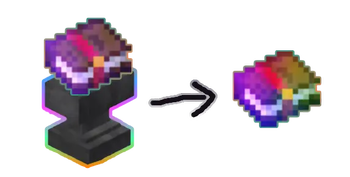
For players in Survival Mode, Adventure Mode and other game modes where commands are disabled, you can customize the effects simply by renaming items using an anvil.
For users of commands or NBT editors, these naming conventions that change the Glint effects can also be applied to item Lore, to avoid making item's custom Name too long.
If you created an ideal and likable Glint combination with this resource pack but the ALYBH-REnchantment Glints resource pack series is not included, you can consider using feedback to encourage the author to consider adding it (if possible).
中文(简体)
该资源包通过识别位于物品 NBT 属性中的 名称(nbt.display.Name) 或 自定义文本信息(nbt.display.Lore.*) 的特定文本内容来决定如何使用光效效果,这意味着你可以通过修改这两个 NBT 属性来启用自定义光效功能。
对于生存模式、冒险模式等无法启用指令功能的玩家而言,可以使用铁砧重命名物品进行自定义。
对于使用指令或NBT编辑器的玩家,这套更改光效光效的命名规则同样可以应用在 物品的Lore(自定义文本信息) 上,以避免物品自定义名称过于冗长。
如果你借助本资源包搭配出了心仪满意且受欢迎的光效组合,但该组合并未被收录进 ALYBH-REnchantment Glints 系列资源包,可以通过反馈提议作者在条件允许的情况下考虑将其补充添加。
English
Before enabling this resource pack, make sure you have installed all prerequisites listed in the COMPATIBILITY section of this page.
This resource pack applies custom Glint effects by detecting specific naming conventions. Therefore, you should first familiarize yourself with the available naming conventions and what they represent. The CONTENTS LIST section of this page lists all available components, such as colors, patterns, and more. When using the pack for the first time, you may want to keep this Wiki handy for reference.
In addition to using individual components, you can freely combine multiple available components to create your own Glint effects. However, keep in mind that only one texture from the same layer can take effect (its priority depends on its position within the file structure). Textures from different layers can all be applied simultaneously, with no restriction on their order or quantity, and textures on higher layers will always be rendered above those on lower layers.
For example, the following naming convention applies an Azure Glint color texture together with the Bubble pattern texture and the Dust decorative texture:
#azure#bubble#dust#
You can edit the custom Glint combination applied to an item in either of the following ways. Of course, you are also free to use any other method you prefer (such as directly editing the data or using a compatible mod).
-
Rename the item using an Anvil. You can also change the item's name using commands or an NBT editor.
-
Add custom Lore to the item using commands or an NBT editor.
These naming conventions are case-insensitive and position-independent. You can place them anywhere you like, such as at the beginning or end of the item's name, or on any line of its Lore, for example:
Item Name#azure#bubble#dust#
#bubble##dust#Item Name#azure#
#dust#Item#bubble# Name#azure#
Custom Lore Line 1
Custom Lore Line 2
#azure##bubble#dust#
Custom Lore Line 1
#bubble#dust#
Custom Lore Line 3
Custom Lore#azure# Line 4
中文(简体)
在启用该资源包之前,请确保你已经安装了在本页面的 兼容性 章节中提到的前置需求。
本资源包通过识别特定的命名规则来赋予光效效果。因此,你需要先了解可用的命名规则以及它们对应的内容:在本页面的 内容列表 章节中,记述了本资源包可用的颜色、图案等部件。初次使用时,你可能需要随时参考本 Wiki。
除了单独使用,你还可以从可用的内容中挑选出需要的部分来进行组合。但需要注意的是:相同层的纹理只能有其中一个生效(优先级取决于它在文件结构中的位置);不同层的纹理可以同时生效,顺序和数量都不受限制,且层越高的纹理显示越靠前。
这是一个例子,可以为物品增加湛蓝色的光效颜色纹理,并同时为它添加泡泡图案纹理和流沙装饰纹理:
#azure#bubble#dust#
你可以通过以下两种方式来编辑想要在物品上使用的自定义光效组合,当然,你也可以用其他你喜欢的方式(例如直接编辑数据文件或使用特定的模组)去编辑。
-
可以通过直接将物品放置在铁砧上以物品重命名的方式来为物品修改名称。此外,你还可以使用指令或NBT编辑器为物品修改名称。
-
使用指令或NBT编辑器为物品添加自定义文本信息。
这些命名规则对大小写和所处位置不敏感,你可以将其放置在想要的任何位置,比如物品名称的最前方或最后方,又或者描述信息的任意一行等,例如:
物品名称#azure#bubble#dust#
#bubble##dust#物品名称#azure#
#dust#物品#bubble#名称#azure#
自定义文本信息行1
自定义文本信息行2
#azure#bubble#dust#
自定义文本信息行1
bubble#dust#
自定义文本信息行3
自定义#azure#文本信息行4
Below is the list of available Glint effects in this resource pack, including their IDs, names, layers, applicable specific naming conventions and comments.
Only one texture on the same layer can take effect (the priority depends on its position in the file structure), while textures on different layers can take effect simultaneously, with textures on higher layers being displayed in the foreground.
以下是该资源包中可用的光效列表,包含了它的编号、名称、层、可用的特定命名规则和注释信息。
相同层的纹理只能有其中一个生效(优先级取决于它在文件结构中的位置),不同层的纹理可以同时生效,且层越高的纹理显示越靠前。
List (列表)
List of Base Color (基础色列表)
English
| Part Number | Name | Layer | Conventions | Comments |
|---|---|---|---|---|
| b0 | Red | 0 | #red#, #r# | - |
| b1 | Orange | 0 | #orange#, #oran# | - |
| b2 | Yellow | 0 | #yellow#, #y# | - |
| b3 | Lime | 0 | #lime#, #yellowgreen#, #limegreen# | - |
| b4 | Green | 0 | #green#, #g# | - |
| b5 | Jade | 0 | #jade#, #jadegreen#, #jadeg#, #turquoisegreen#, #turqgreen#, #turqg# | - |
| b6 | Turquoise | 0 | #turquoise#, #turq# | - |
| b7 | Cyan | 0 | #cyan#, #teal# | - |
| b8 | Azure | 0 | #azure#, #azureblue# | - |
| b9 | Blue | 0 | #blue#, #b# | - |
| b10 | Violet | 0 | #violet#, #vio# | - |
| b11 | Purple | 0 | #purple#, #purp# | - |
| b12 | Magenta | 0 | #magenta#, #m# | - |
| b13 | Rose | 0 | #rose#, #rosered# | - |
| b14 | White | 0 | #white#, #w# | - |
| b15 | Gainsboro | 0 | #gainsboro#, #gain# | - |
| b16 | LightGray | 0 | #lightgray#, #lg# | - |
| b17 | Gray | 0 | #gray#, #darksilver# | - |
| b18 | Brown | 0 | #brown#, #darkorange# | - |
| b19 | Pink | 0 | #pink#, #lightred# | - |
| b20 | Lavender | 0 | #lavender#, #lave# | - |
中文(简体)
| 部件编号 | 名称 | 层 | 命名规则 | 注释信息 |
|---|---|---|---|---|
| b0 | 红 | 0 | #red#, #r# | - |
| b1 | 橙 | 0 | #orange#, #oran# | - |
| b2 | 黄 | 0 | #yellow#, #y# | - |
| b3 | 黄绿, 青柠绿 | 0 | #lime#, #yellowgreen#, #limegreen# | - |
| b4 | 绿 | 0 | #green#, #g# | - |
| b5 | 翠绿 | 0 | #jade#, #jadegreen#, #jadeg#, #turquoisegreen#, #turqgreen#, #turqg# | - |
| b6 | 松石绿 | 0 | #turquoise#, #turq# | - |
| b7 | 青 | 0 | #cyan#, #teal# | - |
| b8 | 湛蓝, 天蓝 | 0 | #azure#, #azureblue# | - |
| b9 | 蓝 | 0 | #blue#, #b# | - |
| b10 | 蓝紫, 紫罗兰 | 0 | #violet#, #vio# | - |
| b11 | 紫 | 0 | #purple#, #purp# | - |
| b12 | 品红, 洋红 | 0 | #magenta#, #m# | - |
| b13 | 玫瑰红 | 0 | #rose#, #rosered# | - |
| b14 | 白 | 0 | #white#, #w# | - |
| b15 | 庚斯博罗灰 | 0 | #gainsboro#, #gain# | - |
| b16 | 浅灰 | 0 | #lightgray#, #lg# | - |
| b17 | 灰 | 0 | #gray#, #darksilver# | - |
| b18 | 棕 | 0 | #brown#, #darkorange# | - |
| b19 | 粉红 | 0 | #pink#, #lightred# | - |
| b20 | 薰衣草紫 | 0 | #lavender#, #lave# | - |
List of Gradient Color (渐变色列表)
English
| Part Number | Name | Layer | Conventions | Comments |
|---|---|---|---|---|
| g0 | Red-Orange-Yellow | 0 | #roy#, #redorangeyellow# | - |
| g1 | Yellow-Lime-Green | 0 | #ylg#, #yellowlimegreen# | - |
| g2 | Cyan-Azure-Blue | 0 | #cab#, #cyanazureblue# | - |
| g3 | Blue-Purple-Magenta | 0 | #bpm#, #bluepurplemagenta# | - |
| g4 | Red-Green-Blue | 0 | #rgb#, #redgreenblue# | Horizontal Gradient |
| g5 | Cyan-Magenta-Yellow | 0 | #cmy#, #cyanmagentayellow# | - |
| g6 | Rainbow | 0 | #rainbow# | - |
| g7 | NeonRainbow | 0 | #neon#, #neonrainbow# | - |
| g8 | Copper | 0 | #copper#, #bronze# | - |
| g9 | Silver | 0 | #silver# | - |
| g10 | Gold | 0 | #gold#, #golden# | - |
中文(简体)
| 部件编号 | 名称 | 层 | 命名规则 | 注释信息 |
|---|---|---|---|---|
| g0 | 红-橙-黄 | 0 | #roy#, #redorangeyellow# | - |
| g1 | 黄-柠-绿 | 0 | #ylg#, #yellowlimegreen# | - |
| g2 | 青-湛-蓝 | 0 | #cab#, #cyanazureblue# | - |
| g3 | 蓝-紫-品 | 0 | #bpm#, #bluepurplemagenta# | - |
| g4 | 红-绿-蓝 | 0 | #rgb#, #redgreenblue# | 水平方向渐变 |
| g5 | 青-品-黄 | 0 | #cmy#, #cyanmagentayellow# | - |
| g6 | 彩虹 | 0 | #rainbow# | - |
| g7 | 霓虹彩虹 | 0 | #neon#, #neonrainbow# | - |
| g8 | 铜 | 0 | #copper#, #bronze# | - |
| g9 | 银 | 0 | #silver# | - |
| g10 | 金 | 0 | #gold#, #golden# | - |
List of Special Color (特殊色列表)
English
| S.Number | Name | Layer | Conventions | Comments |
|---|---|---|---|---|
| s0 | None | 0 | #none# | To disable Color Glints |
| s1 | ChromeYellow | 0 | #chromeyellow#, #chroy# | Unexpectedly popular so... |
中文(简体)
| 部件编号 | 名称 | 层 | 命名规则 | 注释信息 |
|---|---|---|---|---|
| s0 | 无色 | 0 | #none# | 用于禁用颜色光效 |
| s1 | 铬黄渐变 | 0 | #chromeyellow#, #chroy# | 意外地受欢迎所以加了 |
English
| Part Number | Name | Layer | Conventions | Comments |
|---|---|---|---|---|
| p0 | Binary | 15 | #binary#, #binarycode#, #code# | - |
| p1 | Bubble | 15 | #bubble# | - |
| p2 | Rect. Frame | 15 | #frame#, #rect#, #rectframe#, #rectangle#, #rectangleframe# | - |
| p3 | Heart | 15 | #heart#, #love# | - |
| p4 | PCB Traces | 15 | #pcb#, #pcbtrace#, #pcbtraces# | - |
| p5 | SGA | 15 | #sga#, #standardgalacticalphabet# | - |
中文(简体)
| 部件编号 | 名称 | 层 | 命名规则 | 注释信息 |
|---|---|---|---|---|
| p0 | 二进制 | 15 | #binary#, #binarycode#, #code# | - |
| p1 | 泡泡 | 15 | #bubble# | - |
| p2 | 方框 | 15 | #frame#, #rect#, #rectframe#, #rectangle#, #rectangleframe# | - |
| p3 | 心形 | 15 | #heart#, #love# | - |
| p4 | PCB 走线 | 15 | #pcb#, #pcbtrace#, #pcbtraces# | - |
| p5 | SGA 符号 | 15 | #sga#, #standardgalacticalphabet# | - |
English
中文(简体)
English
中文(简体)
English
中文(简体)
English
Compatible with Minecraft Java Edition 1.13 and newer.
Requires a CIT-supporting (Espeically CIT Enchantment) mod such as CIT Resewn or OptiFine.
Since this pack doesn't modify any original textures and only leverages CIT mod features, it is fully compatible with ALYBH-REnchantment Glints and other similar Glint replacement texture packs. They don't share or overwrite each other's file structures, so they can coexist and work together seamlessly.
Also, its file structures and textures properties are designd to compatible with ALYBH's CIT Recolored Enchantment Glints.
中文(简体)
兼容 《Minecraft》Java 版 1.13 及以上 的版本。
需要安装支持 CIT(尤其是支持 CIT 附魔功能)的模组,例如 CIT Resewn 或者 OptiFine 。
由于本资源包未修改任何原版纹理,仅调用CIT模组的功能 ,因此可与 ALYBH-REnchantment Glints 以及其他同类替换光效的资源包完全兼容。各资源包不会共用或互相覆盖文件结构,能够共存并流畅协同运行。
同时,其文件结构与纹理属性经过设计,可兼容 ALYBH's CIT Recolored Enchantment Glints。
Effective Date: 2026-07-24 (GMT+8)
生效日期:2026 年 7 月 24 日(GMT+8)