Settings Reference
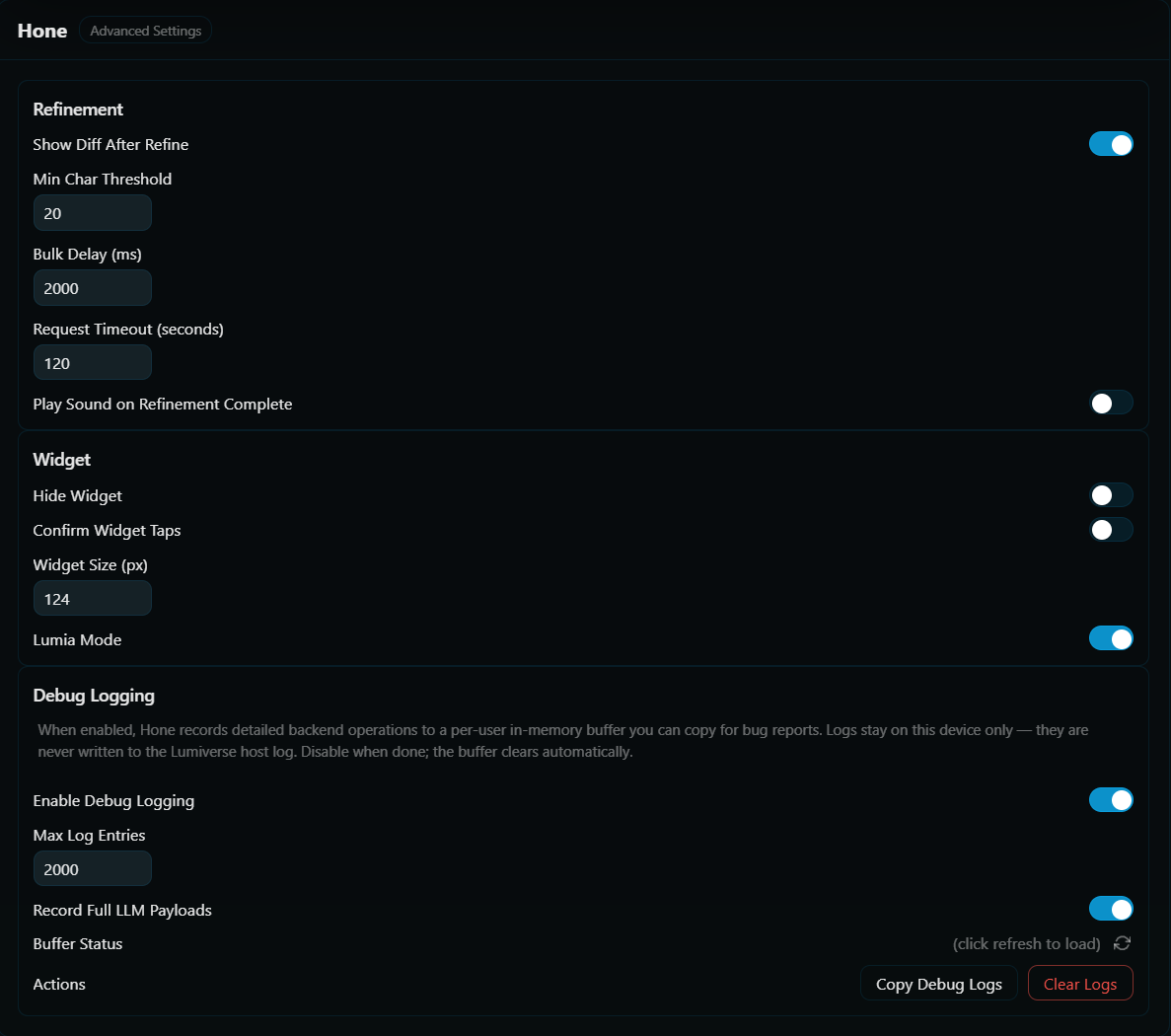
This page covers everything in the Advanced page.
All settings are per-user.
| Setting | Default | Range | Purpose |
|---|---|---|---|
| Show Diff After Refine | On | - | Show a word-level diff modal after every successful refinement. Turn off for silent background refinement (auto-refine pairs well with this off). |
| Min Char Threshold | 20 | 0–500 | Skip refinement for messages shorter than this. Saves tokens on trivially smallmessages. |
| Bulk Delay (ms) | 2000 | 0–30000 | Milliseconds to wait between messages during "Hone All" runs. Keeps you from hitting rate limits on a 50-message chat. |
| Request Timeout (seconds) | 120 | 30–600 | Per-LLM-call timeout. Applied to every stage. A 3-stage pipeline can take up to 3× this before the whole refine aborts. |
| Play Sound on Refinement Complete | Off | - | Audio cue when a refine finishes. |
| Custom Sound URL | "" |
- | Paste any URL to override the default sound. Visible only when Play Sound is on. |
| Setting | Default | Range | Purpose |
|---|---|---|---|
| Hide Widget | Off | - | Hide the floating chibi/icon widget entirely. Drawer plus per-message button still work. |
| Confirm Widget Taps | Off | - | Require a second tap within 4 seconds before the widget fires. Useful on mobile to avoid accidental triggers. |
| Widget Size (px) | 48 | 24–1920 | Widget diameter. Also exposed via the widget's long-press / right-click context menu. |
| Lumia Mode | On | - | Render the chibi character sprites. Off uses a classic circular icon pill. |
See Multi-User and Privacy for the privacy story.
| Setting | Default | Range | Purpose |
|---|---|---|---|
| Enable Debug Logging | Off | - | Start capturing per-user debug entries to an in-memory ring buffer. Off by default. |
| Max Log Entries | 2000 | 100 - 20000 | Ring buffer capacity. Resizing preserves the most recent entries. |
| Record Full LLM Payloads | Off | - | Include text sent to and received by the LLM in debug logs when honing. |
Plus two action buttons:
- Copy Debug Logs. Formats the buffer with timestamps and copies to clipboard. Paste into a bug report.
- Clear Logs. Empties the buffer without disabling capture.
A "Buffer Status" row shows current count, capacity, and whether logging is on.
For completeness, settings that live elsewhere in the UI:
- Active output preset and active input preset. Drawer -> Output / Input preset bar.
- Active model profile. Drawer -> Models tab.
- Auto-Refine AI toggle. Drawer -> Hone tab -> Automation section.
- AI Message POV / User Message POV. Drawer -> Output / Input.
- Max Lorebook Tokens / Max Message History Tokens. Drawer -> Output (or Input) -> Context sub-subtab.
- Automation. Auto-refine and notification sound.
- Float Widget. Detailed behavior around the four widget settings.
- Multi-User and Privacy. The full story on debug logging.