Repository navigation
Releases: Aalzard/subcraft
Release list
SubCraft 0.1.7

SubCraft 0.1.7 improves responsiveness and brings the first separate layer-content and mask effect stacks.
- Smoother editing: desktop compositing runs in the background with latest-edit-wins snapshots, procedural caching and uploads of changed tiles. New sparse GPU textures initialize without uploading every empty tile. Export still waits for an exact complete result.
- Real square layer previews: content and grayscale mask thumbnails update as you paint or adjust effects. Select either thumbnail to choose what you edit.
- Texture painting: brush channels can paint images, including normal maps, or a whole imported material, with UV/planar/triplanar projection and normal detail blending. Presets retain the images.
- Masks and effects: add white/black masks; preview, invert, disable, copy/paste or remove them. Masks support Paint, Fill, image, Generator, Levels and Invert effects. Paint/fill layer content has independent Paint, Fill and Levels stacks, with visibility, blending, opacity, reorder and duplicate controls.
- Cleaner workspace: compact brush settings above the 3D View, grid/axis controls, symmetry/lazy-mouse popover, UI size preference and clearer alternating panel rows. Properties follows the selected layer, mask or effect.
Projects use format 5; older files still open. Projects saved with content effects require 0.1.7 or newer.
General Blur/Sharpen/Bevel filters, Compare Mask and Anchor Points are still in development. Initial graphics setup can still pause briefly; background compositing does not eliminate every startup or GPU stall.
Validation: 414 workspace tests passed, Clippy completed with existing warnings, Windows packaging path tests passed, and the real Windows/D3D12 app was profiled at 4096². This continuation used command-driven native checks; no mouse control was used. Linux is built and package-checked by the release workflow, not hand-tested.
Downloads: Windows installer (setup.exe), Windows portable ZIP, and Linux x86_64 tarball.
SubCraft 0.1.6
SubCraft 0.1.6
✨ New
- 3D View toolbar: render resolution (100 / 75 / 50 / 25 %) for speed, anti-aliasing on/off, orthographic camera, and a View mode to see the full material or just one channel (Base Color, Normal, Roughness, Metallic, Height, AO). Remembered between launches.
- Texture resolution switch (Texture Sets → Resolution): change a texture set's working size from 128 to 4096 at any time, or apply it to all. Painted strokes are resampled and one Ctrl+Z brings them back. Lower = faster painting.
- Blend mode and opacity in every layer row, instead of a separate block under the list.
- Update notice: SubCraft checks for a newer release when it starts and points at the green Update button when there is one. Turn it off in Edit → Preferences.
- Graphics selection in Edit → Preferences: Automatic, DirectX 12 or OpenGL.
🛠️ Fixed
- Import textures… now turns the picked maps into one material right away, ambient occlusion included (AO maps used to be skipped).
- Saved smart materials no longer show a blank white thumbnail. Smart materials and smart masks now preview on a sphere.
- The brush keeps painting at the model's edges when its center slides off the model.
- Removed the orange hover tint that covered the model.
📝 Notes
- On 0.1.5? Click the green Check / update button to update. The automatic update notice works from 0.1.6 onward.
- The browser version is deprecated for now. Please use the desktop download.
- SubCraft is an independent project, not affiliated with or endorsed by ArtCraft.
SubCraft v0.1.5
SubCraft 0.1.5 brings the starter pack and the latest painting workflow improvements to desktop and the browser.
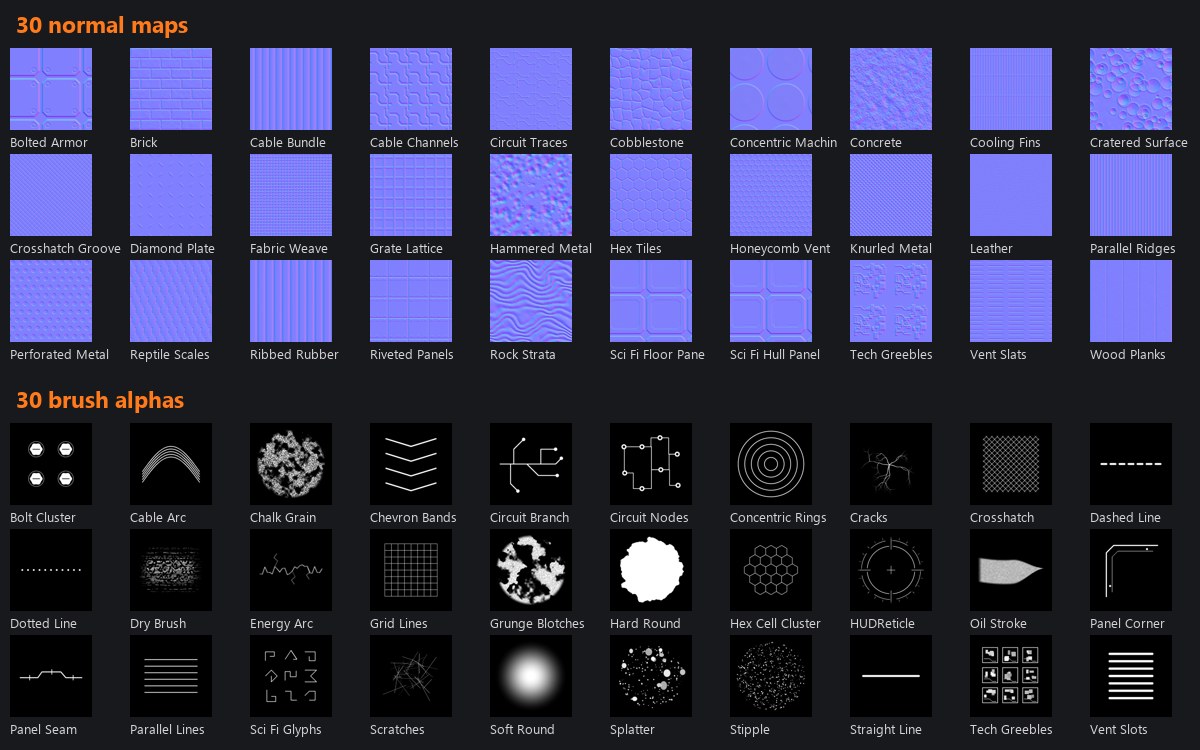
- 60 CC0 images: 30 normal maps and 30 brush alphas, with a Starter pack shelf category and a Tileable filter.
- Image previews: repeated tiles, a lit normal sphere and an alpha sample stroke. Adjust strength, green convention, brightness/contrast, rotation, scale, wrap mode, inversion and seamless edge blending before applying.
- Editable Pen paths: create and edit Bézier anchors/handles in the 3D or 2D view, with dedicated layers, undo/redo and project persistence.
- Layer editing: drag layers above/below each other or into/out of folders, expand folders, and double-click or press F2 to rename.
- Welcome and quick start: open models/projects, resume recent files on desktop, try the sample, or follow the illustrated guide.
- Complete browser export: every texture map downloads in one ZIP.
Desktop images work offline. The browser downloads full starter PNGs only when selected. The losslessly optimized pack is 12.9 MB; thumbnails are 340 KB.
Updating: in desktop v0.1.4, press the green Check / update button. Earlier versions need one installer or portable download to get that button. Choose the Windows installer for a normal installation, the Windows ZIP for portable use, or the Linux x64 archive.
Projects: v0.1.5 opens older projects. Projects saved in this version use schema 4 and need v0.1.5 or newer. Pen width follows UVs; use separate paths across UV seams. This remains an early application with known workflow limits.
Validation: 319 local workspace tests, Linux/Windows engine checks, web build and both package jobs passed. Actual browser painting/preview/save/reopen/export and native screenshot launches were exercised. An isolated Windows per-user install, v0.1.4-to-v0.1.5 upgrade and uninstall passed with the packaged executable. Linux GUI, physical tablet input and the manual all-users installer wizard were not run locally.
Layer editing and eyedropper work include adaptations from CalangoTech's Studio fork. Starter images are supplied by Aalzard under CC0; credits ship in every package.
SubCraft 0.1.4
SubCraft can now update itself. Click the green Check / update button in the top bar to download the latest stable release, install it and restart with your unsaved project restored.
If you are on v0.1.3 or earlier, download this version once to get the button. After that, use it for future releases.
- Installed Windows copies keep their per-user/all-users installation mode; Windows asks for permission for an all-users update.
- Portable Windows and Linux x64 copies update their executable in place.
- Packages are checked against GitHub's SHA-256 digest before installation.
- Unsaved document changes, the original save path and selected layer are restored from a private checkpoint. Your original project file is not overwritten automatically.
- Completed update downloads are cleaned up. Undo history and camera state reset on restart.
Windows installer and portable update/restart paths were tested with real app binaries and unsaved work. Admin/UAC interaction and a Linux GUI restart were not exercised. The required Linux, Windows and web checks passed before merging.
Download the Windows setup for an installed app, the Windows zip for a portable copy, or the Linux archive. Existing projects still open. See CHANGELOG.md.
SubCraft 0.1.3
Right-click a piece to fill it, paint only there, mask a layer or add wear/dirt generators. The new Parts panel lists connected pieces, UV islands, objects and material IDs; I isolates, H hides and Esc restores the view.
Also included:
- Eyedropper for color and material values, plus a fuller layer context menu.
- Autosave and crash recovery copies, with settings in Preferences.
- Rotating logs, crash reports and Help → Report a bug with prefilled version/OS/GPU details. Logs stay on your computer until you attach them.
- A Windows packaging fix for custom build folders, so the installer contains the current executable.
Download the Windows setup for an installed app, the Windows zip for a portable copy, or the Linux archive. Your existing projects still open; new saves use project schema 3.
Eyedropper work was adapted from CalangoTech’s SubCraft Studio fork. See CHANGELOG.md for the full changes.
SubCraft 0.1.2
New
- Parts: work on one piece of your model. Properties → Parts → Pick parts in the 3D view, then click pieces of the model to show or hide the layer there. The piece under the cursor lights up, and Esc finishes. Painting, fills, smart materials and export all respect it, and it's saved in your project. Parts are the separate pieces of the mesh, so a model that's all one connected piece needs splitting in your 3D app first.
Changed
- New app icon: an engraved hand on orange.
Download
- Windows:
SubCraft-0.1.2-setup.exe(installer, just run it over your current version) orSubCraft-0.1.2-windows-x64.zip(portable). - Linux:
SubCraft-0.1.2-linux-x86_64.tar.gz, unpack and run./install.sh.
Full list in CHANGELOG.md.
SubCraft 0.1.1
Fixed
- Startup crash on some PCs (older Intel graphics drivers,
igvk64.dll). On Windows SubCraft now runs on Direct3D 12. If you used theWGPU_BACKEND=dx12workaround you can remove it (setx WGPU_BACKEND ""), but it does no harm.
New
- Textures in the shelf: Shelf → Textures shows every image you imported, sorted by type (Base Color, Normal, Roughness…). Drag one onto a channel in Properties to use it there, or onto the model for a new fill layer.
- Tiling X / Y and offset for fill layers (Link keeps X and Y equal), with a reset button.
- Strength sliders for every fill channel: Normal / Height strength, Roughness / Metallic / AO strength, Base Color brightness, Emissive intensity.
Download
- Windows:
SubCraft-0.1.1-setup.exe(installer) orSubCraft-0.1.1-windows-x64.zip(portable). - Linux:
SubCraft-0.1.1-linux-x86_64.tar.gz, unpack and run./install.sh.
Full list in CHANGELOG.md.
SubCraft 0.1.0
First public release of SubCraft, an open-source 3D texture painter in the spirit of Substance Painter.
Install (Windows)
- Download
SubCraft-0.1.0-setup.exebelow (or the portableSubCraft-0.1.0-windows-x64.zip). - Run it. Windows SmartScreen may say "Windows protected your PC" because the installer isn't code-signed yet: click More info → Run anyway.
- Start SubCraft from the Start Menu. Needs a GPU with DirectX 12 or Vulkan.
Found a bug or missing something? Open an issue.
New
- Windows installer:
SubCraft-<version>-setup.exewith Start Menu shortcut, optional desktop
shortcut, uninstaller in Settings → Apps and.subcraftfile association. A portable zip is
still available. (#10) - Use your own images: any PNG / JPG / TGA / TIF / EXR in a fill layer channel, with UV,
tri-planar or planar projection, tiling and rotation. Images are saved inside the project. (#11, #13) - Import texture set: select a texture's maps (base color, roughness, normal, height, metallic,
AO…) and get one fill layer. Files are matched by name; glossiness and DirectX normal maps are
converted automatically. Find it in the Layers toolbar, the Layer menu and Shelf → Materials. (#12, #13) - Image masks: use a black & white image or a logo with transparency as a mask effect. (#13)
- Your library in
Documents\SubCraft\Library: imported brush tips and HDRIs stay in the shelf
after a restart. Right-click library items to show or remove them. (#14) - Save smart materials and smart masks: right-click a layer → Save as smart material or
Save mask as smart mask, then reuse them in any project from the shelf. (#15) - Shelf search and filters: search box plus All, Mine and category chips. (#16)
- Brush presets: save size, flow, tip, jitter, symmetry and material from the Brush panel;
presets appear first in Shelf → Brushes. (#17) - Drag and drop: drag materials, smart materials and smart masks onto the model (applies to
the part under the cursor) or onto a layer. (#18) - Stencils: paint through an image laid over the 3D view. Hold S and drag to move, rotate or
scale it; hold N to paint without it. (#20)
Fixed
- Projects containing TGA images could not be reopened. (#11)
- Edge wear and other generator masks followed UV seams instead of the model's edges. (#6)
- Layer rows overlapped the Blend / Opacity controls in a short Layers panel. (#19)
Changed
- Project file schema 2 (image masks). Older projects open unchanged; older SubCraft versions
can't open projects saved with this version. (#13)