




Claude Code is amnesiac. Every session starts from zero.
Engram gives it a brain that persists across sessions, projects, and teams.
📖 Read the PRD · 🎨 Design System · 🚀 Quick Start · 📸 Screenshots
Engram is a VS Code extension that creates a persistent memory layer for Claude Code. It silently:
- 🔍 Indexes your codebase — Detects stack, frameworks, components, functions, routes, and schemas
- 📝 Records every session — Extracts decisions, bug fixes, patterns, and warnings from git diffs
- 💉 Injects context automatically — At the start of every Claude Code session, relevant memories are injected into the system prompt
Result: Claude Code knows your project's conventions, remembers past bugs, and never asks "what framework are you using?" again.
| Without Engram | With Engram |
|---|---|
| "What framework is this project using?" | Knows it's React 18 + TypeScript + Supabase |
| Re-explains the same DB schema every session | Remembers the schema and all migrations |
| Repeats a bug fix you explained 3 sessions ago | Has the bug fix stored with file references |
| Token budget wasted on project context | 2000-token compressed context auto-injected |
| New team member starts from zero | Import .engram file for instant onboarding |
# Clone the repo
git clone https://github.com/Abhion24/EngRam.git
cd Engram

# Install dependencies
npm install
cd dashboard && npm install && cd ..

# Build everything
node esbuild.config.mjs --production
cd dashboard && npx vite build && cd ..

# Package the extension
npx @vscode/vsce package --no-dependencies

# Install in VS Code
code --install-extension engram-1.0.0.vsix- Open any project in VS Code
- ⚡ Engram activates automatically — look for
$(brain) Engramin the status bar - First time? It auto-indexes your codebase (progress shown in notification)
- Click the status bar or run
Ctrl+Shift+P→Engram: Open Memory Dashboard - Dashboard opens at http://localhost:6173 with your real project data
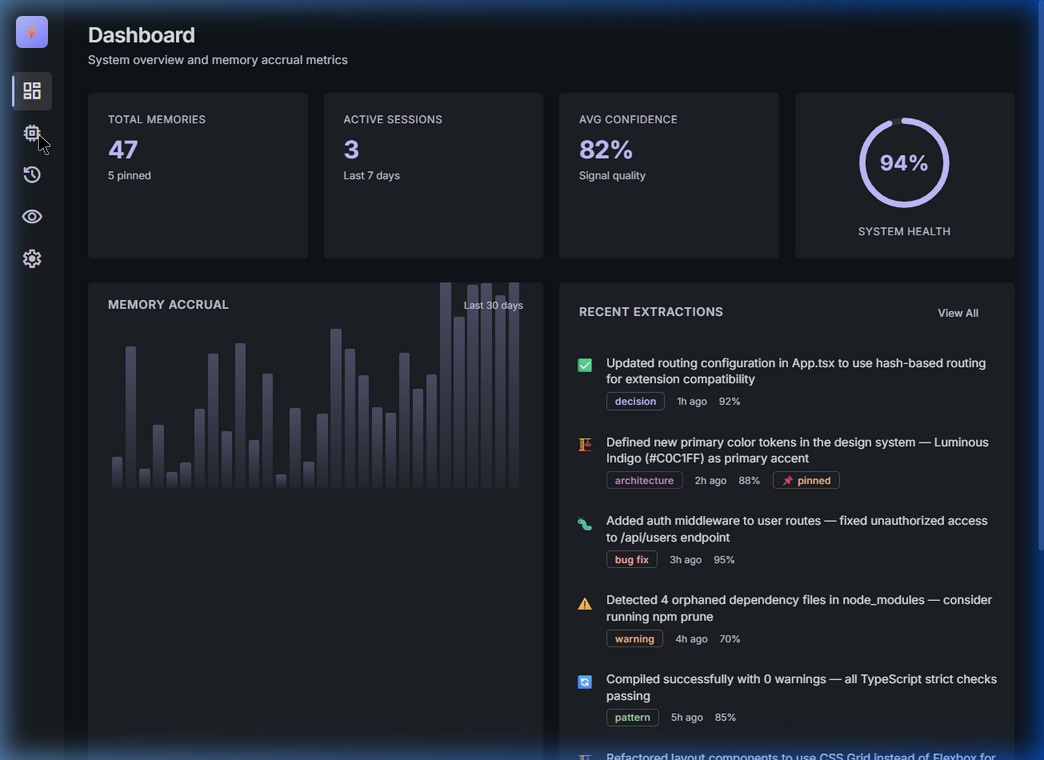
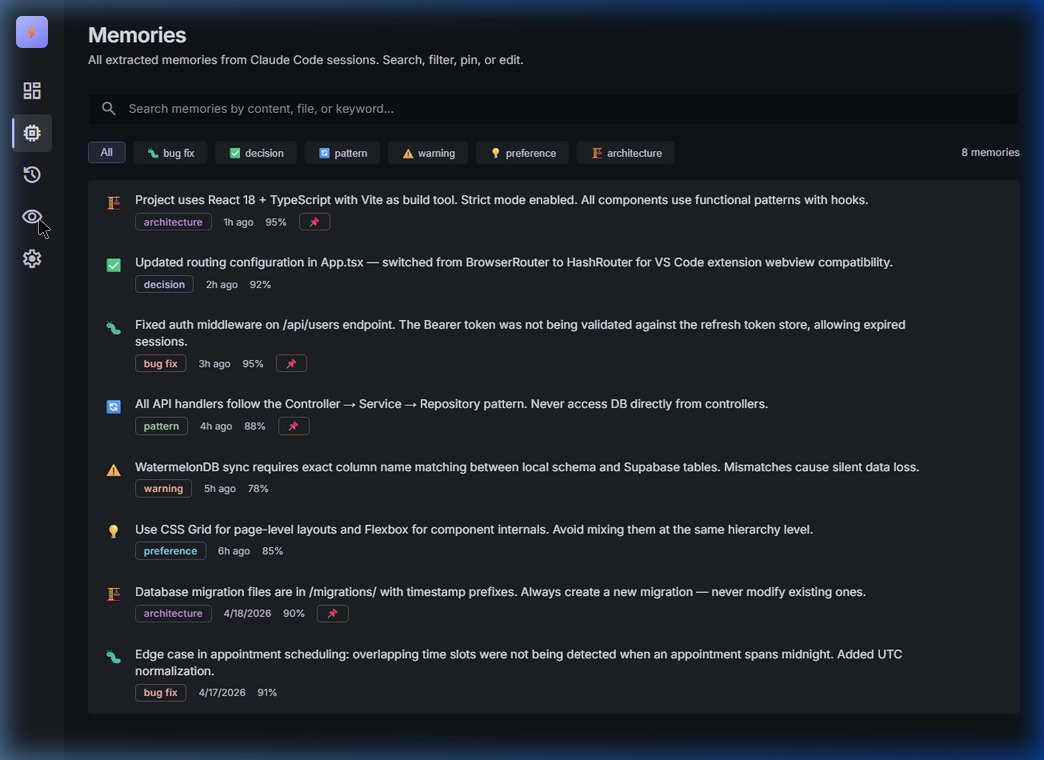
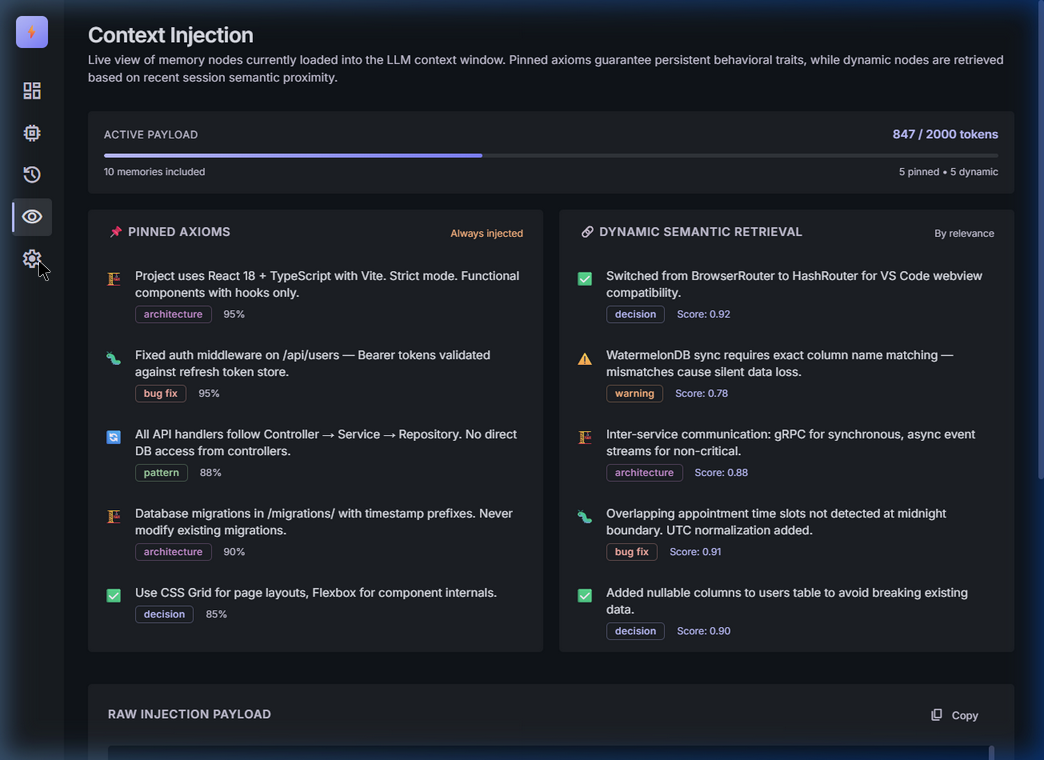
Developer opens VS Code
    ↓
Engram activates → detects project → indexes codebase
    ↓
Claude Code session starts → Engram injects relevant context (2000 tokens)
    ↓
Developer works with Claude → Engram watches file changes
    ↓
Session ends → Engram analyzes git diffs → extracts memories via Claude API
    ↓
Next session starts smarter than the last
| Layer | How It Works |
|---|---|
| 🔍 Codebase Indexer | Scans project files, extracts functions/components/routes/schemas, detects stack from package.json |
| 📝 Session Recorder | Watches file changes during Claude Code sessions, analyzes git diffs, extracts decisions via Claude Sonnet |
| 💉 Context Injector | Retrieves pinned + recent + semantically relevant memories, compresses to token budget, injects into system prompt |
No Python. No ChromaDB. No better-sqlite3. Engram uses pure JavaScript — JSON file storage + cosine similarity vector search. Install once, works everywhere.
| Command | Description |
|---|---|
Engram: Open Memory Dashboard |
Opens the web dashboard at localhost:6173 |
Engram: Index Codebase |
Force re-index the current project |
Engram: Show Memory Count |
Shows memory count + health score |
Engram: Export Memories (.engram) |
Save all memories as a portable file |
Engram: Import Memories (.engram) |
Load a teammate's memory file for instant onboarding |
Engram: Clear All Memories |
Delete all memories (with confirmation) |
| Setting | Default | Description |
|---|---|---|
engram.claudeApiKey |
"" |
Your Anthropic Claude API key |
engram.tokenBudget |
2000 |
Max tokens injected into Claude's context |
engram.confidenceThreshold |
0.6 |
Min confidence for memory injection (0.0-1.0) |
engram.autoIndex |
true |
Auto-index codebase on first open |
engram.enableSessionRecording |
true |
Auto-extract memories from sessions |
engram.dashboardPort |
6173 |
Port for the web dashboard |
engram.memoryDecayDays |
30 |
Days before unpinned memories lose relevance |
Engram uses "The Cognitive Loom" design philosophy:
- Hyper-Functional Stoicism — Every pixel serves a purpose
- No-Line Philosophy — Zero borders for separation; tonal shifts only
- Ghost Shadows — Depth without visible edges
- Luminous Indigo (
#C0C1FF) — Primary accent against deep dark surfaces - Inter — Exclusive typeface at dense 1.25 line-height
Full design tokens documented in DESIGN.md.
ENGRAM/
├── src/
│   ├── extension.ts           # VS Code extension entry point
│   ├── api/claudeApi.ts       # Claude API wrapper + local embeddings
│   ├── memory/
│   │   ├── memoryTypes.ts     # TypeScript interfaces
│   │   ├── memoryStore.ts     # JSON-backed memory CRUD
│   │   └── vectorStore.ts     # Pure JS cosine similarity search
│   ├── indexer/
│   │   └── codebaseIndexer.ts # AST parsing + stack detection
│   ├── session/
│   │   ├── sessionRecorder.ts # File watcher + memory extraction
│   │   └── diffAnalyzer.ts    # Git diff parsing
│   ├── context/
│   │   ├── contextInjector.ts # Context building + dedup
│   │   └── tokenBudget.ts     # Token counting + compression
│   └── server/
│       └── dashboardServer.ts # Express REST API (14 endpoints)
├── dashboard/
│   └── src/
│       ├── App.tsx            # Root with sidebar + routing
│       ├── styles/globals.css # Complete "Cognitive Loom" design system
│       └── pages/             # Dashboard, Memories, Sessions, Context, Settings
├── package.json               # VS Code extension manifest
├── DESIGN.md                  # Full design system documentation
├── Engram_PRD_v1.pdf          # Product Requirements Document
└── LICENSE                    # MIT License
Engram's .engram export format makes team onboarding instant:
# Senior developer exports their memory
# VS Code → Ctrl+Shift+P → "Engram: Export Memories"
# → Saves to project-name.engram

# New developer imports it
# VS Code → Ctrl+Shift+P → "Engram: Import Memories"
# → Instantly has all project conventions, patterns, and known bugs- VS Code Marketplace publishing
- Multi-model support (GPT-4, Gemini)
- Team memory sync via cloud
- Memory graph visualization
- CLAUDE.md auto-generation from memories
- Git hook integration for automatic session recording
MIT License — see LICENSE
Built by Abhi Khade • Opus 4.7 Hackathon • April 2026
⭐ Star this repo if Engram saved you from explaining your project again!
