Pix is a Windows desktop companion for the pi coding agent. It bundles two parts:
- pi-web — a local web UI for pi (forked from agegr/pi-web): session browsing, real-time chat, model configuration, skill management, and project file preview in the browser.
- Pix Launcher — a native Windows control plane that runs pi-web for you: it lives on your desktop as a floating ball, starts the service in one click, and shows provider balances and subscription quota in a popover panel.
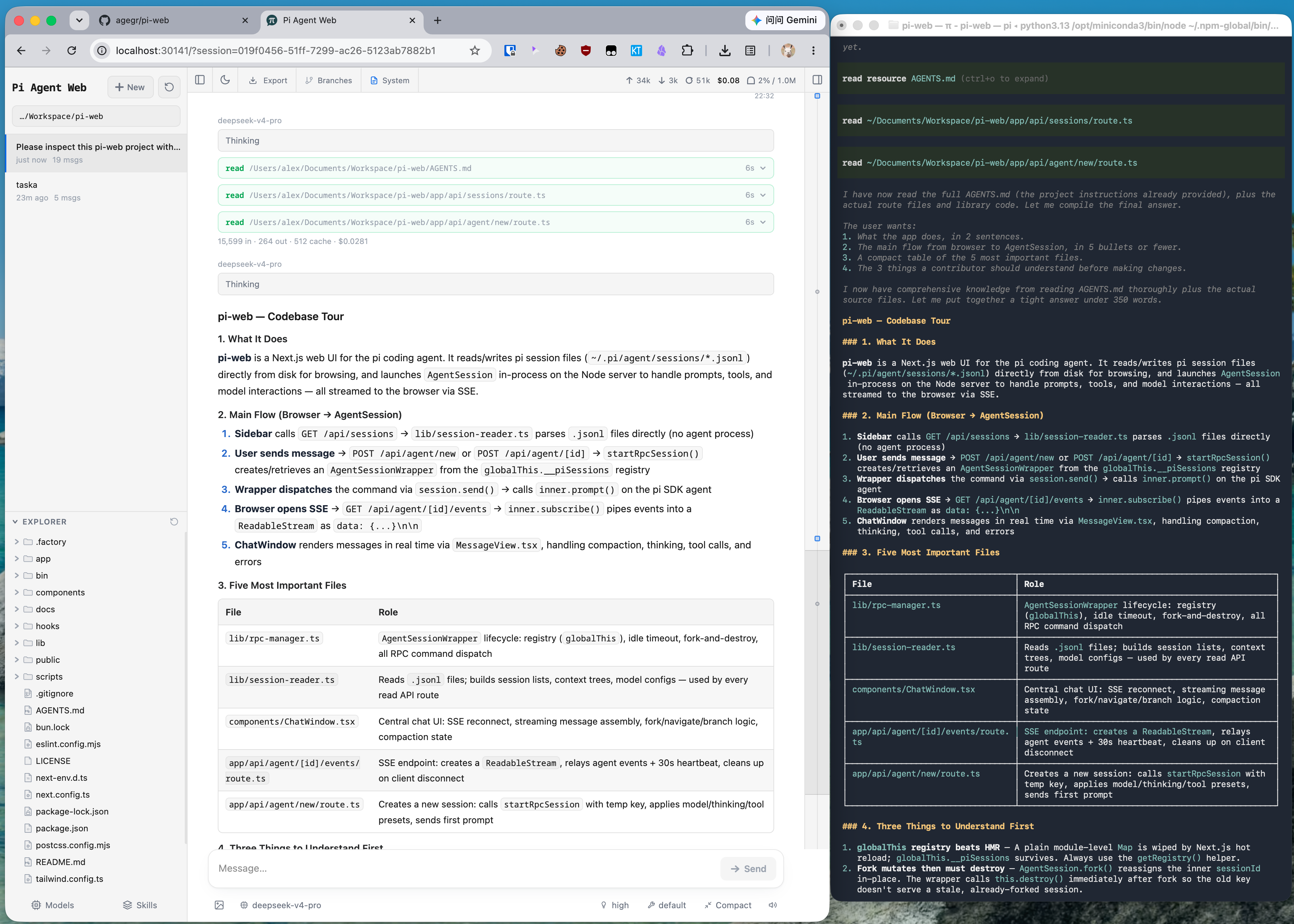
- Pick work back up: browse previous pi conversations by project without digging through terminal history or session paths.
- Try different directions safely: continue from an earlier message or fork a session into a separate route.
- Work across branches: switch Git worktrees from the sidebar so new sessions and the Explorer follow the checkout you choose.
- Chat beside the project: browse files on the left and preview source, docs, images, audio, and PDFs on the right while the agent works.
- See session state clearly: context usage, cost, compaction state, and system prompt details are visible from the top bar.
- Configure less from the terminal: manage models, login/API keys, model tests, and skill switches from the web UI.
- Use the interface in your language: switch between the supported UI languages from the top bar.
The launcher is what makes Pix different from plain pi-web. It is a small WinForms app that stays out of the way until you need it.
- Floating ball: a draggable, always-on-top dark orb. Click it and a satellite panel fades in beside it — the ball itself never repaints or moves during the transition.
- One-click service control: start/stop pi-web on a random loopback port, wait for the health check, then open the UI in an isolated Edge/Chrome
--appwindow. - Browser docking: after the app window opens, the ball glides to its right edge and follows it magnetically. Drag the ball away to detach — it remembers where you left it.
- Balance & quota panel: see at a glance what your configured providers have left —
- DeepSeek: total / topped-up / granted balance per currency
- MiniMax Coding Plan (CN & global): remaining 5-hour window and 7-day window with reset times
- Kimi: remaining 5-hour / 7-day Code quota, plus subscription & gift balance in the detail line
- Service insight: PID, port, and live AgentSession count; a system tray menu mirrors the controls.
- Quiet by design: smooth 150–240ms animations, hidden scrollbars, a persistent dedicated browser profile (extensions and logins survive restarts instead of re-onboarding every launch), and an application icon that matches the orb.
Pix ships on-device speech-to-text (SenseVoice via sherpa-onnx — fully local, no cloud, no API key). Chinese, English, Japanese, Korean and Cantonese are auto-detected.
- In the web UI: click the mic button in the chat input bar, speak, click again to stop — the transcript is inserted at the cursor.
- System-wide: toggle "语音输入" in the launcher panel (or the tray menu), then hold Right Ctrl in any app, speak, and release — the text is typed at the cursor. Right Alt is a second binding. Long transcripts fall back to clipboard paste.
The model (~240 MB) is not bundled and is git-ignored. Download the int8 build of SenseVoice and place these two files under models/sensevoice-small-int8/ next to the app:
model.int8.onnxtokens.txt
Sources: Hugging Face · ModelScope mirror. To keep the model elsewhere, point the PIX_VOICE_MODEL_DIR environment variable at its folder. If the model is missing, the mic button turns amber — click it to see these instructions.
- Windows 10/11
- Node.js 22.19.0 or newer, available on
PATH - .NET 8 Desktop Runtime (only for the launcher; building from source needs the .NET 8 SDK instead)
pi-web works standalone on any platform, no launcher required:
npx @agegr/pi-web@latest
# or
npm install -g @agegr/pi-web
pi-web
Then open http://127.0.0.1:30141. The CLI will try to open the browser automatically after the server is ready. Pi Web listens on 127.0.0.1 by default.
Options:
pi-web --port 8080              # custom port
pi-web --hostname 0.0.0.0       # expose on a trusted network
pi-web -p 8080 -H 0.0.0.0       # combine options
pi-web --no-open                # do not open the browser automatically

PORT=8080 pi-web                # environment variable is also supported
PI_WEB_HOSTNAME=0.0.0.0 pi-web  # explicit network exposure
PI_WEB_ALLOWED_HOSTS=pi-web.internal pi-web  # allow an exact proxy/custom hostname
PI_WEB_NO_OPEN=1 pi-web         # useful when running as a background service
Pi Web has no application-level authentication and can invoke a high-privilege agent. Do not expose it to the internet; only use non-loopback bindings on a trusted network.
API requests accept loopback names, IP literals, the selected bind hostname, and exact comma-separated names in PI_WEB_ALLOWED_HOSTS. Configure that variable when a trusted reverse proxy uses a different external hostname.
Pi Web reads the standard HTTP_PROXY, HTTPS_PROXY, and NO_PROXY environment variables for server-side model and API requests.
On macOS or Linux:
HTTP_PROXY=http://127.0.0.1:7890 \
HTTPS_PROXY=http://127.0.0.1:7890 \
NO_PROXY=localhost,127.0.0.1 \
npx @agegr/pi-web@latest
On Windows PowerShell:
$env:HTTP_PROXY = "http://127.0.0.1:7890"
$env:HTTPS_PROXY = "http://127.0.0.1:7890"
$env:NO_PROXY = "localhost,127.0.0.1"
npx @agegr/pi-web@latest# 1. Install dependencies and build pi-web (production build)
npm install
npm run build
# 2. Build the launcher
dotnet build .\launcher\PixLauncher.csproj -c Release
# 3. Run it — it finds bin\pi-web.js by walking upward from its location
.\launcher\bin\Release\net8.0-windows\PixLauncher.exeIf the launcher sits outside the repository, point it at the pi-web directory:
$env:PI_WEB_ROOT = "E:\Pix"Prebuilt launcher archives are attached to GitHub Releases. They contain only the launcher — you still need a pi-web build (npm run build) for it to drive.
PixLauncher.exe (WinForms, control plane)
   │  loopback HTTP only
   │   GET  /api/health              (readiness, no auth)
   │   GET  /api/launcher/status     (balances & quota, Bearer token)
   │   POST /api/launcher/shutdown   (graceful stop, Bearer token)
   ▼
node bin/pi-web.js (Next.js service)
   ▼
Edge/Chrome --app window (user's existing Default profile)
- The two processes share no code; the launcher only talks HTTP to pi-web.
- A random
PI_WEB_LAUNCHER_TOKENis generated per launch. Without it, the/api/launcher/*endpoints return 404 — plainpi-webruns (CLI, npx, dev server) expose no privileged surface. - Provider credentials are resolved through pi's own auth storage and used only in server-side requests to the matching official provider API; they are never returned to the launcher or the browser.
- Data directory: Pi Web reads
~/.pi/agent/sessionsby default. SetPI_CODING_AGENT_DIRto point at another pi agent directory. - Session files: files are stored as
~/.pi/agent/sessions/<encoded-cwd>/<timestamp>_<uuid>.jsonl. - Model config: the Models panel reads and writes
models.jsonin the pi agent directory. Model lists and defaults come from pi's config. - File access: file browsing and preview are scoped to the selected project directory and working directories that appear in sessions.
- Git worktrees: see Worktrees in Pi Web for when the switcher appears, how new worktrees are created, and what removal does.
- Forks vs in-session branches: Fork creates a new
.jsonlfile. "Edit from here" creates another branch inside the same session file. - Internationalization: UI text lives in
lib/locales/zh.json/lib/locales/en.json(keys must stay in sync) and is consumed viauseT()fromlib/i18n.tsx.
npm install
npm run dev          # pi-web at http://localhost:30141

dotnet build .\launcher\PixLauncher.csproj
dotnet run --project .\launcher\PixLauncher.csproj
Common checks:
node_modules/.bin/tsc --noEmit
npm run lint
Do not run next build while the dev server is up — it pollutes .next/. For a production build on Windows, isolate the build-time profile first (see docs/launcher.md).
- Pix Launcher details — scope, security model, provider adapters
- Worktrees in pi-web — branch switching in the sidebar
- AGENTS.md — architecture notes and development conventions
MIT, same as upstream pi-web.