
🎉 Release — 0.0.3
🎉 Release
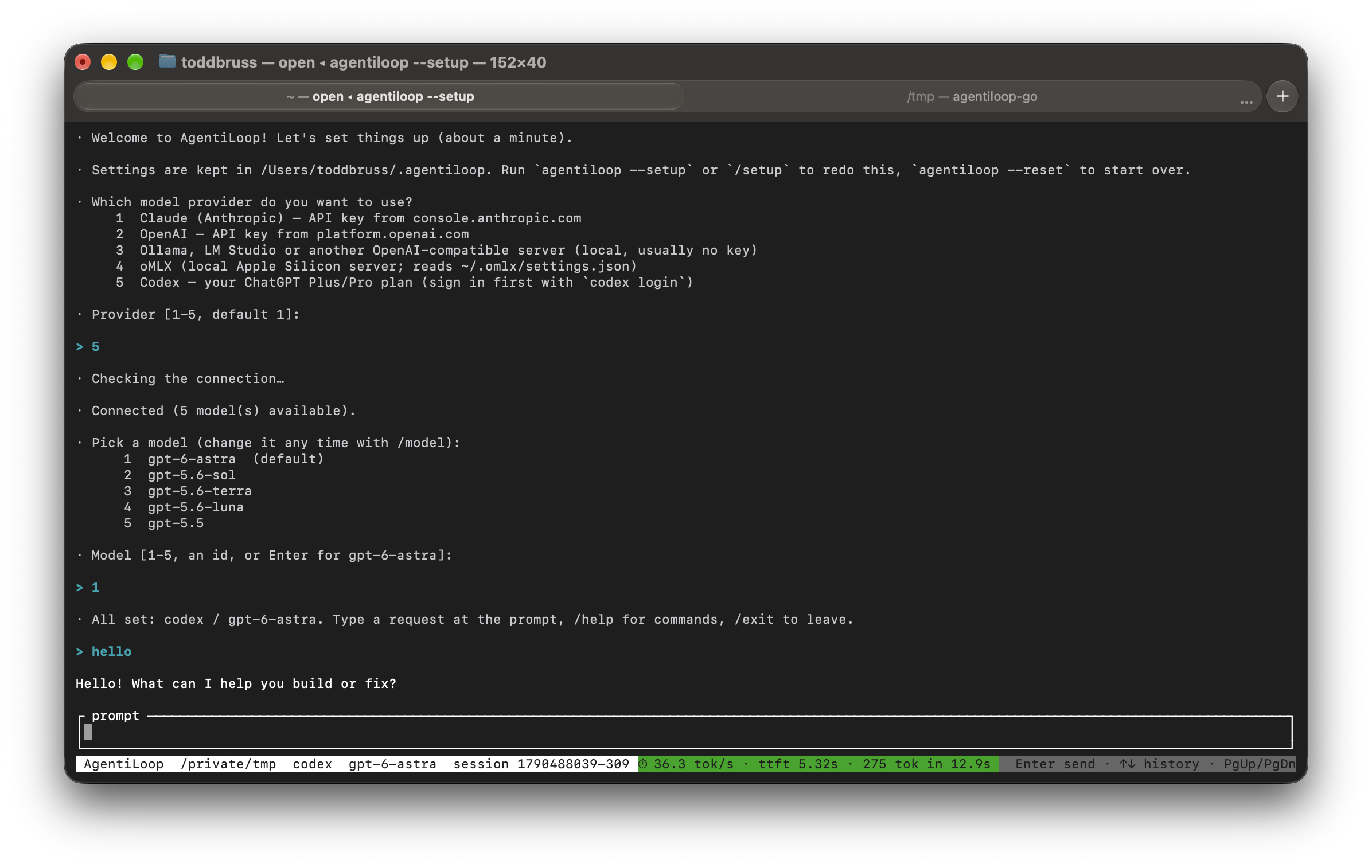
AgentiLoopGo 0.0.3 is built from main and tagged v0.0.3. The theme of this release is getting connected: a first-run setup wizard (plain terminal or full-screen TUI), a new Codex provider that uses your ChatGPT Plus/Pro plan, OpenAI fixes for the newest models, and smarter context budgeting so small models work too. The Rust version, AgentiLoop CLI 0.0.3, has the same features and the same tests; every Go commit mirrors its Rust twin. The macOS binaries are signed with Developer ID and notarized.
Testers welcome — see What to test below.
✨ New
- Setup wizard:
agentiloop --setup(or justagentiloopon a machine with no credentials) asks for a provider, key and model, checks the connection, and saves to~/.agentiloop/env, your shell profile, or the macOS Keychain.agentiloop --resetwipes it all. Works in the line REPL, in the TUI (--setup --tui) and mid-session with/setup(1666179,12eb614). - Codex provider (
-p codex): sign in once withcodex loginand AgentiLoop uses your ChatGPT Plus/Pro plan — no API key. Includes token refresh, the/responsesstreaming API, the model list, hosted web search and theapply_patchtool (3f289f4). - Windows: the wizard stores the key as a user environment variable (
setx) instead of a profile that a Restricted execution policy never runs; PowerShell profiles are supported on every OS (8947939,02c27d0). - TUI: drag to select text and it is copied to the clipboard on release (
8247b2a). - CI now tests on macOS, Linux and Windows, including a Windows smoke test of
--setup/--reset(28430b9).
🔧 Changes
- OpenAI:
api.openai.comrequests go through/v1/responses(the newest models reject tools + reasoning onchat/completions) and sendmax_completion_tokensinstead of the deprecatedmax_tokens(3f42cf1,1356d5d). - Model limits come from the provider's catalog (Anthropic
GET /v1/models/{id}, OpenAI's published limits, OpenAI-compatible servers) instead of a hard-coded table (66351e4,1fe111e,341eaa8). - Context budgeting: the completion limit is computed after reserving room for the system prompt, messages and tool definitions, recalculated every turn and applied to compaction — so "hello" no longer overflows an 8K model (
f27e9d2). - Default
max_tokensraised to 32k; truncated tool calls are reported clearly (fb83e1e). - Shorter default system prompt; identity questions are answered as AgentiLoop (
4265025,7c2eb35). - READMEs (8 languages) rewritten around the wizard, with a Pong demo (
d0a69e7,d06d3e2).
📦 Downloads
| Platform | File |
|---|---|
| macOS Apple Silicon | agentiloop-macos-arm64.tar.gz (signed + notarized) |
| macOS Intel | agentiloop-macos-x86_64.tar.gz (signed + notarized) |
| Linux x86_64 | agentiloop-linux-x86_64.tar.gz (glibc 2.35+) |
| Linux ARM64 | agentiloop-linux-arm64.tar.gz (glibc 2.35+) |
| Windows x86_64 | agentiloop-windows-x86_64.zip |
Unpack the download and put agentiloop (agentiloop.exe on Windows) on your PATH, then run agentiloop — the wizard takes it from there.
🧪 What to test (testers welcome!)
agentiloop --versionprints0.0.3.- On a clean machine (or after
agentiloop --reset), runagentiloop— the wizard should start by itself. Try it plain and with--setup --tui. - Each provider: Claude (API key), OpenAI (API key; try a gpt-5/gpt-6 model — it should use
/v1/responses), Ollama / LM Studio (no key), oMLX, and Codex (codex loginfirst, then pick 5). - A small local model (8K context): say
helloand run a tool — no "context window exceeded" errors. - Windows: after the wizard, open a new PowerShell and check the key is in
$env:— no profile edits needed. SmartScreen may warn because the Windows binary is not code-signed yet. - TUI: drag over some output and paste it somewhere.
- Report problems with your OS, provider/model and the command you ran. Do not include API keys.
🎮 Pretend war games with Astra
A session in the new -p codex provider, playing a make-believe war-games simulation with gpt-6-astra in the TUI. Astra runs the turns as a labelled fictional simulation, refuses the one order that crosses the line (turn 15), and keeps the story going through revived populations, a magic potion that rebuilds every building, and a negotiated democratic transition. Status bar shows the codex provider, model, session id and live tok/s.

🔢 Version
- Version set to 0.0.3 (
199307f).
Full Changelog: v0.0.2...v0.0.3