)
)
)
)
)


&logoSize=auto&label=Follow&labelColor=rgb(85%2C85%2C85)&color=rgb(147%2C147%2C147))
Every mod adds its own piece to Hytale. Trouble starts when two pieces need to change the same asset.
Patchwork lets mod authors stitch focused changes into existing JSON assets without shipping complete replacement files. Add a field, merge configuration, insert new behavior, remove something obsolete, or conditionally adapt to another installed mod—all while leaving the original asset untouched.
Your patches ship alongside your mod. Patchwork gathers the applicable pieces, layers them over the currently loaded assets, and publishes the finished result through a generated asset pack.
The original files remain exactly where they were.
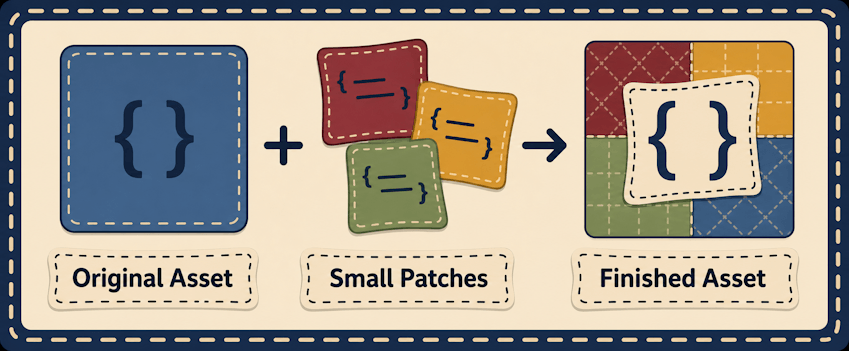
Instead of copying an entire asset to change one small section, describe the change itself:
{
  "Id": "MyMod_EnableFollowing",
  "Target": "Server/NPC/Roles/Creature/Mammal/Cow.json",
  "When": {
    "ModInstalled": "ExampleAuthor:ExampleMod"
  },
  "Operations": [
    {
      "Id": "EnableFollowing",
      "Op": "Merge",
      "Path": "/Parameters",
      "Value": {
        "CanFollow": {
          "Value": true
        }
      }
    }
  ]
}
This patch changes the cow only when the specified mod is installed. Patchwork resolves the current version of the target asset, applies the requested operation, and generates the finished asset at runtime.
No bundled override. No manually maintained duplicate. No change when the integration is not needed.
See the asset-selection guide.
Target and Targets accept an exact asset path or an explicit selector beginning with glob::
{
  "Target": "glob:Server/NPC/**/*.json",
  "Operations": [{"Op": "Replace", "Path": "/Enabled", "Value": true}]
}
Only prefixed selectors are patterns. * matches within one path segment, ** crosses zero or more segments, and ? matches one character. Raw wildcards and regular expressions are not interpreted. Expansion uses one immutable original-asset snapshot, excludes Patchwork's generated pack, deduplicates matches, and orders them deterministically. A selector matching nothing produces a warning rather than inventing an asset.
See optional changes and conflict reports.
Patchwork reports overlaps between successful effects from different definitions at the same target path and effect kind. Reports distinguish same-pack/cross-pack scope and redundant-identical/material overlaps without exposing written values or fingerprints. /patchwork status shows bounded summary counts; /patchwork conflicts lists redacted rows, and /patchwork conflicts <exact-target> filters the report.
Neutral definitions can choose a root ConflictPolicy: Report (default) applies and reports overlaps, Allow applies while suppressing rows introduced by that definition, and Reject stops only the affected target while unrelated targets continue. A rejected target retains previously published generated bytes during a normal reload when available. Policy belongs to the later definition in deterministic order; it is not ownership, locking, permission, or authorization.
Patchwork is built for mods that need to cooperate without becoming tightly coupled.
Use it to:
- Add optional behavior when another mod is installed.
- Change an asset based on a config setting in your mod.
- Extend an asset without replacing everything around it.
- Apply one change across several related assets.
- Create compatibility layers that activate only when relevant.
- Adapt to particular mod or game versions.
- Check whether assets, fields, or configuration values exist before applying a change.
- Read supported JSON configuration from another installed mod’s registered data directory.
- Keep your base assets valid even when an optional dependency is absent.
A patch can stand alone, use several conditions together, or target multiple assets at once. Conditions can be combined with All, Any, and Not, allowing integrations to be as narrow or flexible as they need to be.
See the core operations guide.
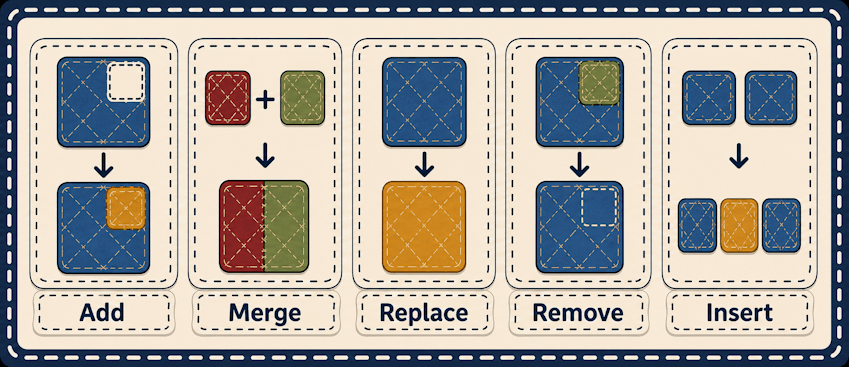
Patchwork supports core JSON operations:
- Add — add a new field or array entry.
- Merge — blend an object into an existing section.
- Replace — change a value that is already present.
- Remove — remove an existing field or entry.
- Insert — place an entry before, after, at the start of, or at the end of an array.
- Matching and cross-asset merges — select object entries with recursive matchers or merge data from another exact asset without mutating source files.
Insert operations can locate stable anchors instead of relying on fragile array indexes. They can also detect whether their content already exists, making patches safe to regenerate without duplicating entries.
If a required operation cannot be completed, Patchwork rejects that target instead of publishing a half-applied asset. Clear diagnostics identify the patch, operation, target, and reason.
See array and matching operations.
When a simple add, merge, or insert is not enough, Patchwork also provides four format-free operations for common integration jobs:
- MergeMatching — find matching object entries in an array, then deep-merge new fields into each match.
- UpsertMatching — merge into matching entries, or insert one new object when nothing matches.
- OverlayFromAsset — deep-merge an entire exact-path source asset onto the current target. Source values win while unrelated target fields remain.
- MergeObjectFromAsset — deep-merge one object selected from another exact-path source asset into an existing object in the target.
Matching uses the same recursive object matcher as other array operations, and both cross-asset operations read the original generation snapshot. They never modify their source assets, do not accept glob: sources, and can be made optional with Required: false when a source is only present in some mod setups.
See conditions: apply only when needed.
Compatibility patches should appear only when they make sense.
Patchwork can condition changes on:
- Installed mods
- Mod, game, or server versions
- Existing or missing assets
- Whether the target asset exists
- JSON fields and values within an asset
- JSON configuration stored in another installed Java mod’s registered data directory
- Nested combinations of conditions
This allows a mod to ship its integrations directly, rather than asking server owners to download and arrange a collection of separate compatibility packs.
Patchwork’s access to other mod data is read-only and confined to registered mod data directories. It cannot use absolute paths or escape into unrelated parts of the filesystem.
Patchwork is available as both a standalone mod and an embeddable Java runtime.
Mod authors can declare Patchwork as a dependency or embed it directly so their patches continue to work without requiring server owners to install another jar manually.
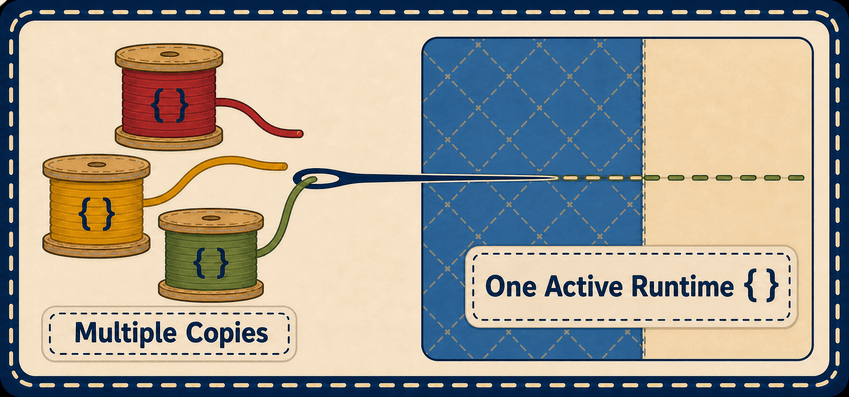
If several mods bring their own copy, Patchwork elects exactly one active runtime:
- The newest compatible version wins.
- If versions are equal, the standalone installation is preferred.
- Every other copy remains passive.
Only the elected runtime scans patches, generates assets, registers commands, and performs background work. Embedded copies can still contribute integrations without creating duplicate patch systems.
Patchwork never edits the source files belonging to Hytale or another mod. It generates patched copies in its own runtime asset pack, preserving the original materials underneath.
Patches are applied in a stable, deterministic order. Multiple mods can contribute changes to the same target, and failed targets are kept out of the generated output rather than being published in a partially modified state.
Some asset types can update live, while others may require a restart. Patchwork reports that distinction honestly through its status and reload tools.
Patchwork began as the universal asset patcher inside Alec’s Tamework.
The standalone release preserves the existing patch format and continues to recognize legacy patches under Server/Tamework/Patches when Tamework is installed. New integrations should use the neutral location:
Server/Patchwork/Patches
Tamework can embed Patchwork and contribute its own macros and reload behavior, while the core patching system remains useful to every mod—not only Tamework extensions.
See the server owner guide.
Most of Patchwork is intended to work quietly.
Install the standalone jar when a mod lists Patchwork as a required dependency. If a mod already embeds a compatible version, no additional installation is necessary unless that mod’s documentation says otherwise.
Patchwork automatically prevents duplicate runtimes from doing duplicate work.
Administrative tools are available under:
/patchwork
These tools provide patch status, diagnostics, explicit regeneration, and self-testing when troubleshooting an integration. They require the patchwork.admin permission and default to the hytale:Admin group.
The standalone plugin registers Server/Patchwork/Patches/**/*.json as a native Hytale asset type. Hytale’s Asset Editor can discover, create, structurally edit, validate, and save the same portable definitions consumed by Patchwork.
See the field reference and compatibility and versions guide.
The generation dependency index records definition files, concrete target expansions, exact cross-asset sources, and glob stable prefixes. The elected runtime uses it to debounce relevant directory-pack edits into one automatic regeneration pass; Patchwork's generated output is excluded so it cannot feed back into itself. Archive-pack and unregistered mod-data changes remain manual or restart-driven. See reloads and generated files.
For monitored Hytale server stores, Patchwork calls a target hot-reloaded only after Hytale reports the expected generated provider and asset path. Common, custom, unknown, disabled-monitor, or unconfirmed routes remain restart-required; writing a generated file alone is never treated as a live reload.
Patchwork 1.2.1 supports these installation modes:
- Install
patchwork-standalone-1.2.1.jaras a Hytale server mod. - Embed
com.alechilles:patchwork-runtime:1.2.1in another Java plugin.
For complete technical details, see patch anatomy, operations, embedding Patchwork, and compatibility and versions.
A good compatibility layer should feel like it was always part of the design.
Patchwork gives mod authors a shared way to layer focused, conditional changes over Hytale assets—without copying whole files, forcing hard dependencies, or unraveling one another’s work.
Bring your own piece. Patchwork will help stitch it in.
Source: https://github.com/Alechilles/Patchwork
Documentation: https://wiki.hytalemodding.dev/mod/patchwork
For mod authors: Patch definitions belong under Server/Patchwork/Patches/**/*.json
Patchwork is source-available under the Patchwork Source Available License 1.0.