Technical Documentation
- Overview
- Quick Start
- Architecture
- Database Schema
- API Reference
- Scanning Logic
- Authentication
- Notification Rules
- Telegram Integration
- Connection Launch
- Docker Details
- CLI Tools
- Frontend Structure
- Configuration Reference
- Deep Scan
- Scan Nodes
- CMDB / i-doit Integrations
- External Database
- Development Notes
- Troubleshooting
LanLens is a single-container Docker application for self-hosted network inventory, local network scanning, home lab network monitoring and lightweight device documentation. It helps operators discover MAC/IP devices, keep a practical device inventory, review network changes, and prepare CMDB/i-doit export data without requiring a cloud account.
LanLens can:
- Periodically scan the local network via ARP broadcast
- Identify device vendors from MAC addresses using the offline IEEE OUI database
- Classify devices heuristically and enrich classes through optional LLDP/CDP, multicast and SNMP identity evidence
- Track online/offline state, IP history, DHCP range membership, open services and scan-detected inventory changes
- Flag security-awareness signals such as unknown DHCP servers, ARP/MAC drift and VRRP/HSRP peers
- Poll optional SNMP v1/v2c/v3 targets for IF-MIB inventory, common network-device identity, switch-port context and diagnostics
- Perform per-device port scans using nmap
- Provide a React-based dark-themed web UI for management and documentation
- Document device services and group them in the optional Services directory via drag-and-drop or explicit segment selection
- Send notifications through configured Telegram, webhook/Gotify and email channels
- Support SSH link, RDP file download, and web browser connection shortcuts
- Prepare reviewed CMDB/i-doit CSV exports and integration sync workflows
LanLens stores inventory in the configured database volume. There is no product telemetry pipeline; outbound traffic is limited to features that are configured or triggered, such as update checks, notifications, CMDB/i-doit, webhooks or external database/integration targets.
- Docker 20.10+ with Docker Compose v2
- Linux host recommended for direct ARP scanning
-
network_mode: hostandNET_RAW/NET_ADMINcapabilities for full local MAC/vendor discovery
Download the compose file:
curl -O https://raw.githubusercontent.com/AlexRosbach/LanLens/main/docker-compose.ymlGenerate a secret key:
python3 -c "import secrets; print(secrets.token_hex(32))"Replace CHANGE_THIS_TO_A_LONG_RANDOM_STRING in docker-compose.yml, then start LanLens:
docker compose up -dOpen the UI:
http://<your-host-ip>:7765
Default first-run login:
admin / admin
LanLens forces a password change after the first login. For full MAC/vendor discovery, run it on a Linux host with host networking as shown in the compose file.
Set LANLENS_PORT in docker-compose.yml when the UI should use another port:
environment:
  LANLENS_PORT: "8080"
For built-in HTTPS in host-network deployments, open Settings → System → HTTPS Settings, upload certificate material, choose the HTTPS port, and enable HTTPS. A central reverse proxy remains the preferred TLS model when the deployment can use one.
LanLens keeps expert modules hidden by default. Enable Settings → Features → Advanced View when the installation needs CMDB/i-doit, Services, DHCP Monitor, TLS checks, ping history, Scan Nodes, SNMP, passive discovery or build metadata.
Dockerfile (multi-stage build):
  Stage 1 — Node 20 Alpine: npm ci && npm run build → /app/frontend/dist/
  Stage 2 — Python 3.12 Slim:
    - nginx (reverse proxy + static files)
    - uvicorn (FastAPI application server on 127.0.0.1:8000)
    - SQLite database at /data/lanlens.db (Docker volume)

Request flow:
  Browser → nginx:80 → /api/* → uvicorn:8000 → FastAPI
                     → /ws/*  → uvicorn:8000 → WebSocket
                     → /*     → /app/frontend/dist/ (static)
backend/
  main.py           FastAPI application, lifespan, WebSocket endpoint
  config.py         Pydantic settings from environment variables
  database.py       SQLAlchemy engine + SessionLocal factory
  models.py         ORM models (User, Device, PortScan, ScanRun, Setting, Notification, TokenBlacklist)
  schemas.py        Pydantic request/response models
  auth/
    jwt_handler.py  create_access_token, decode_token
    password.py     hash_password, verify_password (bcrypt)
    dependencies.py get_current_user FastAPI dependency
  routers/
    auth.py         /api/auth/* — login, logout, me, change-password
    devices.py      /api/devices/* — CRUD, port scan trigger
    scan.py         /api/scan/* — start, status, history
    settings.py     /api/settings/* — dhcp, telegram, schedule
    notifications.py /api/notifications/* — list, read-all, delete
    connect.py      /api/connect/* — RDP file download
  services/
    scanner.py      ARP scan with scapy, device upsert logic
    port_scanner.py nmap port scan, returns open ports + protocol flags
    mac_vendor.py   OUI lookup via manuf library
    device_classifier.py  Vendor/hostname/port heuristics → device class
    notification.py Telegram message sending via httpx
    scheduler.py    APScheduler background scan loop
  cli/
    init_db.py      Create SQLite tables (idempotent)
    init_admin.py   Create default admin user if none exists
    reset_password.py  CLI tool for password reset

frontend/
  src/
    api/            Axios-based typed API clients per domain
    store/          Zustand state stores (auth, devices, UI settings)
    components/
      ui/           Button, Input, Modal, Badge, Card, Spinner
      layout/       Sidebar, TopBar, Layout
      devices/      DeviceTable, ConnectButtons, DeviceClassIcon, RegisterDeviceModal
    pages/          Login, ForcePasswordChange, Dashboard, DeviceDetail, Settings, Notifications
    utils/          formatters, connectionUtils
    assets/         logo.svg (original SVG design)
| Column | Type | Description |
|---|---|---|
| id | INTEGER PK | Auto-increment |
| username | TEXT UNIQUE | Login username |
| password_hash | TEXT | bcrypt hash (cost 12) |
| force_password_change | BOOLEAN | True on first login |
| created_at | DATETIME | UTC |
| last_login | DATETIME | UTC, nullable |
| Column | Type | Description |
|---|---|---|
| id | INTEGER PK | Auto-increment |
| mac_address | TEXT UNIQUE | Uppercase colon-separated (XX:XX:XX:XX:XX:XX) |
| ip_address | TEXT | Last seen IPv4 address |
| hostname | TEXT | PTR DNS reverse lookup |
| label | TEXT | User-assigned name |
| device_class | TEXT | Server / VM / IoT / Router / Switch / Workstation / NAS / Printer / Unknown |
| vendor | TEXT | From OUI database |
| notes | TEXT | Free text |
| is_registered | BOOLEAN | User has explicitly labeled this device |
| is_online | BOOLEAN | Seen in last ARP scan |
| first_seen | DATETIME | UTC |
| last_seen | DATETIME | UTC |
| Column | Type | Description |
|---|---|---|
| id | INTEGER PK | |
| device_id | INTEGER FK | → devices.id (CASCADE DELETE) |
| scanned_at | DATETIME | UTC |
| open_ports | TEXT | JSON array of {port, protocol, service, state}
|
| ssh_available | BOOLEAN | Port 22 open |
| rdp_available | BOOLEAN | Port 3389 open |
| http_available | BOOLEAN | Port 80 open |
| https_available | BOOLEAN | Port 443 open |
| Column | Type | Description |
|---|---|---|
| id | INTEGER PK | |
| started_at | DATETIME | |
| finished_at | DATETIME | Nullable |
| scan_type | TEXT |
arp / full / scheduled / manual
|
| devices_found | INTEGER | Total hosts in this scan |
| devices_new | INTEGER | New MACs discovered |
| devices_offline | INTEGER | Previously online, now absent |
| status | TEXT |
running / done / error
|
| error_message | TEXT | Nullable |
| Column | Type | Description |
|---|---|---|
| key | TEXT PK | Setting name |
| value | TEXT | String value |
| updated_at | DATETIME |
Known keys:
-
dhcp_start— Network scan start IP -
dhcp_end— Network scan end IP -
scan_interval_minutes— Scheduler interval -
telegram_bot_token— Telegram bot API token -
telegram_chat_id— Target chat/group ID -
telegram_enabled—"true"/"false" -
notify_on_device_online—"true"/"false" -
notify_on_device_offline—"true"/"false"
| Column | Type | Description |
|---|---|---|
| id | INTEGER PK | |
| device_id | INTEGER FK | → devices.id (SET NULL on delete) |
| event_type | TEXT |
new_device / device_online / device_offline
|
| message | TEXT | Human-readable description |
| is_read | BOOLEAN | UI read status |
| telegram_sent | BOOLEAN | Whether Telegram delivery succeeded |
| created_at | DATETIME |
| Column | Type | Description |
|---|---|---|
| jti | TEXT UNIQUE | JWT ID claim |
| expires_at | DATETIME | For cleanup |
// Request
{ "username": "admin", "password": "secret" }

// Response 200
{
  "access_token": "eyJ...",
  "token_type": "bearer",
  "force_password_change": false
}Returns current user. Requires Authorization: Bearer <token>.
{ "current_password": "old", "new_password": "newpass123" }Query params: online_only, unregistered_only, device_class, search
Returns DeviceListResponse with items, total, online, offline, unregistered.
{
  "label": "My NAS",
  "device_class": "NAS",
  "notes": "Synology DS920+",
  "is_registered": true
}Triggers background nmap port scan. Returns immediately with 202-like response.
Uses the global port range from Settings -> Network Discovery -> Port Scan Range.
Returns last 5 port scan results.
Triggers immediate ARP scan in background.
{
  "is_running": false,
  "last_scan": {
    "id": 42,
    "started_at": "2026-04-04T12:00:00",
    "finished_at": "2026-04-04T12:00:03",
    "devices_found": 14,
    "devices_new": 0,
    "devices_offline": 1,
    "status": "done"
  }
}{ "dhcp_start": "192.168.1.1", "dhcp_end": "192.168.1.254" }{ "scan_interval_minutes": 5 }{
"device_archive_after_days": 30,
"device_delete_archived_after_days": 90
}Both values are day counts. device_archive_after_days moves inactive, unregistered discovered devices out of the normal dashboard into the archived view. device_delete_archived_after_days counts from archived_at and permanently deletes archived unregistered devices after that many days. Set either value to 0 to disable that step.
Manually archives one device and returns the updated DeviceResponse. Manual archive sets is_archived, stores archived_at, marks the device offline, and records a device_archived timeline event. The device moves out of the normal dashboard list and into the Archived filter.
{
  "telegram_bot_token": "1234567890:ABCdef...",
  "telegram_chat_id": "-1001234567890",
  "telegram_enabled": true
}Returns a .rdp file download with the device's IP pre-configured.
1. APScheduler triggers run_scan() every N minutes
2. scanner.py reads scan_start/scan_end plus optional scan_additional_targets from DB settings
3. scan_start/scan_end are summarized into ARP targets for the directly reachable Layer-2 network
4. scapy: Ether(dst="ff:ff:ff:ff:ff:ff")/ARP(pdst=target)
   srp() with timeout=3s
5. Optional routed scan targets are scanned with `nmap -sn -oX - <target>`
6. For each discovered host:
   a. Normalize MAC to XX:XX:XX:XX:XX:XX when available
   b. Routed hosts without MAC receive a stable internal `ip:` identifier and are displayed as IP-only discoveries
   c. mac_vendor.py: manuf.MacParser().get_manuf(mac) → vendor string when a real MAC exists
   d. DB upsert:
      - If identifier exists: update ip, last_seen, is_online=True
      - If new identifier: insert with is_registered=False, create Notification
   e. Reverse DNS lookup (socket.gethostbyaddr) in thread pool
7. Devices not found in the current scan are marked offline only after the configured grace period
8. Write ScanRun summary to DB
9. Send pending Telegram notifications
1. Triggered by: POST /api/devices/{id}/scan-ports, the manual UI action, or the optional scheduled background job
2. port_scanner.py: nmap.PortScanner()
3. Arguments: configured in Settings; default is "-sS -T4 --top-ports 1000" (SYN scan, fast)
   Fallback: "-sT -T4 ..." (TCP connect, no root needed)
4. Parse results: extract open ports, service names
5. Set flags: ssh_available, rdp_available, http_available, https_available
6. Write PortScan row to DB
- Client sends
POST /api/auth/loginwith credentials - Server verifies bcrypt hash, creates access token (8h expiry) with
jticlaim - Client stores token in localStorage
- Every request includes
Authorization: Bearer <token> - FastAPI's
get_current_userdependency decodes + validates token - Logout: token is not explicitly blacklisted (stateless) — frontend clears it from localStorage
- New users have
force_password_change = Truein the DB -
/api/auth/mereturns this flag - Frontend route guard: if
force_password_change, redirect all routes to/change-password - After changing password: flag set to
False, guard removed
Use Settings -> Notifications -> Notification rules to choose which events are enabled globally and which external channels receive them. The matrix has one global event column and separate Telegram, webhook/Gotify and email columns, so each channel can subscribe to new-device alerts and network-change alerts independently while the global column remains the master switch for that event.
Channel rules only send when the matching channel is configured and enabled in the same settings tab. Email delivery uses the SMTP settings, webhook delivery uses the configured webhook URL, and Telegram still supports separate update notifications for release checks.
- Create bot: message
@BotFatheron Telegram, send/newbot - Get Chat ID:
- Personal:
https://api.telegram.org/bot<TOKEN>/getUpdatesafter sending a message to the bot - Group: Add bot to group, send message, check
getUpdatesfor negative chat ID (e.g.,-1001234567890)
- Personal:
- Configure in LanLens Settings → Notifications
LanLens — New Device Detected

IP: 192.168.1.42
MAC: AA:BB:CC:DD:EE:FF
Vendor: Raspberry Pi Foundation
Class: IoT
Hostname: raspberrypi.local

Open LanLens to register this device.
- Failed Telegram, webhook and SMTP sends are logged.
- The Notifications page shows successful Telegram, webhook and email deliveries on each stored in-app notification.
- Delivery is retried by the next scan cycle after a short backoff when a configured external channel fails.
- The Notifications page can mark all visible entries as read.
- Use Delete all to remove all stored in-app notifications after confirmation.
- Bulk deletion does not change device history, network-change events, scan results, or external delivery logs; it only clears rows from the notifications list.
Frontend renders an <a href="ssh://ip"> link. Clicking opens the system's default SSH client:
- macOS: Terminal
- Linux: depends on xdg-open configuration
- Windows: requires SSH URI handler (e.g., PuTTY configured as default)
Frontend calls GET /api/connect/{id}/rdp which returns a .rdp file with:
full address:s:<ip>
authentication level:i:2
prompt for credentials:i:1
The browser downloads the file. Double-clicking opens:
- Windows: built-in Remote Desktop Connection (mstsc.exe)
- macOS: Microsoft Remote Desktop (if installed)
- Linux: Remmina or similar
Opens http://ip or https://ip in a new browser tab based on which ports are open.
ARP scanning requires sending raw Ethernet frames to the broadcast address. This requires:
- A raw socket (
AF_PACKET) - Access to the host's physical network interface
network_mode: host makes the container share the host's network stack, giving it direct access to the physical NIC. This is the simplest and most reliable approach for ARP scanning.
Alternative (bridge mode): Remove network_mode: host and add ports: ["8080:80"]. ARP scanning will not work from a bridge network. Additional routed scan targets still use nmap ping sweep (-sn), but the primary local ARP range needs host networking/raw-socket access for full MAC/vendor discovery.
Host-network containers cannot also join a Docker reverse-proxy network. For standalone host-mode deployments, LanLens can terminate HTTPS inside its own nginx process:
- Open Settings → System → HTTPS Settings.
- Upload the certificate and matching private key. An optional CA chain can be uploaded as well.
- Select the HTTPS port and enable HTTPS.
LanLens stores certificate material under /data/tls, validates the certificate/key pair before activation, renders the nginx configuration, and reloads nginx. If the HTTPS port is the same as LANLENS_PORT, that port switches from HTTP to HTTPS. If the ports differ, HTTP can optionally redirect to HTTPS.
External reverse proxies remain the better central TLS option when the deployment model allows them.
The default UI is intended to stay approachable for home-network users. Advanced operational features are grouped behind Settings → Features. Advanced View is the master switch for expert modules; individual feature switches then control CMDB/i-doit, Services, DHCP Monitor, Plugin API, passive discovery, TLS certificate checks, ping history and internal build metadata. When disabled, LanLens hides the related UI surfaces, rejects the related authenticated API calls and stops matching background jobs, while keeping stored settings and historical data intact.
The Changes view shows the structured device_change_events history across all devices. It surfaces device discoveries, online/offline transitions, IP and hostname changes, archive/unarchive actions, CMDB ID generation, merge actions, maintenance updates and manual documentation edits. Use the filters to narrow by event type, time range or free-text search across device labels, hostnames, IPs, MAC addresses, fields, sources and event messages.
Each row shows the changed field plus before/after values and links to the affected device detail page. Device Detail keeps its per-device timeline for local context, while the global Changes page answers broader questions such as what changed in the last day, week or month.
Use Export audit CSV to download the currently filtered change history for audit or compliance review. The export uses the same event type, time range and search filters as the visible table. CSV cells are escaped before download, and the API also supports format=json for machine-readable audit snapshots.
To route scan-detected network changes into alerting systems, enable Settings -> Notifications -> Notification rules -> Network changes for the desired in-app and external channels. LanLens creates notifications for scan-detected IP, hostname, online/offline and archive changes; enabled Telegram, webhook/Gotify and email deliveries receive the same event payloads with a device link when server_url is configured.
LanLens forwards browser-visible UI failures to the backend log stream so operators can see them in container logs. Failed API responses, toast error messages, runtime exceptions and unhandled browser promise rejections are posted to /api/client-errors and logged under lanlens.client_errors. The payload is bounded and redacts common token, password, secret and authorization patterns before logging.
Passive discovery is an opt-in expert module. Enable Advanced View, Plugin API and Multicast protocol discovery under Settings → Features, then use Settings → Network Discovery → Multicast protocols to run a manual capture or schedule background captures. The same settings card controls the background interval in minutes and the capture duration in seconds; the manual capture button uses that configured duration too.
LanLens stores visible mDNS, SSDP/UPnP, LLDP, CDP and generic IPv4 multicast observations. Recognized control-plane traffic such as OSPF, VRRP and HSRP is labelled explicitly; other multicast packets are still stored with source/destination addresses plus UDP ports when visible. LLDP/CDP frames are captured with the multicast/passive-discovery module and parsed for neighbor identity, advertised port and device capabilities. Repeated observations with the same protocol, source, destination and service identity update their latest seen timestamp instead of filling per-device lists with duplicate rows. mDNS deduplication groups recurring packets by source and advertised service type or local host name, so a device does not get duplicate-looking rows just because the mDNS question, answer or summary text changed between packets. Generic multicast deduplication intentionally ignores ephemeral source-port churn and changing MAC metadata when the source, multicast group and destination port are the same. Per-device discovery tables show unique observations that can be linked to the device's current IP, MAC address or recorded IP history. Click an observation row to inspect parsed details and the raw captured payload.
When a linked observation carries a high- or medium-confidence device-class inference, passive discovery can update the matched device's device_class. Unknown devices are filled automatically; high-confidence router, switch, access-point, printer and similar observations may also replace broad generic classes such as IoT or Workstation. LLDP/CDP bridge/switch, router, WLAN access-point, telephone and station capabilities are treated as strong class signals. More specific existing classes are left unchanged so manually curated inventory data is not overwritten by weak service advertisements. If normal DNS discovery did not provide a usable hostname, linked mDNS observations can also fill hostname from advertised .local names.
Use Diagnose 10s in the same settings card when a network is known to send mDNS/UPnP but LanLens shows no observations. The diagnostic runs a short foreground capture and reports the active BPF filter, enabled protocols, matching packets seen, packets parsed, observations stored, linked observations, device classes updated, hostnames updated, duplicates skipped and capture errors. The same card lists recent observations and links matched rows directly to device detail pages. If packets_seen is zero, the LanLens host/container is not seeing that traffic. If packets are seen but not parsed or stored, the issue is in the parser, protocol switches or database write path. If observations are stored but not linked, the source IP/MAC has not matched a known device or its IP history yet.
Docker deployments need host networking and raw packet permissions for live capture. If the container runs in bridge mode or without NET_RAW, the capture endpoint can start but may not observe LAN multicast traffic.
Passive discovery uses Scapy for packet capture and parsing. The currently installed Scapy package metadata reports GPL-2.0-only; keep that license in mind when redistributing LanLens images or changing packet-capture dependencies. LanLens also uses other GPL/LGPL or dual-licensed backend dependencies for network discovery and connectivity features; see THIRD_PARTY_NOTICES.md for the maintained dependency license matrix.
Use Settings → Network Discovery → Device retention to keep old discoveries from cluttering the active dashboard. Archive after inactive days moves unregistered discovered devices whose last_seen is older than the configured threshold into the dashboard's Archived filter. Registered/documented devices are not archived or deleted by retention. Archived devices are excluded from the normal device list, online/offline counters and new-device count. If a later scan sees the same device again, LanLens unarchives it automatically.
Use the device detail Danger Zone to archive one device immediately without waiting for the retention window. This keeps the device history and documentation but moves it into the dashboard's Archived filter.
Delete archived after days is a second retention window that starts at archived_at. When enabled, unregistered archived devices older than that threshold are permanently deleted by the background retention job or the next completed scan. Set either field to 0 to disable that step.
-
NET_ADMIN: Required for interface configuration -
NET_RAW: Required for raw socket creation (ARP and passive multicast capture)
/data is a Docker named volume containing:
-
lanlens.db— SQLite database (all persistent state) -
tls/— optional HTTPS certificate, private key, and HTTPS settings
Backup: docker run --rm -v lanlens_data:/data -v $(pwd):/backup alpine tar czf /backup/lanlens-backup.tar.gz /data
Located at /usr/local/bin/reset-password inside the container.
# Interactive
docker exec -it lanlens reset-password

# Non-interactive
docker exec lanlens reset-password --password "MyNewPass123"
Implementation: directly connects to SQLite with sqlite3 module, updates password_hash and sets force_password_change=1. Does not depend on FastAPI or any other running service.
Creates all database tables if they don't exist. Safe to run repeatedly.
Creates the admin user with the default password if no users exist in the database. Safe to run repeatedly.
| Store | Contents |
|---|---|
authStore |
JWT token, user object, login/logout/refresh actions |
deviceStore |
Device list, stats (total/online/offline/unregistered), fetchDevices |
uiSettingsStore |
Shared UI preferences such as Services navigation visibility |
/login          → AuthRoute: redirects to / if already logged in
/change-password → PasswordChangeRoute: requires token, no other guard
/*              → ProtectedRoute: requires token, force_password_change=false
The TopBar polls GET /api/scan/status every 2 seconds while a scan is running to detect completion. A future enhancement would use the WebSocket endpoint (/ws/scan-updates) for push-based updates.
LanLens images are published on Docker Hub under:
alexrosbach/lanlens
Use the compose file from this repository for the expected host-network deployment model and set the image tag according to the published build you intend to run.
environment:
  SECRET_KEY: "your-64-char-random-string"   # Required
  DEFAULT_ADMIN_PASSWORD: "admin"             # First-run only
  TZ: "Europe/Berlin"                         # Container timezone
DB_PATH: "/data/lanlens.db" # SQLite file pathAny standard TZ database name: UTC, Europe/Berlin, America/New_York, Asia/Tokyo, etc.
- Verify
network_mode: hostis set in docker-compose.yml - Verify
cap_add: [NET_ADMIN, NET_RAW]is set - Check that
dhcp_startanddhcp_endmatch your actual network range - Run
docker exec lanlens ip route— should show your host's routing table - Run
docker exec lanlens arp -a— should show ARP cache
Set a proper SECRET_KEY in docker-compose.yml. Generate one with:
python3 -c "import secrets; print(secrets.token_hex(32))"- Verify bot token format:
1234567890:ABCdefGHIjklMNOpqrSTUvwxYZ - Verify you have sent at least one message to the bot (for private chats)
- For groups: ensure the bot is a member and the chat ID starts with
-100 - Check container logs:
docker logs lanlens
nmap requires the SYN scan to run as root (which it does inside the container). If it still fails:
- Check target device firewall rules
- Try from the host:
nmap -sS -T4 --top-ports 100 <device-ip>
# Restore from backup
docker-compose down
docker run --rm -v lanlens_data:/data -v $(pwd):/backup alpine tar xzf /backup/lanlens-backup.tar.gz -C /
docker-compose up -ddocker-compose down -v # WARNING: deletes all data
docker-compose up -dDeep scan is an opt-in, credential-based enrichment mode that collects detailed hardware, OS, service, container, and audit data from managed devices over SSH (Linux) or WinRM (Windows).
Linux targets:
- SSH service running and accessible from the LanLens host
- A user account with at least read access to
/etc/os-release,lscpu,free,lsblk, andsystemctl - For hypervisor inventory:
virsh,qm, orpctinstalled and accessible to the scan user
A dedicated non-root scan user is recommended:
sudo useradd -m -s /bin/bash lanlens-scan
sudo passwd lanlens-scan
For commands that require elevated read access, grant only the required commands:
cat <<'EOF' | sudo tee /etc/sudoers.d/lanlens
lanlens-scan ALL=(ALL) NOPASSWD: /usr/bin/lscpu, /usr/bin/free, /usr/bin/lsblk, \
  /usr/bin/systemctl, /usr/bin/docker, /usr/bin/podman, \
  /usr/sbin/virsh, /usr/sbin/qm, /usr/sbin/pct, /usr/bin/k3s
EOF
For Proxmox hosts, the scan user must usually be a member of the kvm group, or the scan must run as root:
sudo usermod -aG kvm lanlens-scanWindows targets:
- WinRM (Windows Remote Management) enabled:
Enable-PSRemoting -Force - NTLM authentication allowed (default)
- Port 5985 (HTTP) reachable from LanLens host
- For server roles/features: PowerShell with
Get-WindowsFeatureavailable (Windows Server)
Recommended Windows setup:
Enable-PSRemoting -Force
Set-Item WSMan:\localhost\Client\TrustedHosts -Value "YOUR_LANLENS_IP" -Force
Add-LocalGroupMember -Group "Remote Management Users" -Member "lanlens-scan"
The windows_audit profile needs local Administrator rights for Windows Features, licensing, AD, DHCP, IIS, SQL Server, and Hyper-V inventory.
Credentials are managed in Settings → Deep Scan Credentials.
| Field | Description |
|---|---|
| Name | Descriptive name for this credential set |
| Type |
Linux SSH or Windows WinRM
|
| Username | Login username on the target device |
| Password/Key | Encrypted at rest using Fernet (key derived from SECRET_KEY) |
| Description | Optional notes |
Credentials are never returned in plaintext by any API endpoint. The encrypted_secret column in the database contains a Fernet token and cannot be decrypted without the original SECRET_KEY.
Note: If you rotate
SECRET_KEY, existing credentials become unreadable and must be re-entered.
| Profile | Collects |
|---|---|
hardware_only |
CPU, RAM, disks, vendor/model from DMI |
os_services |
OS release, kernel, hostname, uptime, running systemd services |
linux_container_host |
OS + services + Docker/Podman containers, K3s pods |
windows_audit |
Windows OS, hardware, installed server roles/features, running services, licensing state, IIS sites, Hyper-V VMs, SQL Server, AD domain, DHCP scopes |
hypervisor_inventory |
OS + services + virsh/KVM VM list, Proxmox QEMU and container lists |
full |
All of the above |
In the Device Detail page, expand the Deep Scan card:
- Click Configure
- Select a credential from the dropdown
- Choose a scan profile
- Optionally enable automatic scans and set an interval (minimum 5 minutes)
- Click Save Configuration
- Click Run Deep Scan to trigger an immediate scan
Findings are stored as key/value pairs grouped by finding_type:
| Type | Content |
|---|---|
hardware |
CPU, RAM, disks, vendor, model, serial number |
os |
OS release, kernel version, hostname, uptime |
service |
Running systemd services (Linux) or Windows services |
container |
Docker/Podman containers, K3s pods |
hypervisor |
VM list from virsh/qm/pct |
vm_guest |
Enumerated VMs with MAC/IP where available |
audit |
Windows features, licensing, IIS, AD, DHCP, SQL Server |
When a hypervisor scan completes, LanLens attempts to match each discovered guest VM against known devices:
-
MAC address match (preferred) — compares guest MAC addresses from
virsh domiflistagainst device MAC addresses in LanLens - IP address match (fallback) — compares guest IP addresses against device IP addresses in LanLens
Matched relationships are stored in device_host_relationships and displayed in the Host / Guest tab of both the host device and the guest device. Relationships are updated on each hypervisor scan (last_confirmed_at timestamp).
When auto_scan_enabled is set on a device, the deep scan scheduler (which polls every 60 seconds) will trigger a scan when interval_minutes has elapsed since last_scan_at. The scheduler ensures only one scan runs per device at a time.
- Credentials are encrypted using Fernet symmetric encryption. The key is derived from
SECRET_KEYvia SHA-256 and URL-safe base64 encoding. - The
encrypted_secretcolumn is never returned by any API endpoint. - All API endpoints require a valid session (HTTP-only cookie or Bearer token).
- SSH connections use
AutoAddPolicyfor host key acceptance — suitable for internal networks. If strict host key checking is required, configure the scan user with a pre-approvedknown_hostsfile. - WinRM connections use NTLM authentication over HTTP (port 5985). For production use, consider enabling HTTPS (port 5986) on Windows targets and updating the session URL accordingly.
| Table | Purpose |
|---|---|
credentials |
Encrypted credential store |
device_deep_scan_config |
Per-device scan settings (one row per device) |
deep_scan_runs |
Audit trail of every scan execution |
deep_scan_findings |
Structured findings (hardware, OS, services, etc.) |
device_host_relationships |
VM-to-host relationships |
All tables are created automatically by the migration script on container start and are cascade-deleted when the parent device is removed.
| Table | Column | Type | Description |
|---|---|---|---|
credentials |
auth_method |
VARCHAR(16) |
password (default) or key (SSH private key) |
devices |
cmdb_id |
VARCHAR(64) |
Unique CMDB identifier (e.g. DEV-0001), nullable |
| Table | Purpose |
|---|---|
auto_scan_rules |
Global rules for automatic deep scans by device class |
Each registered device can receive an automatically generated CMDB identifier. The format is {PREFIX}-{NNNN} where prefix and digit count are configurable in Settings → System → CMDB IDs.
- IDs are generated on first device registration and can be regenerated from Device Detail.
- Uniqueness is enforced by a database unique index; the generator retries up to 3 times on concurrent collision before returning HTTP 409.
- Prefix defaults to
DEV, digit count defaults to4(e.g.DEV-0001).
Scan Nodes are an optional and currently untested/experimental way to cover segmented VLAN/site networks from one central LanLens instance.
- Central LanLens owns the UI, database, deduplication, device documentation and i-doit sync.
- A Scan Node is a small Docker container deployed inside a VLAN/site with host networking and
nmap -sn. - The node has no inbound API. It only needs outbound HTTPS to Central.
- Central generates the deployment command in Settings -> Network -> Scan Nodes with the central URL, node name and token.
- The generated Scan Node image reference should match the Scan Node build published for the LanLens version in use.
- Set
LANLENS_SCAN_TARGETSto override the node's local auto-detected IPv4 CIDR. - Set
LANLENS_SCAN_INTERVALto control the node loop interval; invalid values fall back to 300 seconds. - If a node does not report MAC addresses, Central uses IP-only pseudo-identifiers. IP-only matches are intentionally conservative and must not overwrite an existing device with a real MAC address.
Operational notes:
- Test Scan Nodes in a controlled VLAN/site before production rollout.
- Avoid overlapping IP ranges unless devices can be matched by MAC or another stable identifier.
- Treat a lost node token like a credential leak and rotate it from the Scan Nodes UI.
- For prefilled i-doit tenants, keep
idoit_create_policy=match_onlyduring onboarding so unmatched Scan Node discoveries becomematch_requiredinstead of creating duplicate CMDB objects.
See also:
LanLens 1.5.0 adds two CMDB integration foundations:
- i-doit integration: configuration, JSON-RPC connection test, local mapping validation, per-device dry-run payload preview, object matching/create/update, scheduled sync and audit logs.
- Generic CMDB REST: authenticated inventory export, connector-neutral mapping/config endpoints, per-device dry-run/push, import preview and audit logs for REST-capable CMDB tools.
Security and operational boundaries:
- i-doit, webhook and generic CMDB REST URLs are validated before outbound requests.
- Self-hosted private LAN targets are allowed; loopback, link-local, multicast, reserved, unspecified and cloud metadata addresses are blocked.
- Outbound webhook, i-doit JSON-RPC and generic CMDB REST requests connect to the validated resolved address while preserving the original Host/SNI, reducing DNS-rebinding risk between validation and connect.
- Secrets are not returned in cleartext by config responses; configured flags or masks are returned instead.
- i-doit sync logs include the LanLens device display name, device ID and result details so operators can jump back to the device detail page from the UI.
- The optional Settings → Debug tab appears when Debug tools is enabled in Settings → Features. It can filter persistent troubleshooting logs by topic (
CMDB,i-doitor all), text such as CMDB IDs/object IDs/hostnames and level (Error,Warning,Info,Debug,Trace) so failed sync attempts can be inspected without opening container logs. - In
match_onlymode, LanLens still searches for an existing i-doit object before skipping. It uses stable identity hints in this order of confidence: stored object ID, manually stored i-doit SYSID, CMDB/inventory ID, MAC address, IP address, hostname and exact object title. Manual SYSID values are also matched when the i-doit tenant stores them in Accounting/Inventory fields together with a CMDB ID. If direct SYSID/category filters return no object, LanLens falls back to a bounded object-list scan and verifies the real SYSID or Accounting/Inventory category before linking. Only unmatched devices stay inmatch_required; the policy only prevents creating new objects.
Default i-doit JSON-RPC field mapping writes the LanLens values that have reliable standard-category targets:
- hostname and IP address ->
C__CATG__IP - MAC address ->
C__CATG__NETWORK_PORT - vendor, model and serial number ->
C__CATG__MODEL - inventory number / CMDB ID ->
C__CATG__ACCOUNTING.inventory_no - purpose, description and notes ->
C__CATG__GLOBAL - operating system text ->
C__CATG__OPERATING_SYSTEM.description - CPU, memory and drive findings -> their matching hardware categories when deep-scan data is available
Passive discovery data is available as optional mapping sources too. mdns_discovery, upnp_discovery and passive_discovery can be mapped to an operator-chosen i-doit text/category field, and the full LanLens inventory summary includes mDNS and UPnP/SSDP observations when they are linked to the device.
Some i-doit fields such as responsible person or location are object references in standard i-doit data models, not plain text. LanLens does not guess those object IDs automatically; operators can still add explicit custom mapping entries once the target i-doit field is known.
LanLens 1.5.2 adds a reviewed CSV export for i-doit. In Settings → CMDB → i-doit, use Load export preview to build rows from the current inventory, adjust fields in the table, untick rows that should not be included, and download the CSV.
This workflow is deliberately file-based and does not call i-doit JSON-RPC. It is useful when operators want an AutoDoku-style review step before import, or when the i-doit environment expects CSV reconciliation instead of automated writes.
The export can include SNMP-derived identity context when SNMP targets have been polled through Settings → Network → SNMP targets and switch topology:
SNMP-SwitchSNMP-PortIdentity Confidence
It also includes mDNS, UPnP/SSDP and Passive Discovery columns when passive-discovery observations match the device by current IP, historical IP or MAC address.
These fields make reconciliation easier in prefilled CMDB environments because a device can be checked against the physical switch port where its MAC address was last seen, instead of relying only on hostname, IP address or stale object IDs.
LanLens can register SNMP v1, v2c and v3 profiles for common SNMP network devices, then poll inventory from the container using snmpwalk. Vendor detection recognizes common Cisco/Meraki, UniFi/Ubiquiti, Sophos, Juniper, MikroTik, Fortinet, Aruba/HPE, Netgear, TP-Link, D-Link, Zyxel, pfSense and OPNsense identities from sysDescr/sysObjectID, while unsupported agents still fall back to generic SNMP handling. SNMP targets do not have to be switches: routers, firewalls, printers and other SNMP agents can be scanned for system identity, and interface inventory is stored when IF-MIB is available. Switch-port endpoint topology is populated only when a target exposes bridge forwarding tables. IP-scan-only devices can still be linked to an SNMP target by matching the device IP to the SNMP target host, and recognized switch/router/firewall/AP identities with interface inventory can promote an unknown linked device class to the matching class. The SNMP inventory stores:
- switch system name, description and object ID
- interface index, name, description, alias, status, speed and physical address
- bridge forwarding table entries, mapped back from MAC address to interface index where the switch exposes BRIDGE-MIB or Q-BRIDGE-MIB mappings
- detected vendor context from
sysObjectIDandsysDescr
Existing SNMP targets can be edited inline in Settings -> Network Discovery -> SNMP targets and switch topology. Name, host/IP, assigned profile and enabled state can be changed without deleting learned interface or MAC-table data. The same card can optionally poll enabled SNMP targets in the background at a configurable interval from 1 to 1440 minutes.
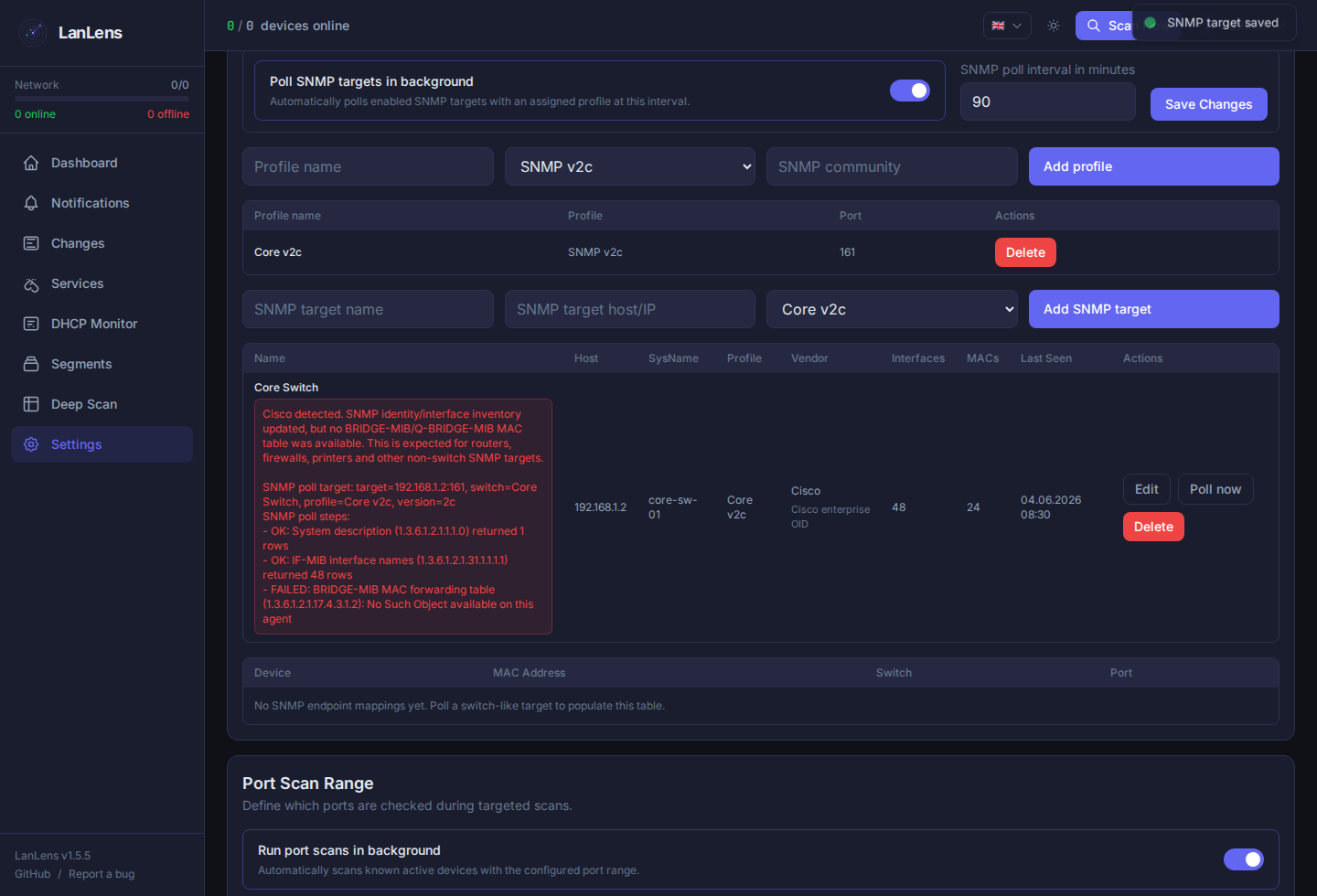
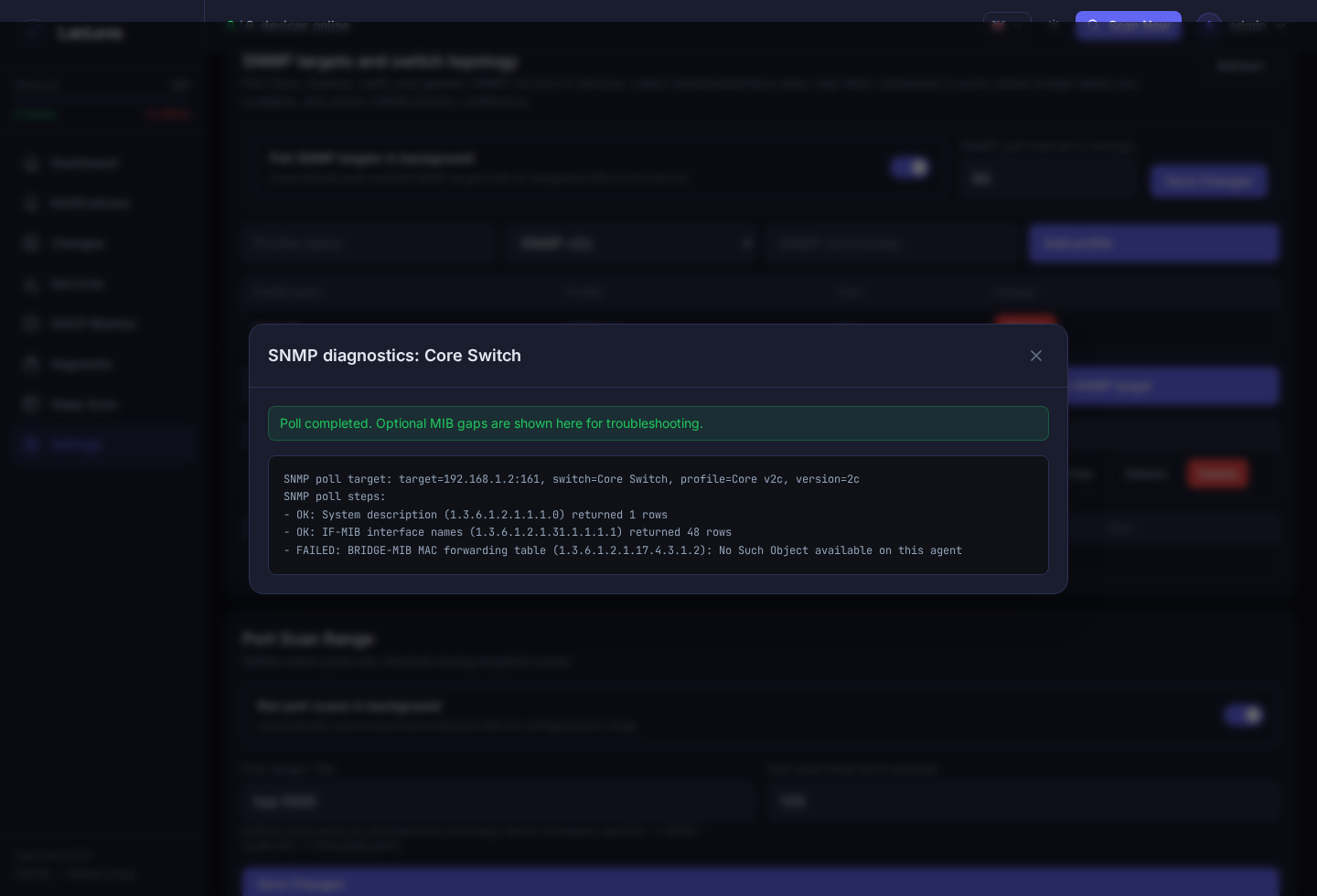
Routers, firewalls and some switches may expose IF-MIB without a BRIDGE-MIB or Q-BRIDGE-MIB MAC table. In that case LanLens keeps the interface inventory and returns a completed poll. Missing bridge tables stay visible in the poll diagnostics but are treated as optional context, not as the target's latest error.
SNMP poll troubleshooting details are stored on each target after every manual or background poll and can be opened from the target row's Details action. The detail includes the target host/port, target name, selected profile name, SNMP version and SNMPv3 security mode without exposing community strings or passwords. It also lists each attempted SNMP step, the OID used, whether it succeeded, how many rows were returned, and which optional IF-MIB or BRIDGE-MIB/Q-BRIDGE-MIB step failed or was unavailable. Failed polls still surface a compact latest-error badge in the table, while successful polls with optional MIB gaps keep those gaps in the details dialog instead of marking the target as failed.
SNMP data is most useful when the router, firewall, access point or switch exposes IF-MIB, EtherLike-MIB and, for endpoint mapping, bridge forwarding tables. For common SNMP-capable devices, expect the first poll to show system identity, vendor detection and interface inventory. If the device also exposes BRIDGE-MIB or Q-BRIDGE-MIB MAC tables, LanLens can map known device MAC addresses to the learned interface and VLAN. If it does not expose those tables, LanLens still records the target and interfaces, and the SNMP target is shown on the matching device detail page when the SNMP target is explicitly assigned to the device or when its host/IP matches the device IP. Endpoint-to-port topology remains empty until a switch that exposes MAC tables is polled.
SNMP interface polling also stores real-port statistics when the device exposes the related IF-MIB and EtherLike-MIB counters: speed, admin/oper status, unicast/non-unicast packet counters, discards, errors, unknown protocols, CRC/FCS/alignment errors, collisions and frame-too-long fragment counters. The device detail page shows the switch, port, speed and port statistics when a device is matched through the MAC table. The switch-port grid accepts common physical interface naming from multiple vendors such as Ethernet, GigabitEthernet, ge/xe/et, ether, port, SFP/QSFP, WLAN/radio, WAN/LAN, PPP and serial names. It filters common virtual interfaces such as loopback, VLAN/SVI, tunnel, bridge, LAG/bond/team, management, stack and port-channel rows so the visualization focuses on real switch/router/firewall/AP ports.
When an SNMP target is linked to a LanLens device and the poll returns interfaces, the device detail page shows a switch-port visualization. Each real interface is rendered as a port tile: green means active or carrying learned endpoints, grey means inactive or empty. Hovering a tile shows the interface, status, speed, CRC errors, collisions, fragments, cast packet counters, discard/error counters and learned device/MAC/VLAN context when bridge tables are available; unlabeled endpoints show the MAC once with any VLAN context. Clicking a tile with a matched LanLens device opens that device detail page. Interface-only targets still show their SNMP port inventory with empty endpoint labels so troubleshooting remains possible even when BRIDGE-MIB/Q-BRIDGE-MIB is unavailable.
MAC tables are used to identify known LanLens devices by MAC address and attach switch/port/VLAN context to those devices. Expanding routed scan targets from SNMP-learned data needs IP-to-MAC evidence, not only a bridge MAC table. That follow-up should use IP-MIB/ARP-style SNMP data or explicit operator-provided scan targets before adding routed subnets to Settings -> Network Discovery -> Scan range.
The API surface is available under /api/snmp:
GET /api/snmp/profilesPOST /api/snmp/profilesDELETE /api/snmp/profiles/{profile_id}GET /api/snmp/switchesPOST /api/snmp/switchesPUT /api/snmp/switches/{switch_id}DELETE /api/snmp/switches/{switch_id}POST /api/snmp/switches/{switch_id}/pollPUT /api/settings/snmp-pollGET /api/snmp/switches/{switch_id}/interfacesGET /api/snmp/devices/{device_id}/portsGET /api/snmp/topology/endpointsGET /api/snmp/devices/{device_id}/identity
SNMP community strings and SNMPv3 credentials are stored in the application database and masked in API responses. Protect the database volume accordingly. LLDP/CDP passive capability classification is available through passive discovery; a richer topology graph is intentionally left for later increments.
Set the DATABASE_URL environment variable to use an external database instead of the built-in SQLite file:
environment:
  DATABASE_URL: "mysql+pymysql://user:password@host:3306/lanlens"
Example MariaDB compose setup:
services:
  lanlens:
    image: alexrosbach/lanlens:<chosen-tag>
    environment:
      SECRET_KEY: your-secret-key-here
      DATABASE_URL: mysql+pymysql://lanlens:yourpassword@mariadb:3306/lanlens
    depends_on:
      - mariadb

  mariadb:
    image: mariadb:11
    environment:
      MYSQL_ROOT_PASSWORD: rootpassword
      MYSQL_DATABASE: lanlens
      MYSQL_USER: lanlens
      MYSQL_PASSWORD: yourpassword
    volumes:
      - mariadb_data:/var/lib/mysql

volumes:
  mariadb_data:
Connection string formats:
| Database | Format |
|---|---|
| MariaDB/MySQL | mysql+pymysql://user:pass@host:3306/dbname |
| PostgreSQL | postgresql+psycopg2://user:pass@host:5432/dbname |
| SQLite | Use DB_PATH, not DATABASE_URL
|
When DATABASE_URL is set:
- SQLite-specific migrations are skipped;
Base.metadata.create_all()generates dialect-correct DDL. - The database export endpoint returns HTTP 400 (SQLite-only feature).
- All incremental
ALTER TABLEmigrations are dialect-compatible and run on both SQLite and MariaDB.
Use the database engine's native backup tooling for external databases, for example mysqldump for MariaDB.
Credentials of type linux_ssh support two authentication methods:
auth_method |
Secret content | Notes |
|---|---|---|
password (default) |
SSH password | Standard password-based SSH login |
key |
PEM private key (RSA, Ed25519, ECDSA, DSS) | Key stored Fernet-encrypted; supports all paramiko key types |
Select the auth method in the Credential Modal. The private key is stored encrypted and never returned by the API.
The frontend supports four languages, switchable via the TopBar toggle or the Settings page:
| Code | Language |
|---|---|
en |
English |
de |
Deutsch |
it |
Italiano |
zh |
简体中文 |
Settings → System → Export & Import provides:
| Action | Endpoint | Description |
|---|---|---|
| Export Settings | GET /api/admin/export/settings |
Downloads all settings as a JSON file |
| Export Database | GET /api/admin/export/database |
Downloads the SQLite .db file (SQLite only) |
| Import Settings | POST /api/admin/import/settings |
Uploads a previously exported settings JSON |
All admin endpoints require a fully set-up account (force_password_change = false).
python3 -m venv .venv
source .venv/bin/activate
pip install -r backend/requirements.txt

export SECRET_KEY=dev-secret-key-at-least-32-chars-long
export DB_PATH=./data/lanlens.db
mkdir -p data

python backend/cli/init_db.py
python backend/cli/init_admin.py
uvicorn backend.main:app --reload --port 8000cd frontend
npm install
npm run devdocker compose up -d --buildThe Docker build compiles the React frontend, stamps build metadata into the frontend and backend app files, installs backend dependencies, renders nginx configuration at startup, applies database migrations, and starts nginx plus FastAPI in one container.
LanLens follows Semantic Versioning. The app version is shown in the UI and via GET /api/health. Detailed release history lives in CHANGELOG.md, and release-based update checks depend on populated GitHub Releases.