Repository navigation
Architecture
Express is a project that can be installed on a Kubernetes cluster. It automatically provides developers with the following items for deployed APIs:
- Automatic horizontal scaling
- Load balancing
- Authorization
- Identity manager
This is accomplished through two main components: the Express services that run on the cluster and the Express Controller which provides the command line interface.
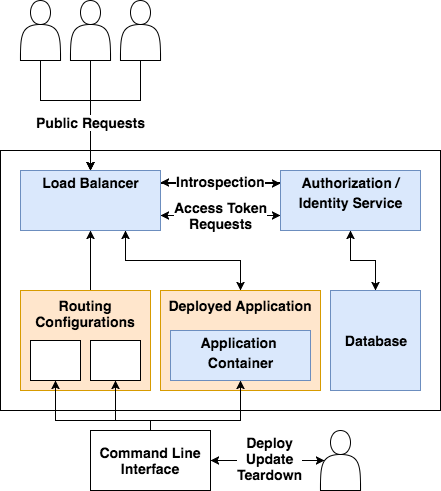
Public requests to the system come in through the load balancer. NGINX is used for load balancer with a round-robin load balancing policy. When Express is first installed on a Kubernetes cluster, the only endpoints that are publicly exposed are for the Authorization and Identity service.
Application containers that have been deployed by developers using the command line interface, otherwise known as the Express Controller, are exposed based on the routing configurations. These routing configurations are automatically generated by the Express Controller based on the contents of the endpoints configuration file provided by the developer when deploying or updating an application container. To avoid naming conflicts, all endpoints are prefixed with the name given to the service by the developer.
The NGINX load balancer handles all request routing. The request routing is designed to route four different types of requests:
-
OAuth2 and Identity Requests. The
/oauth2prefix is reserved for the Authorization and Identity Service. Any requests with this prefix are immediately routed to one of the service instances. - Unprotected Endpoints. Unprotected endpoints are endpoints exposed in the endpoints configuration file provided by a developer that do not require any scopes. These requests are immediately routed to one of the instances of the developer's application container.
-
Protected Endpoints. Protected endpoints are endpoints exposed in the endpoints configuration file provided by a developer that have one or more required scopes. These requests are handled using the ngx_http_auth_request_module. This involves stripping the request body and proxy passing the request header with the bearer token to the authorization service's
/oauth2/introspectendpoint. The authorization service then performs token introspection. If introspection fails 401 unauthorized is returned to the NGINX load balancer. If introspection succeeds then the user ID and validated scopes are passed back to the NGINX load balancer. In this case, the bearer token in the header is replaced with the user ID and user scopes and proxy passed to the deployed application container. - Not Found. If a URL isn't found then the request is proxy passed to the internal default handler service that provides error pages for common HTTP error codes.
All components in the architecture overview diagram that are coloured blue are designed to scale horizontally. This includes the following components:
- Load Balancer
- Authorization / Identity Service
- Database
- Deployed Application Containers
To ensure that the round-robin policy used by the load balancer evenly distributes load across all the nodes in the Kubernetes cluster, all horizontally scalable services are given an inter-pod anti-affinity. This ensures that, when load increases, new instances will favour nodes that do not have an existing instance running on them.
Having an inter-pod anti-affinity breaks the Kubernetes abstraction of abstracting over the number of physical machines. However, an anti-affinity is required because the deployed application containers are provided by developers using the Express project. Because of this, their CPU and memory usage is unknown making it impossible to define accurate resource requests or limits. Without being able to accurately define resource limits, having one pod per machine yielded the best performance during load testing.
Scaling for the following components is handled using horizontal pod autoscalers:
- Load Balancer
- Authorization / Identity Service
- Deployed Application Containers
Horizontal scaling is based on having a CPU utilization of over 50% the requested amount. This design choice often results in pre-mature scaling. However, over-scaling is restricted by the pod anti-affinity which ensures there will never by more than one instance of a service per node. A CPU utilization of 50% was chosen for the threshold due to the variable startup times of deployed application containers. Because these are provided by developers through the Express Controller, their startup time is unknown to the Express system. Having a lower threshold allows for increased load to be handled more reliably for application containers with longer startup times.
To ensure that the database can be scaled horizontally across multiple nodes, the design uses a Cassandra database. This is achieved using a Stateful Set. However, this introduces two problems: horizontal pod autoscalers do not support stateful sets and Cassandra nodes have a substantial startup time making it difficult to handle spikes in load.
Because of this, when Express is installed on a Kubernetes cluster, a Cassandra node is created on each machine within the cluster. This avoids the need to automatically scale the database up and down as load changes. To ensure that performance is not affected, a Token Aware Load Balancing Policy is used by the authorization service.
When developers deploy application containers using the Express Controller, four components are automatically created and configured. These components for a single application container are shown below in green. The NGINX Ingress controller is the reverse proxy responsible for routing and is shared between all deployed application containers. The instances in blue represent the instances of the application container running on the cluster which may consist of one or more physical machines.
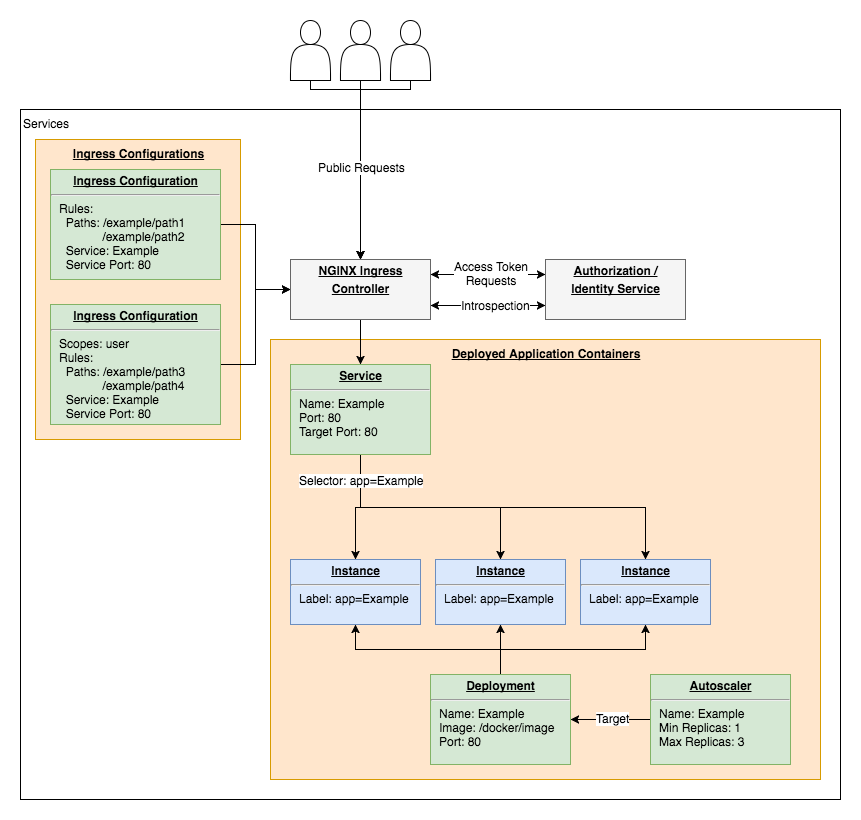
- Deployment. A Kubernetes Deployment is created to manage the application container. This allows multiple instances of the container to seamlessly run across multiple machines, deployed application containers to be updated to different Docker Images with no downtime and for the deployed application to be automatically restarted in the event of an unexpected failure.
- Autoscaler. A Kubernetes Horizontal Pod Autoscaler is created to automatically scale the deployment based on CPU utilization. The autoscaler is responsible for monitoring the application instances created by the deployment and creating new instances if CPU utilization exceeds 80%.
- Service. A Kubernetes Service is created to reference and provide access to the instances managed by the deployment. This exposes the IP addresses of the instances to allow for load balancing and routing.
- Ingress Configurations. A set of Kubernetes Ingresses are created to expose the service to the public. An ingress configuration is created for each set of endpoint access scopes. A default configuration that routes directly to the service is created for unprotected endpoints while configurations that route to the authorization service's introspection endpoint are created for protected endpoints. These Ingress configurations are applied to the NGINX Ingress controller that handles all routing.