Repository navigation
Controller Design CMD Deploy
The design of the deploy operation is based on a transaction model where a transaction is used for each of the four Kubernetes objects. Successful transactions are tracked by the deployment handler. This allows for the handler to rollback all transactions if any of them fail.
The Deploy Handler is responsible for managing managing the deploy operation to ensure that the entire deploy is successful or none of it is performed.
The deploy handler is given a reference to the Kube Client when it is created. This client uses the local configuration for the running Kubernetes cluster to allow the deploy handler to communicate with the cluster through the client-go library.
Once the deploy handler has been created, createService is called. This creates the Kubernetes Service using the default service configuration and the provided name and port. The default service configuration specifies a node port service with a single TCP port.
Service {
	ObjectMeta: {}
	Spec: {
		Ports[]: [{Protocol: TCP}]
		Type: NodePort
	}
}
Inside createService, the default configuration is copied and the deploy name, port and selector are added. The selector is used to specify the set of instances that the service references in the form of app=name. An additional group label is added when services are created to differentiate between internal services and services that belong to deployed applications. Deployed applications can be found by looking at all services with the label group=services.
Once the service has been created, createDeployment is called. This creates the Kubernetes Deployment which will run the application instances referenced by the service. Deployments are also created from a default configuration.
The default configuration contains the specification for the replication controller that is responsible for managing instances of the application container and the pod specification which contains the application container. The container specification exposes a single port for the service to connect to.
The container is also given a pre-stop command to sleep for 15 seconds. This delay is required for updating deployed application containers with zero downtime because of the update interval for the reverse proxy before the set of IP addresses for the new updated application container are detected. A detailed discussion can be found here. An external PreStop command was used rather than a SIGTERM handler with a delay to minimize coupling with the application container.
Deployment {
	ObjectMeta: {}
	Spec: {
		Selector: {}
		Template: {
			ObjectMeta: ObjectMeta{}
			Spec: {
				Containers[]: [{
						Ports[]: [{Name: "http", Protocol: TCP}]
						Lifecycle: {
							PreStop: {
								Exec: {
									Command: {"sleep", "15"},
								}
							}
						}
					}]
				}
			}
		}
	}
}
Inside createService, the default configuration is modified to give both the replication controller and pod specification the app=name label for identification. This label is vital because it matches with the service's selector to allow the service to find all instances. The container specification is also updated to use the Docker image specified by the developer and to expose the same port that the service is expecting. The Kubernetes deployment is created with a replication factor of one because the number of replicas is delegated to the autoscaler.
After the deployment has been created, an autoscaler is created by calling createAutoscaler to add or remove instances of the containerized application based on CPU utilization. This results in the creation of a Kubernetes Horizontal Pod Autoscaler.
A basic default configuration is used only specifying that the autoscaler will be used to scale a Kubernetes deployment.
HorizontalPodAutoscaler {
	ObjectMeta: {}
	Spec: {
		ScaleTargetRef: {
			Kind: "Deployment"
	    }
    }
}
Inside createAutoscaler, the name of the deployment and the app=name name label are added to allow the autoscaler to locate the Kubernetes deployment it was created to manage. The minimum and maximum number of replicas are also provided. If no user input was given then these are both set to 1.
The last step is to create the endpoints that are exposed to the public to allow access to the deployed application container. This process uses the endpoints .yaml parser to produce the set of Kubernetes Ingress configurations as detailed here.
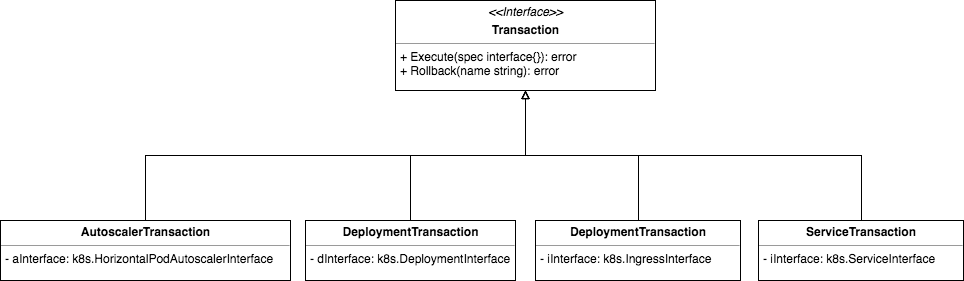
After the deploy handler applies the provided parameters to the default configurations for the deployment, service, autoscaler, and Ingress configurations, the configurations are deployed using transactions.
This is accomplished using the AutoscalerTransaction, DeploymentTransaction, IngressTransaction, and ServiceTransaction. Each of these transactions implements the Transaction interface to allow transactions to be executed and rolled back.
When a transaction succeeds, it is added to the deploy handler's list of transactions. If executing any of the transactions fails then the deploy handler can iterate though its list of transactions and rollback all transactions. This design ensures that either all Kubernetes objects are deployed or that none of them are despite the client-go library having no built-in support for atomic transactions.