Repository navigation
Authorization Docs HTTP
The authorization and identity service provides a set of HTTP endpoints to provide authorization using supported OAuth2 grants and to login and register user accounts. These public endpoints allow:
- OAuth2 Refresh Grant
- OAuth2 Client Credentials Grant
- OAuth2 Password Grant
- Token Revocation
- Token Introspection
- Account Login
- Account Registration
The OAuth2 endpoints support the refresh, client credentials and password grants. The implicit and authorization grants are not supported at this time.
The refresh, client credentials, and password grants are all made available through the /oauth2/token endpoint.
The client credentials grant allows a client identifier and client secret to be exchanged for an access token. Refresh tokens are not given using this grant. Only scopes possessed by the client may be successfully granted. Only POST requests will be accepted.
Example:
  Request:
    curl -k --user client_id:client_secret --data 'grant_type=client_credentials&scope=offline' https://<cluster-ip>/oauth2/token

  Response:
    {
      "access_token":"ezCYnFJpKi9Tnr3ePhMOQ4jhMVo9FX5zOGR4DqyNsGg.eve5BiXoiR8wrCvOPCOb3_jzwWP1LMEP8yoX37SqIaw",
      "expires_in":3599,
      "scope":"offline",
      "token_type":"bearer"
    }
The client credentials grant allows a resource owner's username and password to be exchanged for an access token. Refresh tokens are given using this grant if the offline scope is requested. Only scopes possessed by both the client and the user account may be successfully granted. Only POST requests will be accepted.
Example:
  Request:
    curl -k --user client_id:client_secret --data 'grant_type=password&username=testuser&password=password&scope=offline' https://<cluster-ip>/oauth2/token

  Response:
    {
      "access_token":"YW3WTlhjnJ5LxTEmLwQnhrJImdoHnhw7GuYlNszM0Gc.NjUWPq5lv1PXLIFzFfpWUyNTYtHHib_zAi6GG1vopPI",
      "refresh_token":"i-HTq6d7Vm7YpjETqmPkg_U2gQwAX2lDvtNjsERSOuQ.sNCqWPhG6_sORmzFo341zN84ZPOcWs1n-CXOfyEIbjM",
      "expires_in":3599,
      "scope":"offline",
      "token_type":"bearer"
    }
The grant allows a refresh token to be exchanged for a new access token and refresh token. No new scopes may be granted using the refresh grant. Only POST requests will be accepted.
Example:
  Request:
    curl -k --user client_id:client_secret --data 'grant_type=refresh_token&refresh_token=i-HTq6d7Vm7YpjETqmPkg_U2gQwAX2lDvtNjsERSOuQ.sNCqWPhG6_sORmzFo341zN84ZPOcWs1n-CXOfyEIbjM&client_id=admin' https://<cluster-ip>/oauth2/token

  Response:
    {
      "access_token":"92mHoMgVVF4vTXf283zh3I9bgLGt21TuTPkszYA_K2I.8U6ljim1MQEm4OGigKwzluPlODccQX1wKxfR5GS1Nm0",
      "expires_in":3599,
      "refresh_token":"K_wlSay22TUzzuuG-fhRdSDRqinb7RpwKRKUHFHKvzo.rB2oDIP5KX461LBr9uWK5fKUnO9UQuAgibyCgE0_i70",
      "scope":"offline",
      "token_type":"bearer"
    }
Access and refresh tokens can be revoked using the revoke endpoint available at /oauth2/revoke. After a token has been revoked, it can no longer be used. Only POST requests will be accepted.
Example:
  Request:
    curl -k --user client_id:client_secret --data 'token=RCip0wpdJZBObpVPbdBKpLrWVchVacX2WkN0iO3lYds.mxsZWpxe92K6LF8bpUr6zZau-29VdsbSRG7raLYn9xo' https://192.168.34.195/oauth2/revoke

  Response Status:
    200 OK
The introspection endpoint can be used to verify OAuth2 access or refresh tokens. Introspection is used to verify the bearer token when sending a request to a protected endpoint. This endpoint can be accessed at /oauth2/introspection. The bearer token must be in the authorization header rather than the request body.
Example:
  Request:
    curl -k -I -H "Authorization: Bearer Jz6aKD827dcMuRnUwu114xqnZd_oQm6i7LCGFjMpElg.DkPRG7_8vWUj2U_0a1Owh9Ld7NAYIq36OpV4qfyVSSw" https://192.168.34.195/oauth2/introspect

  Response Status:
    200 OK
The identity endpoints provide endpoints for creating and signing in to user accounts. These endpoints provide both an HTML GUI and HTTP POST endpoints.
The register endpoint is used to create new accounts. These accounts are given the user and offline scopes by default. Administrator accounts can be created by adding additional scopes to existing accounts using the authorization command line interface.
The GUI can be accessed at /oauth2/register:
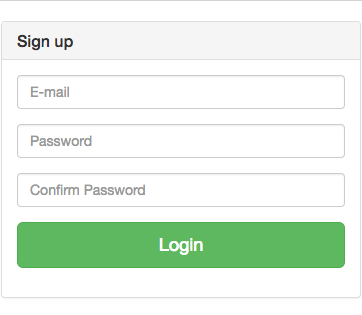
Direct requests can also be made using a POST request to /oauth2/register.
Example:
  Request:
    curl -k --data 'username=new_user&password=password&confirm-password=password' https://192.168.34.195/oauth2/register

  Response:
    {
      "access_token":"QgNYAx6FJWZUsCDrbyt7r0nJyNRznwsp_xb_2DiwDzI.0MBV1O_g5EK7wO3EvD6DsNN-EpFA79NZmcv7RRAn75c",
      "expires_in":3599,
      "refresh_token":"po-ApChtJCkb1K7Arx3Pbdh2qTIpRcgi8K_rSUX9b3Q.l67f5rpLel68cgT_6heehhrRdOKucLnsyBsPRyuht8Q",
      "scope":"offline",
      "token_type":"bearer"
    }
The login endpoint is used to log in to existing accounts. The user and offline scopes are requested by default upon login.
The GUI can be accessed at /oauth2/login:
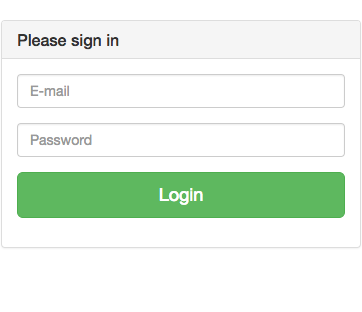
Direct requests can also be made using a POST request to /oauth2/login.
Example:
  Request:
    curl -k --data 'username=new_user&password=password' https://192.168.34.195/oauth2/login

  Response:
    {
      "access_token":"PlczPBEhKmMwfAy91694dQDkqkmjojAJ-2LHPVPk3X0.goOtg10442D3wAJx0neSPj6g1zBQQNEQ2bAEhF2gwn0",
      "expires_in":3599,
      "refresh_token":"IYKzQu_9qb3dDyXzzcievUSG0VlUF19SPcdvzceSwyE.3pjVjSHJX9o2jrnJaWjENXv-eJl9O6gpZrEa_zyntME",
      "scope":"offline",
      "token_type":"bearer"
    }