Repository navigation
Releases: Alone9898/SpineSlim
Release list
SpineSlim 2.0.0-alpha.6 · Windows x64 Full Package

SpineSlim 2.0.0-alpha.6
Windows x64 预发布版 / Windows x64 pre-release.
本次更新
- AI 智能体检预览:新增独立模块,可点击中央图标或按钮体验持续动效、递增进度、分阶段分析日志和风险卡片。当前仅为交互演示,风险内容均标注为示例;不会读取、修改或上传项目文件,也不会执行清理。
- 后续开发方向:接入用户主动选择的本地项目目录,先生成资源清单、引用关系与重复项分析,再给出纹理、音频、动画等优化建议及可核查的风险报告。真正的自动清理需在预览、确认和回退机制完成后再提供;本版尚不包含这些能力。
- 匿名统计完善:记录模块进入、处理开始及唯一最终结果,并按固定枚举统计失败阶段和原因;不上传文件路径、名称、素材或原始异常。设置中可在本次运行期间关闭统计;每次启动默认开启。详见 匿名使用统计。
安装与验证
- 完整 Windows x64 安装包包含桌面应用、Python worker 和资源处理工具。第三方组件遵循各自许可,部分工具可能需要单独授权。
- AI 智能体检当前为 UI 预览,点击后显示的进度及风险不是实际扫描结果。现有 Spine、Rive、3D、图集、资源处理和音频模块继续可用。
- 软件更新会提示前往下载页,不会自动安装。
What changed
- AI Asset Audit preview: A new module demonstrates the animated centerpiece, increasing progress, staged analysis log and sample risk cards. This is an interactive preview only. It does not read, change or upload project files, and performs no cleanup.
- Coming next: User-selected local project scanning, an asset inventory, reference and duplicate analysis, then reviewable suggestions for textures, audio and animation. Automatic cleanup will require preview, confirmation and rollback safeguards. None of these scanning or cleanup capabilities are included in this build.
- Anonymous analytics: Module entries, processing starts and one terminal outcome per task are counted with fixed error and stage categories. File paths, names, assets and raw exceptions are not uploaded. Analytics can be turned off for the current session and starts enabled at each launch. See Anonymous Usage Analytics.
Installation and verification
- The full Windows x64 installer includes the desktop app, Python worker and asset-processing tools. Third-party licenses still apply; some tools may need separate authorization.
- AI Asset Audit progress and risks are illustrative, not actual scan results. Existing Spine, Rive, 3D, atlas, asset-processing and audio modules remain available.
- Update checks open the download page; they do not install updates automatically.
SpineSlim v2.0.0-alpha.5
SpineSlim 2.0.0-alpha.5
Windows x64 预发布版 / Windows x64 pre-release.
新功能与改进
- Spine 版本转换:资源处理默认将 JSON 升级到 Spine 4.2.11;高级模式可指定 3.5–3.8、4.0–4.2 范围内的完整
x.y.z目标版本,对 JSON 或 SKEL 升级、降级。 - 输出格式:高级模式可保持骨骼原格式,或输出 JSON、SKEL;转换结果保存至独立的
program/spine-converted,保留源文件和现有program/spine。 - 处理保护:校验目标版本、检测输出重名,并在转换成功后才提交结果;界面显示转换阶段进度。
使用与限制
- 降级可能改变较新版本的曲线、约束和时间线。请使用目标 Spine 运行时检查动画、Atlas 和贴图。
- 高级模式再次运行会替换已有的
program/spine-converted内容。转换功能使用随完整安装包提供的 SpineSkeletonDataConverter;第三方工具遵循各自许可。 - 仅提供 Windows x64 安装包;软件更新会提示下载,不自动安装。
验证
- 前端构建通过;Python 80 项测试通过(其中 6 项跳过);Rust 4 项测试通过。
- 完整安装包通过 ImageMagick、Basis、TexturePacker、Spine 转换器、FFmpeg 和资源处理冒烟测试。
Features and improvements
- Spine version conversion: Resource processing upgrades JSON to Spine 4.2.11 by default. Advanced mode accepts a full
x.y.ztarget version in the 3.5–3.8 or 4.0–4.2 ranges and converts JSON or SKEL in either direction. - Output format: Advanced mode keeps the source skeleton format or writes JSON or SKEL. Results go to
program/spine-converted, preserving the source and existingprogram/spine. - Safer processing: Validate target versions, detect output-name collisions, and commit results only after successful conversion. The UI reports conversion progress.
Usage and limits
- Downgrades may change newer curves, constraints and timelines. Check animation, Atlas and textures with the target Spine runtime.
- Running advanced mode again replaces existing
program/spine-convertedcontents. Conversion uses the bundled SpineSkeletonDataConverter; third-party licenses still apply. - Windows x64 only. Update checks open the download page and do not install updates automatically.
Verification
- Frontend build passed; 80 Python tests passed (6 skipped); 4 Rust tests passed.
- The full package passed bundled-tool checks for ImageMagick, Basis, TexturePacker, the Spine converter and FFmpeg, plus asset-processing smoke tests.
SpineSlim 2.0.0-alpha.4 · Windows x64 Full Package
SpineSlim 2.0.0-alpha.4
Windows x64 预发布版 / Windows x64 pre-release.
新功能与改进
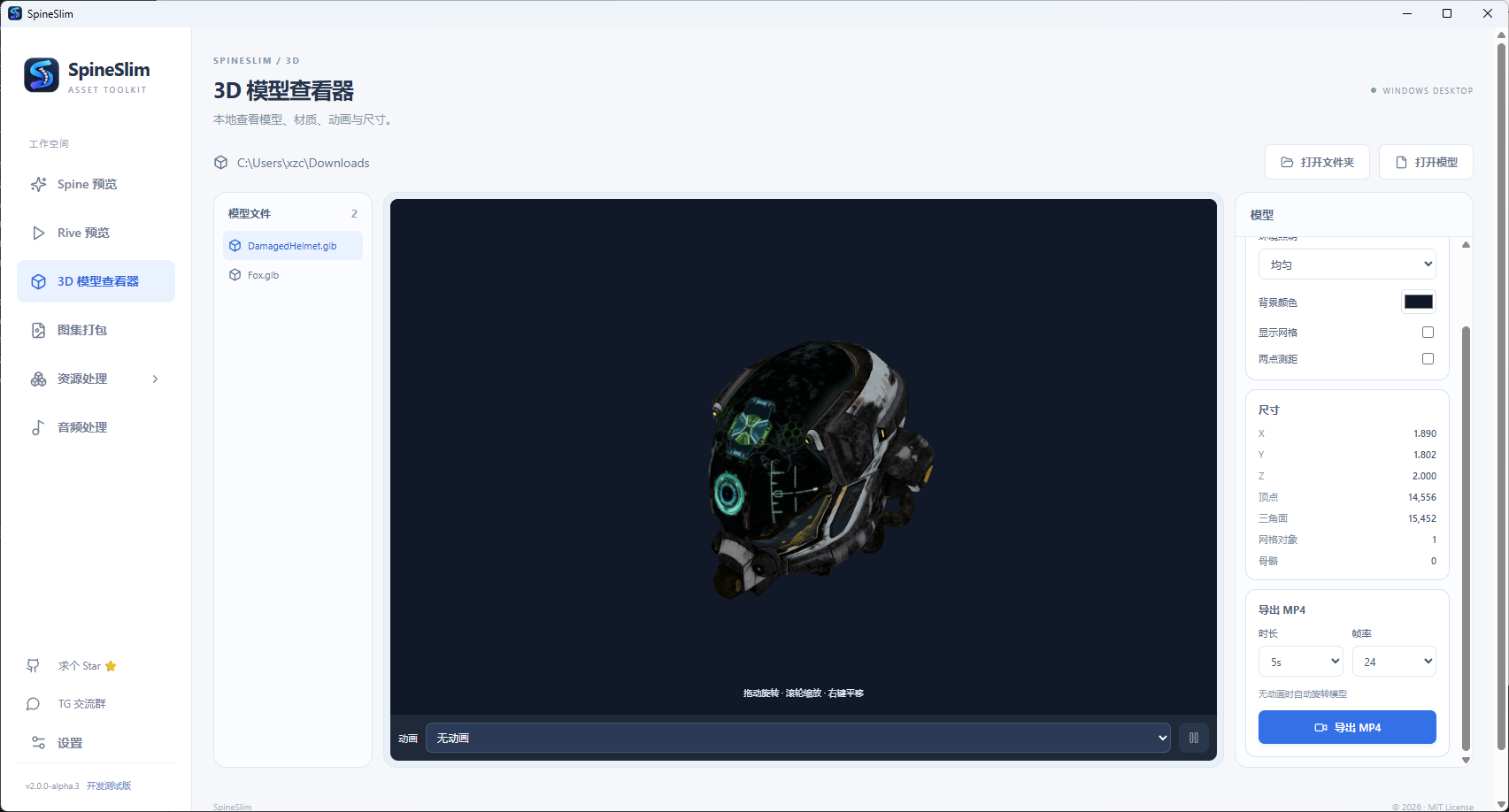
- 3D 模型查看器:本地打开 GLB、GLTF、FBX、OBJ / MTL 和 STL 文件或目录;查看材质、模型动画、尺寸与网格,切换照明和渲染模式,进行两点测距,并通过 FFmpeg 导出 MP4。
- Spine 预览:选中动画后可一键复制原始动画名;按钮可反复点击,方便粘贴到游戏代码中。
- 预览导入页:Rive 与 3D 模型查看器使用统一的拖拽提示、格式说明和文件 / 文件夹入口。
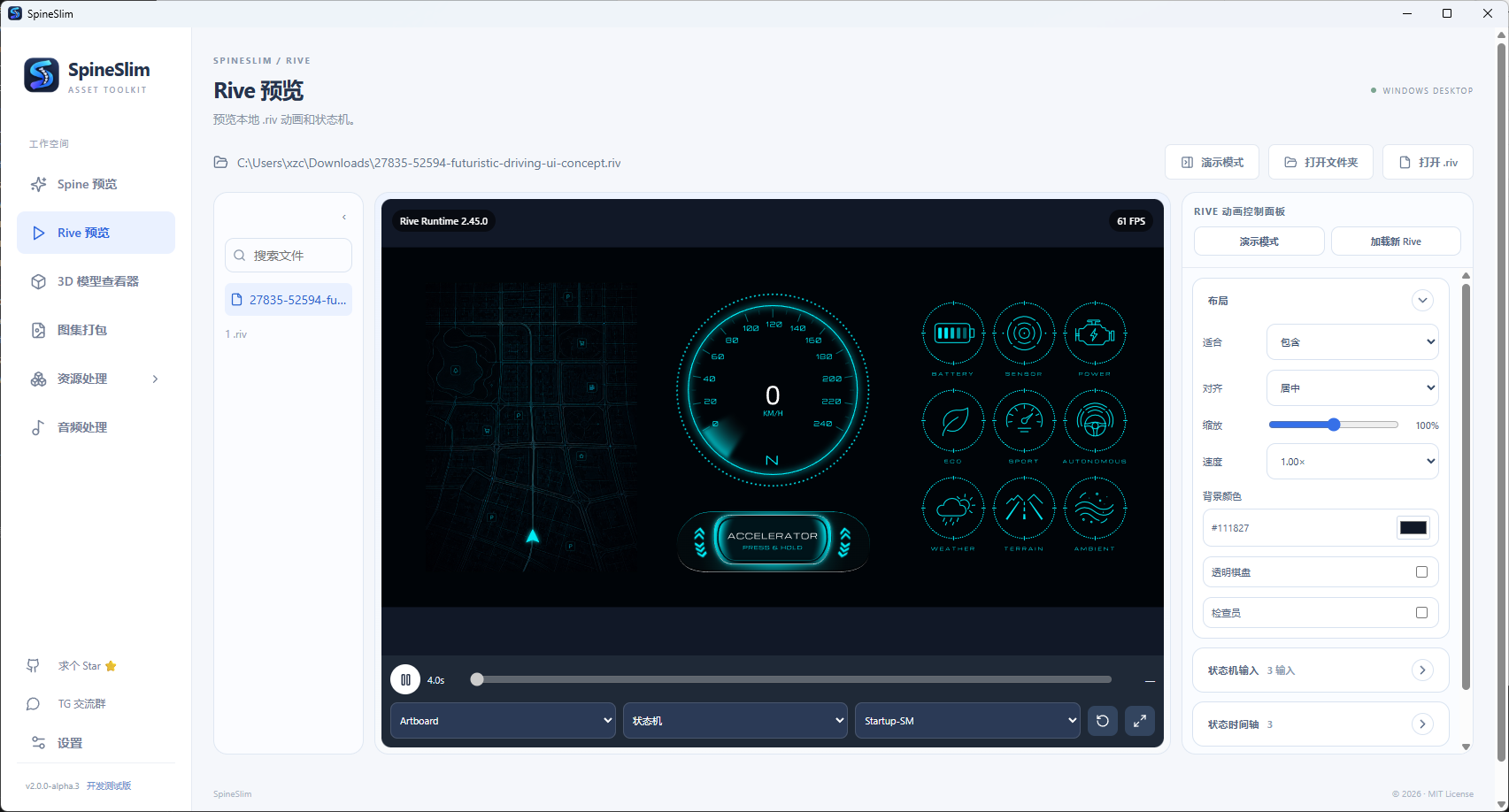
- 双语文档:补充 Rive、3D 模型查看器截图及格式、依赖说明。
| 3D 模型查看器 | Rive 预览 |
|---|---|
 |
 |
使用与限制
- 3D 模型的外部贴图、GLTF
.bin和 OBJ 材质文件应与模型放在所选目录中。测距单位取决于模型本身;不支持原生.blend、CAD 或 Unity 工程文件。 - MP4 导出、音频及视频处理使用 FFmpeg;完整安装包中的第三方工具仍遵循各自许可。TexturePacker 不附带个人授权或激活信息。见
THIRD_PARTY.md、PACKAGE-README.txt和licenses。 - 仅提供 Windows x64 安装包;软件更新会提示下载,不执行应用内自动安装。
验证
- 前端构建通过;Rust 4 项测试通过;Python 74 项测试通过,其中 6 项跳过。
- 本地全包校验了 ImageMagick、Basis、TexturePacker、Spine 转换器和 FFmpeg,并通过 Spine / UI / 视频处理冒烟测试。
Features and improvements
- 3D model viewer: Open local GLB, GLTF, FBX, OBJ / MTL and STL files or folders. Inspect materials, animation clips, dimensions and meshes; adjust lighting and render modes, measure between points and export MP4 with FFmpeg.
- Spine viewer: Copy the selected animation's original name with a button that remains available for repeated use.
- Preview import pages: Rive and 3D now share clear drag-and-drop guidance, format notes and file/folder actions.
- Documentation: Add Rive and 3D screenshots to the Chinese and English guides.
Usage and limits
- Keep external textures, GLTF
.binfiles and OBJ materials in the selected model folder. Measurements use model units. Native.blend, CAD and Unity project files are not supported. - MP4 export, audio and video processing use FFmpeg. Bundled third-party tools retain their own licenses; TexturePacker activation is not included. See
THIRD_PARTY.md,PACKAGE-README.txtandlicenses. - Windows x64 only. Update checks open the download page and do not install updates automatically.
Verification
- Frontend build passed; 4 Rust tests passed; 74 Python tests passed, with 6 skipped.
- The local full package verified ImageMagick, Basis, TexturePacker, the Spine converter and FFmpeg, then passed Spine, UI and video processing smoke tests.
SpineSlim v2.0.0-alpha.3
SpineSlim 2.0.0-alpha.3
Windows x64 完整安装包。所含第三方工具不附带个人授权或激活信息;请阅读安装目录中的
THIRD_PARTY.md、PACKAGE-README.txt和licenses,并确认自身具备相应使用权。
新功能
- Rive 预览:打开单个
.riv或扫描目录,切换画板、动画和状态机;支持播放控制、动画时间轴、全屏、布局调整、传统状态机输入、事件记录和本地会话 JSON 导出。运行时随前端打包,可离线预览嵌入素材的文件。 - 软件更新检查:启动时查询 GitHub Releases;设置中可手动检查。发现更高版本且有 Windows EXE 时显示版本和发布页入口。当前流程由用户自行下载安装,不会自动替换程序。
修复
- 修复 GitHub 发布列表顺序与版本号顺序不一致时可能漏报新版本的问题。
- 修复 Spine 并发升级中进度回调异常时可能遗留临时 JSON 文件的问题。
- 统一 Spine / Rive 预览与其他工作区的顶部留白、侧栏菜单项高度。
- 修正 Rive 画布缩放后的点击坐标,启用默认数据绑定,并避免加载提示遮挡画布交互。
优化
- Spine JSON 升级最多并发运行 8 个转换任务,减少重复读取和校验;进度按实际完成顺序更新,同时保持结果列表的文件顺序。16 份 Spine 3.8 测试素材的升级阶段由约 0.78–0.82 秒降至 0.20–0.22 秒;实际整批处理还取决于素材、磁盘、复制和纹理转换耗时。
- 侧栏移除语言下拉;中文 / English 切换集中在设置页。
已知限制
- 目前仅提供 Windows x64 桌面构建;软件更新仅提示并打开下载页,不执行应用内安装。
- Rive 外部素材不会自动从网络加载;数据绑定属性暂未纳入传统状态机输入面板。
本地验证
- 前端
npm run build通过;Rust 单元测试 3 项通过;Spine / worker 测试 29 项通过、1 项因系统不允许创建符号链接而跳过。 - 用真实交互
.riv验证状态机:点击 Launch 进入仪表盘,长按加速器时isAccelerating变为true。 - 完整安装包已构建并完成部分处理流程冒烟测试;第三方组件的再分发条款尚未完成独立核验。
Features
- Rive viewer: Open a
.rivfile or scan a folder; switch artboards, animations and state machines. Playback, animation seeking, fullscreen, layout controls, legacy state-machine inputs, event logs and local JSON session export are available. The runtime is bundled for offline previews of embedded assets. - Update checks: Check GitHub Releases at startup or manually in Settings. A newer release with a Windows EXE shows its version and download page. Installation remains a manual step.
Fixes
- Select the highest eligible release by version, even when GitHub returns releases in a different order.
- Clean up temporary Spine JSON files if a progress callback fails during parallel conversion.
- Align the Spine and Rive viewer spacing with other workspaces and normalize sidebar navigation rows.
- Correct pointer coordinates after zooming the Rive canvas, enable default data binding, and prevent the loading overlay from intercepting input.
Improvements
- Run up to eight Spine JSON converter tasks concurrently, avoid redundant JSON reads, and report progress as files finish while preserving result order. In a 16-file Spine 3.8 sample, the upgrade stage fell from about 0.78–0.82 s to 0.20–0.22 s; end-to-end gains depend on assets, disk I/O and texture processing.
- Move the Chinese / English selector from the sidebar into Settings.
Known limits
- Windows x64 only for now. Update checks do not install releases automatically.
- External Rive assets are not fetched, and data binding properties are not yet shown among legacy state-machine inputs.
Local verification
- Frontend build passed; 3 Rust tests passed; 29 Spine/worker tests passed, with 1 skipped because symlink creation is unavailable on this system.
- Verified an interactive
.rivsample: clicking Launch opens the dashboard, and holding the accelerator setsisAcceleratingtotrue. - The full installer was built and smoke-tested for selected processing flows; third-party redistribution terms have not been independently verified.
SpineSlim 2.0.0-alpha.2 · Windows x64 Full Package
SpineSlim 2.0.0-alpha.2 · Windows x64 Full Package
本次版本重点修复 Spine 资源处理在 Windows 上提交输出时的 WinError 5,并重新构建同步 Python worker。下载 SpineSlim_2.0.0-alpha.2_windows-x64_full-setup.exe,安装后即可测试。
修复日志
program/spine不再整体重命名,改为逐个迁移目录内容,避免 ACL、资源管理器、杀毒软件或其他程序占用导致拒绝访问。- 提交失败时支持回滚;输出目录被占用时显示明确的中英文重试提示。
- 修复桌面 EXE 与 worker 版本不同步的问题。
- worker 构建增加
Pillow和tkinterdnd2依赖预检,避免打包后后台启动失败。
验证
- Python worker tests:18 passed,1 skipped。
- 临时隔离目录完成 Spine 端到端处理和输出提交验证。
- 已验证打包 worker 可启动并加载 Pillow。
- Windows x64 Tauri 全包安装器构建成功。
包含内容
安装包包含桌面程序、Python worker、ImageMagick、Basis Universal、FFmpeg、TexturePacker、SpineSkeletonDataConverter、离线 WebView2 安装组件及许可证清单。第三方工具遵循各自许可,TexturePacker 可能需要单独授权或激活。
English
This release fixes Windows WinError 5 when committing Spine output and rebuilds the synchronized Python worker.
- Spine output contents are moved item by item instead of renaming
program/spineas a whole. - Failed commits support rollback and show bilingual output-locked guidance.
- The packaged desktop app and worker are rebuilt from the same source.
- Worker builds now check
Pillowandtkinterdnd2before packaging.
The full installer includes the desktop app, Python worker, ImageMagick, Basis Universal, FFmpeg, TexturePacker, SpineSkeletonDataConverter, offline WebView2 installer and license notices. Third-party licensing and activation remain separate.
SpineSlim 2.0.0-alpha.1 · Windows x64 Full Package
SpineSlim 2.0.0-alpha.1 · Windows x64 全包
本次为 2.0 预览版(Pre-release),包含 Tauri 桌面程序、Python 后台、五个处理工具和离线 WebView2 安装组件。下载 SpineSlim_2.0.0-alpha.1_windows-x64_full-setup.exe 安装,无需另外安装 Python、Node.js 或 Rust。
四个主要模块
- Spine 预览:加载 3.8 / 4.0 / 4.1 / 4.2 JSON / SKEL,切换动画与皮肤、播放速度、时间轴、缩放平移、网格与全屏,导出 GIF / MP4。
- 图集打包:PNG / JPG / WebP 本地打包,透明裁剪、间距、边缘扩展、多页预览,导出 Unity、Cocos、Godot 4、PixiJS、Phaser 3、Spine 元数据。独立图集模块无需 TexturePacker。
- 资源处理:Spine JSON 升级、原格式 / WebP / PNG / JPG / Basis、UI 分类、位图字体及 WebM / VP9 视频,逐文件阶段进度、日志和包体统计。
- 音频处理:批量 MP3 / OGG / WAV,试听、裁剪、淡入淡出、短音效拼接,导出 Howler.js / Phaser 音频图集。
支持中文 / English,包含 GitHub Star 和 Telegram 群入口。设置始终显示在侧栏底部,可检测工具及指定路径;打包版关闭右键菜单。修复 X 按钮无法退出的问题,已在本机安装后验证普通、最大化及最小化恢复后的关闭。
全包内容
内含运行环境及资源处理工具,安装后即可使用。第三方组件遵循各自许可,部分工具可能需要单独授权。
验证与限制
- 71 项 Python 测试通过、1 项跳过;前端构建和 Rust 编译通过。
- 包内五个工具检测通过;图片、UI 图集、视频以及 MP3 / OGG 音频图集完成构建机验证。
- 未完成干净电脑、离线安装及第三方激活的完整验收,欢迎反馈;EXE 未做代码签名。
- Unity / Godot / Cocos 元数据已做格式和坐标测试,实际编辑器导入仍需目标项目验证。
- GIF / MP4 单次最长 30 秒;音频最多 500 个,单文件及总时长最多 2 小时;试听加载前 10 分钟,淡入淡出应用于导出。
- 资源处理成功提交会替换对应输出范围,请使用独立目标目录;音频每次生成独立结果目录。
附带 SHA256SUMS.txt 和工具资源清单,便于核对下载与包内文件。
English
Windows x64 full-package preview, 2.0.0-alpha.1. Download the full-setup.exe installer. It includes the Tauri app, Python worker, ImageMagick, Basis Universal, FFmpeg, TexturePacker, SpineSkeletonDataConverter and an offline WebView2 installer. No separate Python, Node.js or Rust installation is required.
Features: Spine JSON/SKEL preview (3.8/4.0/4.1/4.2), GIF/MP4 export, sprite sheet packing for Unity/Cocos/Godot/PixiJS/Phaser/Spine, texture and video processing, and audio conversion/trimming/fades/merging with Howler.js/Phaser audio sprites. Chinese/English UI; Settings is available at the bottom of the sidebar in all builds. The context menu is disabled in production. Fixed the window close button; normal, maximized and restored-window exit passed after local installation.
Bundled tools are detected automatically. Bundling does not grant commercial licenses or activation. TexturePacker may require separate licensing/activation, and Spine runtimes and other components retain their own terms. Keep the worker and tools folders. License notices are included.
Build-machine tests passed for bundled tools, image/UI/video workflows, and MP3/OGG audio sprites; 71 Python tests passed with one skipped. Clean-machine/offline installation, activation, and target-engine imports still need validation. The installer is unsigned. See the guide for supported formats, output replacement rules and export limits.
SHA-256 checksums and a bundled-resource manifest are attached.