Releases: Ameyanagi/ReShiki
Release list
ReShiki 0.8.0

ReShiki 0.8.0 adds contextual drawing shortcuts, one editable shortcut gallery, Haworth templates, ring fills, and improved ligand drawing and interchange. It also fixes large PNG exports and figure exports of drawings with unresolved chemical assignments. This release includes the reviewed changes from PRs #22–#34 and #36. Download · Release validation.
Drawing and chemistry
- Haworth projections: carbohydrate templates with defined stereochemistry, plus five- and six-member outlines. Native, figure and checked editable exports retain supported depictions. Blank scaffolds do not infer stereochemistry. Usage and tested scope.
- Contextual shortcuts: element replacement, complete groups, atom growth, ring attachment and fusion, bond styles, arrangement and joining. Geometry fixes include linear triple bonds, ring attachment angles, branching and bold-bond junctions. Complete shortcut list.
- Explicit labels and composition: NH3 keeps its three hydrogens at a donor contact; supported formula labels such as C2H5 and OCH3 create real groups. Enter can name a selected fragment. Label anchoring, reverse-label fallback and clipping were corrected. Labels and abbreviations.
- Internal label angles: NH, CH₂, CCl₂, CF₂ and NMe keep the bonded atom at the junction and place the remaining text on the open side calculated from the incident bond directions. This fixes stacked hydrogens, rotated labels, isotope/charge spacing and bond clipping. Compact internal groups retain their atoms, bonds and formula during editable CDX/CDXML round trips. Before/after examples and checked angles.
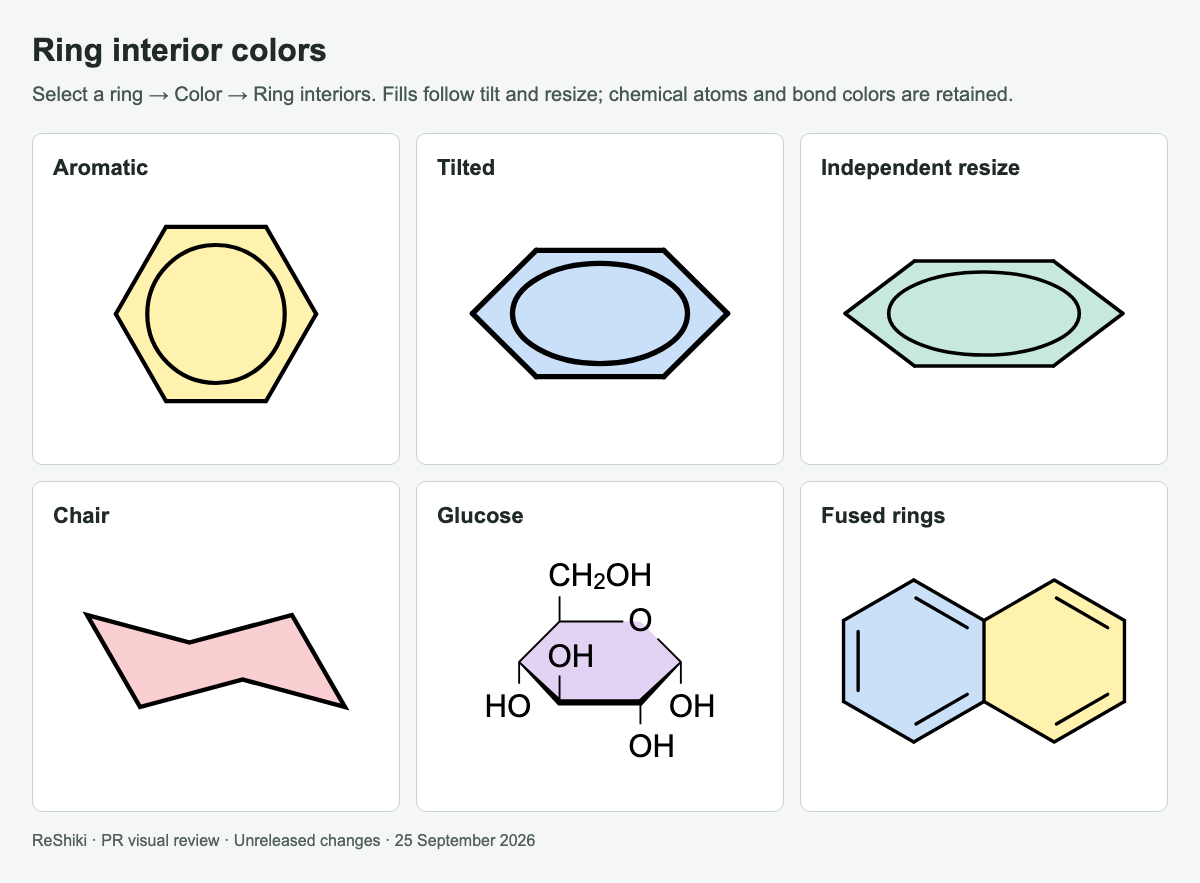
- Independent resizing: side handles change width or height; corner handles preserve proportions. Atom-owned circles and curves transform with the structure while fonts and stroke widths retain their sizes. Selection transforms.
- Ring interior colors: fill selected cycles, remove a fill, and retain ownership through copying, movement and resizing. Native, figure and supported editable exports preserve fills. Visual examples.
- Templates and groups: 105 built-in templates, including macrocycles and ligands; MgBr and N3 shortcuts; Cp and arene multi-center attachments. Library.
- Crossings: aromatic circles and tilted inner curves now honor front/back bond clearance. The gaps remain transparent in image copies. Before and after.
Groups and templates may be modified or revised in future releases. These definitions and layouts are the current implementation; users can use them now and keep editable copies or custom templates.
Desktop, licensing and review records
- macOS opens native
.rskdocuments through Finder/Open With and preserves an existing edited document by using a separate window. Native opening evidence. - Original project code is offered under MIT OR Apache-2.0, copyright 2026 Ameyanagi and ReShiki contributors. Third-party material retains its own terms and notices. The contribution agreement and CI check record the contributor's dual-license acceptance. License scope.
- PR and issue templates now request a feature image or matched bug-fix before/after images. The merged stack includes 35 reusable review images and editable fixtures. All reviewed changes · Visual review guidance.
Shortcut help and direct drawing gestures
Figure export now preserves visible drawings when molecular analysis fails, with a review notice. Large PNG files automatically use a lower resolution while keeping physical size; the saved-file status reports their actual dimensions and DPI. PDF and SVG remain vector formats. Before/after export evidence.
New standalone text formulas such as C₂H₂ and Ca(OH)₂ acquire subscripts automatically. Ordinary prose stays unchanged, and manual formula/script controls remain available. This formats captions without changing molecular composition. Before and after.
Bold aromatic ring edges now join automatic double-bond outlines and differently colored branches without protruding caps. At the C–F carbon, all three directions define the corner; the thick and thin ring edges meet the two sides of the substituent directly. Ellipse recognition also retains supported color and layer values until their full-width values have been checked. The tested bold arene also supports editable CDX/CDXML copy, preserving double-bond placement on reimport. Unsupported appearances retain native editing and an external picture fallback, with concise copy status and hover details. Matched examples and interchange scope.
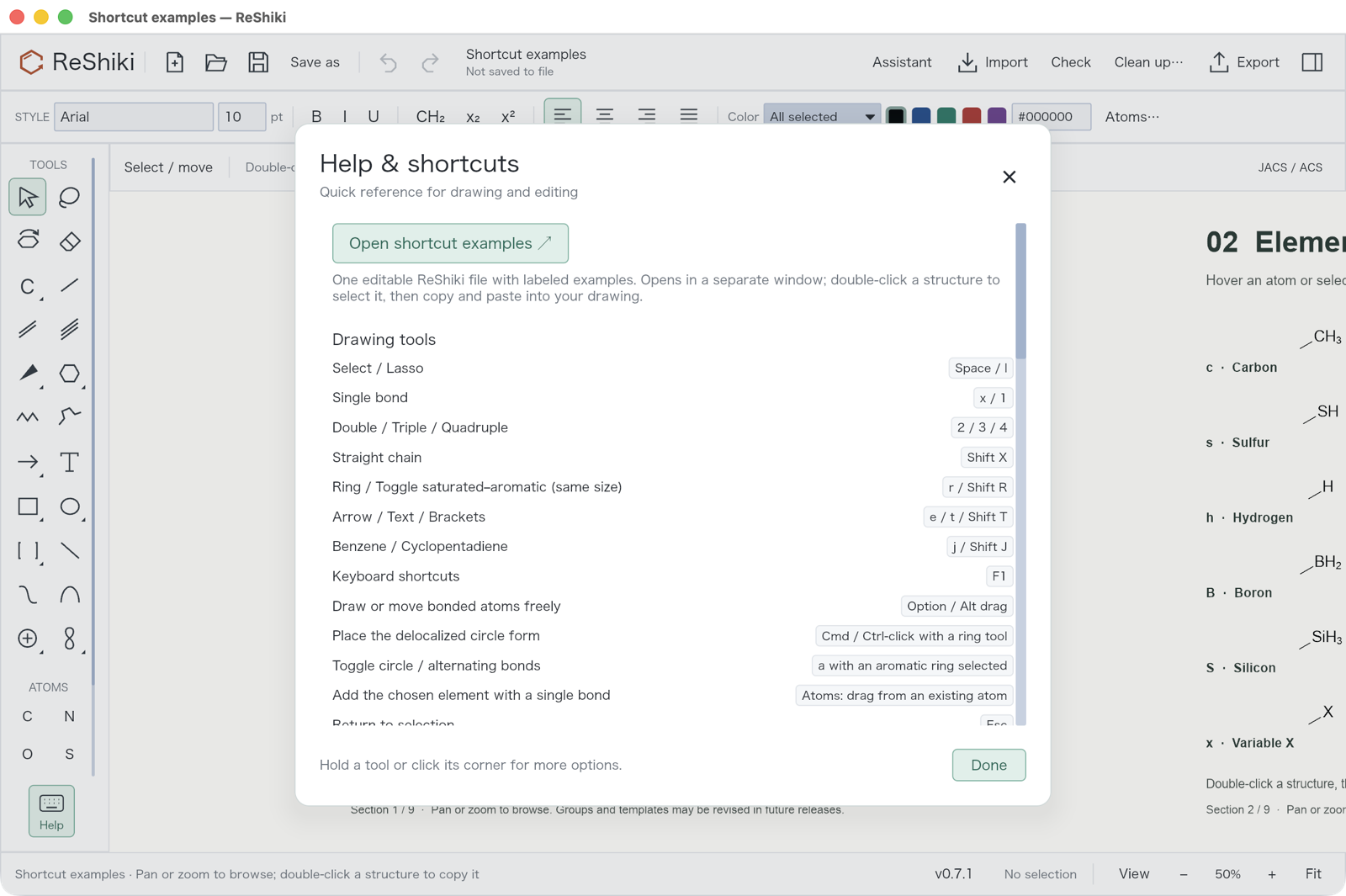
Help → Open shortcut examples opens one bundled, editable .rsk document in a separate window. Its nine sections on the normal unbounded canvas contain labeled examples that can be selected and copied into another drawing. It works offline; Save as creates a personal copy. Download and shortcut list.
Choose an element in Atoms and drag from an existing atom to add it with a single bond. Clicking still replaces an atom. Fixed length and angle settings apply; Option/Alt permits free placement. Connecting existing endpoints preserves their elements and existing bond order.
The Rings palette offers Benzene with alternating bonds and Aromatic circle. Hold Cmd/Ctrl while placing a regular ring, benzene or cyclopentadiene for the circle form. Select an existing aromatic ring and press a to toggle circle/alternating display. Chairs and Haworth tools keep their existing projection behavior.
Native screenshots, all nine example sections, and before/after fixes.
The normal canvas fills the drawing area. The permanent gray inset and paper border are removed; enabled rulers reserve only their own gutters, and crosshairs remain overlays. Optional page setup is for printing and multipage PDF output.
Scroll vertically or sideways to pan the canvas. Hold Cmd/Ctrl while scrolling to zoom at the pointer; +/− and Fit remain available.
Clipboard transfer of unresolved drawings
Editable CDXML/CDX transfer preserves structurally valid drawings when chemical bond assignment fails, with a review warning and no inferred molecular properties. Copy supplies a sized picture fallback for appearances that editable exchange cannot represent, while retaining the editable native drawing for ReShiki. Before and after screenshots.
Perspective pi-ligand shortcuts
At an atom, j and J now create tilted Cp and arene rings with retained 3D coordinates, tapered front edges and a contact behind the ring. Further tilts preserve real bond lengths, aromaticity and multi-center targets. Native copying retains the editable model. Cp/arene rings also transfer as editable CDX with aromatic bonds, perspective edges, hidden ligand charges and multicenter targets; the returned native CDX fixtures are tested on import. The clipboard compatibility table lists remaining conversions. Before/after examples.
Moving attachment points
Dragging or nudging a centroid or multi-center attachment now moves the ligand and its substituents together, leaving the metal and other ligands fixed unless selected. Right-click → Move attachment point only retains deliberate endpoint adjustments. Before/after captures.
Crossing clearance now uses retained 3D depth at each intersection. After a ligand is dragged across the metal, the contact passes in front of the far ring edge and behind the near side as appropriate; the aromatic ellipse follows the same ordering. Further tilts update thick and tapered perspective edges. Before/after captures.
Assistant-generated Cp/Cp* ligands also default to depth-based contact ordering. A generated...
ReShiki 0.7.1
Chemical drawing, reinvented.
This patch improves image-assisted drawing of coordination complexes and preserves aromaticity when editing bond appearance.
Fixes and improvements
- Transparent source drawings stay readable by the assistant; the original image remains in the conversation.
- Metal–ring contact previews accept the supported solid, dashed, and dative styles, with typed attachment targets preserved through supported grouped exchange.
- Cp/Cp* reconstruction starts with the defined aromatic ligand graph, then applies real 3D tilt. Methyl groups, ligand charges, and five-center attachment targets are retained.
- Visual review can adjust an individual ligand and contact overlap without rotating the complete complex.
- Applying or reversing an aromatic wedge retains the ring's aromatic order and inner ellipse. Partial ring curves no longer acquire stray dashed edges.
- Charge symbols can be hidden without deleting stored charges or changing formula contributions.
- Includes the Windows popup-shadow accumulation fix from #18.
- Adds an illustrated change log with seven desktop screenshots and a Codex installation/sign-in guide for the optional assistant.
Illustrated changes and screenshots · Set up Codex · Assistant guide
Install or update
Download the macOS DMG, the Windows setup program for your architecture, or a portable archive below. Existing users can use ReShiki → Check for updates → Update and restart after saving their work. Drawing and chemistry tools work offline; Codex and internet access are only needed for the assistant.
Format and chemistry limits
Reconstructed complexes still require review of metal/halide charges, coordination, and stereochemical assignments. Keep the native .rsk document for editing. SVG/PNG/PDF retain the drawing appearance; editable CDXML/CDX requires visible charge labels and rejects unsupported projection emphasis or aromatic wedge styling rather than silently changing its meaning.
All 28 release jobs passed, including five platform packages, Windows installers, twelve live chemistry-reference groups on macOS/Windows/Linux, and macOS signing/notarization. All eight public package checksums and all five portable archives' build metadata were verified after publication. The signed macOS packages also passed local Gatekeeper, install-copy, offline chemistry, and GUI checks. SHA256SUMS lists the eight package checksums.
Full changes: v0.7.0...v0.7.1
ReShiki 0.7.0
Chemical drawing, reinvented.
ReShiki 0.7.0 improves molecular editing, coordination drawings, image-assisted reconstruction, and desktop updates.
- Continuous bond junctions and wedge tips that retain the normal bond width.
- Bond-length and angle constraints when moving bonded atoms or groups; Option/Alt enables free movement.
- A dedicated 3D tilt tool, Shift snapping, and selection-aware right-click menus.
- Typed multi-center and variable attachments with supported CDXML/CDX and V3000 ALL/ANY interchange.
- Defined Boc, Cp and Cp* groups that retain their chemical graphs and atom counts; shared toolbar alignment for groups and captions.
- Editor-only dummy handles, inner ring curves, saturated/aromatic ring switching, and batch atom coloring.
- A compact image assistant with sent-image history, GPT-6-Astra as the default when available, and completed previews retained after timeouts.
- In-app update checks and verified installation/restart, with protection for unfinished edits and assistant input.
Release notes · Illustrated changelog and screenshots · ChemDraw comparison and format limits · Validation record
Keep the .rsk original. CDXML/CDX expands Cp/Cp* and rejects partial ring curves, free wildcard text and projection-only front-bond emphasis; use native or SVG/PNG/PDF output for those appearances. Coordination geometry cleanup, complex identifiers and variable-attachment formulas remain unsupported. Generated chemistry still requires review; chat history is session-local.
Downloads support Apple Silicon macOS, Windows x64/ARM64, and Linux x64/ARM64. macOS packages are signed and notarized; Windows/Linux packages are unsigned. No Python, RDKit or uv installation is needed. SHA256SUMS covers all eight downloads.
Full changelog: v0.6.1...v0.7.0
ReShiki 0.6.1
Chemical drawing, reinvented.
ReShiki 0.6.1 brings the rust Reaction Cycle identity to the app and website, alongside the drawing improvements and native offline chemistry in the 0.6 series. This is the first published release after 0.5.0.
- Draw and edit faster: direct bond and chain tools, reusable template placement, sweep erasing, alignment, and improved reaction arrows.
- Review editable assistant drafts: progress updates, layout review, previews, and undoable application of proposed schemes.
- Work offline from the first launch: drawing, imports, cleanup, molecular properties, and native InChI support are included. No Python, RDKit, or uv installation is required. The optional assistant requires an internet connection.
- Use the new identity: app and installer icons, website branding, and a reusable light/dark logo asset kit.
- See it in action: the 83-second introduction is now on the homepage, with English captions and a direct video download.
New drawings use .rsk; existing .reshiki and .moruno drawings remain supported.
Download the macOS disk image, Windows setup program, or portable package for your platform below. macOS supports Apple Silicon; Windows and Linux support x64 and ARM64. The macOS app and disk image are signed and notarized. SHA256SUMS covers all eight downloads.
Installation guide · 0.6 drawing improvements · 0.6.1 release notes · Full changelog
ReShiki 0.5.0
ReShiki 0.5.0 adds native Windows clipboard and printing support, editable drawings in Microsoft Office, and more chemistry and image processing in Rust.
- Editable Office drawings on Windows: copy from ReShiki into desktop Word, PowerPoint or Excel, double-click to edit, and press Ctrl+S to update the embedded drawing. Transparent vector previews stay sharp when resized. In Excel, set the object's fill to No fill to show worksheet cells through it.
- Windows clipboard and printing: native Copy/Paste preserves editable drawings, Copy Image offers static image formats, and the Windows print dialog supports page ranges and printer preferences. The installer registers ReShiki as the embedded drawing editor.
- Windows rendering: direct software rendering avoids expensive GPU emulation on virtual machines and remote desktops. Clipboard, printing and process support are built into the application without a .NET runtime or extra helper.
- Rust chemistry and file handling: binary CDX conversion, molecular formulas and masses, valence checks, hydrogen counts, and bounded ring perception now run in Rust. Ring calculations retain a checked RDKit fallback when agreement cannot be established.
- Images: embedded raster normalization runs in Rust, preserving orientation, reflection and transparency. Pillow is no longer installed in the production chemistry environment.
- Documentation: the Windows guide covers installation, native printing and verified Word, PowerPoint and Excel editing workflows.
Install uv before first launch. Python and RDKit are still required and are set up automatically. Downloads cover Apple Silicon macOS, Windows x64/ARM64, and Linux x64/ARM64. macOS packages are signed and notarized; Windows and Linux packages remain unsigned.
Office double-click editing requires desktop Office on Windows. Keep a separate .reshiki original when sharing editable drawings with a Mac. See the Windows notes for platform limits and the architecture notes for the Rust migration's verification scope.
Full changelog: v0.4.0...v0.5.0
v0.4.0
ReShiki 0.4.0 adds installers, background version checks, and a refreshed visual manual.
- Mac: open the signed, notarized
.dmgand drag ReShiki to Applications. Apple Silicon only. - Windows: run the x64 or ARM64
-setup.exe. Setup installs for your account and supports upgrades and uninstalling. Windows builds are unsigned. - Updates: click ReShiki in the app to check manually, download a new release, or turn automatic checks off. Automatic checks run daily; installation stays under your control.
- Idle CPU: inactive assistant, chemistry, and recovery timers no longer trigger repeated redraws.
- Documentation: a simpler header, warmer colors, screenshot-led guides, and a direct Assistant link.
Install uv first. Portable downloads remain available for all five platforms. Drawings and settings are preserved during upgrades.
ReShiki 0.3.0
Moruno is now ReShiki (リシキ).
Visual manual · Assistant guide · Sponsor this work
- New drawings use
.reshiki; existing.morunodrawings and clipboard content remain editable. - Templates, assistant preferences, and recovery drafts carry over without changing the originals.
- The website and manual now use ReShiki throughout, with 36 fresh screenshots.
Install uv before opening the app. First launch sets up the local chemistry environment and needs internet access.
Download the archive for your platform: Apple Silicon macOS, Windows x64 or ARM64, or Linux x64 or ARM64. The Mac app is signed and notarized. Windows and Linux packages are unsigned. SHA256SUMS contains checksums for all five archives.
ReShiki means “REinvention of the wheel for drawing chemical structure.” Shiki is 式, as in chemical equation; R also stands for Rust, and RE for reaction.
Moruno 0.2.0

The first public release includes editable molecular drawings, reaction schemes, and a visual manual.
- Draw atoms, bonds, chains, and rings with JACS / ACS defaults.
- Attach templates through a chosen atom or bond; save reusable fragments.
- Arrange captions, bent arrows, shapes, orbitals, and pictures. Clean up only the selected structures.
- Ask the assistant for a drawing, then review it or accept edits automatically. Applied changes remain undoable.
- Save editable documents; copy structures and images; export SVG, PDF, PNG, and chemical data.
Downloads
Install uv first. Moruno installs its chemistry tools locally on first use.
| Platform | Architecture |
|---|---|
| macOS 14+ | Apple Silicon; signed and notarized |
| Windows 10/11 | x64; unsigned |
| Windows 11 | ARM64 app with an x64 chemistry worker; unsigned |
| Linux | x64 (Ubuntu 22.04+) and ARM64 (Ubuntu 24.04+); unsigned |
Intel Macs are not supported. Native system clipboard exchange and printing currently target macOS; Windows and Linux use file exports for these workflows.
All five packages passed extracted-archive startup, fresh chemistry setup, and offline reuse checks. Desktop workflow checks used macOS. Moruno remains under active development; review generated chemistry before using a figure.