A modern, responsive web application for managing online courses. Built with React, Firebase, and Redux, this application allows users to browse courses, enroll in them, and track their progress.
-
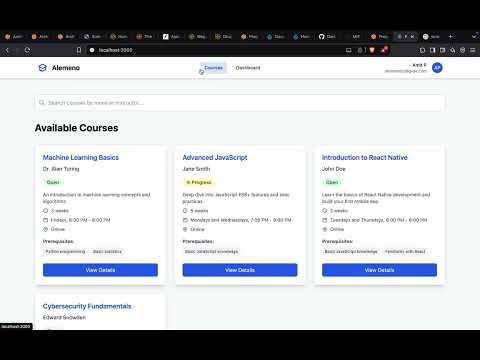
Course Catalog
- Browse available courses
- Search courses by name or instructor
- View detailed course information
- Real-time course status updates
-
User Dashboard
- Track enrolled courses
- Monitor course progress
- View completed courses
- Update course progress
-
Course Management
- Course enrollment
- Progress tracking
- Detailed syllabus view
- Prerequisites display
-
Real-time Updates
- Firebase integration
- Live data synchronization
- Instant search results
- Progress updates
- React.js
- Redux Toolkit
- Firebase/Firestore
- Tailwind CSS
- React Router


Before you begin, ensure you have the following installed:
- Node.js (v14.0.0 or later)
- npm (v6.0.0 or later)
- Git
-
Clone the repository
git clone https://github.com/AmitStredz/react-course-app.git cd react-course-app -
Install dependencies
npm install
-
Configure Firebase
- Create a new Firebase project at Firebase Console
- Enable Firestore database
- Copy your Firebase configuration
- Create a
.envfile in the root directory - Add your Firebase configuration:
env REACT_APP_FIREBASE_API_KEY=your_api_key REACT_APP_FIREBASE_AUTH_DOMAIN=your_auth_domain REACT_APP_FIREBASE_PROJECT_ID=your_project_id REACT_APP_FIREBASE_STORAGE_BUCKET=your_storage_bucket REACT_APP_FIREBASE_MESSAGING_SENDER_ID=your_messaging_sender_id REACT_APP_FIREBASE_APP_ID=your_app_id REACT_APP_FIREBASE_MEASUREMENT_ID=your_measurement_id
-
Set up Firestore Database
- Create a 'courses' collection
- Add course documents with the following structure:
{
  name: "Course Name",
  instructor: "Instructor Name",
  description: "Course Description",
  enrollmentStatus: "Open" | "Closed" | "In Progress",
  thumbnail: "image_url",
  duration: "8 weeks",
  schedule: "Flexible",
  location: "Online",
  prerequisites: ["prerequisite1", "prerequisite2"],
  syllabus: [
    {
      week: 1,
      topic: "Introduction",
      content: "Overview of the course"
    },
    // ... more weeks
  ],
students: [
{
id: 102,
name: "Amit",
email: amitstredz@gmail.com
}
-
Start the development server
npm start
-
Build for production
npm run build