Skip to content
This repository was archived by the owner on Nov 10, 2018. It is now read-only.

Latest commit


History

7 Commits

Folders and files

NameName
Last commit message
Last commit date


Repository files navigation

ToolGripEditor

A Roblox plugin that makes the process of editing a Tool's Grip properties a whole lot simpler.

To use, activate the plugin (plugin icon), and select the Tool you want to edit (it must have a Handle). A dummy character will appear above the tool, with handles that you can drag. The orange arrows change the position of the tool, while the green circular handles change the orientation. When close enough, the orientation snaps to 90 degree angles.

Here's an example of what it looks like:
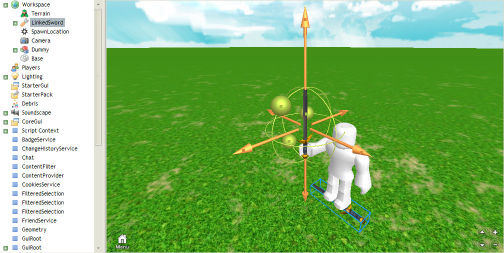
ToolGripEditor example

Installation

  1. Open Roblox Studio.
  2. Go to Tools > Open Plugins Folder to find location of the plugins folder.
  3. Move the ToolGripEditor folder to this location.

About

[ARCHIVED] A Roblox plugin that simplifies the modification of a Tool's Grip properties.

Resources

Stars

4 stars

Watchers

1 watching

Forks

Releases

Packages

Contributors

Languages