Repository navigation
Codeman Skill
The codeman skill lets the agent inside a Codeman session drive Codeman itself. You ask in plain English, and the agent starts worker sessions in any installed CLI, hands each one its task, waits for them, reads their answers and cleans up after itself. No curl, no endpoint names, no session ids in your prompt.
It is one skill for every agent CLI, in the SKILL.md format that Claude Code, Codex,
Gemini CLI, OpenCode, Grok, OMP and most other agent CLIs read. It lives in the repo at
skills/codeman.
Three real runs on a live Codeman: real sessions, real agents, one typed prompt each. Nothing on screen is mocked up; the long waits are sped up and labelled as time-lapse.
The lead Claude Code session gets use codeman to start 5 claude workers, one per TODO item,
and five Claude Code workers power on, one per item, with all six agents working at once.

Sessions an agent starts do not join the grid by themselves. In this recording each worker
was put on the grid as it started, the way Ctrl+click or dragging its tab does it: see
Tile Grid.
The same prompt with eight workers, in the normal view. Every worker gets its own tab, and a lineage line runs from the lead to each one, so you can see who spawned whom. Clicking a worker's tab shows it at work.

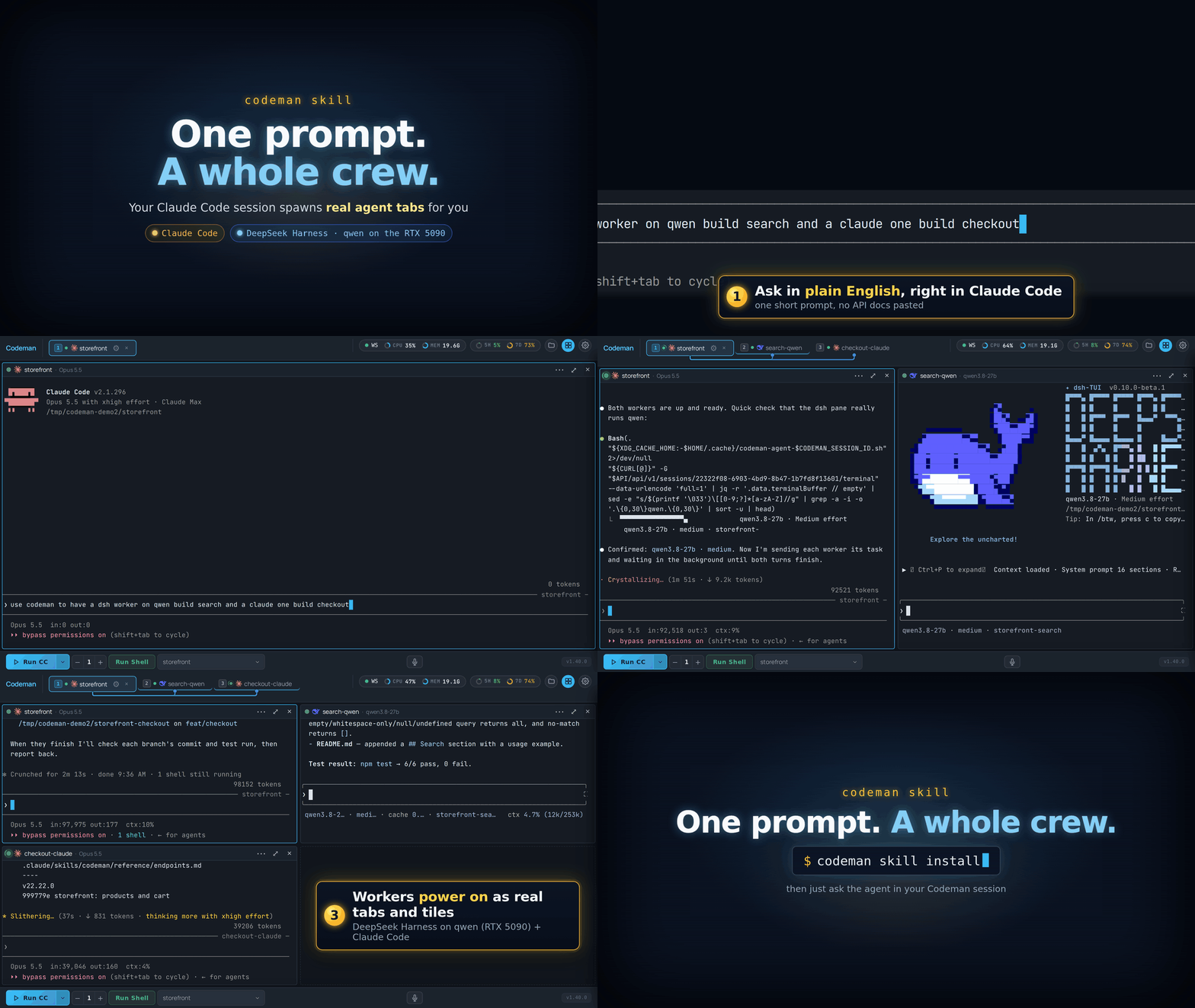
Workers do not have to run the same CLI as the lead. Here the prompt is
use codeman to have a dsh worker on qwen build search and a claude one build checkout: a
DeepSeek Harness worker on a local qwen model and a Claude Code worker power on side by side.
Pick one route. The skill only acts inside a Codeman session, so a global install is safe.
| How | Command | Scope |
|---|---|---|
| Skills CLI | npx skills add Ark0N/Codeman --skill codeman -g |
Global, any skills-aware agent. The way to give it to pi. |
| Claude Code plugin |
/plugin marketplace add Ark0N/Codeman, then /plugin install codeman@codeman
|
Global, through Claude Code's plugin manager. /plugin update codeman follows releases. |
| Bundled CLI | codeman skill install |
Global, at ~/.claude/skills/codeman. |
| Bundled CLI | codeman skill install --case <name> [--mode <mode>] |
One case. --mode codex (or any other run mode) writes it where that CLI looks for skills. |
| Web UI | App Settings → Agents & CLIs → All agent CLIs → Codeman Agent Skill | Injects it into each case when a session is created, where that session's CLI looks: .claude/skills/ for Claude Code, .agents/skills/ for Codex, Gemini CLI, OpenCode, Antigravity, Grok, DeepSeek and OMP. Off by default. |
Use the plugin or codeman skill install, not both: a Claude Code with both lists the
skill twice (codeman and codeman:codeman).
The web UI route skips pi, because a project skill makes pi ask to trust the folder at
startup. A pi or plain shell session uses the codeman agent
commands instead, which are the
same verbs as shell commands.
codeman skill uninstall [--case <name>] reverses the CLI installs (with --case, every
Codeman-managed copy in that case, whichever CLI's directory it sits in). It never touches a
skills/codeman you wrote yourself.
Turning the web UI setting back off does not remove copies it already injected, because
a sweep at session start would pull the skill out from under other live sessions sharing
that directory. Remove them per case with codeman skill uninstall --case <name>.
These prompts work as written:
| You say | What happens |
|---|---|
| "What sessions are running right now?" | Lists them with name, mode and status. Read-only. |
| "Use codeman to start 5 claude workers, one per TODO item." | One worker per item, each handed its task, answers gathered as they finish. |
"Start a shell worker on the myapp case, run the test suite, tell me if it passes." |
Spawns, waits on a completion marker, reads the exit code, cleans up. |
| "Spin up 3 workers for lint, typecheck and tests, run them in parallel, report failures." | One session per task, all started first, then gathered as each finishes. |
"Have a claude worker summarize src/session.ts, then close it." |
Spawns, waits until the worker is ready, sends and waits, reads the answer, deletes the session. |
| "Have a DeepSeek Harness worker build search and a claude worker build checkout." | A mixed fleet: one worker per CLI, started in one go. |
| "Watch session w4 and tell me if it gets stuck on a permission prompt." | Blocks on the blocked signal and brings the question to you. |
Sessions the agent creates are deleted when it is done, so you can watch the tabs appear and disappear in the dashboard while it works.
You: spin up 3 shell workers, run lint / typecheck / the frontend syntax check in parallel, and tell me which failed.
lint       -> 9f2d8e5f   dispatched
typecheck  -> aff9c691   dispatched     3 tabs appear in the dashboard
syntax     -> be9f1f15   dispatched

lint         DONE_lint_17909      rc=0
typecheck    DONE_typecheck_3409  rc=0   gathered as each one finishes
syntax       DONE_syntax_18501    rc=0

deleted 9f2d8e5f, aff9c691, be9f1f15    tabs disappear
The DONE_<task>_<random> strings are the
split-marker trick: a shell session
has no "turn finished" signal, so the skill waits for a marker in the output, typed in two
halves so that only the command's real output ever contains the joined string.
Any run mode installed on the machine can be a worker. Claude Code and DeepSeek Harness are the two with real completion signals (Claude's from its hooks, DeepSeek's from the harness), so the skill can wait for "turn finished" and read the answer as clean text. Every other CLI and plain shell sessions are synchronized on an output marker instead, which works the same from your side. See Agent CLIs for the run modes.
With Claude Code workers, where the installed Claude Code supports it, the lead can also message a worker directly instead of typing into its terminal.
-
It self-gates. Outside a Codeman session (
CODEMAN_MUXunset) it refuses to act and never guesses an API URL, so a global install costs an unrelated agent session nothing. - Unprompted, it may only start sessions, prompt them, and delete the ones it created in that conversation, by exact id, behind a guard that refuses to delete the agent's own session.
- It will not answer another session's permission prompt on your behalf. It brings the question to you instead.
- Only when you ask, naming the target: deleting a case (which erases a real directory of your code), bulk kills, respawn, Ralph, cron, the orchestrator, and settings changes.
Two things to know:
- Codex's default sandbox blocks network access, even to this machine, so the skill needs Bypass approvals and sandbox (App Settings, Codex).
- Codex 0.162 runs its commands in a shared background process, whose Codeman variables can belong to the session that started it.
The skill checks for both and says so instead of acting.
| File | Contents |
|---|---|
SKILL.md |
Safety rules, the fast path (start N workers, task them, collect the answers) and the verb index. Always loaded. |
reference/verbs.md |
Every verb in detail: readiness, send-and-wait, markers, interrupts, cleanup. Loaded on demand. |
reference/recipes.md |
Worked flows: claude, DeepSeek Harness and shell workers, fan-out, watching a blocked worker, messaging. Loaded on demand. |
reference/endpoints.md |
Endpoint tables, error codes, the signals each mode emits, capacity limits. Loaded on demand. |
reference/messaging.md |
Talking to claude workers directly through Claude Code's cross-session messaging. Loaded on demand. |
Only SKILL.md sits in the agent's context; the references load when a job needs them, so a
quick run stays quick.
-
Driving Codeman From An Agent - the
codeman agentcommands, the MCP server, and the raw HTTP rules the skill is built on. - Tile Grid - watching several workers side by side.
- The Dashboard - tabs, lineage lines and status dots.
- Watching Agents Work - the subagents inside each session.