
AI-powered differentiated assessment platform for modern educators.
GitHub · Features · Demos · Getting Started · Architecture
DifferenTest is an open-source educational platform built by Beanpot Studio that empowers teachers to create, manage, and deliver AI-generated differentiated assessments. Upload a lesson plan, and DifferenTest automatically generates editable, age-appropriate quizzes with instant feedback, progress tracking, and verifiable micro-credentials.
Check out DifferenTest in action with these free, open courses:
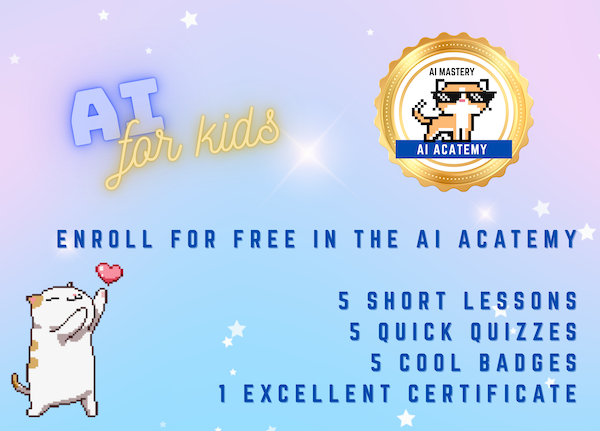
🤖 aCATemy: Artificial Intelligence for Kids Designed for kids in grades 1-3, a gentle introduction to AI hosted by cheerful cats. Free badges & certificates! |
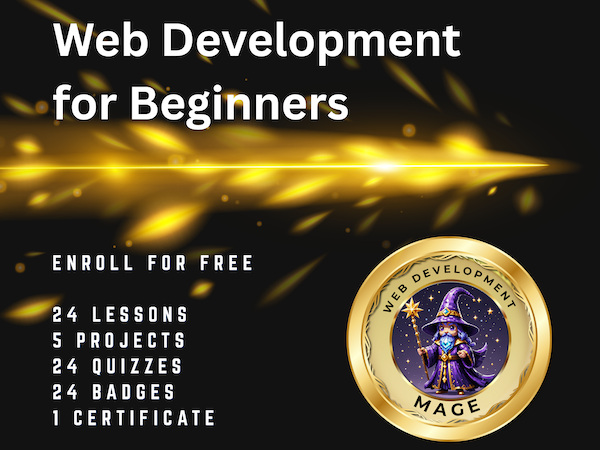
🌐 Web Development Fundamentals Learn HTML, CSS, and JavaScript basics with a comprehensive project-based curriculum. |
Upload lesson plans and learning objectives — DifferenTest uses Google Gemini AI to automatically generate differentiated, editable multiple-choice assessments tailored to your students' level.
Each quiz can be adapted for different age groups (Elementary, Middle School, High School, College/Adult), ensuring every student gets the right level of challenge.
Students earn Open Badge 3.0-compliant verifiable credentials for perfect scores. Badges stack toward full certificates, creating a clear achievement pathway.
Track student performance with detailed dashboards, submission histories, and class-wide progress metrics. Teachers get actionable insights at a glance.
- Teacher Portal: Create classes, manage enrollments, generate quizzes, review submissions, and communicate with students.
- Student Portal: Access courses, take quizzes, track progress, earn badges, and view certificates.
Engage younger learners with themed skins (e.g., cat-themed quizzes with animated characters) that make assessments fun and approachable.
Quizzes can be embedded in external websites via a public API, making DifferenTest a flexible assessment tool for any learning environment.
Teachers and students can communicate securely through the platform's messaging system.
- Node.js 18+
- npm, yarn, or pnpm
- A Firebase project (Firestore, Authentication, Storage)
- A Google Gemini API key
# Clone the repository
git clone https://github.com/beanpotstudio/differentest.git
cd differentest

# Install dependencies
npm install

# Set up environment variables
cp .env.example .envCreate a .env file with the following:
PUBLIC_FIREBASE_API_KEY=your_firebase_api_key
PUBLIC_FIREBASE_PROJECT_ID=your_firebase_project_id
PUBLIC_FIREBASE_MESSAGING_SENDER_ID=your_messaging_sender_id
PUBLIC_FIREBASE_APP_ID=your_firebase_app_id
PUBLIC_GEMINI_API_KEY=your_gemini_api_key
VITE_USE_FIREBASE_EMULATOR=false# Start the development server
npm run dev
# Run unit tests
npm test
# Run end-to-end tests
npm run test:e2enpm run build
npm run preview| Layer | Technology |
|---|---|
| Frontend Framework | Astro + Vue.js 3 |
| Styling | Tailwind CSS |
| Backend & Database | Firebase (Firestore, Auth, Storage) |
| AI | Google Gemini API |
| Animations | LottieFiles (.lottie animations) |
| Charts | Chart.js, ApexCharts |
| Testing | Vitest (unit), Playwright (e2e) |
| Deployment | Netlify |
users          → Profiles, roles (student/teacher), class enrollments
classes        → Course metadata, teacher info, skin themes, access codes
enrollments    → Student-class relationships with status tracking
quizzes        → Quiz content, questions, lesson plans, badge images
quizAttempts   → Student submissions, scores, selected answers, timestamps
activities     → Audit log of platform events (enrollments, quiz completions)
src/
├── components/       # Vue.js components
│   ├── ui/           # Reusable UI components (Header, Footer, Modals)
│   ├── services/     # Animation, notification, icon services
│   └── skins/        # Themed quiz result components (e.g., CatQuizResult)
├── composables/      # Vue composables (useNotification, useSkin)
├── layouts/          # Astro layouts
├── lib/              # Firebase config, service layer, auth
├── pages/            # Astro pages (home, courses, teacher, student, admin)
├── stores/           # Pinia-like auth store
├── styles/           # Global CSS, themed styles (cats.css)
├── utils/            # Utilities (Cloudinary upload, Firebase helpers, math)
└── plugins/          # Markdown quiz plugin
# Run unit tests
npm test

# Run tests in watch mode
npm run test:watch

# Run with coverage
npm run test:coverage

# Run end-to-end tests
npm run test:e2e- Create a Class — Set up a course with a name, age group, and optional theme skin.
- Generate Quizzes — Upload a lesson plan or write learning objectives; AI generates a differentiated quiz.
- Manage Enrollments — Share the unique class code with students; approve or manage enrollments.
- Review Submissions — View student quiz attempts, scores, and time spent.
- Issue Credentials — Award badges and certificates for achievements.
- Join a Class — Use a class code to enroll in a teacher's course.
- Take Quizzes — Complete AI-generated assessments with instant feedback.
- Track Progress — View your scores, badges, and certificates on your dashboard.
- Earn Credentials — Achieve perfect scores to earn verifiable Open Badges.
DifferenTest is pre-configured for deployment on Netlify via @astrojs/netlify. Deploy by connecting your repository or using the CLI:
npm run build
npx netlify deploy --prodContributions are welcome! Please feel free to submit a Pull Request.
- Fork the repository
- Create your feature branch (
git checkout -b feature/amazing-feature) - Commit your changes (
git commit -m 'Add amazing feature') - Push to the branch (
git push origin feature/amazing-feature) - Open a Pull Request
This project is licensed under the Creative Commons Attribution-NonCommercial-ShareAlike 4.0 International (CC BY-NC-SA 4.0).
You are free to share and adapt the material for non-commercial purposes, as long as you provide attribution and distribute any adaptations under the same license. Commercial use requires a separate license from Beanpot Studio.
See the LICENSE file for the full license text.
- Built with Astro and Vue.js
- AI powered by Google Gemini
- Backend by Firebase
- Author: Jen Looper via Beanpot Studio - beanpotstudio.com
DifferenTest — Differentiated assessments for every learner.