
Run AI coding agents on your own machine, from anywhere.
lfg turns a Linux box or macOS workstation into a private control plane for
Claude Code, Codex, OpenCode, Cursor, Grok, Hermes, Pi, and GitHub Copilot. It
starts each agent in a long-lived tmux session, streams the transcript to a
web UI, and lets you answer prompts or steer work from your phone or laptop.
Website · Quick start · Security · Contributing
Repository renamed (2026-08-05). This project now lives at
github.com/BennyKok/omg.dev(formerlyBennyKok/lfg). GitHub redirects the old web and git URLs; update bookmarks andgit remotewhen convenient. The CLI is stilllfg.
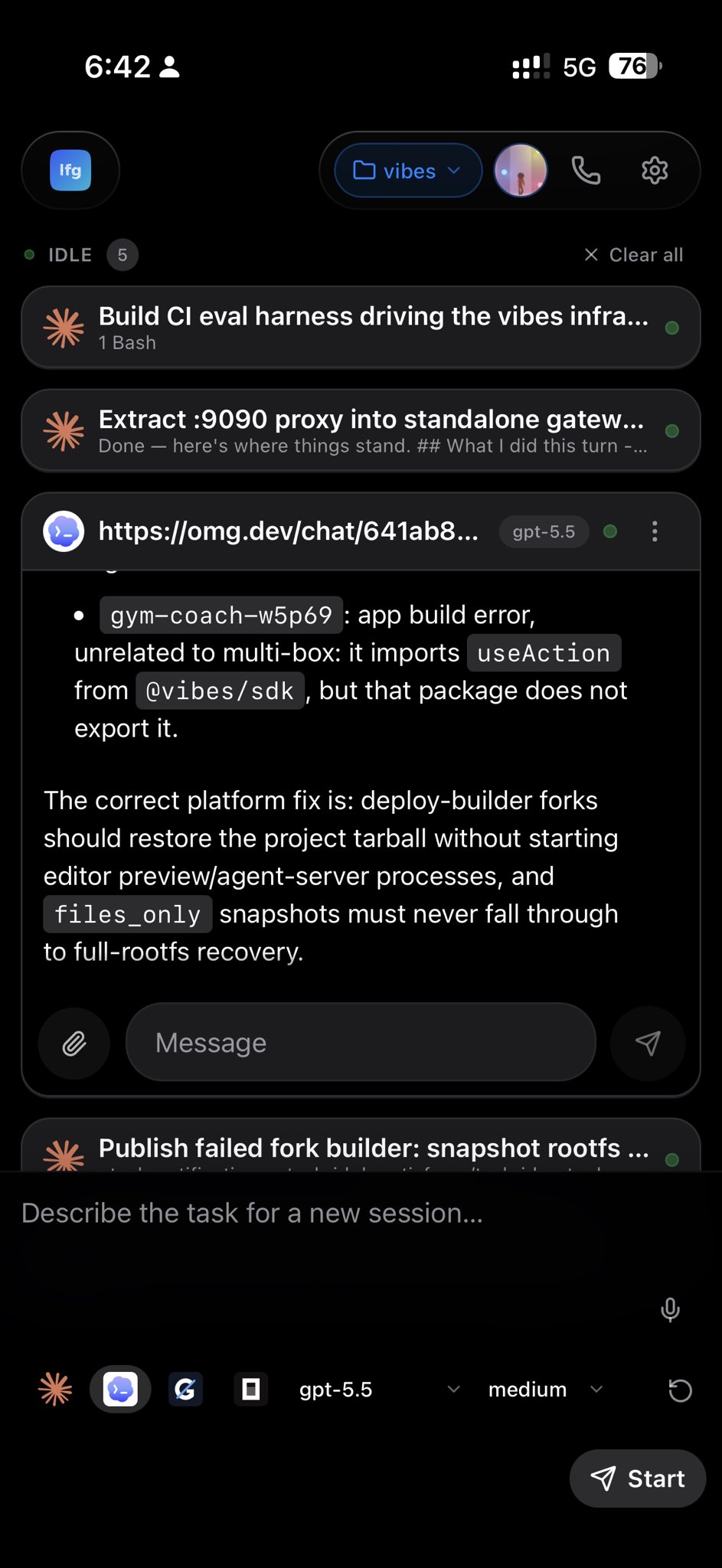
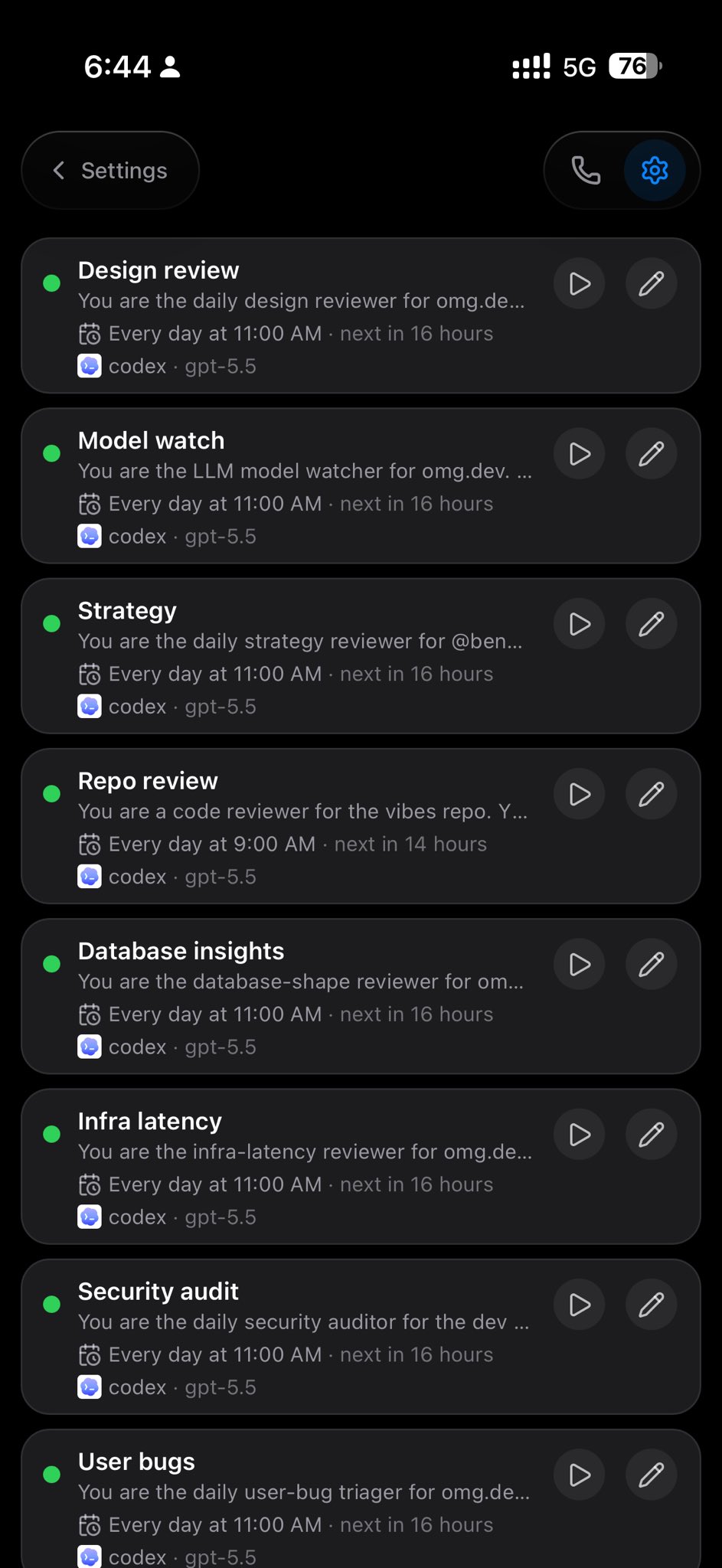
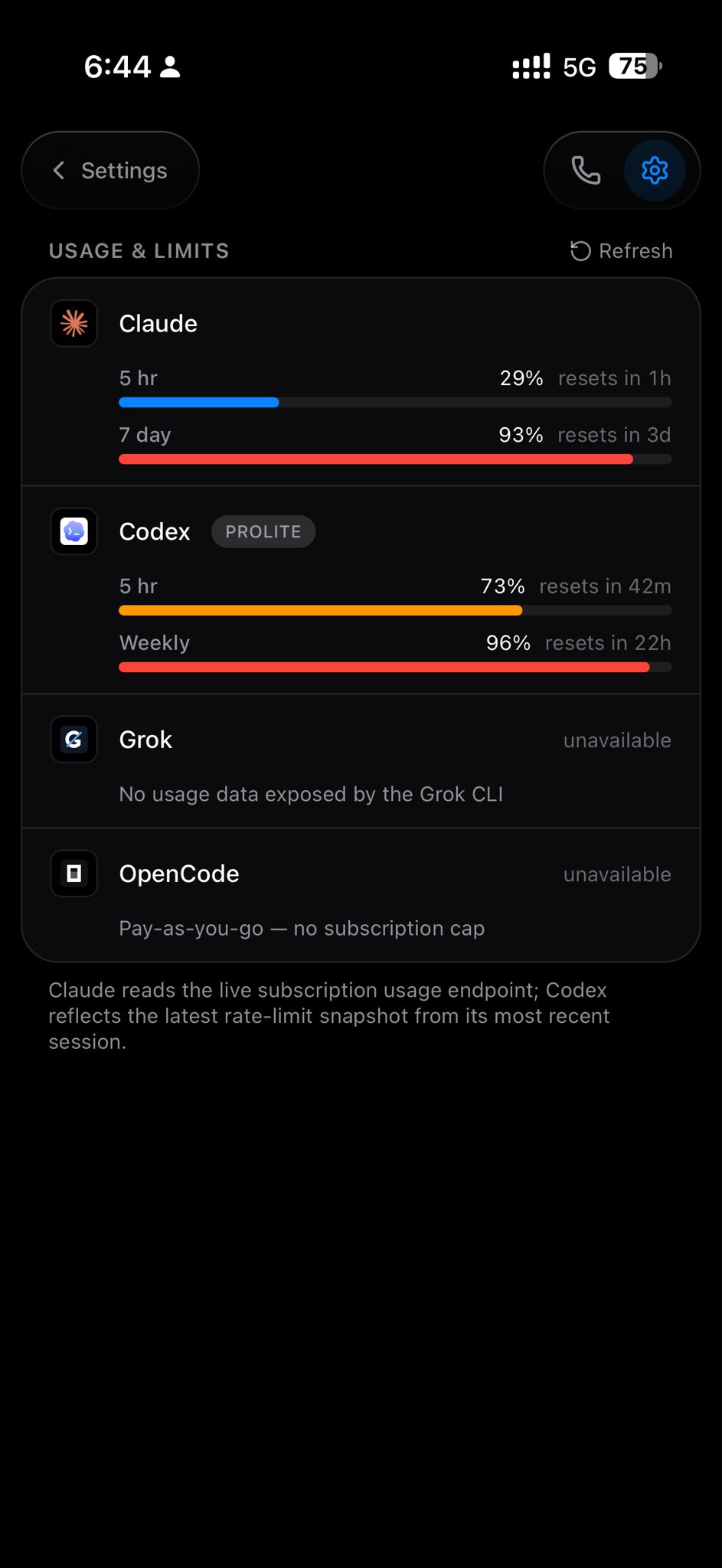
The guided path keeps the whole computer lifecycle under one command surface:
npx --yes @omg-dev/cli@latest computer setupNo omg.dev account is needed to install LFG. Setup delegates to LFG's own
installer, is a no-op when LFG is already present, and accepts --reinstall
when you deliberately want to run the installer again. Then open
http://127.0.0.1:8766.
For ongoing lifecycle management and relay access, install the CLI once, then sign in and connect the computer to omg.dev's hosted relay:
npm install --global @omg-dev/cli
omg login
omg connect
Manage the same installation through omg.dev:
omg computer status                    # inspect the local install and pairing
omg computer update                    # update an existing LFG installation
omg computer upgrade                   # alias for update
omg computer uninstall                 # remove LFG; preserve sessions and config
omg computer uninstall --purge --yes   # also permanently delete local LFG data
update never installs a missing computer, and uninstall delegates cleanup to
LFG instead of guessing which files it owns. Removal stops LFG's service and
deletes its command, MCP registrations, and release files. Shared prerequisites
such as Bun, Tailscale, tmux, and coding-agent CLIs are left alone; source
checkouts are preserved unless explicitly purged.
The
omg computerlifecycle requires a CLI release that includes those commands. If your installedomgdoes not recognize them, update the CLI or use the direct installer and LFG-native commands below.
To install without the omg.dev CLI:
curl -fsSL https://raw.githubusercontent.com/BennyKok/omg.dev/main/scripts/setup.sh | bashThen open http://127.0.0.1:8766.
That's the whole install. The script provisions Bun, tmux, and git,
downloads the latest release, writes .env, and starts lfg as a user service
bound to loopback. On a fresh Ubuntu/Debian box, add
LFG_INSTALL_SYSTEM_DEPS=1 so it may apt-get the base packages.
Update or remove a direct installation through LFG itself:
lfg setup                     # update and re-run idempotent provisioning
lfg uninstall                 # remove LFG; keep sessions and config for reinstall
lfg uninstall --purge --yes   # also permanently delete sessions and config
Next: connect a coding agent so you have something to run, and reach it from your phone.
Or try it hosted, with no install at all:

One click on omg.dev gives you a
workspace with lfg already running — nothing to install and no server to
provision. See One-click setup on omg.dev.
Which should I pick? Install locally if you want agents working on the repos and authenticated CLIs already on your machine — that is what
lfgis for. Use omg.dev to try it in seconds, or when you would rather not run a box at all.
git clone https://github.com/BennyKok/omg.dev.git
cd lfg
bun install
cp .env.example .env
bun run serve
Open http://127.0.0.1:8766. For UI hot reload (proxies /api to the Bun
server): cd web && bun install && bun run dev.
The installer handles all of this for you; this list is for the from-source path and for the curious.
- Bun,
tmux,git - At least one coding agent CLI — see below
- Optional: Tailscale for private remote access
lfg drives agent CLIs that you own and authenticate. Open Settings → Coding
agents in the web UI to install one, check its binary path and auth state, and
register LFG's MCP server with it.
| Agent | Command | Notes |
|---|---|---|
| Claude Code | claude |
Installed by the setup script |
| OpenAI Codex | codex |
|
| OpenCode | opencode |
|
| Cursor | cursor-agent |
|
| Grok | grok |
|
| Hermes | hermes |
|
| GitHub Copilot | copilot |
Needs Node 22+ |
| Pi | bundled | Ships with LFG (@earendil-works/pi-coding-agent); no separate install |
OAuth-based agents need a one-time terminal or browser login. API-key providers
read env vars such as ANTHROPIC_API_KEY or OPENAI_API_KEY from .env. Pi
authenticates via ANTHROPIC_API_KEY or ~/.pi/agent/auth.json.
Settings → Coding agents → Install MCP registers LFG MCP with Claude, Codex, OpenCode, Grok, and Cursor when those CLIs are present. (Hermes, Copilot, and Pi have no MCP registration surface.) The setup script does this automatically for Claude and Codex when they are already installed.
lfg binds to loopback and has no authentication of its own — it trusts the
network you put it behind. If you use omg.dev, its authenticated CLI is the
shortest path to the hosted relay:
omg connect # installs LFG if needed, then pairs and connectsomg connect discovers omg.dev's relay and passes a one-time code directly to
lfg connect, without a dashboard or clipboard step. It resumes the saved
binding on later runs. Sign in once with omg login; install the CLI with
npm install --global @omg-dev/cli if you do not already have it.
The underlying remote-access choices remain Tailscale or a relay you trust:
LFG_TAILSCALE_SERVE=1 lfg setup # private: front it with TailscaleLFG_RELAY_URL=wss://your-relay.example/connect lfg connect ABC123 # outbound relay, no inbound portTailscale is the simpler choice if you only open the UI from your own devices. The relay (experimental) exists for the case Tailscale can't cover — rendering a session from your box on a public web origin. omg.dev operates one that its CLI configures for you; other operators can implement the same generic protocol. No relay ships with LFG itself. Full comparison, the pairing flow, and opt-in session lifecycle events: docs/remote-access.md.
Do not put lfg on the public internet without your own auth in front of it.
See Security.
omg.dev is the fastest way to try
lfg — one click, no local install and no server to provision:
- Open omg.dev/sandbox/templates/lfg and sign in to omg.dev if prompted.
- omg.dev creates a sandbox from the prebuilt
lfgtemplate and startslfg serve --host 0.0.0.0 --port 8766. - Your browser lands on the workspace URL with the LFG web UI already running.
The template ships with lfg and its prerequisites installed, so none of
What you need applies. Workspaces hibernate when idle and wake
on the same URL.
A fresh workspace intentionally has no agent CLIs signed in — use Settings → Coding agents as above. Because the sandbox is a remote machine, agents work on repos you clone into that workspace; to use the repos already on your own machine, install locally instead. More detail in deploy/omg.
- Run agents where your code lives. Sessions execute on your machine, in your repos, with your local CLIs and credentials — not a remote sandbox you have to keep in sync.
- One UI for every harness. Switch agents and models per session, resume work, answer permission prompts, and manage projects from an installable PWA.
- Keep it private. The server binds to loopback by default and is designed to be exposed through Tailscale, not the public internet.
- Show the work. Agents can display verification media, publish updatable HTML dashboards, and post finished results to the Shipped feed.
- Delegate with lineage. LFG MCP tools spawn subagents that stay visible in the UI, inherit parent context, and report progress back.
- Automate repo checks. Optional markdown-defined agents collect git, repo, GitHub, model, or security context and produce scheduled reports.
lfg serve                      # web UI + control server
lfg setup                      # rerun provisioning/update flow
lfg uninstall                 # remove LFG while preserving sessions and config
lfg connect <code>             # reach this box through a relay (see docs/remote-access.md)
lfg mcp                        # stdio MCP server for LFG session tools
lfg agents list                # list markdown-defined insight agents
lfg agents run <name>          # run an insight agent
lfg subagent models            # list runtime sub-agent providers/models
lfg subagent create --prompt "..." --agent codex-aisdk
From a source checkout, use bun run <command> (e.g. bun run serve) — the
surface is identical.
lfg mcp talks to the local lfg serve API and exposes LFG's session tools to
any MCP client. Prefer LFG's own subagent tools over a client's generic "spawn
agent" helper so children stay visible in the UI, inherit parent and user
context, and can run on any configured harness.
| Area | Tools |
|---|---|
| Sessions | lfg_list_sessions, lfg_get_session_tree, lfg_get_session_messages, lfg_send_session_message, lfg_close_session |
| Origin delivery | lfg_send_to_origin |
| Presentation | lfg_display_image, lfg_display_video, lfg_publish_artifact, lfg_refresh_artifact, lfg_ship |
| Delegation | lfg_create_subagent, lfg_delegate_to_agent, lfg_delegate_design_task, lfg_delegate_backend_task, lfg_list_subagents, lfg_reparent_session |
| Human input | lfg_ask_user, lfg_input |
| Catalog | lfg_capabilities, lfg_list_repos, lfg_list_models |
Managed sessions launched with an initial task receive a versioned LFG runtime contract (when to show media, publish artifacts, ask the user, delegate, or ship). Sessions started on an older contract are marked in the UI so they can be closed and resumed to pick up the current tool catalog.
Subagents may nest up to four levels. Each child sends [subagent progress]
updates and one terminal [subagent complete] / [subagent blocked] /
[subagent failed] message to its parent.
Configuration lives in .env. .env.example documents every
variable inline — these are the ones most people touch:
| Variable | Purpose |
|---|---|
LFG_HOST |
Bind address. Keep 127.0.0.1 unless you know the risk. |
LFG_PORT |
Web UI and API port. Defaults to 8766. |
LFG_REPOS_ROOT |
Directory scanned for git repos. |
ANTHROPIC_API_KEY |
Optional API key for Claude / Pi flows. |
LFG_<AGENT>_PATH |
Override a CLI's binary path (LFG_CLAUDE_PATH, LFG_CODEX_PATH, LFG_OPENCODE_PATH, LFG_CURSOR_PATH, LFG_HERMES_PATH, LFG_PI_PATH, LFG_COPILOT_PATH). |
LFG_RELAY_URL |
Relay WebSocket URL for lfg connect. See docs/remote-access.md. |
LFG_INSTALL_CHANNEL |
Install channel: source, release, or container. Usually set by setup/deploy. |
Other groups: agent-specific behaviour (LFG_COPILOT_ALLOW_ALL_TOOLS,
LFG_HERMES_PROVIDER, LFG_PI_PROFILE_DIR — see
custom agent profiles), relay event
forwarding (LFG_CONNECT_EVENTS*), backend tracing
(LFG_TRACE_RETENTION_DAYS, LFG_TRACE_TRANSCRIPT_*), and the optional
WhatsApp bridge (LFG_WHATSAPP_*).
Backend diagnostics append to data/logs/trace-YYYY-MM-DD.jsonl (API timings,
transcript indexing, live stream stalls, send queue state).
lfg launches AI agents with shell access on your machine. The control API is
unauthenticated by design because it is meant to run on loopback and be reached
privately through Tailscale.
Do not expose lfg directly to the public internet. Read
SECURITY.md before sharing access.

The shared Dockerfile works for
Railway, Fly.io,
Render, DigitalOcean,
and Koyeb. For Hetzner, use the cloud-init template
in deploy/hetzner. It builds from the source tree
it is given — installs dependencies with Bun, builds the web UI, runs
bun run serve — so a one-click deploy builds whatever commit the platform
checks out. Nothing has to be published first.
These PaaS targets are best for demos or private-network deployments. Day-to-day
agent work is happiest on the machine that already has your repos, tmux, and
authenticated CLIs.
Platform-specific account, networking, and secret requirements live in each
deploy/*/README.md. In short: keep public networking off unless you put auth
in front of lfg, prefer Tailscale for remote access, and scope provider keys
to that environment only.
Every release publishes @lfg-dev/protocol, @lfg-dev/client, @lfg-dev/react,
and @lfg-dev/app — the last being the exact full application the standalone
web UI runs. React hosts mount it with their own transport and asset origin. See
docs/embedding.md.
src/                 CLI, server, sessions, tmux, agents, MCP, integrations
web/                 React/Vite PWA
agents/              Example markdown-defined insight agents
scripts/setup.sh     Installer / provisioning
scripts/             Release, fleet, and smoke helpers
scripts-internal/    Operator-only helpers (gitignored — see CONTRIBUTING.md)
deploy/              Cloud, voice, STT, and ops deployments
docs/                Design notes, agent profiles, README images
Issues and pull requests are welcome. Please read CONTRIBUTING.md and SECURITY.md first.