site docs
This document provides usage instructions for installations of UPC++ at various computing centers. This document describes command line use of existing UPC++ installations and is not a guide to installing or programming UPC++.
For other types of information:
- General information about UPC++ and additional links, see: README.md
- Installing the UPC++ software, see: INSTALL.md
- Tutorial on programming with UPC++, see: UPC++ Programmer's Guide
- Formal details on UPC++ semantics, see: UPC++ Specification
This document is a continuous work-in-progress, the purpose of which is to provide up-to-date information on public installs maintained by (or in collaboration with) the UPC++ team. However, systems are constantly changing. So, please report of any errors or omissions in the issue tracker.
Typically installs of UPC++ are maintained only for the current default versions of the system-provided environment modules such as compilers and CUDA. If you find one of the installs described in this document to be out-of-date with respect to the current defaults, please report using the issue tracker link above.
This document is not a replacement for the documentation provided by the centers, and assumes general familiarity with the use of the systems.

Stable installs are available through environment modules. A wrapper is used
to transparently dispatch commands such as upcxx to an install appropriate to
the currently loaded PrgEnv-{intel,gnu,cray}, craype-{haswell,mic-knl} and
compiler (intel, gcc, or cce) environment modules.
In order to access the UPC++ installation on Cori, is it sufficient to
module load upcxx. This environment module is located in the default
MODULEPATH.
By default the upcxx module will select the latest recommended version of the
UPC++ library. One can see the installed versions with a command like module avail upcxx and optionally explicitly select a particular version with a
command of the form: module load upcxx/20XX.YY.ZZ.
On Cori, the UPC++ environment modules select a default network of aries.
You can optionally specify this explicitly on the compile line with
upcxx -network=aries ....
The upcxx-run utility provided with UPC++ is a relatively simple wrapper,
which in the case of Cori Haswell and KNL nodes uses srun, along with the
addition of some sane default core bindings. To have full control over process
placement and thread pinning, users are advised to consider launching their
UPC++ applications directly with srun. However, one should do so only with
the upcxx environment module loaded to ensure the appropriate environment
variable settings.
If you would normally have passed -shared-heap to upcxx-run, then it is
particularly important that both UPCXX_SHARED_HEAP_SIZE and
GASNET_MAX_SEGSIZE be set accordingly. The values of those and other
potentially relevant environment variables set (or inherited) by upcxx-run
can be listed by adding -show to your upcxx-run command (which will print
useful information but not run anything).
Additional information is available in the
Advanced Job Launch
chapter of the UPC++ v1.0 Programmer's Guide.
On a system like Cori, there are multiple complications related to launch of
executables compiled for -network=smp such that no use of srun (or simple
wrappers around it) can provide a satisfactory solution in general. Therefore,
we recommend that for single-node (shared memory) application runs on Cori, one
should compile for the default network (aries). It is also acceptable to use
-network=mpi, such as may be required for some hybrid applications (UPC++ and
MPI in the same executable). However, note that in multi-node runs
-network=mpi imposes a significant performance penalty.
By default, batch jobs on Cori inherit both $PATH and the $MODULEPATH from
the environment at the time the job is submitted/requested using sbatch or
salloc. So, no additional steps are needed to use upcxx-run if a upcxx
environment module was loaded when sbatch or salloc ran.
cori$ module load upcxx

cori$ module switch craype-haswell craype-mic-knl # both work

cori$ upcxx --version
UPC++ version 2022.9.0  / gex-2022.9.0-0-gc2b830e
Citing UPC++ in publication? Please see: https://upcxx.lbl.gov/publications
Copyright (c) 2022, The Regents of the University of California,
through Lawrence Berkeley National Laboratory.
https://upcxx.lbl.gov

icpc (ICC) 19.0.3.199 20190206
Copyright (C) 1985-2019 Intel Corporation.  All rights reserved.

cori$ upcxx -O hello-world.cpp -o hello-world.x

cori$ salloc -C knl -q interactive --nodes 2
salloc: Granted job allocation 28703076
salloc: Waiting for resource configuration
salloc: Nodes nid0[2350-2351] are ready for job

nid02350$ upcxx-run -n 4 -N 2 ./hello-world.x
Hello world from process 0 out of 4 processes
Hello world from process 2 out of 4 processes
Hello world from process 1 out of 4 processes
Hello world from process 3 out of 4 processesA UPCXX CMake package is provided in the UPC++ install on Cori, as
described in README.md. Thus with the upcxx environment
module loaded, CMake should "just work" on Cori. However, /usr/bin/cmake on
Cori is fairly old and users may want to use a newer version via module load cmake.
Running 64 UPC++ processes per node on Cori Haswell nodes (using both
hardware threads of all 32 cores) requires a non-default value (4M or larger)
for the default size of "hugepages". This can be achieved by loading an
appropriate craype-hugepages[size] environment module at run time or by
setting the environment variable $HUGETLB_DEFAULT_PAGE_SIZE to a supported
value of 4M or larger.
For more information on hugepages, run man intro_hugepages on a Cori login
node. However, one should disregard the text describing PGAS models (and
$XT_SYMMETRIC_HEAP_SIZE in particular) as these apply to the Cray-provided
PGAS implementations, and not to GASNet-based ones such as UPC++.
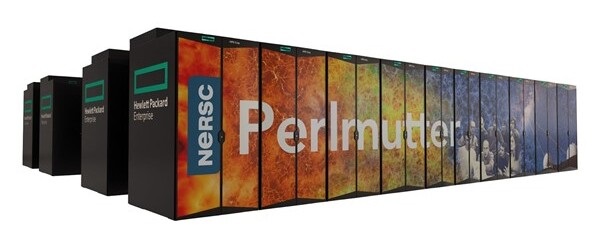
Stable installs are available through environment modules. A wrapper is used
to transparently dispatch commands such as upcxx to an install appropriate to
the currently loaded PrgEnv-{gnu,cray,nvidia,aocc} and compiler (gcc,
cce, nvidia or aocc) environment modules.
In order to access the UPC++ installation on Perlmutter, one must run
$ module load contribto add a non-default directory to the MODULEPATH before the UPC++ environment
modules will be accessible. We recommend inclusion of this command in ones
shell startup files, such as $HOME/.login or $HOME/.bash_profile.
If not adding the command to ones shell startup files, the module load contrib
command will be required once per login shell in which you need a upcxx
environment module.
Environment modules provide two alternative configurations of the UPC++ library:
-
upcxx-cuda
This module supports "memory kinds", a UPC++ feature that enables communication to/from CUDA memory when utilizingupcxx::device_allocator. -
upcxx
This omits support forupcxx::device_allocator<upcxx::cuda_device>, resulting in a small potential speed-up for applications which do not require this feature.
By default each module above will select the latest recommended version of the
UPC++ library. One can see the installed versions with a command like module avail upcxx and optionally explicitly select a particular version with a
command of the form: module load upcxx/20XX.YY.ZZ.
On Perlmutter, the UPC++ environment modules select a default network of ofi.
You can optionally specify this explicitly on the compile line with
upcxx -network=ofi ....
The installs provided on Perlmutter utilize the Cray Programming Environment,
and the cc and CC compiler wrappers in particular. It is possible to use
upcxx (or CC and upcxx-meta) to link code compiled with the "native
compliers" such as g++ and nvc++ (provided they match the PrgEnv-*
module). However, direct use of the native compilers to link UPC++ code is not
supported with these installs.
Currently, we have insufficient experience with PrgEnv-nvidia and
PrgEnv-aocc to include them in our list of supported compilers. However, we
are providing corresponding builds on Perlmutter. We encourage reporting (to
our issue tracker) of difficulties specific to
these two PrgEnv's.
The upcxx-run utility provided with UPC++ is a relatively simple wrapper,
which in the case of Perlmutter uses srun via an additional wrapper
upcxx-srun (see below). To have full control over process placement, thread
pinning and GPU allocation, users are advised to launch their UPC++
applications using upcxx-srun, which works like srun with the addition of
providing NIC binding. One should do so with the upcxx or upcxx-cuda
environment module loaded.
Whenever using srun in place of upcxx-run, if you would
normally have passed -shared-heap to upcxx-run, then it is particularly
important that both UPCXX_SHARED_HEAP_SIZE and GASNET_MAX_SEGSIZE be set
accordingly. The values of those and other potentially relevant environment
variables set (or inherited) by upcxx-run can be listed by adding -show to
your upcxx-run command (which will print useful information but not run
anything).
Additional information is available in the
Advanced Job Launch
chapter of the UPC++ v1.0 Programmer's Guide.
Each Perlmutter GPU node contains 64 CPU cores and 4 Slingshot-11 NICs (and 4 GPUs). Currently each UPC++ process can use at most one Slingshot NIC. In order for a job to utilize all four NICs on a Perlmutter GPU node, all of the following are necessary:
- run at least four processes per node
- ensure each process is bound to distinct CPU cores out of the 64 available
- set environment variables directing each process to use the NIC most appropriate to its core binding
The upcxx-srun launch wrapper helps to automate those three items.
The purpose of the upcxx-srun wrapper installed on Perlmutter is to
dynamically set the GASNET_OFI_DEVICE* family of environment variables as
appropriate for the current Perlmutter node type (e.g. GPU vs CPU), since the
correct settings are different for the two node types. This includes requesting
a suitable core binding if none has been requested by the environment or
command line. Subject to the following differences, the use of upcxx-srun
should be otherwise identical to srun:
- One must use
--ntasksor its short form-n. Cases in whichsrunwould normally compute a task count from other arguments are not supported. - One is required to place
--between the srun options and the executable name, to prevent application options from being parsed by the wrapper as if they weresrunoptions. - The
-shared-heapand-backtraceoptions toupcxx-runare accepted, but must appear before the required--.
On a system like Perlmutter, there are multiple complications related to launch
of executables compiled for -network=smp such that no use of srun (or
simple wrappers around it) can provide a satisfactory solution in general.
Therefore, we recommend that for single-node (shared memory) application runs
on Perlmutter, one should compile for the default network (ofi). It is also
acceptable to use -network=mpi, such as may be required for some hybrid
applications (UPC++ and MPI in the same executable). However, note that in
multi-node runs -network=mpi imposes a significant performance penalty.
By default, batch jobs on Perlmutter inherit both $PATH and the $MODULEPATH
from the environment at the time the job is submitted/requested using sbatch
or salloc. So, no additional steps are needed to use upcxx-run if a
upcxx environment module was loaded when sbatch or salloc ran.
perlmutter$ module load contrib

perlmutter$ module load upcxx

perlmutter$ upcxx --version
UPC++ version 2022.9.0  / gex-2022.9.0-0-gc2b830e
Citing UPC++ in publication? Please see: https://upcxx.lbl.gov/publications
Copyright (c) 2022, The Regents of the University of California,
through Lawrence Berkeley National Laboratory.
https://upcxx.lbl.gov

nvc++ 21.11-0 64-bit target on x86-64 Linux -tp zen2-64
NVIDIA Compilers and Tools
Copyright (c) 2021, NVIDIA CORPORATION & AFFILIATES.  All rights reserved.

perlmutter$ upcxx -O hello-world.cpp -o hello-world.x

perlmutter$ salloc -C gpu -q interactive --nodes 2
salloc: Granted job allocation 1722947
salloc: Waiting for resource configuration
salloc: Nodes nid[002700-002701] are ready for job

nid002700$ upcxx-run -n 4 -N 2 ./hello-world.x
Hello world from process 0 out of 4 processes
Hello world from process 1 out of 4 processes
Hello world from process 2 out of 4 processes
Hello world from process 3 out of 4 processesA UPCXX CMake package is provided in the UPC++ install on Perlmutter, as
described in README.md. Thus with the upcxx environment
module loaded, CMake should "just work".
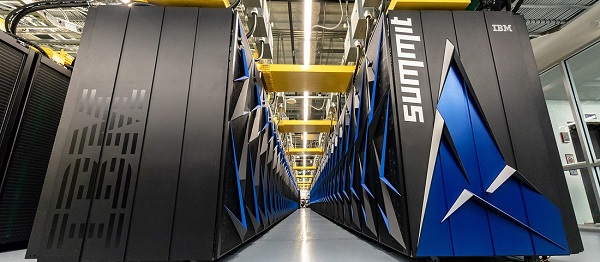
Stable installs are available through environment modules. A wrapper is used
to transparently dispatch commands such as upcxx to an install appropriate
to the currently loaded compiler environment module.
In order to access the UPC++ installation on Summit, one must run
$ module load ums ums-ums014to add a non-default directory to the MODULEPATH before the UPC++ environment
modules will be accessible. We recommend this be done in ones shell startup
files, such as $HOME/.login or $HOME/.bash_profile. However, to ensure
compatibility with other OLCF systems sharing the same $HOME, care should be
taken to do so only if $LMOD_SYSTEM_NAME equals summit.
If not adding the command to ones shell startup files, the module load ...
command will be required once per login shell in which you need a upcxx
environment module.
Environment modules provide two alternative configurations of the UPC++ library:
-
upcxx-cuda
This module supports "memory kinds", a UPC++ feature that enables communication to/from CUDA memory when utilizingupcxx::device_allocator. The default version uses GPUDirect RDMA capabilities of the GPU and NIC on Summit to perform GPU memory transfers at a speed comparable to host memory.
This module supports thegccandpgicompiler families. -
upcxx
This module supports thegccandpgicompiler families, but lacks support forupcxx::device_allocator<upcxx::cuda_device>.
By default each module above will select the latest recommended version of the
UPC++ library. One can see the installed versions with a command like module avail upcxx and optionally explicitly select a particular version with a
command of the form: module load upcxx/20XX.YY.ZZ.
On Summit, the UPC++ environment modules select a default network of ibv.
You can optionally specify this explicitly on the compile line with
upcxx -network=ibv ....
Please note that UPC++ does not yet work with the IBM XL compilers (the default compiler family on Summit).
ORNL defaults summit GPUs to EXCLUSIVE mode, unlike most other sites. In this mode a given physical GPU can only be opened by one process at a time, and concurrent open attempts of the same GPU by other processes will lead to a runtime error. This policy can sometimes be helpful to enforce a job layout designed for a 1:1 mapping between processes and GPUs, but can be problematic for other layouts.
If you ever want to deliberately share GPUs between processes we recommend using bsub -alloc_flags gpudefault to restore NVIDIA's default behavior that allows multiple processes to share one GPU. Another possibility is bsub -alloc_flags gpumps which activates NVIDIA's MPS service that performs more fine-grained interleaving of kernels from multiple processes to improve GPU throughput, but beware the MPS service has occasionally been implicated in stability problems (e.g. leading to job hangs).
Currently the default MODULEPATH on Summit includes center-provided E4S SDK
installs of UPC++ which are not (yet) as well integrated as the ones described
here. It is currently safe to load upcxx and upcxx-cuda if one wishes to
use the latest installs described here (the default, and our strong
recommendation). However, module load upcxx/[version] may resolve to
something different than what one was expecting.
The MODULEPATH may change each time one loads a gcc module, among others.
This could silently give the E4S SDK installs precedence over the ones
documented here. Consequently, it is advisable to check prior to loading a
upcxx environment module, as follows. A command such as module --loc show upcxx/2022.9.0 will show the full path which would be loaded (without making
changes to ones environment). If the result does not begin with
/sw/summit/modulefiles/ums/ums014, then one should repeat module load ums-ums014 (or simply ml ums-ums014) to restore the precedence of the
installs provided by the maintainers of UPC++.
Note that these changes to MODULEPATH are only relevant until you have
loaded a UPC++ environment module.
The upcxx-run utility provided with UPC++ is a relatively simple wrapper
around the jsrun job launcher on Summit. The majority of the resource
allocation/placement capabilities of jsrun have no equivalent in upcxx-run.
So due to the complexity of a Summit compute node, we strongly discourage
use of upcxx-run for all but the simplest cases. This is especially
important when using GPUs, since it is impractical to coerce upcxx-run to
pass the appropriate arguments to jsrun on your behalf.
Instead of using upcxx-run or jsrun for job launch on Summit, we recommend
use of the upcxx-jsrun script we have provided. This script wraps jsrun to
set certain environment variables appropriate to running UPC++ applications,
and to accept additional (non-jsrun) options which are specific to UPC++ or
which automate otherwise error-prone settings. Other than --help, which
upcxx-jsrun acts on alone, all jsrun options are available via upcxx-jsrun
with some caveats noted in the paragraphs which follow.
Here are some of the most commonly used upcxx-jsrun command-line options.
Run upcxx-jsrun --help for a more complete list.
-
--shared-heap VAL
Behaves just as withupcxx-run -
--1-hca
Binds each process to one HCA (default) -
--2-hca
Binds each process to two HCAs -
--4-hca
Binds each process to all four HCAs -
--high-bandwidth
Binds processes to the network interfaces appropriate for highest bandwidth -
--low-latency
Binds processes to the network interfaces appropriate for lowest latency -
--by-gpu[=N]
Create/bind processes into Resource Set by GPU Creates N processes (default 7), bound to 7 cores of one socket, with 1 GPU -
--by-socket[=N]
Create/bind processes into Resource Set by socket Creates N processes (default 21), bound to one socket, with 3 GPUs
The section Network ports on Summit
provides a description of the four HCAs on a Summit node, and how they are
connected to the two sockets. The "hca" and "latency/bandwidth" options are
provided to simplify the process of selecting a good binding of processes to
HCAs. This is probably the most important role of upcxx-jsrun, because there
are no equivalent jsrun options.
With --1-hca (the default), each process will be bound to a single HCA which
is near to the process.
When --2-hca is passed, each process will be bound to two HCAs. The
--high-bandwidth and --low-latency options determine which pairs of HCAs
are selected. Between these two option, the high-bandwidth option is the
default because it corresponds to the most common case in which use of two HCAs
per process is preferred over one (as will be described below).
When --4-hca is passed, each process is bound to all four HCAs.
This option is included only for completeness and generally provides worse
performance than the alternatives.
The default of --1-hca has been selected because our experience has found the
use of a single HCA per process to provide the best latency and bandwidth for a
wide class of applications. The only notable exception is applications which
desire to saturate both network rails from a single socket at a time, such as
due to communication in "bursts" or use of only one socket (or process) per node.
In such a case, we recommend passing --2-hca (with the default
--high-bandwidth) in order to enable each process to use both I/O buses and
network rails. However, this can increase latency and reduce the peak
aggregate bandwidth of both sockets communicating simultaneously.
Of course, "your mileage may vary" and you are encouraged to try non-default options to determine which provide the best performance for your application.
For many combinations of the options above, there are multiple equivalent
bindings available (such as two HCAs near to each socket in the --1-hca case).
When multiple equivalent bindings exist, processes will be assigned to them
round-robin.
In addition to the options described above for HCA binding, there are --by-gpu
and --by-socket options to simplify construction of two of the more common
cases of resource sets. Use of either is entirely optional, but in their
absence be aware that jsrun defaults to a single CPU core per resource set.
If you do choose to use them, be aware that they are mutually exclusive and
that they are implemented using the following jsrun options:
--rs_per_host, --cpu_per_rs, --gpu_per_rs, --tasks_per_rs,
--launch_distribution and -bind.
So, use of the --by-* options may interact in undesired ways with explicit
use of those options and with any options documented as conflicting with them.
To become familiar with use of jsrun on Summit, you should read the
Summit User Guide.
Other than --help, which upcxx-jsrun acts on alone, all jsrun options
are available via upcxx-jsrun with the caveats noted above.
If you need to use upcxx-run options not accepted by upcxx-jsrun, then it
may be necessary to set environment variables to mimic those options. To do so,
follow the instructions on launch of UPC++ applications using a
system-provided "native" spawner, in the section
Advanced Job Launch
in the UPC++ Programmer's Guide.
If you need to understand the operation of upcxx-jsrun, the --show and
--show-full options may be of use. Passing either of these options will echo
(a portion of) a jsrun command rather than executing it. The use of --show
will print the jsrun command and its options, eliding the UPC++ executable
and its arguments. This is sufficient to understand the operation of the
--by-* options.
The --*-hca and --shared-heap options are implemented in two steps where the
second is accomplished by specifying upcxx-jsrun as the process which jsrun
should launch. The "front end" instance of upcxx-jsrun passes arguments to
the multiple "back end" instances of upcxx-jsrun using environment variables.
Use of --show-full adds the relevant environment settings to the --show
output. However, be advised that there is no guarantee this environment-based
internal interface will remain fixed.
If you wish to determine the actual core bindings and GASNET_IBV_PORTS
assigned to each process for a given set of [options] one can run the
following:
upcxx-jsrun --stdio_mode prepended [options] \
  -- sh -c 'echo HCAs=$GASNET_IBV_PORTS host=$(hostname) cores=$(hwloc-calc --whole-system -I core $(hwloc-bind --get))' | sort -V
with output looking something like the following for --2-hca --by-gpu=1 in
a two node allocation:
1: 0: HCAs=mlx5_0+mlx5_3 host=d04n12 cores=0,1,2,3,4,5,6
1: 1: HCAs=mlx5_1+mlx5_2 host=d04n12 cores=7,8,9,10,11,12,13
1: 2: HCAs=mlx5_0+mlx5_3 host=d04n12 cores=14,15,16,17,18,19,20
1: 3: HCAs=mlx5_1+mlx5_2 host=d04n12 cores=22,23,24,25,26,27,28
1: 4: HCAs=mlx5_0+mlx5_3 host=d04n12 cores=29,30,31,32,33,34,35
1: 5: HCAs=mlx5_1+mlx5_2 host=d04n12 cores=36,37,38,39,40,41,42
1: 6: HCAs=mlx5_0+mlx5_3 host=h35n08 cores=0,1,2,3,4,5,6
1: 7: HCAs=mlx5_1+mlx5_2 host=h35n08 cores=7,8,9,10,11,12,13
1: 8: HCAs=mlx5_0+mlx5_3 host=h35n08 cores=14,15,16,17,18,19,20
1: 9: HCAs=mlx5_1+mlx5_2 host=h35n08 cores=22,23,24,25,26,27,28
1: 10: HCAs=mlx5_0+mlx5_3 host=h35n08 cores=29,30,31,32,33,34,35
1: 11: HCAs=mlx5_1+mlx5_2 host=h35n08 cores=36,37,38,39,40,41,42
Where the 1: indicates this is the first jsrun in a given job, and the
second field is a rank (both due to use of --stdio_mode prepended).
Cores 21 and 43 are reserved to system use and thus never appear this output.
On a system configured as Summit has been, there are multiple complications
related to launch of executables compiled for -network=smp such that no use
of jsrun (or simple wrappers around it) can provide a satisfactory solution
in general. Therefore, the provided installations on Summit do not support
-network=smp. We recommend that for single-node (shared memory) application
runs on Summit, one should compile for the default network (ibv). It is also
acceptable to use -network=mpi, such as may be required for some hybrid
applications (UPC++ and MPI in the same executable). However, note that in
multi-node runs -network=mpi imposes a significant performance penalty.
By default, batch jobs on Summit inherit both $PATH and the $MODULEPATH
from the environment at the time the job is submitted using bsub. So, no
additional steps are needed in batch jobs using upcxx-jsrun if a upcxx or
upcxx-cuda environment module was loaded when the job was submitted.
summit$ module load gcc   # since default `xl` is not supported

summit$ module load upcxx-cuda

summit$ upcxx -V
UPC++ version 2022.9.0  / gex-2022.9.0-0-gc2b830e
Citing UPC++ in publication? Please see: https://upcxx.lbl.gov/publications
Copyright (c) 2022, The Regents of the University of California,
through Lawrence Berkeley National Laboratory.
https://upcxx.lbl.gov

g++ (GCC) 9.1.0
Copyright (C) 2019 Free Software Foundation, Inc.
This is free software; see the source for copying conditions.  There is NO
warranty; not even for MERCHANTABILITY or FITNESS FOR A PARTICULAR PURPOSE.

summit$ upcxx -O hello-world.cpp -o hello-world.x

summit$ bsub -W 5 -nnodes 2 -P [project] -Is bash
Job <714297> is submitted to default queue <batch>.
<<Waiting for dispatch ...>>
<<Starting on batch2>>

bash-4.2$ upcxx-jsrun --by-socket=1 ./hello-world.x
Hello world from process 0 out of 4 processes
Hello world from process 2 out of 4 processes
Hello world from process 3 out of 4 processes
Hello world from process 1 out of 4 processesA UPCXX CMake package is provided in the UPC++ install on Summit, as
described in README.md. CMake is available on Summit via
module load cmake. With the upcxx and cmake environment modules both
loaded, CMake will additionally require either CXX=mpicxx in the environment
or -DCMAKE_CXX_COMPILER=mpicxx on the command line.
The default version of the upcxx-cuda environment module (but not the upcxx
one) includes support for the GPUDirect RDMA (GDR) capabilities of
the GPUs and InfiniBand hardware on Summit. This enables communication to and
from GPU memory without use of intermediate buffers in host memory. This
delivers significantly faster GPU memory transfers via upcxx::copy() than
previous releases without GDR support. However, there are currently some outstanding
known issues.
The upcxx-cuda environment module will initialize your environment with
settings intended to provide correctness by default, compensating for the known
issues in GDR support. This is true even where this may come at the expense of
performance. At this time we strongly advise against changing any GASNET_*
or UPCXX_* environment variables set by the upcxx-cuda environment module
unless you are certain you know what you are doing. (Running module show upcxx-cuda will show what it sets).
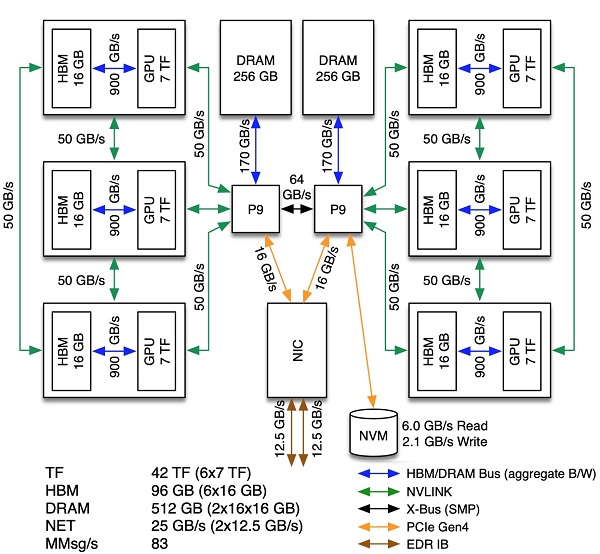
Node Architecture of OLCF Summit, highlighting component connections
Image credit: OLCF Summit User Guide
Each Summit compute node has two CPU sockets, each with its own I/O bus. Each
I/O bus has a connection to the single InfiniBand Host Channel Adapter (HCA).
The HCA is connected to two "rails" (network ports). This combination of two
I/O buses and two network rails results in four distinct paths between memory
and network. The software stack exposes these paths as four (logical) HCAs
named mlx5_0 through mlx5_3.
| HCA | I/O bus | rail |
|---|---|---|
| mlx5_0 | Socket 0 | A |
| mlx5_1 | Socket 0 | B |
| mlx5_2 | Socket 1 | A |
| mlx5_3 | Socket 1 | B |
Which HCAs are used in a UPC++ application is determined at run time by the
GASNET_IBV_PORTS family of environment variables. Which ports are used can
have a measurable impact on network performance, but unfortunately there is no
"one size fits all" optimal setting. For instance, the lowest latency is
obtained by having each process use only one HCAs on the I/O bus of the socket
where it is executing. Meanwhile, obtaining the maximum bandwidth of a given
network rail from a single socket requires use of both I/O buses.
More information can be found in
slides
which describe the node layout from the point of view of running MPI
applications on Summit. However, the manner in which MPI and UPC++ use
multiple HCAs differs, which accounts for small differences between those
recommendations and the settings used by upcxx-jsrun and described below.
Use of the appropriate options to the upcxx-jsrun script will automate setting
of the GASNET_IBV_PORTS family of environment variables to use the recommended
HCA(s). However, the following recommendations may be used if for some reason
one cannot use the upcxx-jsrun script.
Similar to the MPI environment variables described in those slides, a _1
suffix on GASNET_IBV_PORTS specifies the value to be used for processes bound
to socket 1. While one can set GASNET_IBV_PORTS_0 for processes bound to socket 0,
below we will instead use the un-suffixed variable GASNET_IBV_PORTS because it
specifies a default to be used not only for socket 0 (due to the absence of a
GASNET_IBV_PORTS_0 setting), but for unbound processes as well.
-
Processes each bound to a single socket -- latency-sensitive.
To get the best latency from both sockets requires use only one HCA, attached to the I/O bus nearest to the socket.GASNET_IBV_PORTS=mlx5_0GASNET_IBV_PORTS_1=mlx5_3
-
Processes each bound to a single socket -- bandwidth-sensitive.
How to get the full bandwidth from both sockets depends on the communication behaviors of the application. If both sockets are communicating at the same time, then the latency-optimized settings immediately above are typically sufficient to achieve peak aggregate bandwidth. However, if a single communicating socket (at a given time) is to achieve the peak bandwidth a different pair of process-specific settings is required (which comes at the cost of slightly increased mean latency).GASNET_IBV_PORTS=mlx5_0+mlx5_3GASNET_IBV_PORTS_1=mlx5_1+mlx5_2
-
Processes each bound to a single socket -- mixed or unknown behavior.
In general, the use of a single HCA is the best option in terms of the minimum latency and peak aggregate (per-node) bandwidth. For this reason the latency-optimizing settings (presented first) are the nearest thing to a "generic" application recommendation. -
Processes unbound or individually spanning both sockets.
In this case is it difficult to make a good recommendation since any given HCA has a 50/50 chance of being distant from the socket on which a given process is executing. The best average performance comes from "splitting the pain" using two of the available paths per process with one near to each socket, and together spanning both network rails. This leads to the same settings (presented second) as recommended for achieving peak bandwidth from a single socket at a time.
The use of multiple HCAs per node will typically open the possibility of a
corner-case correctness problem, for which the recommended work-around is to set
GASNET_USE_FENCED_PUTS=1 in ones environment. This is done by default in the
upcxx and upcxx-cuda environment modules. However, if you launch UPC++
applications without the module loaded, we recommend setting this yourself at
run time.
The issue is that, by default, the use of multiple network paths may permit an
rput which has signaled operation completion to be overtaken by a subsequently
issued rput, rget or rpc. When an rput is overtaken by another rput
to the same location, the earlier value may be stored rather than the latter.
When an rget overtakes an rput targeting the same location, it may fail to
observe the value stored by the rput. When an rpc overtakes an rput, CPU
accesses to the location targeted by the rput is subject to both of the
preceding problems. Setting GASNET_USE_FENCED_PUTS=1 prevents this overtaking
behavior, in exchange for a penalty in both latency and bandwidth. However, the
bandwidth penalty is tiny when compared to the increase due to using multiple
HCAs to access both network rails and/or I/O buses.
If you believe your application is free of the X-after-rput patterns described
above, you may consider setting GASNET_USE_FENCED_PUTS=0 in your environment
at run time. However, when choosing to do so one should be prepared to detect
the invalid results which may result if such patterns do occur.
For more details, search for GASNET_USE_FENCED_PUTS in the
ibv-conduit README

Stable installs are available through environment modules. A wrapper is used
to transparently dispatch commands such as upcxx to an install appropriate to
the currently loaded PrgEnv-{gnu,cray,amd} and compiler (gcc, cce, amd)
environment modules.
In order to access the UPC++ installation on Crusher, one must run
$ module use /gpfs/alpine/world-shared/csc296/crusher/modulefilesto add a non-default directory to the MODULEPATH before the UPC++ environment
modules will be accessible. We recommend this be done in ones shell startup
files, such as $HOME/.login or $HOME/.bash_profile. However, to ensure
compatibility with other OLCF systems sharing the same $HOME, the following
form should be used:
$ module use /gpfs/alpine/world-shared/csc296/$LMOD_SYSTEM_NAME/modulefilesIf not adding the command to ones shell startup files, the module use ...
command will be required once per login shell in which you need a upcxx
environment module.
Environment modules provide two alternative configurations of the UPC++ library:
-
upcxx-hip
This module supports "memory kinds", a UPC++ feature that enables communication to/from CUDA memory when utilizingupcxx::device_allocator. -
upcxx
This omits support forupcxx::device_allocator<upcxx::hip>, resulting in a small potential speed-up for applications which do not require this feature.
By default each module above will select the latest recommended version of the
UPC++ library. One can see the installed versions with a command like module avail upcxx and optionally explicitly select a particular version with a
command of the form: module load upcxx/20XX.YY.ZZ.
On Crusher, the UPC++ environment modules select a default network of ofi.
You can optionally specify this explicitly on the compile line with
upcxx -network=ofi ....
The installs provided on Crusher utilize the Cray Programming Environment, and
the cc and CC compiler wrappers in particular. It is possible to use
upcxx (or CC and upcxx-meta) to link code compiled with the "native
compliers" such as g++ and amdclang++ (provided they match the PrgEnv-*
module). However, direct use of the native compilers to link UPC++ code is not
supported with these installs.
Currently, we have insufficient experience with PrgEnv-amd to include it in
our list of supported compilers. However, we are providing corresponding
builds on Crusher. We encourage reporting (to our
issue tracker) of difficulties specific to this
PrgEnv.
The upcxx-run utility provided with UPC++ is a relatively simple wrapper,
which in the case of Crusher uses srun. To have full control over process
placement, thread pinning and GPU allocation, users are advised to consider
launching their UPC++ applications directly with srun. However, one should
do so only with the upcxx or upcxx-hip environment module loaded to ensure
the appropriate environment variable settings.
If you would normally have passed -shared-heap to upcxx-run, then it is
particularly important that both UPCXX_SHARED_HEAP_SIZE and
GASNET_MAX_SEGSIZE be set accordingly. The values of those and other
potentially relevant environment variables set (or inherited) by upcxx-run
can be listed by adding -show to your upcxx-run command (which will print
useful information but not run anything).
Additional information is available in the
Advanced Job Launch
chapter of the UPC++ v1.0 Programmer's Guide.
Each Crusher node contains 64 CPU cores and 4 Slingshot-11 NICs (and 8 GPUs). Currently each UPC++ process can use at most one Slingshot NIC. In order for a job to utilize all four NICs on a Crusher node, all of the following are necessary:
- run at least four processes per node
- ensure each process is bound to distinct CPU cores out of the 64 available
- set environment variables directing each process to use the NIC most appropriate to its core binding
Item 1 is up to the user, and item 2 is the default behavior on Crusher. For item 3, one should ensure the following are set in ones environment:
GASNET_OFI_DEVICE_TYPE=NodeGASNET_OFI_DEVICE_0=cxi2GASNET_OFI_DEVICE_1=cxi1GASNET_OFI_DEVICE_2=cxi3GASNET_OFI_DEVICE_3=cxi0
Those five variables are set by the upcxx and upcxx-hip environment
modules, loading one of which is a "best practice" when running a UPC++
application. Care should be taken to ensure they are set even if not
using the environment modules.
On a system like Crusher, there are multiple complications related to launch of
executables compiled for -network=smp such that no use of srun (or simple
wrappers around it) can provide a satisfactory solution in general. Therefore,
we recommend that for single-node (shared memory) application runs on Crusher,
one should compile for the default network (ofi). It is also acceptable to use
-network=mpi, such as may be required for some hybrid applications (UPC++ and
MPI in the same executable). However, note that in multi-node runs
-network=mpi imposes a significant performance penalty.
By default, batch jobs on Crusher inherit both $PATH and the $MODULEPATH
from the environment at the time the job is submitted/requested using sbatch
or salloc. So, no additional steps are needed to use upcxx-run if a
upcxx environment module was loaded when sbatch or salloc ran.
crusher$ module use /gpfs/alpine/world-shared/csc296/crusher/modulefiles
crusher$ module load upcxx

crusher$ upcxx --version
UPC++ version 2022.9.0  / gex-2022.9.0-0-gc2b830e
Citing UPC++ in publication? Please see: https://upcxx.lbl.gov/publications
Copyright (c) 2022, The Regents of the University of California,
through Lawrence Berkeley National Laboratory.
https://upcxx.lbl.gov

Cray clang version 13.0.0  (24b043d62639ddb4320c86db0b131600fdbc6ec6)
Target: x86_64-unknown-linux-gnu
Thread model: posix
InstalledDir: /opt/cray/pe/cce/13.0.0/cce-clang/x86_64/share/../bin

crusher$ upcxx -O hello-world.cpp -o hello-world.x

crusher$ salloc -t 5 --nodes 2
salloc: Granted job allocation 96088
salloc: Waiting for resource configuration
salloc: Nodes crusher[083-084] are ready for job
crusher083$ upcxx-run -n 4 -N 2 ./hello-world.x
Hello from 0 of 4
Hello from 1 of 4
Hello from 2 of 4
Hello from 3 of 4A UPCXX CMake package is provided in the UPC++ install on Crusher, as
described in README.md. Thus with the upcxx environment
module loaded, CMake should "just work".

Stable installs are available through environment modules. A wrapper is used
to transparently dispatch commands such as upcxx to an install appropriate to
the currently loaded PrgEnv-{gnu,cray,nvidia} and compiler (gcc,
cce, or nvidia) environment modules.
In order to access the UPC++ installation on Polaris, one must run
$ module use /lus/eagle/projects/CSC250STPM17/polaris/modulefilesto add a non-default directory to the MODULEPATH before the UPC++ environment
modules will be accessible. We recommend inclusion of this command in ones
shell startup files, such as $HOME/.login or $HOME/.bash_profile.
If not adding the command to ones shell startup files, the module use ...
command will be required once per login shell in which you need a upcxx
environment module.
Environment modules provide two alternative configurations of the UPC++ library:
-
upcxx-cuda
This module supports "memory kinds", a UPC++ feature that enables communication to/from CUDA memory when utilizingupcxx::device_allocator. -
upcxx
This omits support forupcxx::device_allocator<upcxx::cuda_device>, resulting in a small potential speed-up for applications which do not require this feature.
By default each module above will select the latest recommended version of the
UPC++ library. One can see the installed versions with a command like module avail upcxx and optionally explicitly select a particular version with a
command of the form: module load upcxx/20XX.YY.ZZ.
On Polaris, the UPC++ environment modules select a default network of ofi.
You can optionally specify this explicitly on the compile line with
upcxx -network=ofi ....
The installs provided on Polaris utilize the Cray Programming Environment,
and the cc and CC compiler wrappers in particular. It is possible to use
upcxx (or CC and upcxx-meta) to link code compiled with the "native
compliers" such as g++ and nvc++ (provided they match the PrgEnv-*
module). However, direct use of the native compilers to link UPC++ code is not
supported with these installs.
Currently, we have insufficient experience with PrgEnv-nvidia /
PrgEnv-nvhpc to include them in our list of supported compilers. However, we
are providing corresponding builds on Polaris. We encourage reporting (to
our issue tracker) of difficulties specific to
these two (nearly equivalent) PrgEnv's.
The upcxx-run utility provided with UPC++ is a relatively simple wrapper,
which in the case of Polaris uses aprun. To have full control over process
placement, thread pinning and GPU allocation, users are advised to consider
launching their UPC++ applications directly with aprun. However, one should
do so only with the upcxx or upcxx-cuda environment module loaded to ensure
the appropriate environment variable settings.
If you would normally have passed -shared-heap to upcxx-run, then it is
particularly important that both UPCXX_SHARED_HEAP_SIZE and
GASNET_MAX_SEGSIZE be set accordingly. The values of those and other
potentially relevant environment variables set (or inherited) by upcxx-run
can be listed by adding -show to your upcxx-run command (which will print
useful information but not run anything).
Additional information is available in the
Advanced Job Launch
chapter of the UPC++ v1.0 Programmer's Guide.
On a system like Polaris, there are multiple complications related to launch
of executables compiled for -network=smp such that no use of aprun (or
simple wrappers around it) can provide a satisfactory solution in general.
Therefore, we recommend that for single-node (shared memory) application runs
on Polaris, one should compile for the default network (ofi). It is also
acceptable to use -network=mpi, such as may be required for some hybrid
applications (UPC++ and MPI in the same executable). However, note that in
multi-node runs -network=mpi imposes a significant performance penalty.
By default, PBS jobs (both batch and interactive) do not inherit the
necessary settings from the submit-time environment, meaning both the module use ... and module load upcxx may be required in batch jobs which use
upcxx-run. This is shown in the example below.
polaris$ module use /lus/eagle/projects/CSC250STPM17/polaris/modulefiles

polaris$ module load upcxx

polaris$ upcxx --version
UPC++ version 2022.9.0  / gex-2022.9.0-0-gc2b830e
Citing UPC++ in publication? Please see: https://upcxx.lbl.gov/publications
Copyright (c) 2022, The Regents of the University of California,
through Lawrence Berkeley National Laboratory.
https://upcxx.lbl.gov

nvc++ 21.9-0 64-bit target on x86-64 Linux -tp zen-64
NVIDIA Compilers and Tools
Copyright (c) 2021, NVIDIA CORPORATION & AFFILIATES.  All rights reserved.

polaris$ upcxx -O hello-world.cpp -o hello-world.x

polaris$ qsub -q debug -l walltime=10:00,filesystems=home -A ... -l select=2:system=polaris -I

x3005c0s37b0n0$ module use /lus/eagle/projects/CSC250STPM17/polaris/modulefiles
x3005c0s37b0n0$ module load upcxx

x3005c0s37b0n0$ upcxx-run -n 4 -N 2 ./hello-world.x
Hello world from process 0 out of 4 processes
Hello world from process 1 out of 4 processes
Hello world from process 2 out of 4 processes
Hello world from process 3 out of 4 processesA UPCXX CMake package is provided in the UPC++ install on Polaris, as
described in README.md. Thus with the upcxx environment
module loaded, CMake should "just work".
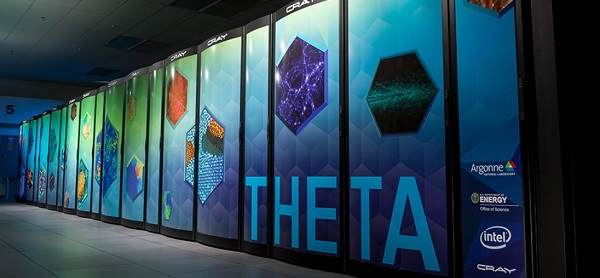
Stable installs are available through environment modules. A wrapper is used
to transparently dispatch commands such as upcxx to an install appropriate
to the currently loaded PrgEnv-{intel,gnu,cray} and compiler (intel,
gcc, or cce) environment modules.
In order to access the UPC++ installation on Theta, one must run
$ module use /projects/CSC250STPM17/modulefilesto add a non-default directory to the MODULEPATH before the UPC++ environment
modules will be accessible. We recommend inclusion of this command in ones
shell startup files, such as $HOME/.login or $HOME/.bash_profile.
If not adding the command to ones shell startup files, the module use ...
command will be required once per login shell and batch job in which you need a
upcxx environment module.
It is also possible to instead include the required command in ones
$HOME/.modulerc to make it persistent. This file must begin with a
#%Module line to be accepted by the module command. This approach may
have a slight advantage over the shell startup files in that a module use ...
is not needed in a batch job (though module load upcxx still is).
A complete .modulerc suitable for Theta:
#%Module
module use /projects/CSC250STPM17/modulefiles
By default the upcxx module will select the latest recommended version of the
UPC++ library. One can see the installed versions with a command like module avail upcxx and optionally explicitly select a particular version with a
command of the form: module load upcxx/20XX.YY.ZZ.
On Theta, the UPC++ environment modules select a default network of aries.
You can optionally specify this explicitly on the compile line with
upcxx -network=aries ....
The upcxx-run utility provided with UPC++ is a relatively simple wrapper,
which in the case of Theta uses aprun. To have full control over process
placement and thread pinning, users are advised to consider launching their
UPC++ applications directly with aprun. However, one should do so only with
the upcxx environment module loaded to ensure the appropriate environment
variable settings.
If you would normally have passed -shared-heap to upcxx-run, then it is
particularly important that both UPCXX_SHARED_HEAP_SIZE and
GASNET_MAX_SEGSIZE be set accordingly. The values of those and other
potentially relevant environment variables set (or inherited) by upcxx-run
can be listed by adding -show to your upcxx-run command (which will print
useful information but not run anything).
Additional information is available in the
Advanced Job Launch
chapter of the UPC++ v1.0 Programmer's Guide.
On a system like Theta, there are multiple complications related to launch of
executables compiled for -network=smp such that no use of aprun (or simple
wrappers around it) can provide a satisfactory solution in general. Therefore,
we recommend that for single-node (shared memory) application runs on Theta,
one should compile for the default network (aries). It is also acceptable to
use -network=mpi, such as may be required for some hybrid applications (UPC++
and MPI in the same executable). However, note that in multi-node runs
-network=mpi imposes a significant performance penalty.
COBALT jobs (both batch and interactive) do not inherit the necessary
settings from the submit-time environment, meaning both the module use ...
and module load upcxx may be required in batch jobs which use upcxx-run.
This is shown in the example below.
theta$ module use /projects/CSC250STPM17/modulefiles
theta$ module load upcxx

theta$ upcxx --version
UPC++ version 2022.9.0  / gex-2022.9.0-0-gc2b830e
Citing UPC++ in publication? Please see: https://upcxx.lbl.gov/publications
Copyright (c) 2022, The Regents of the University of California,
through Lawrence Berkeley National Laboratory.
https://upcxx.lbl.gov

icpc (ICC) 19.1.0.166 20191121
Copyright (C) 1985-2019 Intel Corporation.  All rights reserved.

theta$ upcxx -O hello-world.cpp -o hello-world.x

theta$ qsub -q debug-cache-quad -t 10 -n 2 -A CSC250STPM17 -I
Connecting to thetamom3 for interactive qsub...
Job routed to queue "debug-cache-quad".
Memory mode set to cache quad for queue debug-cache-quad
Wait for job 418194 to start...
Opening interactive session to 3833,3836
thetamom3$ # Note that modules have reset to defaults
thetamom3$ module use /projects/CSC250STPM17/modulefiles
thetamom3$ module load upcxx
thetamom3$ upcxx-run -n 4 -N 2 ./a.out
Hello from 0 of 4
Hello from 1 of 4
Hello from 3 of 4
Hello from 2 of 4A UPCXX CMake package is provided in the UPC++ install on Theta, as
described in README.md. While /usr/bin/cmake is too old,
sufficiently new CMake versions are available on Theta via module load cmake.
With the upcxx and cmake environment modules both loaded, CMake should
"just work" on Theta.