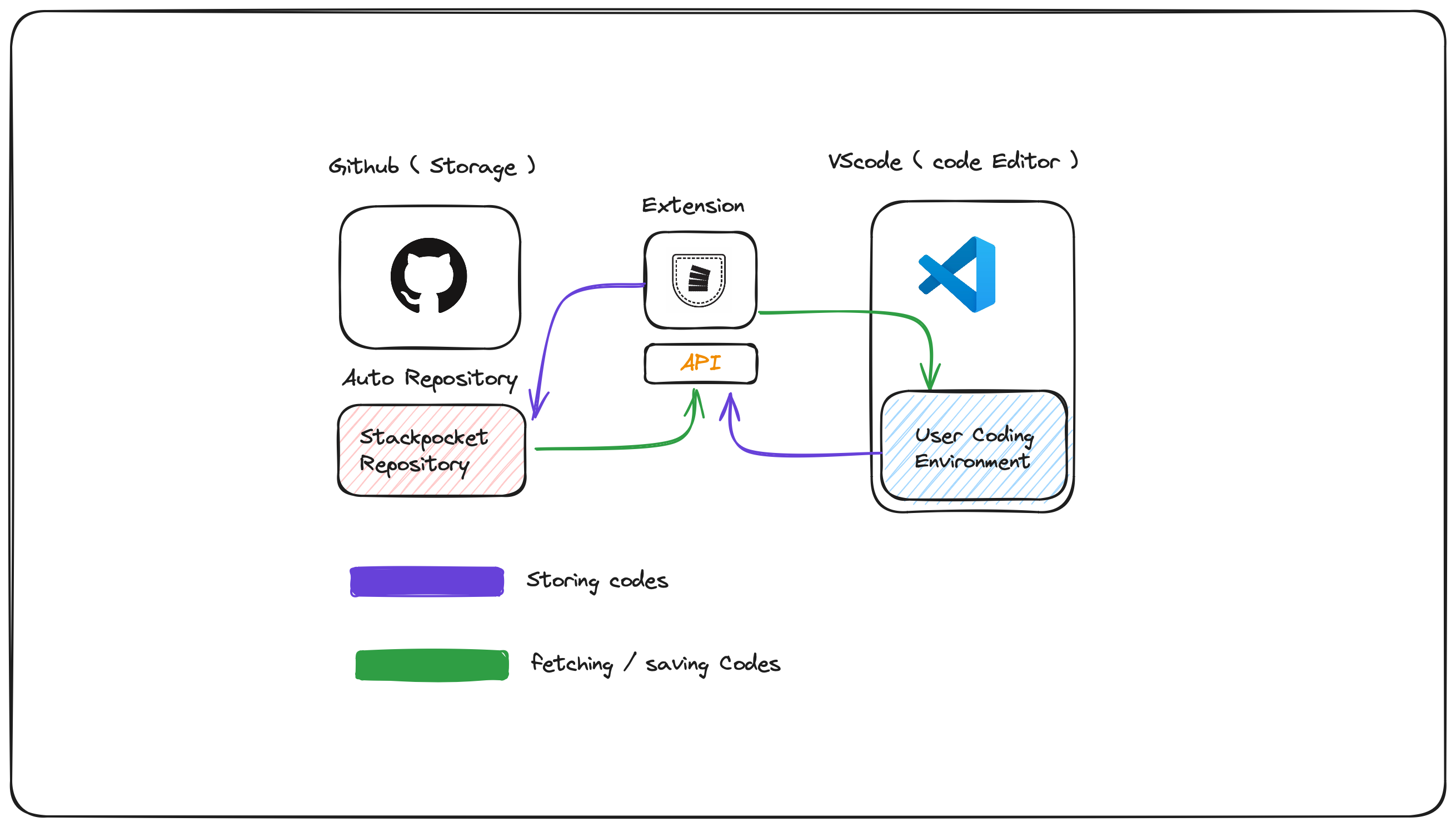
StackPocket is a powerful VSCode extension that allows seamless sharing of code snippets directly within VSCode using GitHub as the storage. It's designed to make code sharing fast and effortless, eliminating the hassle of copying and pasting links.
- Highlight and Pocket: Highlight your code, right-click, and select "pocket it" to save your code snippets.
- Mentions: Access your saved stacks using @stackpocket or mention other users' stacks with @username.
- Collaborate: Easily share code snippets with team members, facilitating collaboration and code review.
- Organize: Fetch your code snippets in an organized folder created by StackPocket within VSCode.
- Store: Store all your code snippets directly in VSCode, with seamless GitHub integration.
- Integrated with GitHub: Automatically uploads code snippets to a GitHub repository, making them easily accessible.
- Fast and Seamless: Share code 10x faster directly within VSCode.
Mentions allow you to quickly access your own code snippets or another user's code snippets by triggering @stackpocket for your own snippets or @username for another user's snippets. This feature enables you to retrieve specific pieces of code without leaving your editor, improving workflow efficiency.
Advantages:
- Efficiency: Quickly access and insert code snippets without leaving the editor.
- Convenience: No need to navigate through multiple files or repositories.
- Collaboration: Easily share and use code snippets from other team members.
The Collaborate feature enables seamless sharing of code snippets with team members directly within VSCode. It simplifies the process of code reviews and collaborative coding sessions, allowing team members to contribute and provide feedback easily.
Advantages:
- Improved Code Reviews: Share code snippets for quick review and feedback.
- Enhanced Collaboration: Work together on code without leaving the editor.
- Time-Saving: Reduce the time spent on sharing code via external tools or platforms.
Organize allows you to fetch your code snippets in an organized folder created by StackPocket within VSCode. This feature helps you keep your code snippets neatly arranged, making it easier to manage and retrieve them when needed.
Advantages:
- Neat Organization: Keep all your code snippets organized in a dedicated folder.
- Easy Retrieval: Quickly find and use the snippets you need.
- Better Management: Simplifies the management of multiple code snippets.
Store all your code snippets directly in VSCode with seamless GitHub integration. This feature ensures that all your snippets are securely stored and easily accessible from any device with GitHub access.
Advantages:
- Secure Storage: Store snippets securely with GitHub.
- Accessibility: Access your snippets from any device with GitHub integration.
- Version Control: Benefit from GitHub's version control features for your code snippets.
- Install VSCode if you haven't already.
- Install the StackPocket extension from the VSCode marketplace.
- Follow the on-screen instructions to link your GitHub account.
- Highlight the code you want to save.
- Right-click and select "Pocket it".
- Use @stackpocket to access your saved stacks or @username to access others' stacks.