Repository navigation
Releases: Bingeljell/image-to-3dlab
Release list
v0.4.1: AMD support on Linux

AssetFurnace 0.4.1: AMD support on Linux
AMD cards are in. Contributed by @dlm21 in #92 and tested on real AMD hardware (RX 7900 XTX and Ryzen AI Max+ 395). Thank you!
New
- AMD on Linux (ROCm). The installer and Setup & Status recognise an AMD card, and three routes run on it:
- Pixal3D compiles itself for your card. There's no ready-made AMD build, so the first setup compiles for 10-20 minutes, once, and needs ROCm's HIP SDK (
sudo apt install rocm-hip-sdkon Ubuntu). - Generate Image installs the ROCm build of stable-diffusion.cpp.
- Auto-rig installs PyTorch's ROCm build. It's a large download (the torch wheel alone is ~6 GB).
- Pixal3D compiles itself for your card. There's no ready-made AMD build, so the first setup compiles for 10-20 minutes, once, and needs ROCm's HIP SDK (
- TRELLIS.2 and Hunyuan3D-2.1 need NVIDIA-only parts, so Setup says plainly that they aren't available on AMD.
- A heads-up when the graphics card looks full, naming the programs using it. It only warns and never blocks a run.
Fixed
- A run that ran out of graphics memory now says so, instead of "exited with code -6".
- The image tab says why a run failed.
- On Linux, the Blender that Setup installed is used before any other Blender on your system.
Install or update
curl -fsSL https://assetfurnace.com/install.sh | bashWindows: irm https://assetfurnace.com/install.ps1 | iex. Run the same line again to update. Nothing big downloads until you pick it in Setup & Status.
Full list: CHANGELOG.
v0.4.0: rig and animate humanoids
AssetFurnace 0.4.0: rig and animate, on your own machine
You can just make stuff. For free. Locally.
Type a sentence or drop a picture, and get back a textured, rigged, animated game character. On your own Apple Silicon Mac or NVIDIA PC. No account, no credits, nothing uploaded.

New
- Rig and animate humanoids locally. Auto-rig adds a skeleton (SkinTokens), and moves from 21 presets (Kimodo) are fitted onto it: rest pose straightened, arms kept out of the body, feet on the floor. Download a GLB for Godot, Unity, Unreal, Blender or three.js.
- The studio. One screen: your Library, a 3D viewer, and a Steps panel that runs the next step. + Create takes an idea, a picture or a GLB all the way to a moving character, and you can stop after any step.
- Runs survive a closed tab. Reopen the studio and it picks the run back up. An Activity page keeps every run, with logs when something fails.
- Open GLB, a short How to use page, and rename or hide assets.
Changed
- New name: AssetFurnace. Same repo, new look.
- Each try is a new try. A fresh seed every time, so trying again gives a different result.
- Qwen-Image pictures are yours, as Qwen confirmed. No more licence warnings.
Removed
- The classic viewer. The studio replaces it. Side-by-side Compare comes back in the studio soon. Need the classic viewer? It's in 0.3.9.
Install or update
curl -fsSL https://assetfurnace.com/install.sh | bashWindows: irm https://assetfurnace.com/install.ps1 | iex. Run the same line again to update. Nothing downloads until you pick a model in Setup & Status.
Full list: CHANGELOG. Built on SkinTokens, Kimodo, Pixal3D, TRELLIS.2, Hunyuan3D and Qwen-Image: thank you. Built with Qwen.
v0.3.9: models face the front
Pixal3D models face the front
A small cleanup release after 0.3.8's prop sheets.
Changed
- Pixal3D models now face you. They used to load showing their back in viewers and game engines. Each new run is turned to face the front, and Pixel Match still lands your picture on the right side. Older models are left as they were.
- Lighter far LODs for props. Each level of detail now halves the texture size (1024, 512, 256), so the far versions are real savings, not near-copies of the close one.
Fixed
- Pixal3D runs, and the props cut from them, record their licence again, so the Props tab shows it.
- Rig Review shows Blender's real error when a rebind crashes, instead of "missing artifacts".
- NVIDIA: the Pixal3D installer says up front when an older driver means a 10+ minute compile, and that updating the driver makes it a one-minute download.
To update, run the install line again. Full list in the CHANGELOG.
v0.3.8: one image, nine game props
One image, nine game props
Generate one picture with a grid of props, turn the whole sheet into 3D in a single Pixal3D run, and the new Props tab splits it into separate, upright, named props, each with three levels of detail ready for a game. Built by @AdrielSantana: our first contributor feature. Thank you!
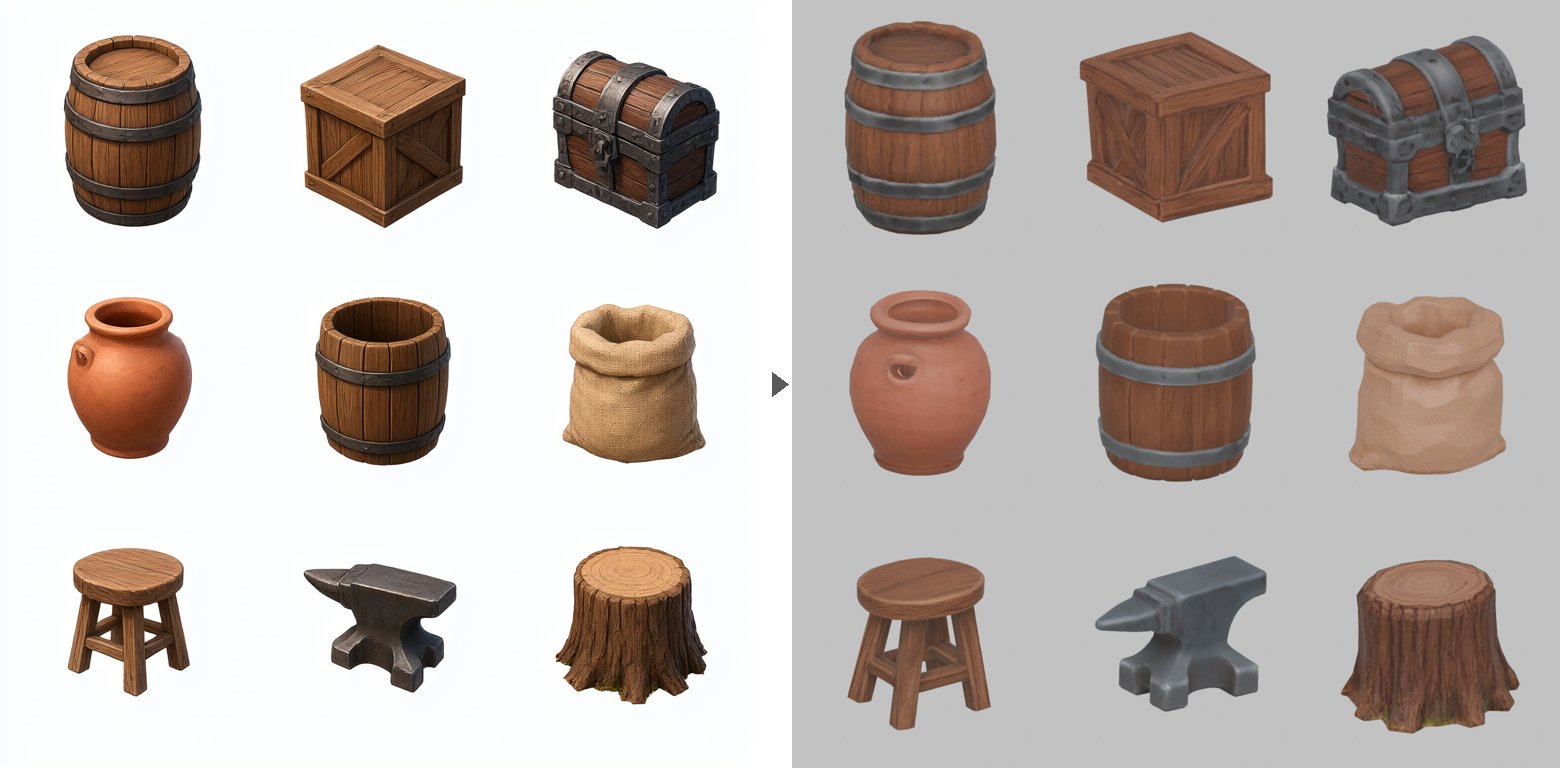
New
- Props tab: pick a generated sheet, name the props, click Split & finish. Each prop gets 3 LODs baked from the original, a 3D view and its own downloads. Came out facing sideways? Turn 90° re-bakes just that prop.
- Install gltfpack from Setup & Status: optional, under 2 MB, and each LOD also comes as a much smaller web-ready file.
- The prompt that works, and what was measured, are in docs/prop-sheets.md.
Fixed
- Finish now stops when a Blender step crashes, instead of reading as done. Finished models pass the Khronos glTF validator with no warnings. (Also @AdrielSantana.)
- Hunyuan paint no longer runs out of memory right after the shape step. Thanks @gabelul (#85).
- Sharper normal maps: a rounding slip was knocking a step of detail off them.
- Install Blender and the Mac Run setup button show their progress again.
- The menu bar stays on one row in a narrow window.
To update, run the install line again. Full list in the CHANGELOG.
Contributors


Assets 2
v0.3.7
Linux + NVIDIA gets every route
TRELLIS.2, Hunyuan3D-2.1 and Pixal3D now install and run on Linux with an NVIDIA card, set up from the viewer. Many fixes along the way make the Mac setup smoother too. Windows is untested; AMD is in progress.
New on NVIDIA
- TRELLIS.2: Microsoft's own code, same settings as on Mac.
- Hunyuan3D-2.1: shape + PBR paint in one run, on a 24 GB card. Not licensed in the EU, the UK or South Korea.
- Pixal3D: the ready-made build, no compiling.
Easier setup
- One install command, and the viewer opens. On RunPod it prints your pod's link.
- Sign in to Hugging Face from Setup & Status and see which gated models you can use.
- Every download says what it fetches, how big it is and under which licence, then asks first.
- Install Blender from Setup & Status on Linux, and Finish this model straight from a Generate result.
Fixed
- Updating after you've generated no longer gets refused.
- Pixal3D models keep their licence record with Debug off (thanks @AdrielSantana).
- Live progress keeps up through proxies (RunPod, nginx, Cloudflare).
Removed
- Stable Fast 3D on NVIDIA. It's Mac only again; the other three routes beat it there.
To update, run the install line again. Full list in the CHANGELOG.
Contributors
Assets 2
v0.3.6
Hotfix for 0.3.5: the viewer did not load. If you installed 0.3.5, run the install line again to update.
Fixed
- The viewer loads again. 0.3.5 shipped with a typo in one script that stopped the whole app starting: no tabs, Browse did nothing and dropped models downloaded instead of opening. A test now parses every viewer script, so this cannot ship again.
- A
.provenance.jsonbeside the GLB is kept. With Debug off, the viewer deleted everything but the GLB, licence record included; the record now stays with the file.
Pixel Match and everything else from 0.3.5 is unchanged: https://github.com/Bingeljell/image-to-3dlab/releases/tag/v0.3.5
v0.3.5
Pixel Match. Normally, Image-to-3D models redraw your picture, and the fine stuff (text, logos, numbers, faces) can come back as garbled or scuffed on your model. Pixel Match fixes that, making the output look near pixel-identical. Eg: Text like "VANGUARD 07" stays "VANGUARD 07" as in the demo video.
pixel-match-0.3.5-4x5-gh.mp4
Pair it with a low-poly finish: ~900k faces down to ~5k, and the front still matches your picture. On by default in Finish for Pixal3D models made in the lab. More backends and more angles are coming next.
Also new
- Finish works on NVIDIA. Linux tested end to end on an RTX 3090; Windows should work the same way. Finish needs Blender 4.2+, which you install yourself (blender.org). Setup & Status now shows whether it's found.
- Finish no longer repaints by default. Pixal3D models arrive painted and Pixel Match keeps the front exact, so a finish takes seconds, not minutes, and needs no extra download. Want the sides and back redrawn too? Tick Also repaint the sides and back (Apple Silicon for now, needs the 8.7 GB Hunyuan paint weights).
- Before and after in Finish, cameras locked together. Plus a 5k-triangle preset and tidier run folders: the finished model sits on its own at the top, named after your model and its size, and the in-between steps are tucked into a
stepsfolder. - Compare shows up to four models in a grid.
- Pixal3D setup brings the BiRefNet-lite background remover along, so thin and light-coloured parts survive the cut-out.
- Rebuild button in Setup & Status for Pixal3D installs that predate our latest fixes. No Terminal needed.
Fixes
- Hunyuan3D-MLX paint works on a fresh install. Thanks @gabelul for the report (#65).
- Mac-only backends point NVIDIA users somewhere. TRELLIS.2 and Hunyuan3D now link their official NVIDIA versions instead of a bare "needs Apple Silicon".
- TRELLIS.2 warns about its gated DINOv3 encoder up front, so nobody waits out a 14 GB download to hit a login error.
- Restarting the viewer no longer kills a Finish run another process is running.
- The viewer no longer quotes run times measured on our machines. Yours will differ.
Update
Run the same install line again:
curl -fsSL https://raw.githubusercontent.com/Bingeljell/image-to-3dlab/main/install.sh | bashirm https://raw.githubusercontent.com/Bingeljell/image-to-3dlab/main/install.ps1 | iexThen open Setup & Status:
- Already have Pixal3D but not the background remover? Pixal3D shows Resume download. It fetches just the 224 MB remover.
- Want Finish? Install Blender 4.2+ if the Blender card says it's missing, then restart the viewer.
Contributors
Assets 2
v0.3.4
Standardised background removal. u2net wasn't cutting it. Literally. So we've upgraded to BiRefNet-lite, which is blazing fast. Took a sec to load on my mac and ~4 secs for clean-up. It's an extra download (224 MB), but it gives the models much cleaner input images, and it now runs for every backend.
Get it from Setup & Status → Background remover. Until you do, runs use u2net as before.
Optimisations
- Pixal3D runs 8 sampling steps instead of 12. 15–30% faster in our tests, same shape. Pick 12 (full) under Steps for hero assets.
Fixes
- Pixal3D only offers 1024. Its single-image mode doesn't support 1536, so picking it failed straight away.
- The Generate 3D preview shows just your model, not the whole viewer squeezed into the panel.
Changes
- Generated images now save to
output/images/.
Update
Run the same install line again:
curl -fsSL https://raw.githubusercontent.com/Bingeljell/image-to-3dlab/main/install.sh | bashirm https://raw.githubusercontent.com/Bingeljell/image-to-3dlab/main/install.ps1 | iexThen, optionally:
-
New background remover: Setup & Status → Background remover → Set up. (From a terminal:
cd ~/image-to-3dlab && .venv/bin/python scripts/bootstrap_matte.py.) -
Faster Pixal3D (Mac): open Terminal (⌘+Space, type "Terminal"), paste this and press Enter:
cd ~/image-to-3dlab && .venv/bin/python scripts/bootstrap_pixal3d.py --build-only --rebuild
It takes a couple of minutes and downloads no models. Restart the viewer afterwards. Same command on Linux with the CUDA toolkit. Windows stays at 12 steps for now. (Installed somewhere other than
~/image-to-3dlab? Use that folder instead.)
v0.3.3
Windows + NVIDIA: your GPU gets used now. The installer was pulling the CPU-only PyTorch (the only one PyPI has for Windows), so everything ran on the processor. It now installs PyTorch with CUDA, and re-running the installer replaces a CPU-only build. Reported by @paisanllc in #50. This one is pending verification on real Windows machines, so if you try it, please tell us how it went.
Also in this release:
- Finish bakes the original's detail onto the finished model: a normal map (the fine relief a retopology throws away) and the source's metallic-roughness map, so metal stays shiny and skin stays matte. New "Bake detail" stage, a few seconds long;
--skip-baketurns it off. Flagged by @AdrielSantana in #49. - Pixal3D writes a run record (
<model>.jsonbeside the GLB) with the input image, settings, licence and file hashes, like the other routes. Reported by @paisanllc in #50.
Update
Run the same install line again:
curl -fsSL https://raw.githubusercontent.com/Bingeljell/image-to-3dlab/main/install.sh | bashirm https://raw.githubusercontent.com/Bingeljell/image-to-3dlab/main/install.ps1 | iexContributors

Assets 2
v0.3.2
NVIDIA driver 610+ works again. Newer drivers renamed the CUDA field that nvidia-smi prints, so Setup couldn't read your CUDA version and refused every model. Found and diagnosed by @paisanllc in #50. Thank you!
Also in this release:
- Apache-2.0 licence, with a
NOTICEfile. Model weights keep their own licences. - Qwen-Image wording: the pictures you generate are yours, per Qwen's statement. The licence text itself is ambiguous, so commercial users should check it themselves.
- Fresh installs now include the mesh libraries (
trimesh,fast_simplification,rtree).
Update
Run the same install line again:
curl -fsSL https://raw.githubusercontent.com/Bingeljell/image-to-3dlab/main/install.sh | bashirm https://raw.githubusercontent.com/Bingeljell/image-to-3dlab/main/install.ps1 | iex