Repository navigation
Releases: BitsAndDopamine/Esperanto-STT
Release list
v0.2

Full Changelog: v0.1.2...v0.2
- improved progress bar with more information
- improved file selector
v0.1.2
Full Changelog: v0.1.1...v0.1.2
Windows executable now works again.
v0.1.1
Full Changelog: v0.1.0...v0.1.1
Esperanto-STT v0.1.1
Esperanto speech-to-text: turn mp3 audio into .srt subtitle files, with a small desktop GUI. Runs on Linux and Windows, CPU-only, fully offline.
Special thanks to all the contributors of the Esperanto Dataset of the Common Voice Project that made this possible.
Features
Transcription
- INT8 ONNX export of NVIDIA's Esperanto Conformer-Transducer Large (~120M params) via onnx-asr + ONNX Runtime — no PyTorch, NeMo or CUDA
- Word-level timestamps → properly timed subtitle blocks
- Input formats: mp3, wav, ogg, flac (m4a/aac only when ffmpeg is installed)
- Long files are transcribed in 30 s chunks (batched) at ~10-15× realtime on CPU — a 48-minute podcast takes ~3-5 minutes
- Output is the model's raw text: lowercase Esperanto with diacritics (ĉĝĥĵŝŭ), no punctuation
Subtitles
- The
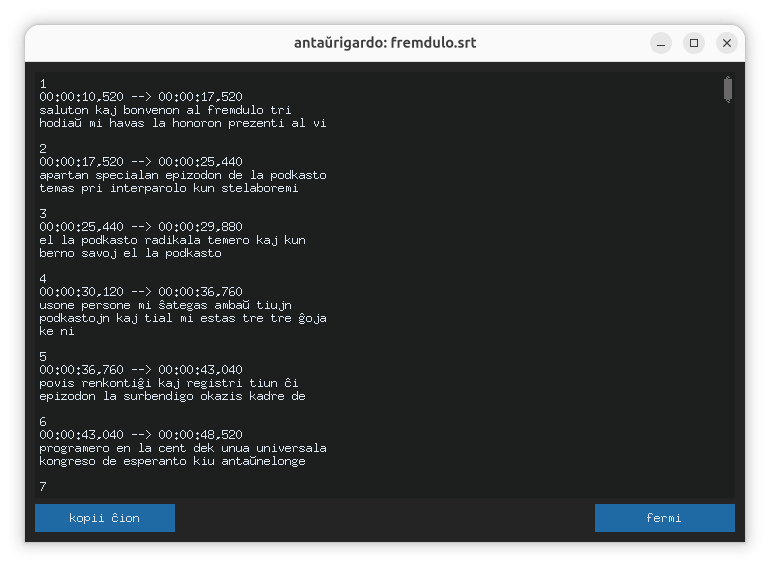
.srtis written incrementally — created when transcription starts and growing block by block, so you can already read it (editor, player, preview window) while the progress bar runs; a partial file is kept if a run fails midway - Readable blocks: ≤ 84 chars (2×42) and ≤ 7 s per block, split on pauses > 1.5 s, min 0.5 s per block
GUI (in Esperanto)
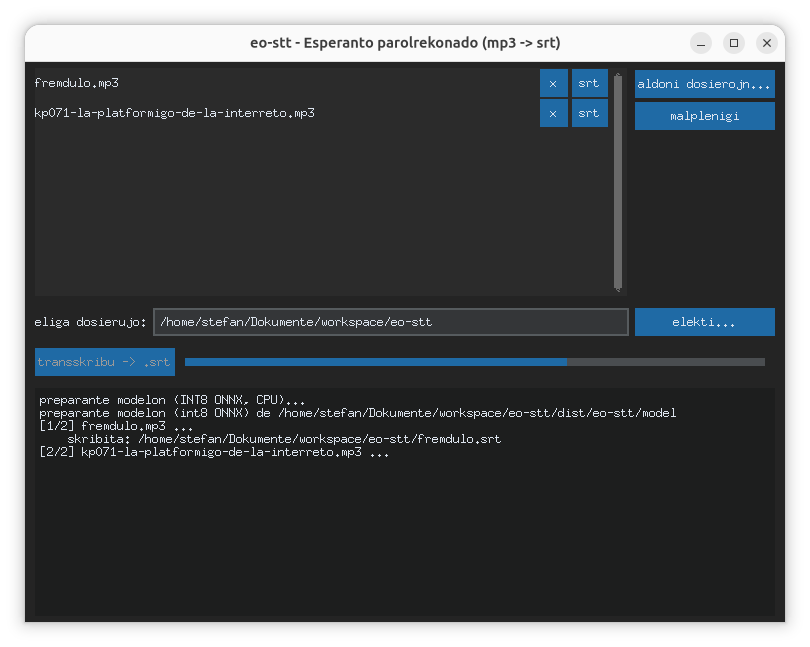
- Dark-mode desktop app (CustomTkinter), fully in Esperanto with diacritics
- File list with per-file progress; an srt button per file opens a read-only preview — works mid-run, too
- When a run completes, a preview window opens automatically for the last file, with a kopii ĉion (copy all) button
- OS-native file picker (zenity on GNOME/Linux, native dialog on Windows)
CLI
eo-stt episode.mp3 more.mp3 -o subtitles/— one.srtper input, written next to the file or into-o- Chunk-level progress; ASCII-only output (safe on any Windows console)
Portable, offline builds
- Self-contained executables for Linux and Windows — no Python, no admin rights, no internet needed on the target machine
- The INT8 model (~142 MB) is bundled beside the executable (
model/) — the app never downloads anything at runtime - One executable, two interfaces: no arguments → GUI, with arguments → CLI
- Point the app at a different model directory with the
EO_STT_MODEL_DIRenvironment variable (or--modelon the CLI)
Downloads
| Artifact | Platform |
|---|---|
| eo-stt-v0.1.1-linux.tar.gz | Linux (x86_64) |
| eo-stt-v0.1.1-windows.zip | Windows (x64) - broken in this release |
Both artifacts are built automatically by CI (GitHub Actions) from the v0.1.0 tag; the model is fetched at build time (pinned commit, sha256-verified) and bundled.
Unpack, then from the eo-stt/ folder run ./eo-stt for the GUI or ./eo-stt episode.mp3 -o out/ for the CLI. On Windows: unzip and double-click eo-stt.exe for the GUI, or run it from a terminal for the CLI.
Notes & known limitations
- Model output is lowercase without punctuation — passed through as-is (that's the model, not a bug)
- Audio is chunked in hard 30 s blocks without overlap: a word straddling a chunk boundary can rarely come out garbled or duplicated
- Windows Defender may flag PyInstaller-built executables as a false positive — add an exclusion for the app folder if that happens
- Build from source: see the README (
python fetch_model.py,python build.py; tests:python -m pytest)
License
- Code: CC0 1.0 Universal (public domain dedication)
- Bundled model: CC-BY-4.0 — NVIDIA's Esperanto Conformer-Transducer Large via OpenVoiceOS/nvidia-eo-conformer-transducer-large-onnx (attribution kept in the README)
Big parts of this repo have been written by Mistral Larg 4 using OpenCode.
v0.1.0
Full Changelog: https://github.com/BitsAndDopamine/Esperanto-STT/commits/v0.1.0
Esperanto-STT v0.1. -- broken release
This release can't open files. Use v0.1.1 instead
License
- Code: CC0 1.0 Universal (public domain dedication)
- Bundled model: CC-BY-4.0 — NVIDIA's Esperanto Conformer-Transducer Large via OpenVoiceOS/nvidia-eo-conformer-transducer-large-onnx (attribution kept in the README)