User Settings
BLXCode opens settings in a center workbench tab (not a modal). The command palette entry Open Settings focuses an existing settings tab or creates one per workspace — see Workspaces → Center tabs for the tab lifecycle. Settings can be opened even without an active workspace — BLXCode lazily provisions an ephemeral shell workspace that hosts only the Settings tab and is disposed when you close it.
| Category | What it configures |
|---|---|
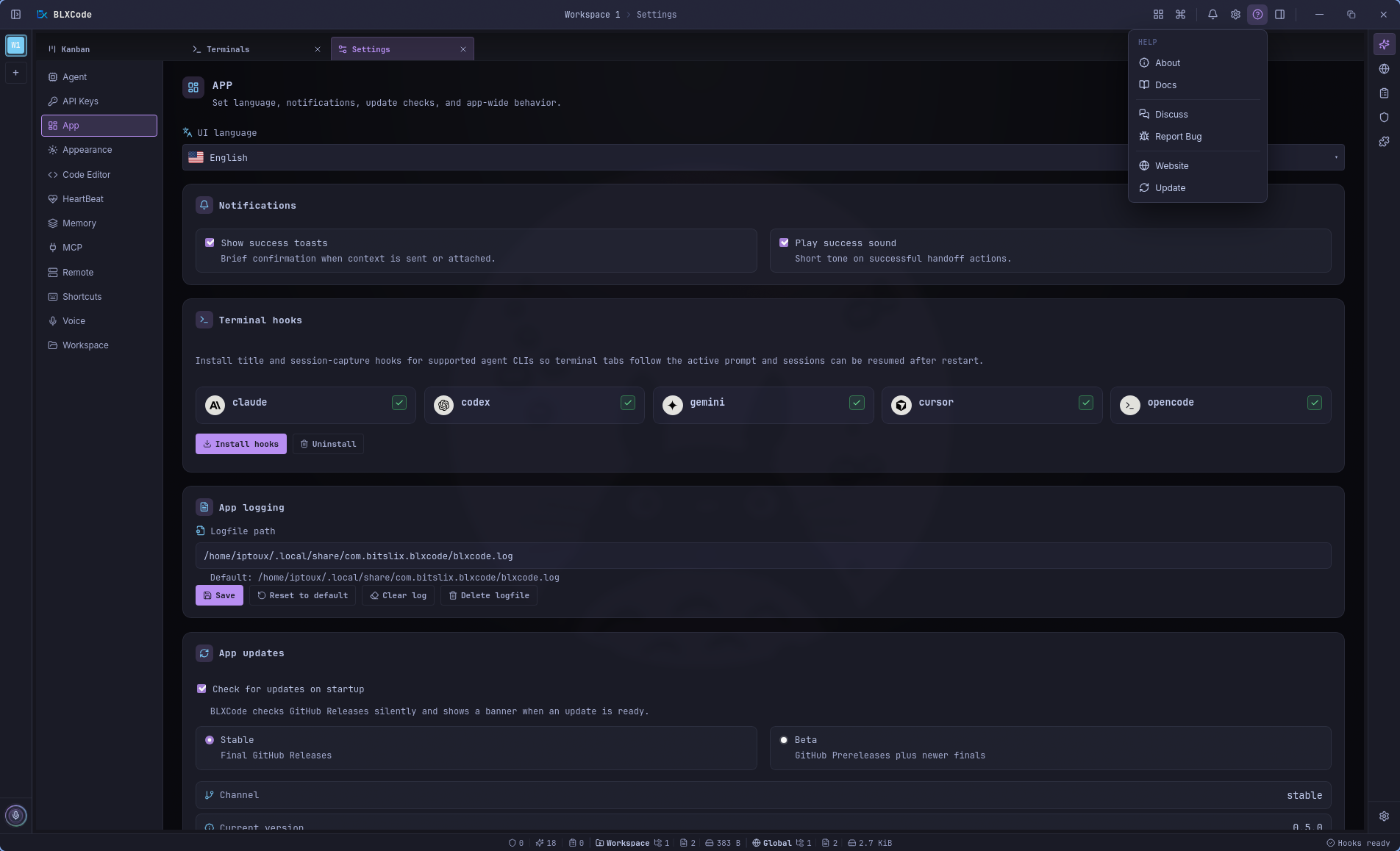
| App | UI language, STT language + push-to-talk, notifications, terminal hooks, app log, app updates (Stable/Beta channel, background checks, structured release-notes dialog), help/About |
| Appearance | App themes — 32 presets, search, Dark/Light filters, plus theme-independent Roundings, Font, and Font size controls; see Appearance & Themes |
| Shortcuts | Keyboard shortcut preset, prefix key, and per-action rebinding (incl. Push-to-Talk); see Keyboard Shortcuts |
| API Keys | All provider secrets in one pane — see below |
| Memory | Memory right-panel toggle, folder-grouping and split-view toggles, Agent memory pointers flow, architecture-rebuild controls, Memory Indexer settings/stats |
| HeartBeat | HeartBeat interval, enable/disable, service listing, Run now, per-service status snapshots |
| MCP | Model Context Protocol servers (stdio / HTTP transports), per-server on/off, connection test, reload-required hints; see MCP Servers |
| Plugins | BLXCode plugin packages, built-in runtime command providers, GitHub package install, enable/disable/remove; see Plugins |
| Workspace | Default project directory, agent sandbox root, embedded browser URL, category colors for Memory, terminal naming mode and name pool, confirm-before-closing |
| Code Editor | Vim key bindings (default on), in-editor shortcuts (Save / Find / Replace / Go to line / Toggle comment / Fold / Move line / Duplicate line / Format) |
| BLXCode Agent | Text, image, and voice inference; Auto-compact threshold; tool-loop limit; Agent orb (3D / 2D); personal nickname; see below |
| Remote | SSH connection presets for remote workspaces (host/port/user, password / key / agent auth, encrypted secrets, session-resume model); see Remote (SSH) |
Legacy saved categories (Image, Voice, Memory) still open the correct pane.
Settings → App collects shell-wide preferences that aren't tied to a single workspace: UI language, voice/STT defaults, push-to-talk, notification toasts and sounds, terminal hooks, the in-app app log, and the GitHub Releases auto-updater. Keyboard shortcuts moved to their own Shortcuts category (see Keyboard Shortcuts).
The App log panel is reachable from the Help menu in the titlebar and from the App settings area. It shows structured app events (MCP lifecycle, hook install outcomes, async command errors, …) from a rotating log file with timestamps, level chips, and per-event metadata. Levels: debug / info / warn / error.
A Help / About menu lives in the titlebar next to the bell. It opens a popover with product metadata (name, version, commit, build channel), a link grid (Docs, Releases, Report issue, Discord, Sponsor), and an integrated Check for updates action wired to the manual update check.
App updates support two channels:
- Stable uses final GitHub Releases.
-
Beta includes GitHub prereleases such as
0.6.0-pre.ed4dc, and also accepts newer final stable releases when they supersede the current beta.
When Check for updates on startup is enabled, BLXCode checks immediately after launch and then every 10 minutes while the app is open. Background checks are quiet when nothing changed, show a discreet statusline item only during the check, and add a titlebar/native notification when a new update is available. Clicking that notification opens the update dialog.
The update dialog reuses the structured release-notes view from post_update_release_notes(version, channel) (hero summary, sections, loading state, fallback to the updater manifest body) instead of showing the manifest body as plain text — the update-specific controls (current → available version, install/download progress, retry, restart, Later) stay in place. Beta builds prefer docs/releases/v{version}.md for the exact prerelease tag and fall back to the stable base notes when needed.
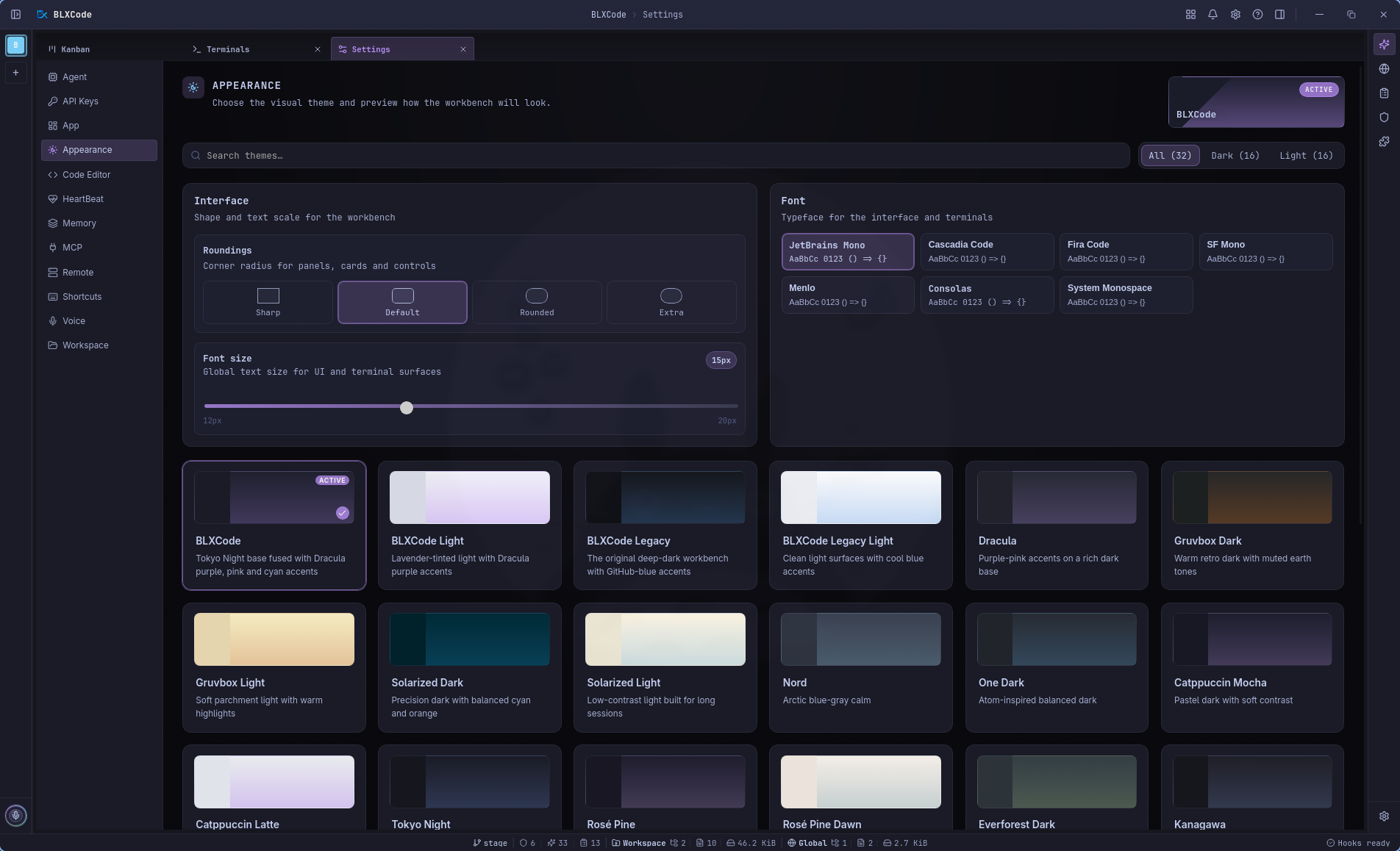
Settings → Appearance lets you pick an app theme and adjust two theme-independent knobs:
- Roundings — a global corner-radius scale (Sharp / Default / Rounded / Extra) that re-rounds the whole workbench instantly.
-
Font — a curated monospace picker (JetBrains Mono bundled, plus Cascadia Code, Fira Code, SF Mono, Menlo, Consolas, and System Monospace as system-dependent options). The xterm terminals read their
fontFamilyfrom the same token and re-fit when the font changes. - BLXCode (default) — the redesigned Tokyo Night × Dracula dark workbench look.
- BLXCode Legacy / BLXCode Legacy Light — the previous GitHub-blue default, kept under explicit ids.
- Thirty additional dark/light presets (Dracula, Gruvbox, Solarized, Nord, One Dark/Light, Catppuccin, Tokyo Night & Light, Rosé Pine / Dawn, Everforest, Kanagawa, Claude Code warm-charcoal, Night Owl, Ayu Mirage / Light, GitHub Light, plus a family of cool light themes — Winter, Paper, Alpine, Frost, Lilac).
- Search and All / Dark / Light filters (16 dark, 16 light).
- Instant preview on each card; choice persists across restarts.
Themes affect sidebar, panels, terminals, graphs, and settings chrome. Embedded web pages, native webviews, and your Memory category color swatches are documented exceptions.
Full guide: Appearance & Themes.
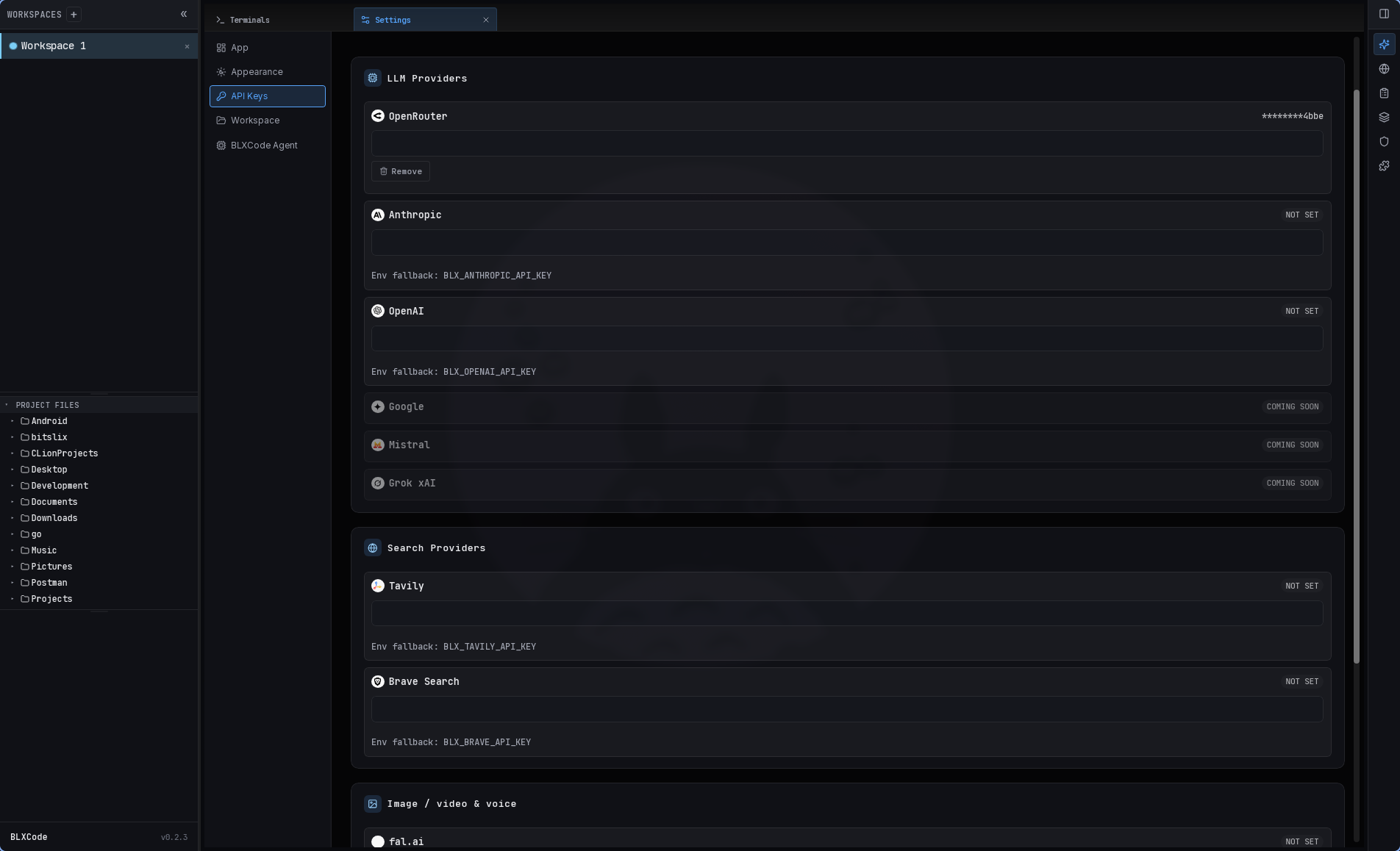
Settings → API Keys is the only place to enter provider secrets.
- LLM providers: OpenRouter, Anthropic, OpenAI, Hugging Face, Cloudflare Workers AI, Together AI, Portkey, and coming-soon rows (Google, Mistral, Grok xAI).
- Media / search: Tavily, Brave, fal.ai (image), Amazon Polly (AWS voice).
- One Save / Discard footer for the whole pane; per-row remove marks keys for deletion on save.
- Keys use the OS keyring (
BLXCodeservice) withBLX_*env fallback when the store is empty; the UI shows via env when a fallback is active.
Agent, image, and voice panes show a short status line pointing here — they do not contain password fields.
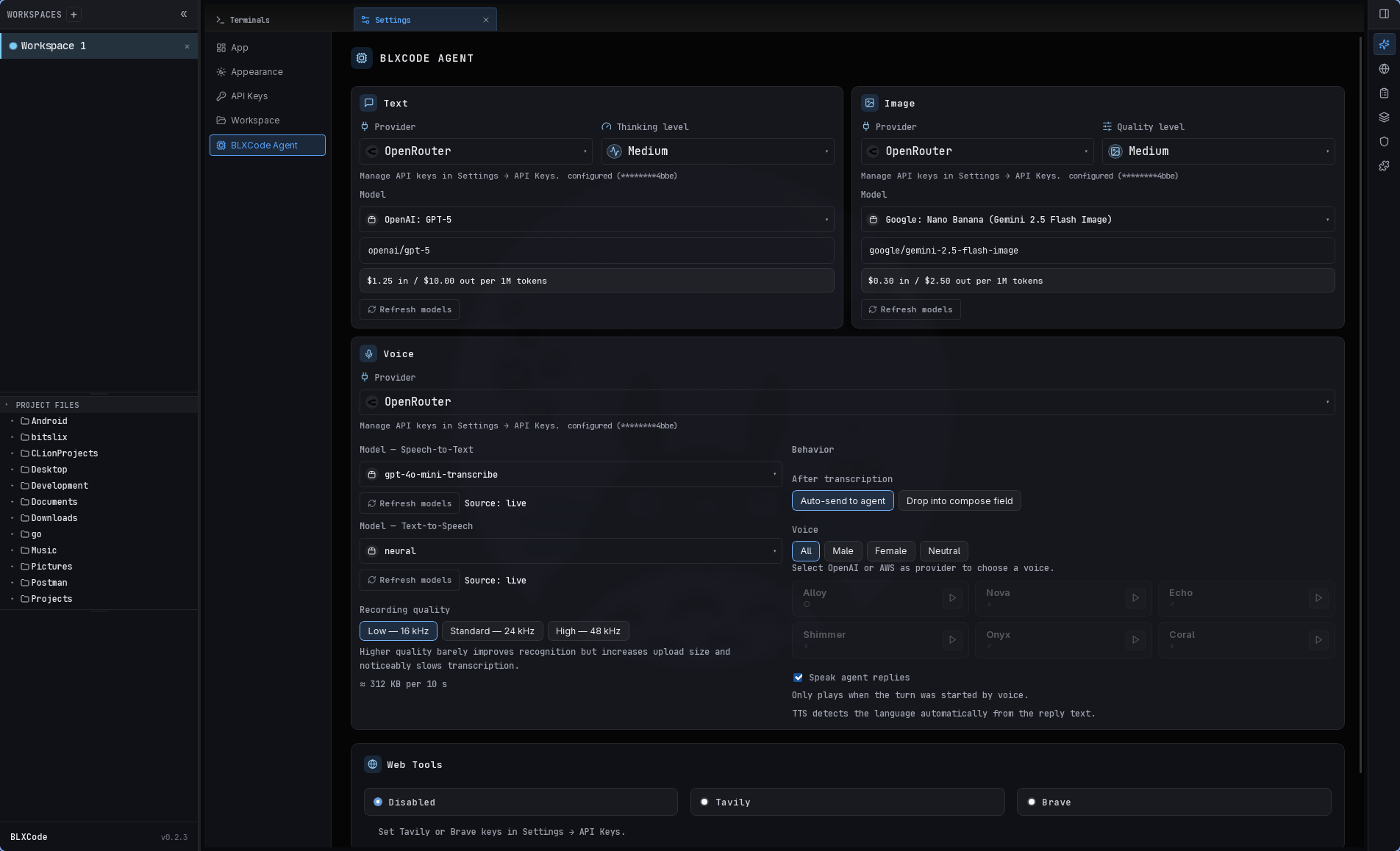
Settings → BLXCode Agent uses a grid:
| Area | Settings |
|---|---|
| Text | Provider, thinking level, tool-loop limit (1–500, default 36), model (AgentModelPicker), refresh |
| Auto-compact | Toggle (default on) and threshold (50–95 %, default 85 %) — runs a non-tool summarization pass when the context window crosses the threshold, between turns, at most once per crossing |
| Image | Provider, quality level, model, auto-save |
| Voice | Provider (OpenAI / OpenRouter / AWS), STT + TTS models, recording quality, post-STT behavior, voice picks, speak replies, Push-to-Talk mode, target, target mode, live partial transcript, TTS-collision policy |
| Agent orb | 3D Drobo (default) or 2D logo — pick which mode the voice orb renders in |
| Web Tools | Tavily / Brave / disabled backend |
One Save / Discard at the bottom persists text provider, tool-loop limit, auto-compact, and web tools together. Image and voice sections auto-save on change. The Agent orb switch updates the open Agent tab without restarting.
Details: Agent Providers, Image Mode, Voice.
Settings → Memory centralizes everything related to the Memory feature. The right-sidebar Memory tab is removed; the Memory center tab and this settings pane together cover the full surface.
| Section | What it does |
|---|---|
| Right-panel toggle | Show the memory file tree in the right sidebar (default off so the right rail no longer auto-shows the tree for new users). |
| Folder grouping | Group notes under their category folder. |
| Split view | Keep the terminal grid visible beside the Memory panel. |
| Agent memory pointers | Install/uninstall the memory pointer blocks (CLAUDE.md, AGENTS.md, GEMINI.md) that let external coding agents discover BLXCode's memory and learnings paths. |
| Architecture | Rebuild or lint the workspace architecture map (memory_rebuild_architecture / memory_lint_architecture). |
| Memory Indexer | HeartBeat-driven indexing of all open workspaces (see Memory Indexer below). |
See Memory And Tasks for the panel itself, the graph, and the agent tools.
A new Memory Indexer service is registered with the HeartBeat runtime. It indexes all currently open workspaces asynchronously:
- Per-workspace runs never overlap (skipped while one is already in flight).
- A run is marked stalled after three consecutive skips.
- Generated Memory notes use frontmatter and are written into the existing Memory categories (
rules,skills,plans) for both workspace memory (.agents/memory/...) and global memory (~/.blxcode/memory/...), so the existing Memory graph and Graph3D clustering consume them without a separateindexcategory.
The Settings → Memory pane shows Memory Indexer stats plus independent provider/model settings, and the left statusbar process area rotates active processes every three seconds — including Memory Indexer running or stalled state.
Settings → HeartBeat configures the HeartBeat runtime — a small, plugin-ready orchestrator that runs registered services on a clampable interval (10 minutes to 24 hours). The first registered service is the Memory Indexer.
| Setting | Behavior |
|---|---|
| Interval | How often the HeartBeat fires (clamped 10 min – 24 h). |
| Service enable / disable | Each registered service can be toggled on or off globally. |
| Service listing | The pane lists every registered service with its on/off state and a short status snapshot. |
| Run now | A button to fire a service manually without waiting for the next tick. |
The left statusbar process area rotates active processes every three seconds, including the Memory Indexer running or stalled state, so you can see at a glance whether the background work is healthy.
See Memory Indexer below for the indexer itself.
Settings → MCP registers and manages Model Context Protocol (MCP) servers. Each server is exposed to the in-app BLXCode Agent and to the bundled terminal CLI agents (claude, codex, gemini, opencode, cursor) on workspace launch.
| Field | Description |
|---|---|
| Name | Display name and mcp.<server>.<tool> prefix. |
| Transport | stdio (command, args, env) or HTTP (url, headers). |
| On / off | Individual switch per server. Enable applies to the in-app agent after a session reset and to terminal CLIs after an app reload. |
| Add / Edit / Remove | CRUD on the central registry at {app_data_dir}/mcp/servers.json. |
| Test connection | Runs initialize + tools/list end-to-end and reports the live tool count. |
For terminal CLIs the enabled servers are translated into each CLI's native, project-scoped config (.mcp.json, .codex/config.toml, .gemini/settings.json, opencode.json, .cursor/mcp.json) on launch, with merge-safe semantics and a .blxcode/mcp-managed.json sidecar that tracks the BLXCode-managed keys. Remote SSH workspaces are skipped.
The available tool set is fixed at session start, so the MCP pane shows a mandatory session-reset reminder (with a one-click reset session button) and raises a reload-required hint whenever a server is added, edited, removed, enabled, or disabled.
See Agent Providers — MCP servers for how the tools are wired into the agent.
Settings → Plugins manages BLXCode plugin packages. The first supported plugin category is Runtime: command providers that detect project run/dev/debug/test/build commands for the titlebar Run menu.
The pane lists built-in and installed packages with their category, version, source, and enabled state.
| Action | Behavior |
|---|---|
| Enable / Disable | Controls whether a plugin contributes runtime commands to the active workspace's Run menu. |
| Install | Opens a dialog for a GitHub repository or package-directory URL, with optional Git ref and package directory fields. |
| Remove | Deletes a GitHub-installed plugin package from the app data plugin folder. Built-in packages cannot be removed. |
| Refresh | Reloads the plugin registry and built-in package list. |
Install URLs can point to a repository root or a package folder, for example:
https://github.com/owner/repo/tree/main/packages/runtime-example
Installed packages are validated before they are copied into BLXCode's app data plugin folder. Current plugins are declarative package directories; BLXCode reads manifests and detector JSON files, and does not execute plugin code.
Settings → Code Editor adds a Vim key bindings switch (default on) and rebindable file editor / preview shortcuts.
| Section | Behavior |
|---|---|
| Vim key bindings | Enables @replit/codemirror-vim for the in-app file editor and the read-only file preview. Vim lives in its own CodeMirror Compartment, so toggling it reconfigures the live editor without a remount (setVim). |
| Editor shortcuts | Save, Find, Find & replace, Go to line, Toggle comment, Fold / unfold, Move line up/down, Duplicate line, Format. Persisted separately (EDITOR_SHORTCUT_BINDINGS_KEY) and dispatched through a dedicated CodeMirror keymap compartment. |
| VIM status indicator | While a file editor/preview tab is focused and Vim is on, the status bar's left slot shows a VIM indicator. |
| Disabled-while-Vim | Because Vim owns the keymap, the editor shortcuts section is disabled with an inline hint while Vim mode is active. |
All file editor and preview settings persist under blxcode_editor_settings_v1 in localStorage. See File Preview for the in-editor experience.
Settings → Workspace:
- Paths & sandbox — default folder for new workspaces and BLXCode Agent file sandbox root.
- Embedded browser — default URL for the Browser tab.
- Category colors — presets used for Memory category dots and sidebar accents (formerly under a separate Memory settings tab).
- Confirm before closing a workspace — when enabled (default), BLXCode asks before closing a workspace from the sidebar ×, context menu, or Terminals tab close path.
-
Terminal naming — switch terminal title bars from the native
#1,#2slot numbers to friendly agent names (Devon, Tom, Mia, …) drawn from an editable, app-wide name pool. Assignment is deterministic from each terminal's stableslot_id(the technical identity used for PTY routing,sessions.json, and terminal_key never changes), so a terminal keeps its name as siblings come and go. Add / remove / reset-to-defaults entries in the pool from the same section. Any single terminal can be given a custom name via double-click on its header title or the header right-click menu (Rename / Reset name); the override persists per slot (slot_name_overrides, keyed byslot_id) and survives restarts. - Architecture LLM prose — reserved for a future optional LLM pass when rebuilding the architecture map; rebuilds today are deterministic and do not call a model.
See Workspaces for File Diff, Git sync, and the architecture map in Memory.
BLXCode replaces several browser-native controls with theme-aware alternatives:
-
<select>popups — dropdown menus in the Create Workspace wizard, Remote connection picks, and other settings selectors use the active theme's surface and text colors instead of the OS default white background. -
Confirmation dialogs — destructive actions (closing a workspace, removing plans, deleting SSH connections) show a themed modal dialog instead of
window.confirm(). The dialog uses the app's accent/ danger tokens and keyboard navigation (Tab, Enter, Esc). -
Create Workspace backdrop — the wizard overlay has a soft top-edge glow (
box-shadow) that matches the active theme's accent color. This replaces a flat dimmed backdrop.
Agent completions, plan/task state changes, blocked tasks, MCP reload-required hints, and background update availability are surfaced through a shared NotificationService and shown in a titlebar notification popover (a bell icon with an unread badge in the titlebar). Each notification has an icon, title, body, timestamp, and an optional deep-link target — e.g. { "view": "kanban" }, { "view": "update" }, { "view": "agent" } — that navigates to the right center tab or dialog. Notification kind, badge counts, and target navigation persist across restarts. Best-effort native notifications are also fired through the existing permission path.
- Agent Harness — core skills, web tools behavior
- Agent Providers — providers, MCP, agent nickname
- Memory And Tasks — Memory settings, HeartBeat/Memory Indexer
- Plans — plans, multi-Kanban, Mermaid diagrams
- Workspaces — app status line, sidebar context drag-and-drop
- Troubleshooting — keyring and key errors