
Audio that isn't Apple Music no longer gets resampled.
What's new
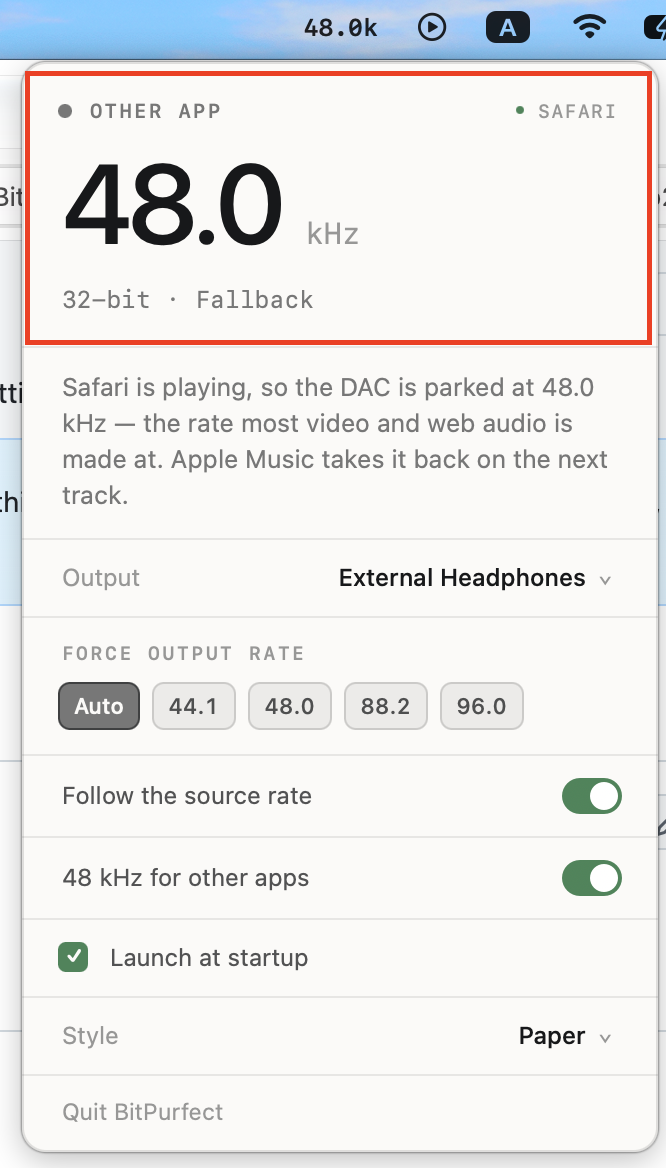
48 kHz fallback for other apps. In 1.0, when Apple Music stopped, the DAC stayed on whatever rate the last track needed — so a YouTube video or a podcast played through a device still parked at 88.2 kHz, resampled the whole way. BitPurfect now drops the device to 48 kHz whenever a non-Music app takes over the audio, which is what video, web audio and system sound are authored at. Apple Music takes the rate back on the next track.
There's a switch for it in the panel — 48 kHz for other apps — on by default.
A new panel reading, "Other app." Rather than showing an idle state or judging bit-perfectness that doesn't apply, the panel names whatever has the audio and says where the rate is parked and why. The screenshot above is exactly that: Safari playing, DAC at 48 kHz, and the sub-line honestly reporting 32-bit · Fallback because that output offers only a 32-bit container at 48 kHz.
Smaller changes
- Safari identifies itself to macOS as
com.apple.WebKit.GPU("Safari Graphics and Media"); it's relabelled to just Safari - The anti-pop stream now writes silence under any app's audio, not only Apple Music's
- A pinned rate still wins over everything, and with nothing playing the rate is left alone so pausing doesn't make the DAC re-lock
Everything from 1.0 is unchanged: sample-rate matching, clock-family-aware fallback, rate holding, and anti-pop for sensitive IEMs.
Two limits worth knowing
- It only sees apps that publish now-playing. Browsers, Spotify, Podcasts, TV and most media players do — Safari is verified. QuickTime playing a plain audio file publishes nothing at all, and neither do games or alert sounds. For those the rate is left where it is rather than guessed at.
- The 24-bit part is best-effort. Bit depth can only be set through a stream's physical format, and a device only offers what its driver publishes — every output on the test machine exposes a 32-bit container at 48 kHz and no 24-bit at all. The rate always moves; the depth is set only where the device genuinely offers it, and the panel reports what actually happened.
Install
macOS will block this on first launch — it's signed with an anonymous (ad-hoc) signature and not notarized.
- Drag BitPurfect to Applications and double-click it. macOS refuses.
- Open System Settings → Privacy & Security, scroll to the message about BitPurfect, click Open Anyway, confirm.
Or from a terminal:
xattr -d com.apple.quarantine /Applications/BitPurfect.app
Nothing leaves your machine — no network access, no analytics, no accounts.
Requirements
- Apple Silicon Mac (arm64 only)
- Apple Music with Lossless enabled
- No admin account needed
Verified on macOS 27.0 only. Detection reads a Core Audio log line whose wording Apple could change in any release.