Bookmark any viewpoint. Switch PLYs in a flash.

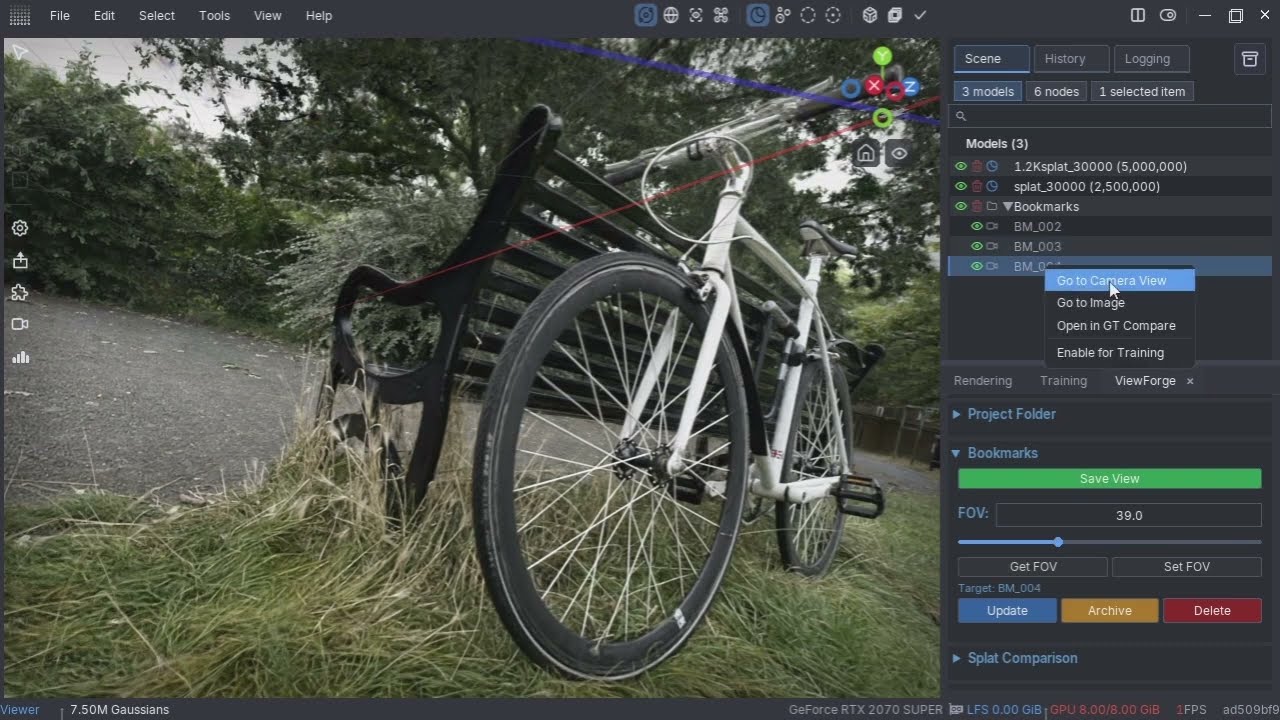
A LichtFeld Studio plugin for saving and managing camera viewpoints (Bookmarks) during 3D Gaussian Splatting workflows.
- Save View — Save the current camera position, orientation, and FOV as a named Bookmark (BM_001, BM_002, ...)
- FOV control — View and adjust FOV per Bookmark; syncs automatically when switching Bookmarks
- Update / Archive / Delete — Manage Bookmarks with confirmation dialogs for destructive operations
- Splat Comparison — Switch between multiple PLY files from the exact same viewpoint
- Manage JSON Files — Unarchive individual or all archived Bookmarks back to the active list
- LichtFeld Studio 0.5.2 or later
- Download or clone this repository
- Copy the folder into your LichtFeld Studio plugins directory:
C:\Users\<username>\.lichtfeld\plugins\ViewForge\ - Restart LichtFeld Studio, or load the plugin from the Plugin Marketplace
Bookmark data is stored under your project folder:
<project>/
└── ViewForge/
    └── Bookmarks/
        ├── BM_001.json
        ├── BM_002.json
        └── _archive/
            └── BM_xxx.json
Folders are created automatically. You can safely move or delete files from Explorer — ViewForge will self-heal on next use.
- Open your project in LichtFeld Studio and load a PLY file
- Click Set Folder... to point ViewForge at your project directory
- Navigate to a viewpoint and click Save View
- Select a Bookmark in the scene browser to load its FOV; right-click to switch the camera to that view
- Use Update to overwrite a Bookmark with the current view
- LFS PAN operation (right + left mouse button simultaneously) may cause the Target selection to reset. Re-select the Bookmark in the scene browser to restore it.
- Crash on Unload: Unloading the plugin via the Plugin Marketplace may cause a crash. Please restart LFS instead of unloading.
GPL-3.0
ViewForge is designed to be a lightweight, seamless addition to your toolkit. We hope it plays well with your favorite scripts and workflows to make your 3DGS environment even better.
Happy splatting! 🚀