A study and memorization aid platform with a focus on social features and efficient learning via spaced repetition
npm install
npm start
And then proceed to localhost:3500 in your browser
Note: Prior to running the application for the first time, we recommend clearing your local storage, as this can potentially interfere with the application
- Cachely is a memorization aid app, you study decks of flash cards
- You start out already logged in as "main user"
- You have some followers, and users you follow
- You have some decks you own, and decks owned by others
- Homepage: View social information and jump to studying (Followers, Following, Most important decks to study)
- Decks: Contains the following views (you start out on the "Your Decks" page)
- Your Decks (decks you created)
- Saved Decks (decks you bookmarked from other users)
- Create Deck (open the deck creator page)
- Profile: View your profile info, and also can search for users and decks via their ids
- try out the following for examples of searching users (without quotes): "aryan_id" or "main_user"
- You can do the same for decks: "OS" "web" "Alg"
- Study: This is where you study a selected deck (decks are recommended based on spaced repetition metadata)
- To study a deck, select the "Study" button on a deck preview
- click on the flashcard to flip it and see the answer, then click correct or incorrect
- src/docs does not contain source code, it contains autogenerated documentation files produces by the jsdocs library
- src/client/scripts/data_interface/localDB.js is the client side database, can be thought of as local storage
- src/client/scripts/data_interface/data.js is the interface between the client and the server
- This is where client side error handling is done for the most part
- src/server/server.js contains the express server
- This is where server side error handling is done for the most part
- src/server/db.js is the interface between the server and the pouchDB database
- src/client/scripts/page_loaders contains functions to load specific pages (home view, decks view, etc)
- src/client/scripts/generators contains functions to generate repeatedly used html elements (like deck previews)
- src/client/scripts/structures contains classes representing the model we use for storing data into our DBs (user, deck, card)
-
Pick a user story from the project board : https://github.com/users/Cjk01/projects/2
-
Before doing anything else run the following git commands
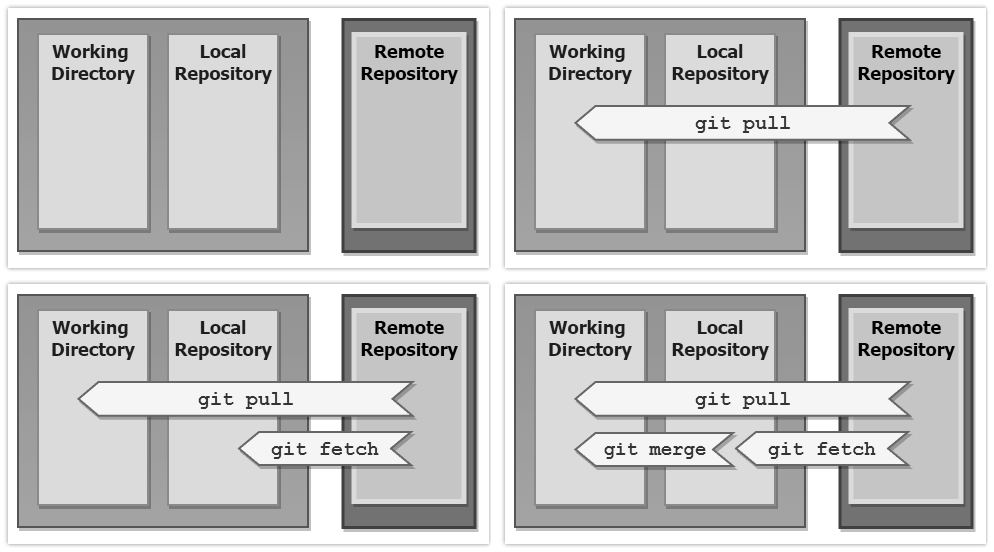
git fetch
git merge
This will fetch changes from the remote to your local, and merge those changes into your current working environment You could also use
git pullUse git pull, if you just want the latest files and have not made any changes otherwise, use fetch and merge:
-
Create a new feature branch to complete your work (you will need to switch back to main once everything is complete as well)
git checkout -b <FEATURE NAME>_<ISSUE #> -
Work on your task, periodically adding your changes to the locally tracked files (called staging area), and committing your local changes
git add . (adds all files)or
git add filename (add a a specific file)and then write your local changes to all tracked files
git commit -am 'describe your commit' -
Once you are done coding , tested your changes, and you are ready to make a pull request, do the following
- make sure all the code you wrote is properly documented with jsdoc https://jsdoc.app/
- run the following command to generate the documentation
npm run jsdoc
-
Create a final commit and then push your local changes to the repository
git push -
On the github project page, click the green button to open your pull request
-
Wait for any other team member to review your pull request
- If anything needs to change, the reviewer will comment the required changes
- Once no more changes are needed, the reviewer merges the pull request
The final part is important because by reading your code, other teamates will get better acquainted with the parts of the code you have been working on. Additionally, it can be easier for others to spot things you missed. This may seem annoying but please do this as it will save us many headaches later on. If you feel you are waiting too long for a review just ping someone on discord.