Repository navigation
v2.13.0 — GPS Track Map, lap detection, and satellite imagery

Highlights
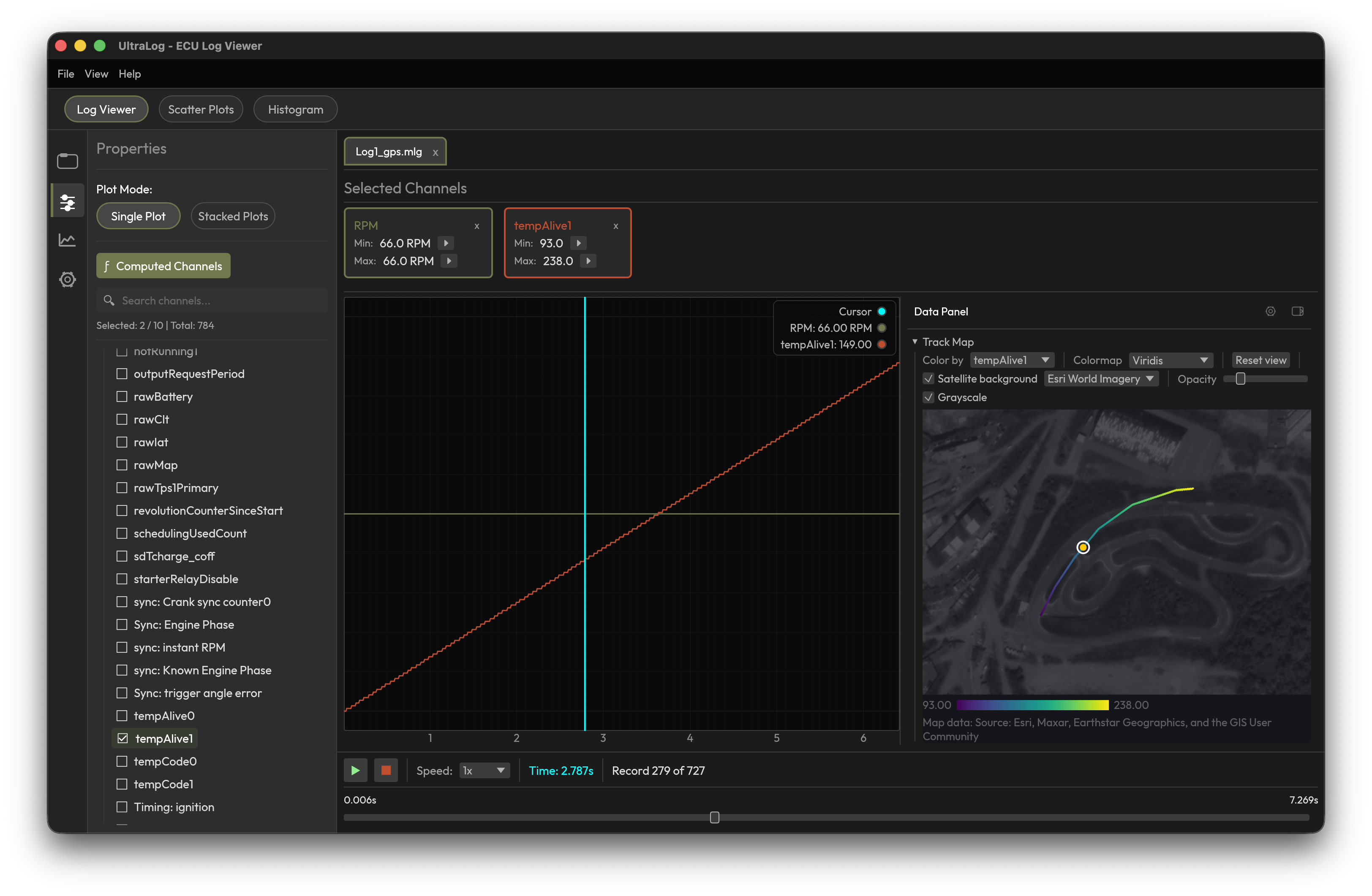
UltraLog can now show you where your log happened. Open any log that contains GPS data and a Track Map appears beside your chart: your session drawn as a racing line, laps detected automatically, and any channel painted onto the track so you can see exactly where the boost spiked or the AFR went lean.
This entire feature — the track map, lap detection, the tile system, and the data-panel framework it lives in — was designed and built by @irudoy. It arrived as a complete, polished, tested contribution, and it is one of the best PRs this project has ever received. Thank you, Ivan. 🏁
New: GPS Track Map
- Works with every supported log format. Detection is data-driven, not format-driven — if your log has recognizable latitude/longitude channels (MLG logs from rusEFI/MegaSquirt/Speeduino, AiM, Link, Haltech, generic OBD-II CSVs, and more), the map appears. No configuration needed.
- Automatic lap detection. Closed loops are detected and listed in a lap selector; pick one to focus the map on a single lap with the rest of the session dimmed.
- Color the track by any channel. Pick any selected channel and the racing line is painted with the Viridis or Turbo colormap — with an editable min/max range and a legend. Watch coolant temperature climb corner by corner.
- Synchronized with your chart. Hovering the track scrubs the chart cursor and timeline while playback is stopped; clicking seeks to that exact moment. The cursor dot follows along during playback.
- Optional satellite and street map backgrounds. Turn on Esri World Imagery or OpenStreetMap tiles under your track, with opacity and grayscale controls so the map never fights your data. Tiles are off by default and opt-in — nothing is downloaded until you enable them, a one-time notice explains that tile requests share your track's approximate location with the provider, and downloads are cached on disk so repeat sessions are instant.
- Any GPS coordinate encoding. Logs that store coordinates as NMEA degrees-decimal-minutes, scaled integers (milli/micro/1e-7 degrees), or 0–360 longitude are detected and normalized automatically — they just work.
- An extensible data panel. The Track Map is the first widget in a new right-side panel built to host more (think g-force plots and gauges) — resizable, collapsible, per-file.
Also in this release
- MLG hex bitfield support — bitfield type IDs written in hexadecimal (
0x10–0x12), as the MLG specification defines them, are now accepted alongside the legacy decimal interpretation. Fixes channel misalignment in MegaSquirt and rusEFI logs from newer tooling. - Accessibility — the new data-panel controls carry proper accessible labels and are fully keyboard-operable.
- Localization — every new UI string ships in all 15 supported languages.
Thanks
💚 @irudoy built the GPS Track Map, lap detection, tile system, and data-panel framework — the headline of this release, end to end. If you enjoy this feature, go give Ivan's work some love on #83.
Installation
macOS
- Download the appropriate
.dmgfile for your Mac:- Intel Mac:
ultralog-macos-intel.dmg - Apple Silicon (M1/M2/M3/M4):
ultralog-macos-arm64.dmg
- Intel Mac:
- Open the DMG and drag UltraLog to your Applications folder
- Launch UltraLog from Applications. The app is signed and notarized by Apple, so it opens without a Gatekeeper warning.
Windows
- Download
ultralog-windows.zip - Extract the zip file
- Run
ultralog-windows.exe
Linux
- Download
ultralog-linux.tar.gz - Extract:
tar -xzf ultralog-linux.tar.gz - Run:
./ultralog-linux
What's Changed
🔧 Maintenance
- chore(release): add Build & Tooling category and create the missing release-note labels by @SomethingNew71 in #82
🔄 Other Changes
- feat(gps): track map, lap detection, and map tiles (2.13.0) by @SomethingNew71 in #84
Full Changelog: v2.12.1...v2.13.0

