Repository navigation
1.6.0

✨ The 1.6.0 tour
A lot fits into this release. CodeAlta Desktop gets Statistics across your whole history, interactive canvases, a Welcome page, and the documentation beside your work. Plugins can build richer tools inside the window, Claude Code can follow you onto your phone, and a new worktree manager helps you clean up safely. Here is the tour of what is new since 1.5.0.
📊 Statistics: the whole picture
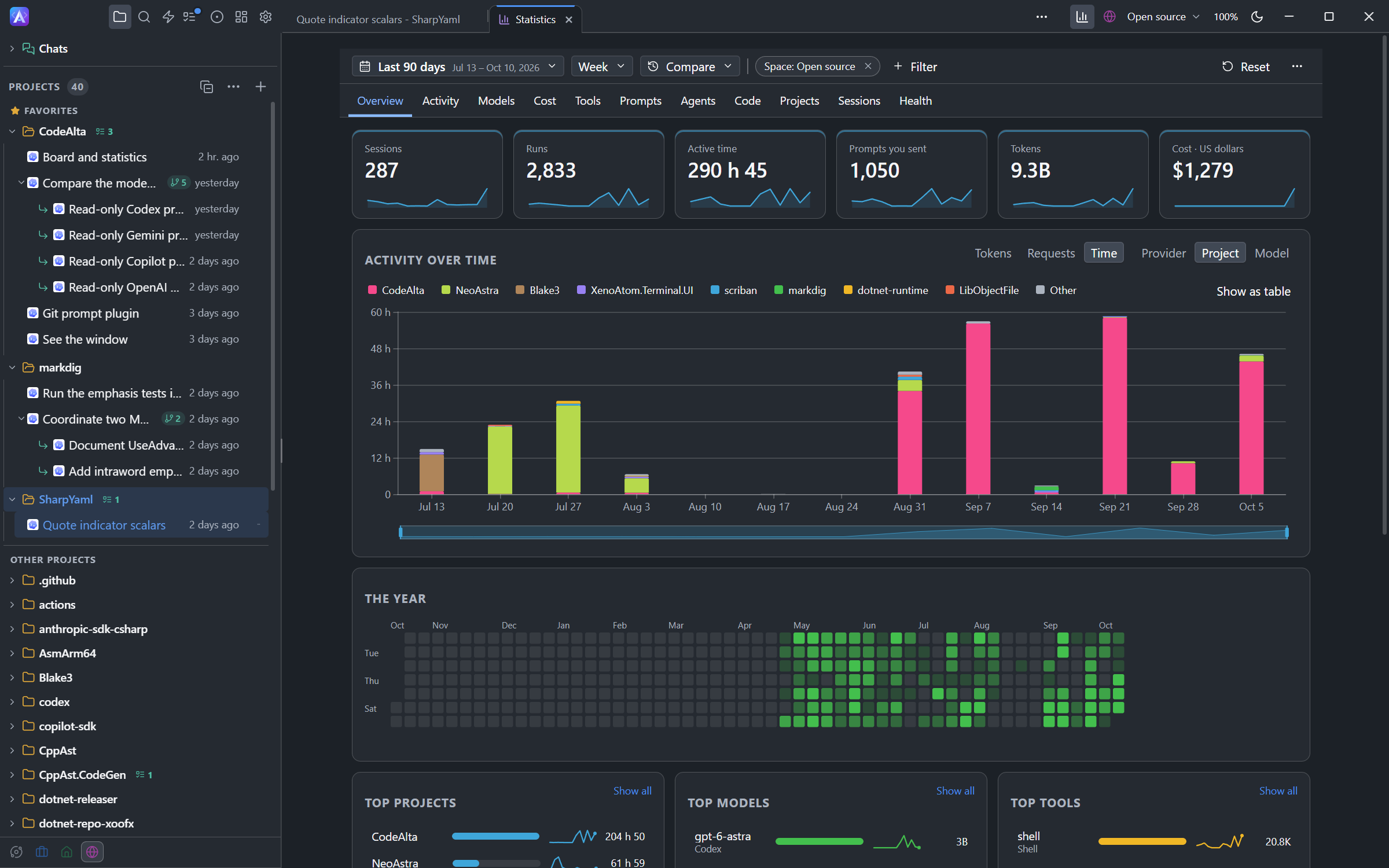
The statistics card of a turn now has a much bigger companion: a Statistics tab that brings your sessions together over time. Eleven pages answer different questions: Overview, Activity, Models, Cost, Tools, Prompts, Agents, Code, Projects, Sessions and Health.
See where your time and tokens go, how much input comes from the cache, which tools take longest or fail, what your sub-agents do, how many files and lines change, and when compactions happen. Activity heatmaps, sessions running at once, context fill and sub-agent depth make the patterns visible. Costs are shown where the provider reports them, with dollars and AI credits kept separate.
Choose a period, compare it with the previous one or last year, and filter by space, project, provider, model, effort, who started the work or kind of tool. Click a chart to narrow it, or switch it to a table. Open Statistics of this project or Statistics of this session from its menu; a session's page includes its sub-agents. Agents read the same numbers with alta statistics, so you can simply ask: Which tools took the most time this week? More →
🔒 Your history, your choice
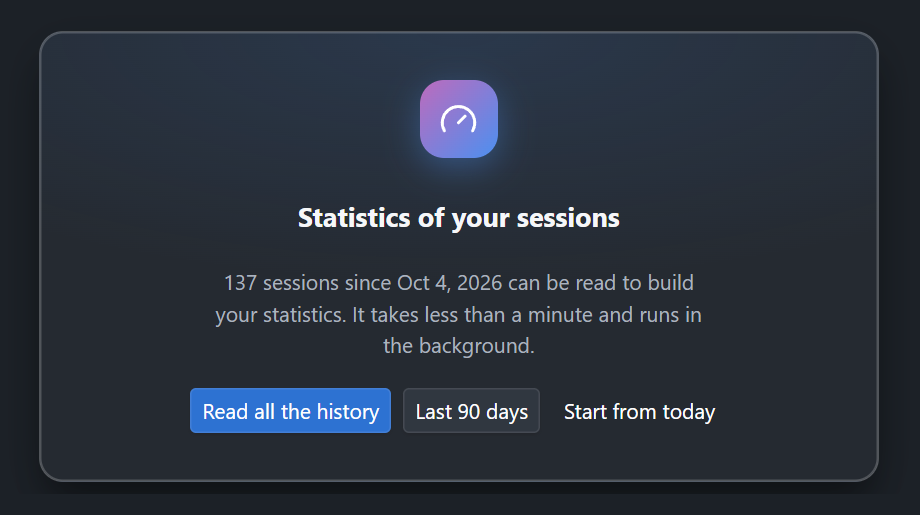
Statistics asks before reading your history: all of it, the last 90 days, or start from today. Recent sessions come first, the charts show which days are not ready yet, and you can pause, resume, stop here or read further back later. Close CodeAlta and the reading continues at the next start. New work keeps the numbers up to date, including sessions written by the TUI when Desktop catches them up.
The data stays on your computer: counts, names and a short, cleaned session title, not copies of your conversations, file paths or command arguments. Statistics can outlive a deleted session; Forget deleted sessions removes those retained numbers and titles. CodeAlta sends no usage analytics to its developers. More →
🧩 Canvases: a place to show the work
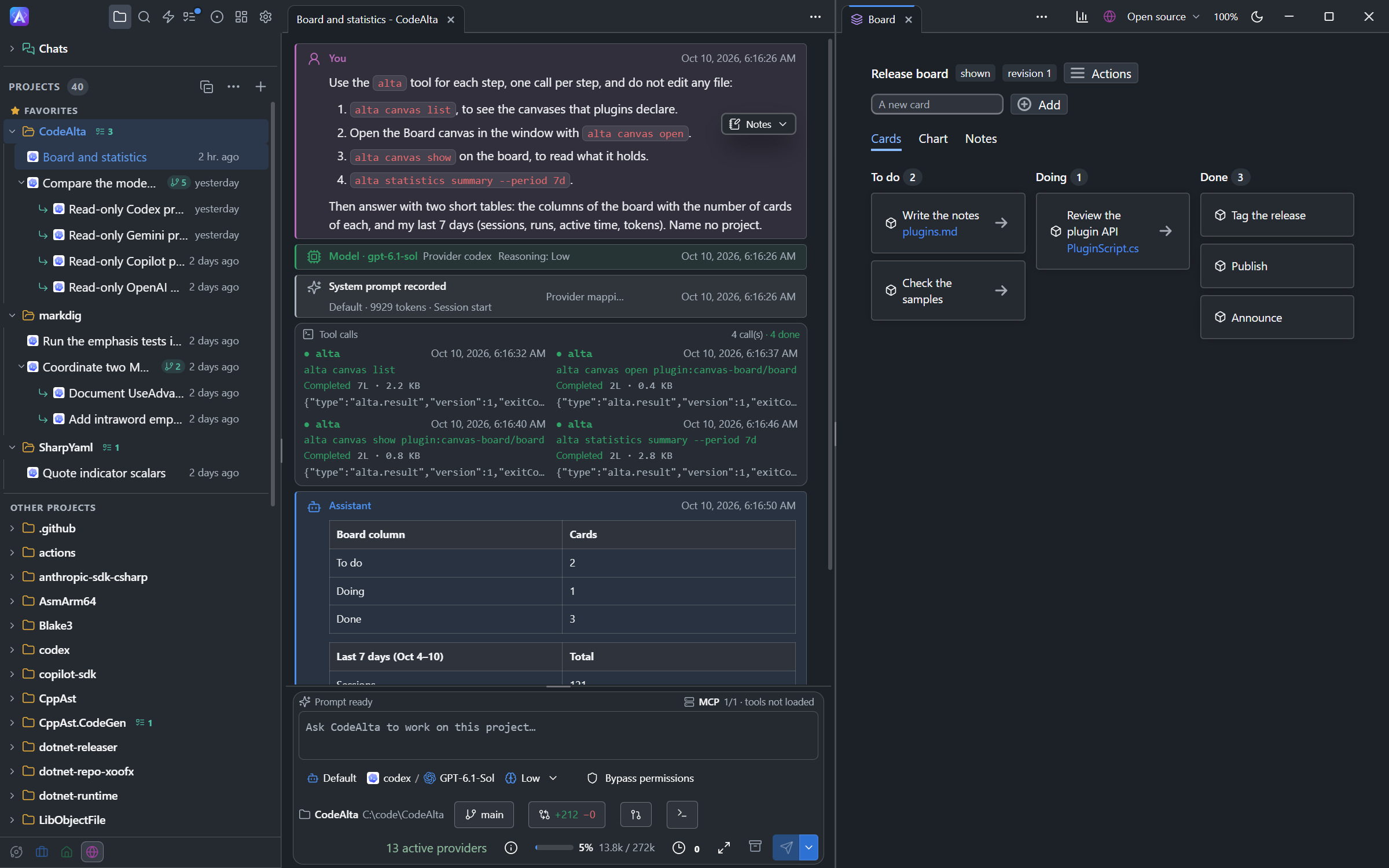
A canvas is a tab that a plugin provides: a board, a checklist, a report or a tool made for your workflow. Keep it beside a conversation, move it into a split pane, close it and reopen it. Its state belongs to the plugin, not to the tab.
The Canvases page lists what your plugins provide, with application, project or session scope. Find them in search and the menus of projects and sessions too. New canvas starts a request for an agent to write one. Agents can read what a canvas shows, run its declared actions and open its tab with alta canvas; opening one in another space does not pull you away from the space you are using. More →
🔌 Plugins get more of the desktop
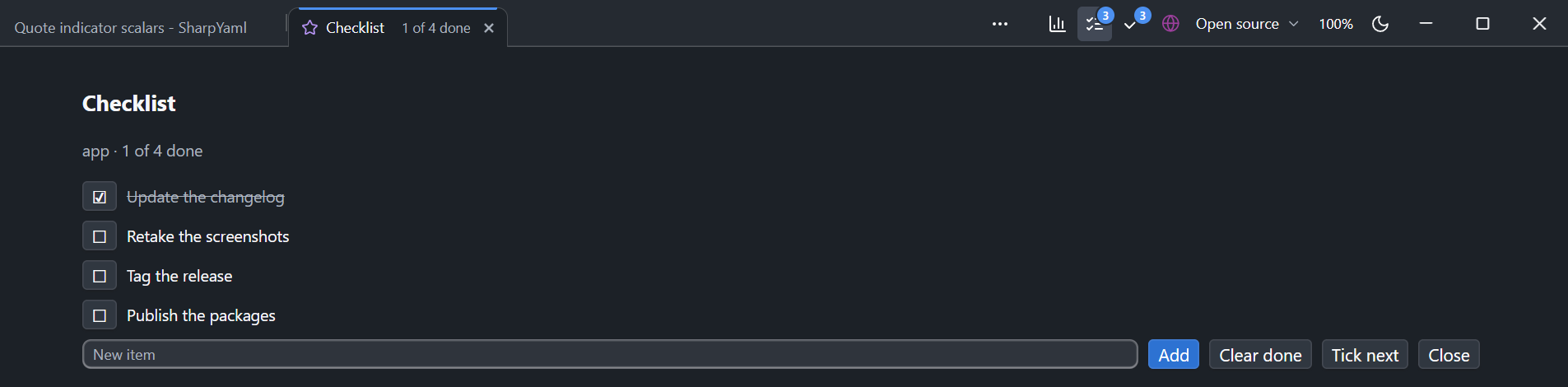
Ask an agent to build the canvas, dialog or tool you have in mind, then use it beside the conversation. Plugins can now add buttons to the title bar, navigation rail and project or session menus, with icons, badges and busy indicators. Hide one with a right click and bring it back in Settings > Plugins. They can also pin cards on Welcome.
For richer tools, a plugin can bring a JavaScript module and use the window's own React, Blueprint controls, tables, icons and docking components. The new codealta module supplies Markdown, code, diagrams, links and theme-aware charts. A canvas talks to its C# plugin through calls, streams and events, and plugins can keep queryable data in their own SQLite tables. The built-in skill includes working checklist, board and Welcome-card examples for you or an agent to adapt. These are trusted local plugins, not sandboxed web pages. More →
🏠 Welcome home
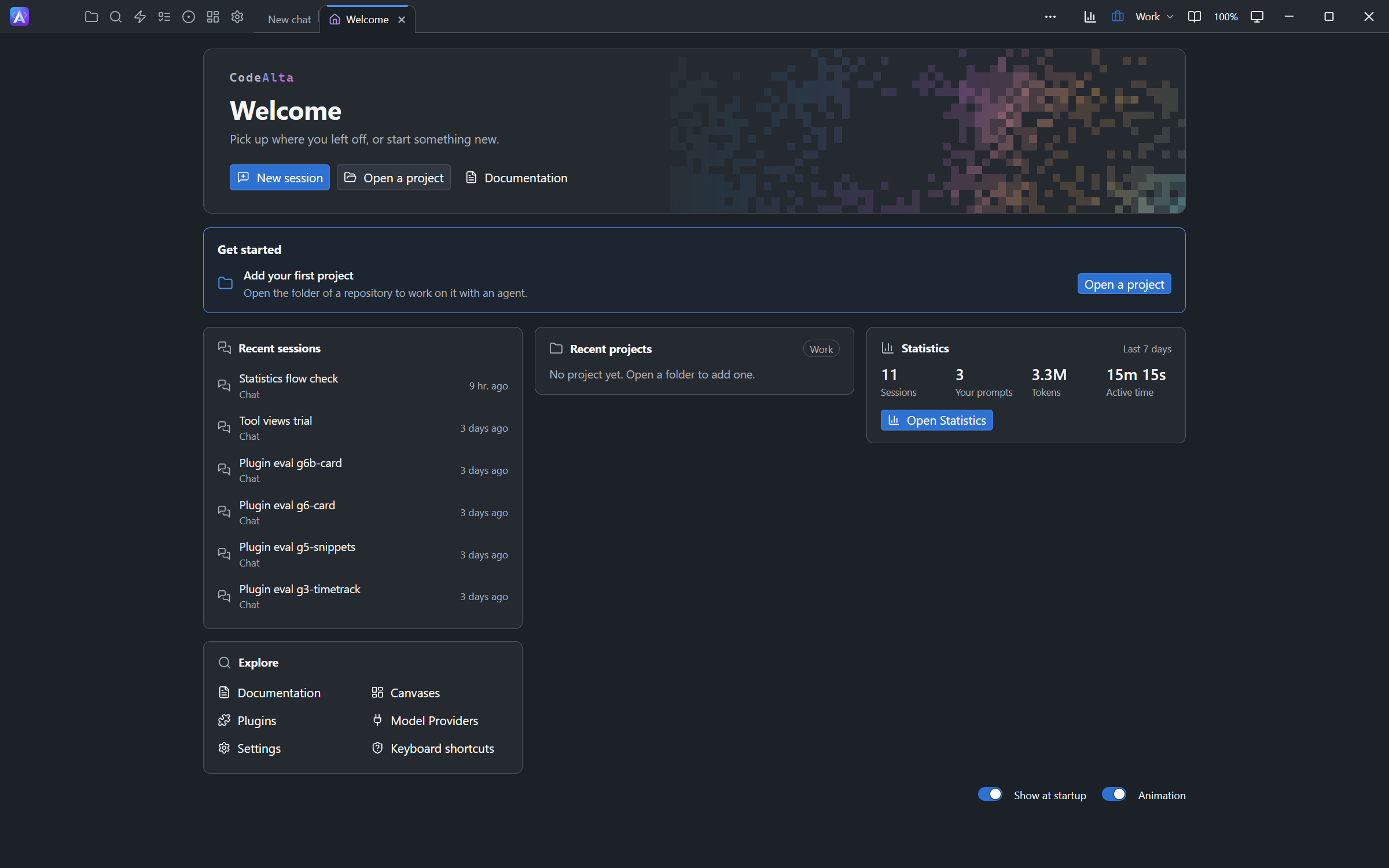
The new Welcome tab puts New session, Open a project and Documentation one click away. Return to the recent sessions and projects of your current space, see your last seven days in the Statistics card, or explore the tools of the app. First-time setup steps appear only while you still need them.
The Home button returns to the same Welcome tab, and the page shows the version you are running. Prefer your last tab at startup? Turn off Show at startup. The animation has its own switch, respects reduced motion, and rests while the page is hidden. More →
📚 The guide beside your code
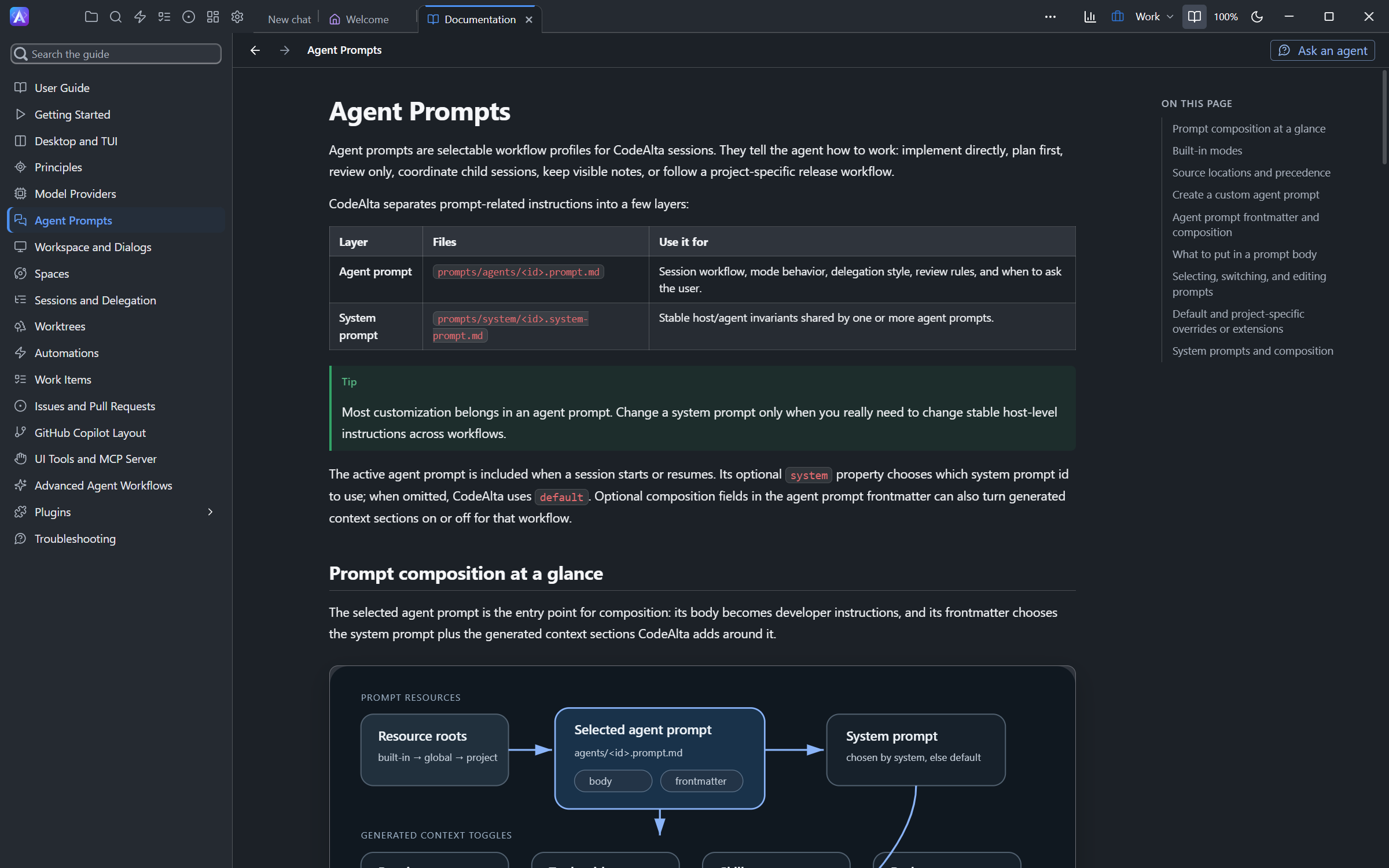
The user guide now opens inside CodeAlta, from the book button or /documentation. It ships with the app, so reading it works offline. Search every page, jump to a heading, enlarge a picture, go back and forward, and return to where you were reading. Put it in a pane beside the work it explains.
Ask an agent sends your question about a page or the whole guide to a new chat with your configured default provider and model. The agent reads the same guide and answers with links that open right back in Documentation. Nothing is sent to a model until you submit a question. Agents in other sessions can consult and open the guide with alta documentation too. More →
📱 Take Claude Code with you
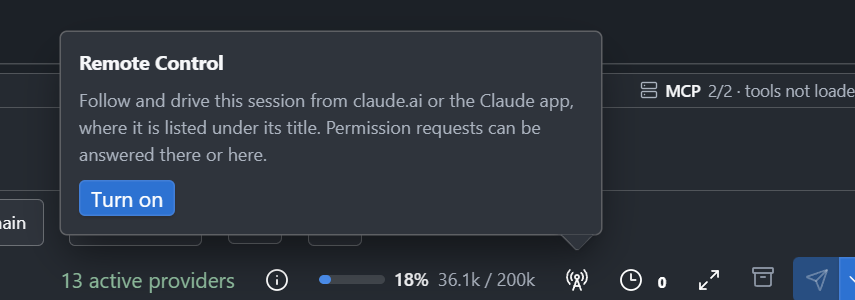
Turn on Remote Control for a Claude Code session and follow it from claude.ai or the Claude app. Open or copy the link, or scan its QR code with your phone. Prompts sent there appear in the CodeAlta timeline, permission requests can be answered on either side, and stopping the turn there stops it here too. CodeAlta's own alta ask questions still wait in the desktop window.
It needs Claude Code signed into your claude.ai account, not an API key. Remote Control is off by default; Settings > Appearance can reconnect the sessions you left connected when CodeAlta starts again. More →
🌳 All your worktrees, safely in one place
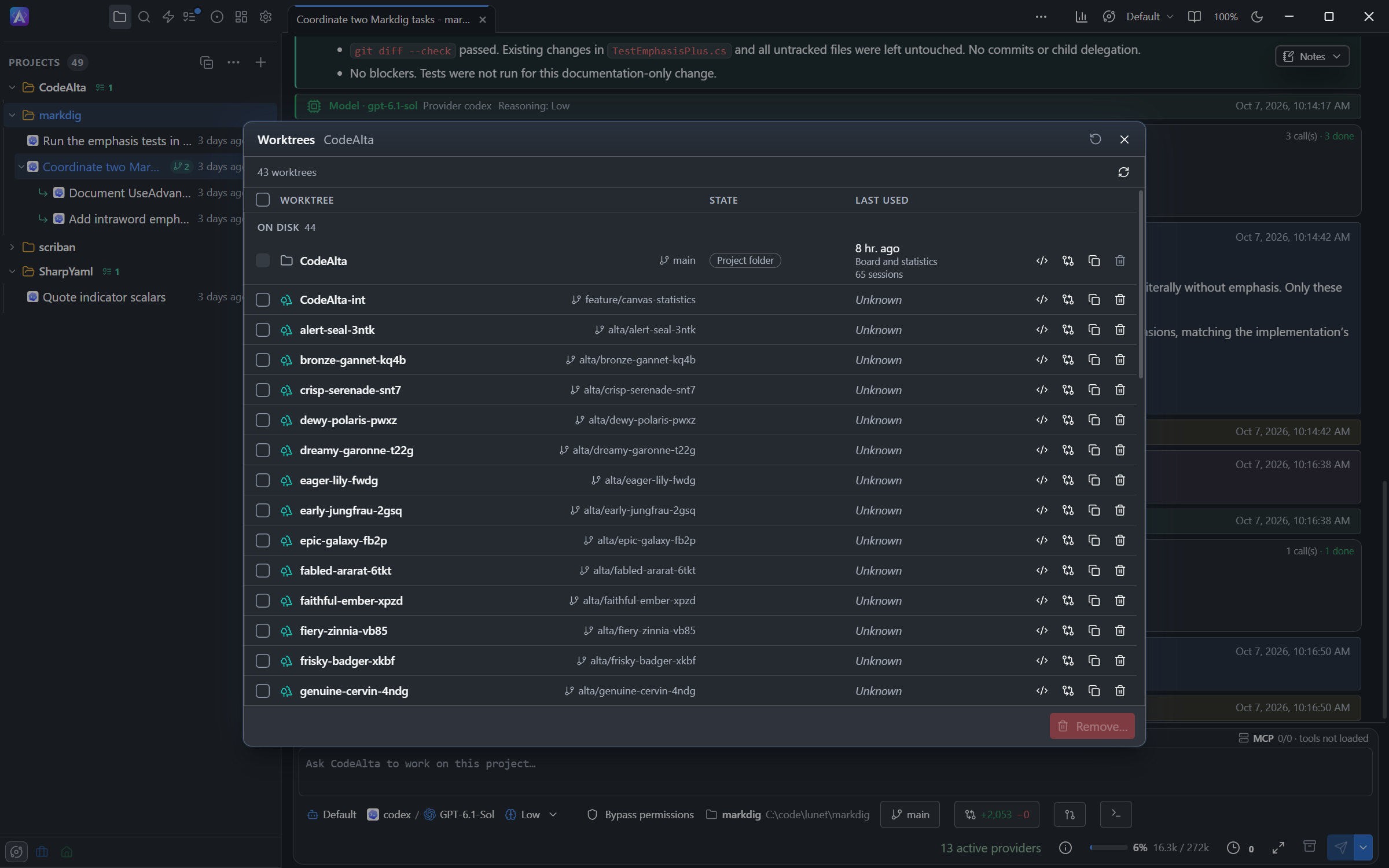
The new Worktrees window (/worktree, or the menu of a project) lists every checkout Git knows about, even when its session was deleted or its folder is gone. See its branch, last use and whether it is in use or locked; open its own code editor or changes, or copy its path.
Select one worktree or several to remove. CodeAlta shows what will go, protects the main and project checkouts and worktrees that are busy or locked, and asks separately before discarding uncommitted changes. Branches stay unless you opt to remove safely merged alta/ branches. Each worktree gets its own outcome, and Stop lets the current group finish without starting another. Projects registered inside a linked worktree now select the right checkout in Changes too. More →
🎁 And also
- Middle-click a tab to close it, through the same close action and unsaved-edit checks as its close button (#92).
- No white edges while resizing a dark window on Windows (#93), and more dependable room for the title-bar controls.
- Notes and task proposals stay readable together, including in narrow panes, without replacing your saved Notes position.
- Background activity is unambiguous: the count includes only running tasks, recent job results remain accessible, and a busy provider no longer hides the session's background jobs.
- Image prompts explain why they wait: steering is text-only, so their disabled Steer now button says that the images will go with the next turn.
- Broken skills can be inspected and removed, including invalid YAML, unnamed skills and duplicate names; removal targets the skill you selected.
- Permission review handles long scripts instead of silently denying them, with a clear warning when the display is shortened. Changing review mode no longer changes the approval decision of a turn already in progress.
- Automations respect inherited permission restrictions when an agent creates, enables or runs them, and Jira's created/updated triggers save correctly.
- Show on a waiting-session notice keeps your latest tabs and checks unsaved edits, even if you opened an editor after the notice appeared.
- Update notices stay until dismissed. Desktop checks every ten minutes, even while hidden, and keeps a known available update through temporary network failures.
- More resilient local storage: the application database has daily checked backups and recovery, concurrent preference saves keep the newest choices, and session-state records no longer grow with every handled prompt.
🌐 A new tour of the whole workspace
The refreshed website walks through 13 feature stories with genuine desktop screenshots, a scroll-driven showcase and a compact animated CodeAlta banner. Sessions, Code & git, Worktrees, Work items, Issues, Automations, Canvases, Plugins, Statistics, Spaces, Welcome, Documentation and Model Providers all have their place.
Installation stays right below the logo. The tour works with a keyboard, stacks on a phone, follows your theme and keeps every feature available with reduced motion or without JavaScript. The documentation pictures have been refreshed for 1.6.0 too. Take a look →
🩹 Three fixes that unblock your work
- Unreadable project instructions no longer block a session. A locked or inaccessible
AGENTS.mdproduces a warning identifying the unavailable guidance, while readable instructions, history and prompts still work. #94 - Startup failures leave useful diagnostics. Exception chains, including native-loader errors, are reported to the log and stderr before a managed startup failure returns. #95
- Codex sign-in cleans up its callback listener safely. Canceling or timing out browser login no longer leaves the late listener exception unobserved, fixing the reported
ObjectDisposedExceptioncrash. #96
For profile backups and plugin authors: the application database now lives in
~/.alta/data/alta.sqlite3, with its copies underdata/backups/. It holds durable Statistics and plugin data, not just a disposable cache. The move from the old cache location is automatic. Thealtacommand rootscanvas,landinganddocumentationare now reserved for CodeAlta.
Changes
✨ New Features
- Add Remote Control for Claude Code sessions (PR #91) by @xen2
- Add chart library and reusable Chart components (5c2fd57)
- Add application database and plugin database access (96cf377)
- Add canvas platform with plugin-provided tabs (8f3c11a)
- Add Statistics journal reader and facts reducer (79c1136)
- Add Canvases page and alta canvas commands (db06cd7)
- Add plugin buttons in the title bar, rail and menus (97cbde0)
- Add Statistics history, storage and query commands (05fa65d)
- Add plugin scripts, shared libraries and the codealta module (9913328)
- Add carried plugin RPC for canvases (9ffe8db)
- Add Statistics dashboard and entry points (155e5d9)
- Add remaining Statistics metrics and restore detection (c310a57)
- Add safe project worktree management window (#90) (b604e70)
- Add welcoming landing canvas and plugin cards (240193a)
- Add shipped documentation viewer and agent questions (ca453a4)
- Add session-scoped Statistics entry points (260ba76)
- Add Home shortcut and version to Welcome (c3cec5e)
- Add homepage stories for automations, issues and work items (838a6d6)
🐛 Bug Fixes
- Fix white edges while resizing the window in a dark theme (PR #93) by @xen2
- Fix canvas and Statistics defects found in visual tests (c388e66)
- Fix application database and session cache recovery (3b95625)
- Fix canvas, plugin script and chart review findings (16cf6ca)
- Fix Statistics engine and dashboard review findings (eb80c79)
- Fix duplicate session canvas tabs across projects (efb5d8a)
- Fix canvas and tab lifecycle review findings (8088a8a)
- Fix database and Statistics recovery edge cases (06cc87f)
- Fix Statistics visuals and update screenshots (5d8d493)
- Fix retained canvas close events on reopen (ac60263)
- Fix Statistics visuals and shell program redaction (58d24a5)
- Fix canvas cleanup and reconnect retention (cdf3115)
- Fix escaped file extensions in Statistics facts (dc87990)
- Fix linked-project checkout diff selection (#90) (6b2a750)
- Fix derived metrics of session-scoped Statistics (2a19982)
- Fix Landing page entry in plugin settings (be5c8fd)
- Fix shipped documentation markup and scroll restoration (dccffee)
- Fix canvas and Statistics menus for every Explorer session (28e8c98)
- Fix selected-scope Explorer session plugin menus (e106ad5)
- Fix Landing callback lifetime and card isolation (8609399)
- Fix shipped documentation filesystem boundary (b86e23c)
- Fix worktree refresh and removal outcome accuracy (112345e)
- Fix hidden canvas ownership and scoped Statistics freshness (0699e4b)
- Fix Statistics context samples and qualified metric displays (a276960)
- Fix runtime stream-pressure test stability (1a1aae7)
- Fix automation permission admission and Jira trigger saving (682dbaa)
- Fix waiting-session toast navigation freshness (0079a9c)
- Fix Notes and task proposal overlap (c2ae066)
- Fix reminder test synchronization (4e94a75)
- Fix titlebar space for Documentation and window controls (a33c080)
- Fix integration of upstream changes for 1.6.0 (640587b)
- Fix image prompt steering explanation (514105d)
- Fix background task activity visibility and counts (e08eee5)
- Fix selection and removal of malformed skills (5e675cc)
- Fix unreadable project instruction files (#94) (b272476)
- Fix desktop startup failure diagnostics (#95) (74f028c)
- Fix Codex OAuth callback listener task ownership (#96) (ddd8369)
- Fix periodic desktop update notifications (27276a6)
🚀 Enhancements
- Enhance session state records with capped queue and provenance (e1643a9)
- Refactor derived Statistics regression test placement (2e1adcd)
- Enhance homepage with scroll-driven feature stories (90be001)
- Enhance homepage scroll-story polish (8e64c3e)
🏭 Tests
- Fix test synchronization with timeline layout frames (6240041)
- Fix test wait for the startup guide transition (5f9f78b)
📚 Documentation
- Fix doc of canvases, plugins and Statistics (7c18bc9)
- Add doc screenshots of canvases and Statistics (b44d117)
- Add documentation hook for scripted canvases (0069fc2)
- Fix documentation scroll placement in the native dock (b3b694f)
- Fix doc guidance for native hover verification (df3d097)
- Add doc screenshots of Documentation and Welcome (eb46e74)
- Update doc screenshots and highlight no telemetry (78fdfdd)
- Update doc screenshots for the 1.6 desktop features (02becfd)
- Update doc punctuation to use spaced hyphens (ea6d10e)
🧰 Misc
Full Changelog: 1.5.0...1.6.0
Published with dotnet-releaser
