Releases: Commanderx-code/helix-boot
Release list
Helix Boot v0.6.10

Full Changelog: v0.6.9...v0.6.10
Helix Boot v0.6.9
Full Changelog: v0.6.8...v0.6.9
Helix Boot v0.6.8
Full Changelog: v0.6.7...v0.6.8
Helix Boot v0.6.7
Full Changelog: v0.6.6...v0.6.7
Helix Boot v0.6.6
Full Changelog: v0.6.5...v0.6.6
Helix Boot v0.6.5
A round of fixes from a review of everything added since 0.5.3. Two of them could lose data in unusual situations, so updating is recommended:
- an update from another PC that failed half-way could lose the stick's own icons and splash;
- on a stick last written by 0.6.1 or older, a tool could be removed as an "old version" of another whose file name differed only in a number.
Also: a refresh that changes nothing now writes nothing to the stick's theme, and Lazarus PE and Super GRUB2 Disk have icons in the default set.
Fixed
From a review of everything since 0.5.3:
- A stick's own icons and splash could be lost for good if an update from
another PC failed half-way: they were moved aside first. They now stay in
place. - On a stick last written by 0.6.1 or older, a tool could be taken for an old
version of another whose file name differed only in a number
(windows10.iso,windows11.iso) and be removed. Only a download named after
its version is matched that way now. - A stick given a name of your own (
stick_label), or renamed, was refused by
refresh.shand Update if its first fill had been cut short. It is known by
Ventoy's own partition beside it. - In the Windows app, Apply in the Look window could run while an update
was copying. The Look window now holds the app while it is open. - A dry run, and the app's update summary, listed an image that only moves
folder as one to be removed. - A
look.jsonon the stick with a value this version doesn't know crashed
theme.shand left the Look… button doing nothing. - In the Look window, a picture chosen but not sent was treated as already on
the stick after Apply. - A boot menu or theme file that couldn't be written on Windows was reported
as "in use" and the update still ended as a success; only the running app's
own file is let through now. refresh.sh <folder>stopped with an error after a good sync when the folder
wasn't on a plain partition.
Changed
- A refresh that changes nothing writes nothing to the stick's theme: the
theme on the stick is updated in place, and the boot menu is only rebuilt
when what it is built from changed.
Added
- Icons in the default set for the two entries that still had their classic
ones: Lazarus PE (the phoenix on a glossy badge, drawn by
docs/artwork/helix-icons/make-lazarus-pe.py) and Super GRUB2 Disk.
Helix Boot v0.6.4
Please update from v0.6.2 and v0.6.3. In those, Update from a PC without your local.toml removed Kaspersky Rescue Disk from a stick that had it: the tool is switched off as shipped, and the update took that as a reason to remove it. Fixed here.
Also new:
- Helix Boot is on the stick itself. Every stick gets a
HelixBootfolder withHelixBoot.exeandHelixBoot.sh, so it can be updated, or its look changed, from any PC. - An update says what it will do first.
HelixBoot.exeshows what it will copy, remove and keep, and asks before writing. - A new stick is named
HelixBootinstead ofVentoy.
Added
- Helix Boot on the stick itself: every stick gets a
HelixBootfolder with
the latest releasedHelixBoot.exeandHelixBoot.shand a short README, so
it can be updated, or its look changed, from any PC without downloading
anything first. - An update says what it will do before it does it.
HelixBoot.exeshows
what Update stick will copy, remove and keep, and asks before writing
when anything is copied or removed.helix sync --dry-runand
helix unpack --dry-runend with the same summary. - A new stick is named
HelixBootinstead ofVentoy(stick_labelunder
[settings];"Ventoy"keeps Ventoy's own). tests/boot/boot_menu.pyboots the menu in QEMU with every theme, on UEFI
and BIOS, and checks each came up; CI runs it on every push and keeps the
screenshots.
Fixed
- An update from a PC without your
local.tomlremoved a tool that is switched
off as shipped but that you had switched on (Kaspersky Rescue Disk): it took
"off here" as a reason to remove it. Only a tool switched off by hand in that
PC's ownlocal.tomlcounts now.
Changed
- A file on the stick that hasn't changed isn't written again on every
refresh, and one that is in use (the app updating the stick from the stick,
on Windows) no longer stops the run: it is replaced next time.
Helix Boot v0.6.3
New default icons. Every tool, category and Ventoy entry in the boot menu now has an icon from one glossy set, on every theme. The previous set is still there: ./theme.sh --icons classic, or Icons: Classic in the Windows app's Look window.
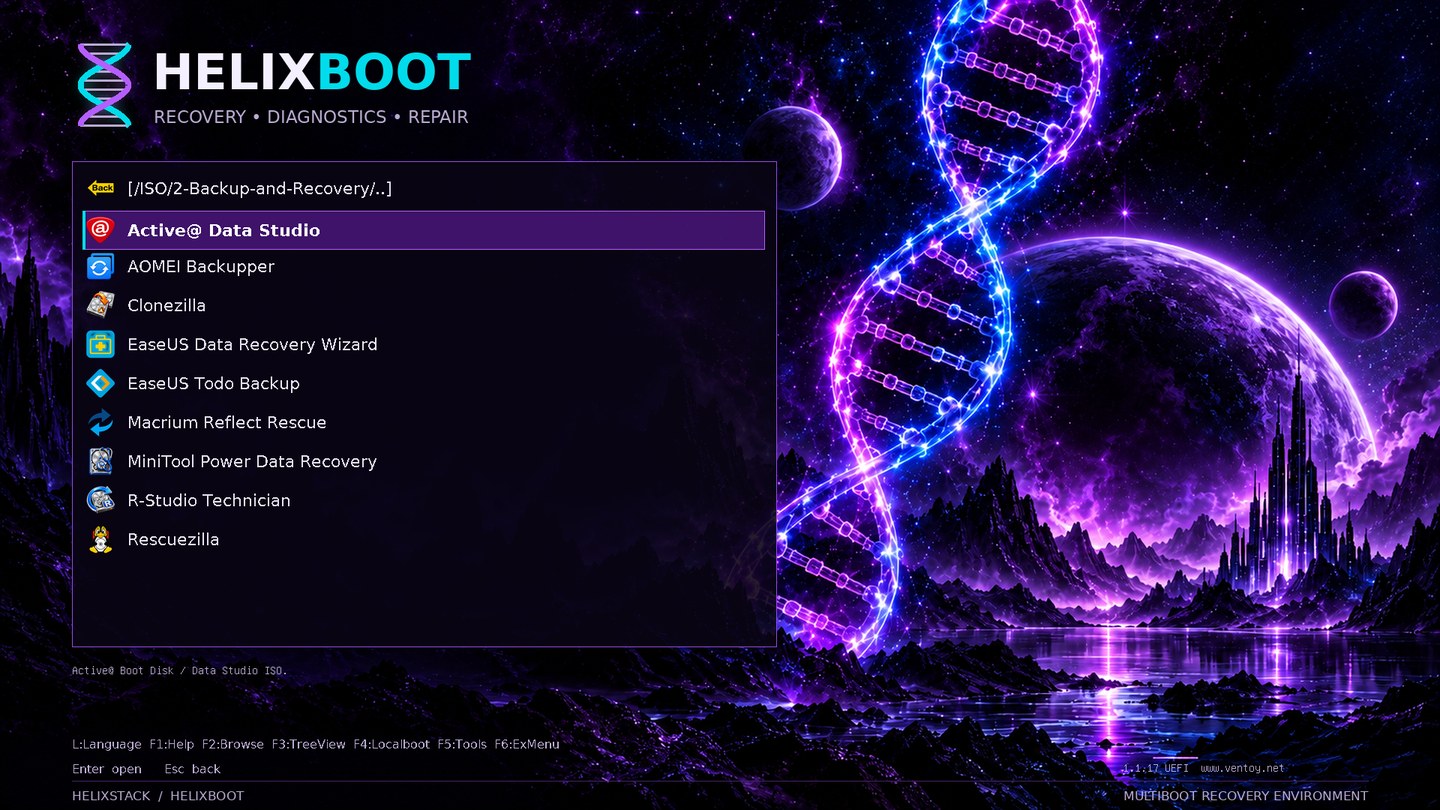
Also: a stick keeps its own icons and splash when it is updated from a PC that has none of its own.
Changed
- New default icons: every tool, category and Ventoy entry now has an icon
from one glossy set, the HELIXBOOT icon collection, the same on every theme
(the presets no longer recolour the category icons). The set before it, each
tool's own logo with flat category icons, is theclassicicon pack:
./theme.sh --icons classic. Masters are indocs/artwork/helix-icons/. - A stick keeps its own icons and splash (the ones from a
byo/folder) when it
is updated from a PC that has none of its own, instead of getting the stock
ones back. The PC that put them there still replaces or removes them.
Helix Boot v0.6.2
Please update from v0.6.1 and earlier if you use a stick from more than one PC. In those versions, Update (and refresh.sh) made the stick match the PC running it: updating from a PC without your own files, such as the Windows app on a second machine, removed every paid and bring-your-own tool from the stick, and any tool whose download had just failed.
From this version a stick remembers which PC put each tool on it. An update removes a tool only when it brings a newer copy, when the tool is switched off, or when the PC that put it there no longer has it. Everything else stays, with its name and icon in the boot menu, and the run lists what it kept.
Also fixed: a stick renamed in Explorer wasn't recognised, HelixBoot.exe couldn't download from some sites, and the Look window didn't fit a short screen.
Changed
- An update no longer strips a stick of tools the updating PC doesn't have.
Updating from a second PC (the Windows app without yourbyofiles, say)
used to remove every paid or bring-your-own tool, and a tool whose download
had just failed. Now a managed file is removed only when the same tool was
brought again (a newer version) or the tool is switched off; the rest stay,
keep their names, tips and icons in the boot menu, and the run says which
were kept.--prune-unknown(helix sync,helix unpack,refresh.sh)
removes them as before. The stick records which tool each image belongs to;
a pack says which tools were switched off where it was made.
Fixed
HelixBoot.exefailed to download from some sites with
CERTIFICATE_VERIFY_FAILED(Hiren's, OnyX): Windows hadn't fetched their
root certificate yet. It now also trusts the certifi bundle.- A stick whose data partition was renamed (to anything but
Ventoy) wasn't
recognised: the Windows app showed it as not having Ventoy, so Look… and
Update refused it, andrefresh.sh/theme.shdidn't find it. A stick
is now known by Ventoy's ownVTOYEFIpartition, whatever the other is called. - The Look window fits a short screen (a 1366×768 laptop, a small VM window): its
preview is smaller there, so the buttons no longer end up under the taskbar.
Helix Boot v0.6.1
Two more boot-menu themes, greyscale icons, and a folder of tools for a Mac.
- Standby and Poly dark join the theme list (
./theme.sh --theme standby, or the Look… window inHelixBoot.exe). They are other people's GRUB themes, adapted for Ventoy, and show every tool's icon in shades of grey. Standby is now the plain choice, in place of Ventoy's own white look. - The stick gets a Mac folder: 18 free utilities to run on a working Mac, Apple silicon included, kept current like every other tool.
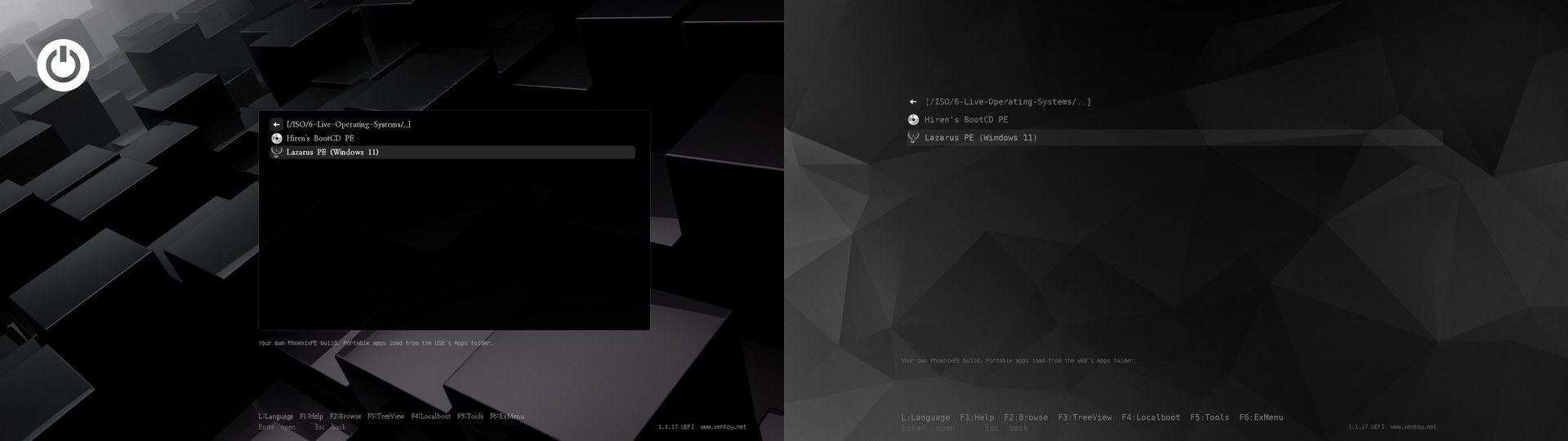
Standby is by Llewelyn Trahaearn (GPL) and Poly dark by Andrei Shevchuk (MIT); each is credited in its folder with its licence.
Added
- Tools for a Mac, in a
Macfolder on the stick with aREADME.txt: 18
free utilities to run on a working Mac (EtreCheck, OnyX, Malwarebytes, the
Objective-See tools, Stats, Macs Fan Control, coconutBattery,
GrandPerspective, AppCleaner, SuperDuper!, TestDisk & PhotoRec, Mist,
OpenCore Legacy Patcher, Chris Titus Tech's MacUtil), fetched, verified and
kept current like everything else.platform = "mac"on an app puts it
there, as downloaded, and packs carry them. - Two more themes for
theme.shand the Look window, both other people's GRUB
themes with their own layout, adapted for Ventoy: Standby (Llewelyn
Trahaearn, GPL) and Poly dark (Andrei Shevchuk, MIT), each with a splash
in its colours. A preset can now bring its own layout and fonts
(standalone = trueinpreset.toml). - Greyscale icons:
--icons greyredraws every icon, yours included, in shades
of grey. Standby and Poly dark use it by themselves: the icon choice now
defaults toauto, the theme's own style, and--icons logoskeeps colour.
Changed
- Standby is the plain choice, in place of Ventoy's own white look: "Off" is no
longer on the theme list, and--theme off(or a stick that had it) gives
Standby.theme = ""inlocal.tomlstill gives Ventoy's own look.
Fixed
- The look preview follows each theme's own layout, boxes and font sizes.