HTTPS SSL
HTTP is the most used application protocol on the internet. It is the client-server protocol used to transfer web pages and web application data. In HTTP, the client, usually a web browser, connects to a web server such as Apache HTTP Server. HTTP is also used under the hood by man mobile and modern applications.
During HTTP communication, the client and the server exchange messages. The client sends requests to the server and gets back responses.

One of the most important components of online business is creating a trusted environment where potential customers feel confident in making purchases. Browsers give visual cues, such as a lock icon or a green bar, to help visitors know when their connection is secured.
Try your hand at hacking insecure connections!
You can quickly check whether or not your connection is encrypted by looking at the address bar where the website URL is. If there is a green lock then you know the connection is encrypted.
#SSL / TLS and HTTPS SSL (Secure Socket Layer) or TLS (Transport Layer Security) works on top of the transport layer, often this is TCP. TLS can be used for more or less any protocol, HTTPS is just one common instance of it. If your exchange of information is not encrypted, anybody can intercept your messages and either steal information or masquerade as you or the server you are talking to. HTTP Secure (HTTPS) or HTTP over SSL/TLS is a method to run HTTP, which is a clear-text protocol, over SSL/TLS, a cryptographic protocol. When using HTTPS:
- An attacker on the path cannot sniff the application layer communication
- An attack on the path cannot alter the application layer data
- The client can tell the real identity of the server and, sometimes, vice versa.
- The attacker can still attack the application! The extra encryption layer just protects data exchanged between the client and the server. It does no protect from an attack against the application itself, i.e. and SQL injection.
In regular, non-encrypted HTTP, the protocol stack will look similar to:
- HTTP
- TCP
- IP
- Ethernet
When using HTTPS, the stack looks like:
- HTTP
- TLS (SSL)
- TCP
- IP
- Ethernet
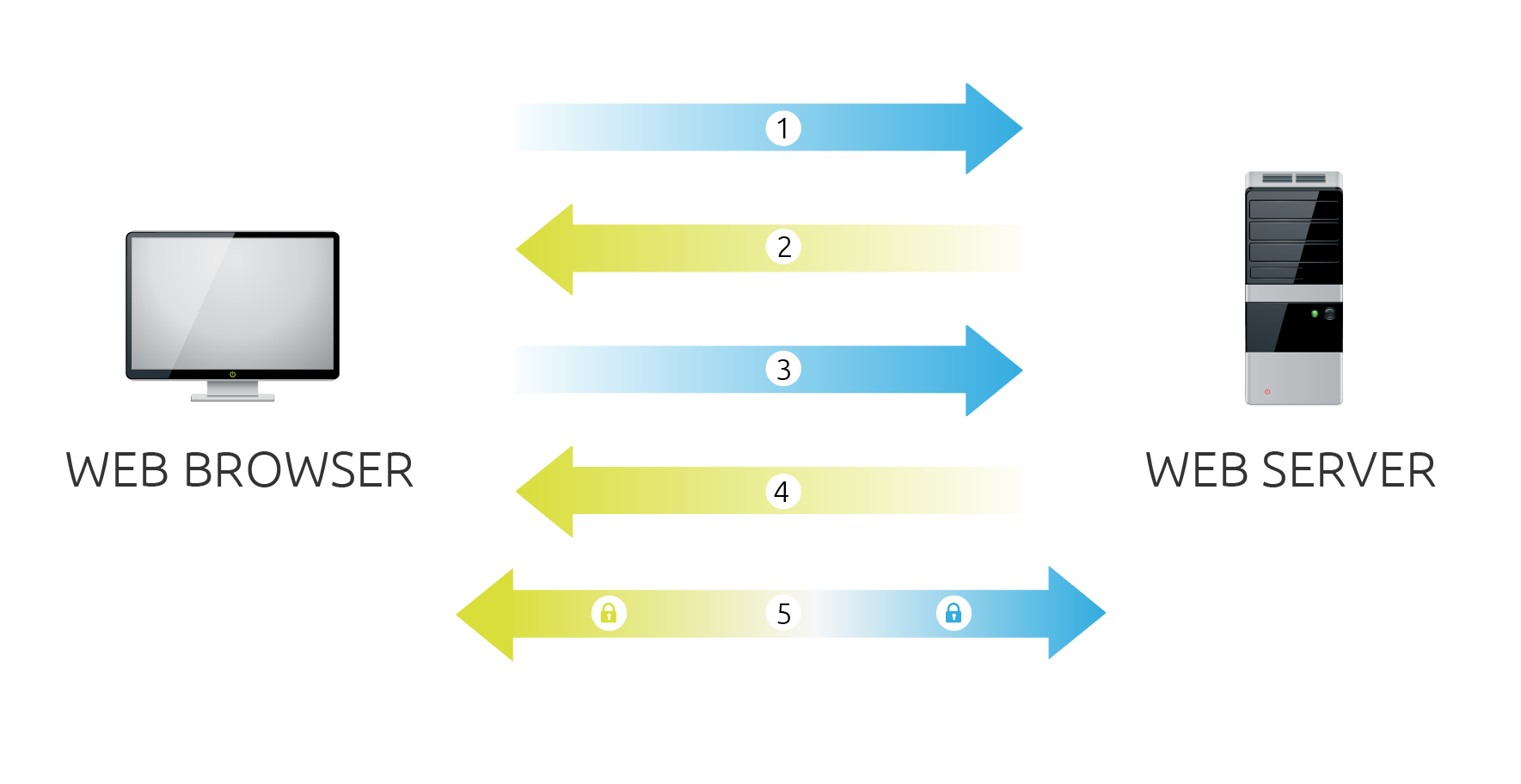
###How Does SSL Certificate Create A Secure Connection?
-
Browser connects to a web server (website) secured with SSL (https). Browser requests that the server identify itself.
-
Server sends a copy of its SSL Certificate, including the server’s public key.
-
Browser checks the certificate root against a list of trusted CAs and that the certificate is unexpired, unrevoked, and that its common name is valid for the website that it is connecting to. If the browser trusts the certificate, it creates, encrypts, and sends back a symmetric session key using the server’s public key.
-
Server decrypts the symmetric session key using its private key and sends back an acknowledgement encrypted with the session key to start the encrypted session.
-
Server and Browser now encrypt all transmitted data with the session key.
Sara (the sender) wants to send an encrypted email to Rajiv (the recipient). First Rajiv sends Sara a copy of his SSL Certificate. In this highly-simplified example, the public key in Rajiv's SSL Certificate is "+1." The private key, which stays in Rajiv's computer, is also "+1."
So Sara composes a message to Rajiv. It says, "Hi--Sara." Then she instructs her computer to use Rajiv's SSL certificate to encrypt the message. The computer reads Rajiv's public key and adds +1 to each letter in the message.
For example, A+1=B, B+1=C, and so forth.
The encrypted message looks like this:
HI - SARA becomes IJ - TBSB
Anyone who reads the message along the way cannot understand it, because they do not have Rajiv's SSL certificate.
When Rajiv receives the message, his computer subtracts one from each letter in the message. It is again perfectly readable.
Real life is a little different...
The problem with this example is that if Rajiv has identical keys, and if he sends Sara his SSL certificate, then she can decrypt messages he receives from other people. He cannot send her his public key if it is the same as his private key; otherwise she could decrypt all Rajiv's messages. A real public key looks more like this:
3048 0241 00C9 18FA CF8D EB2D EFD5 FD37 89B9 E069 EA97 FC20 5E35 F577 EE31 C4FB C6E4 4811 7D86 BC8F BAFA 362F 922B F01B 2F40 C744 2654 C0DD 2881 D673 CA2B 4003 C266 E2CD CB02 0301 0001
And Sara has now way of determining his private key.
If you are interested in more number Theory with Cryptography, follow the links below to learn about the Diffe-Helman and RSA algorithms. Wikipedia is alwaysa great place to start.