jdbc
To start of the tutorial, JDBC, which stands for Java Database Connectivity, is a standard Java API for database-independent connectivity between Java and a wide range of databases. For our purposes, we will be utilizing JDBC with connectivity to SQL.
In order to use JDBC effectively, you must have the following installed:
-
CORE Java Programming, refer to the previous tutorial for further instructions: https://github.com/CourseReps/ECEN489-Spring2016/wiki/java, https://github.com/CourseReps/ECEN489-Spring2016/wiki/intellij
-
SQLite, refer to the previous tutorial for further instructions: https://github.com/CourseReps/ECEN489-Spring2016/wiki/sqlite
The JDBC API uses a driver manager and database-specific drivers to provide transparent connectivity to heterogeneous databases. What the device manager does is ensure that the correct driver is used to access each data source. Below is a hierarchy of the architectural diagram show at the high level the Java application all the way to drivers and the specific databases (Figure 1).
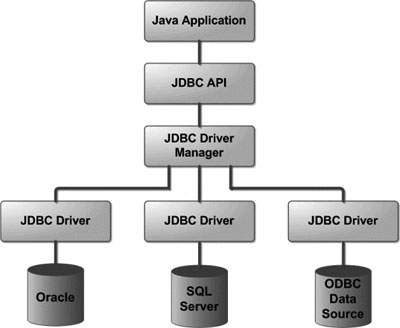
** Common JDBC Components **
- DriverManager:
- DriverManager:
- DriverManager: