
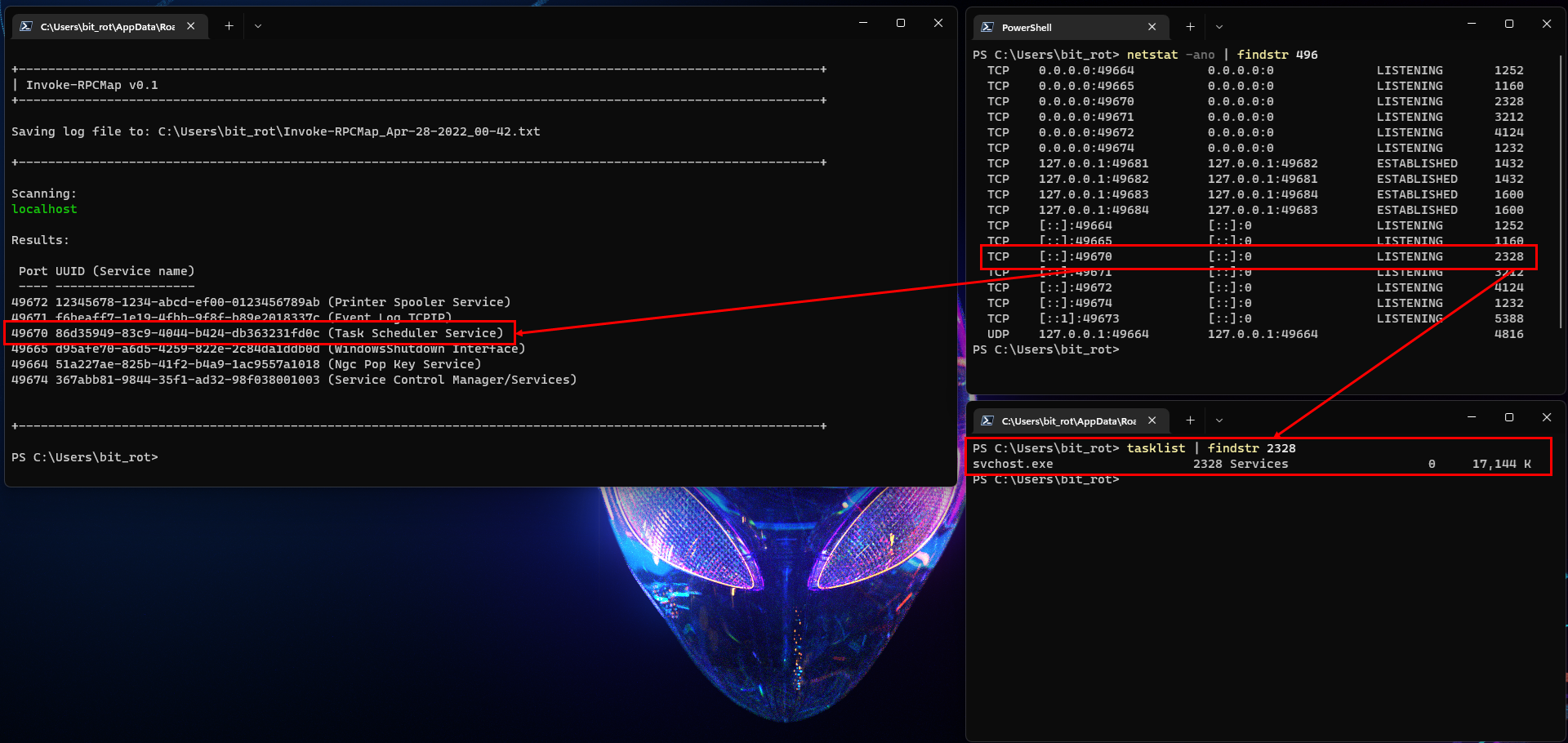
Invoke-RPCMap is a PowerShell tool designed to enumerate local and remote RPC services/ports through the RPC Endpoint Mapper service. This can be particularly valuable in scenarios where a connection to a remote port is established, but the service is masked by a generic process like svchost.exe.
The script offers the following functionalities:
- Creates a local log file.
- Connects to the RPC Endpoint Mapper service to retrieve a list of ports/UUIDs.
- Compares the returned UUIDs against a predefined list to identify the service name.
- Prints the mapping results.
- Optionally tests if the identified ports are reachable on the target host(s).
- Processes multiple hosts sequentially if provided.
- Optionally opens the log file upon completion.
- Test if the identified ports are reachable on the target host(s). (optional)
The inspiration and core logic of this script were adapted from this Microsoft scripting blog post.
-
Basic usage (scan localhost):
PS> .\Invoke-RPCMap.ps1
-
Scan multiple hosts:
PS> .\Invoke-RPCMap.ps1 -t localhost,host1,192.168.1.50
or
PS> .\Invoke-RPCMap.ps1 -TargetHosts localhost,host1,192.168.1.50
-
Open the log file in notepad upon completion:
PS> .\Invoke-RPCMap.ps1 -t localhost,host1,192.168.1.50 -OpenLog
or
PS> .\Invoke-RPCMap.ps1 -Target localhost,host1,192.168.1.50 -Log
-
Test port reachability on the target host(s):
PS> .\Invoke-RPCMap.ps1 -t 192.168.1.50 -Reachable
or
PS> .\Invoke-RPCMap.ps1 -Target 192.168.1.50 -r
-
Automatically retrieve the IPv4 address of the Ethernet interface and scan it for RPC services
(Get-NetIPAddress -InterfaceAlias Ethernet -AddressFamily IPv4).IPAddress | .\Invoke-RPCMap.ps1
You can view the full documentation for this module with:
PS> Get-Help .\Invoke-RPCMap.ps1 -FullThis script assumes that you have the appropriate execution policy set to run scripts on your system. If you encounter execution policy restrictions, consult the PowerShell documentation or consider using -ExecutionPolicy Bypass. Ensure that you understand the security implications before altering the execution policy.
Rob Willis @b1t_r0t
Blog: robwillis.info
- DJ Stomp @DJStompZone
Discord: discord.stomp.zone