Repository navigation
Releases: DR-89/time-crisis-vr
Release list
Time Crisis VR v0.9.0 - World scale and view distance

Time Crisis VR v0.9.0 adds a calibrated physical world scale and adjustable distance from nearby cover, for Quest standalone and Windows PCVR / desktop.
Quest upgrade notice: v0.9.0 uses a new signing key. The original key was unavailable after restoring the project. An APK update over v0.8.4 or earlier will be rejected by Android. Back up your settings and EEPROM before the required uninstall/reinstall. Follow the migration instructions, also attached as TC1-Quest-Upgrade.md. Windows is unaffected. Future updates signed with the new key can update normally.
Downloads
- TimeCrisisVR-v0.9.0-quest.apk: Quest ARM64; open Time Crisis VR (Experimental) under Unknown sources.
- TimeCrisisVR-v0.9.0-windows-x64.zip: extract fully and run Play VR.cmd with your OpenXR headset connected, or Play Desktop.cmd for mouse play.
- SHA256SUMS.txt: hashes for the packages and migration guide.
Both packages include the game files and weapon model. The production Quest package remains org.timecrisis.quest; the separate local World Scale Test app is not replaced by this APK.
Changes and controls
- Corrected scene calibration: a complete opening soldier is about 1.71 m and nearby cover about 1.28 m at 100% (empirical references).
- Open the left menu. Right stick left/right: WORLD SIZE, 25–400%. Left stick left/right: VIEW DISTANCE, 0–100 cm. Start with 100% / 40 cm in a running level; 0 cm restores the original arcade-camera position.
- Stereo depth, head parallax, surface aiming and world impact marks follow the same settings immediately, including paused edits. Controller/gun size, HUD and physical-ducking thresholds remain in metres.
- Saved gun angle, hand choice and cover modes are retained. Windows options also accept Left/Right for scale and Page Up/Page Down for distance.
Validation
Android and Windows builds pass the scale/input/settings, upstream-patch, native math and production GLES single-eye/multiview checks. APK contents, signature, alignment and package identity are verified; the clean Windows ZIP starts and renders through 601 simulation frames. The calibrated local test build was exercised on Quest 3. These are not complete-game or sustained 120 FPS guarantees; the earlier Stage 2 crash reports remain open for reproduction.
README and controls · Attribution. The MIT license covers the port code, not original game content.
Time Crisis VR v0.8.4 - Configurable gun angle
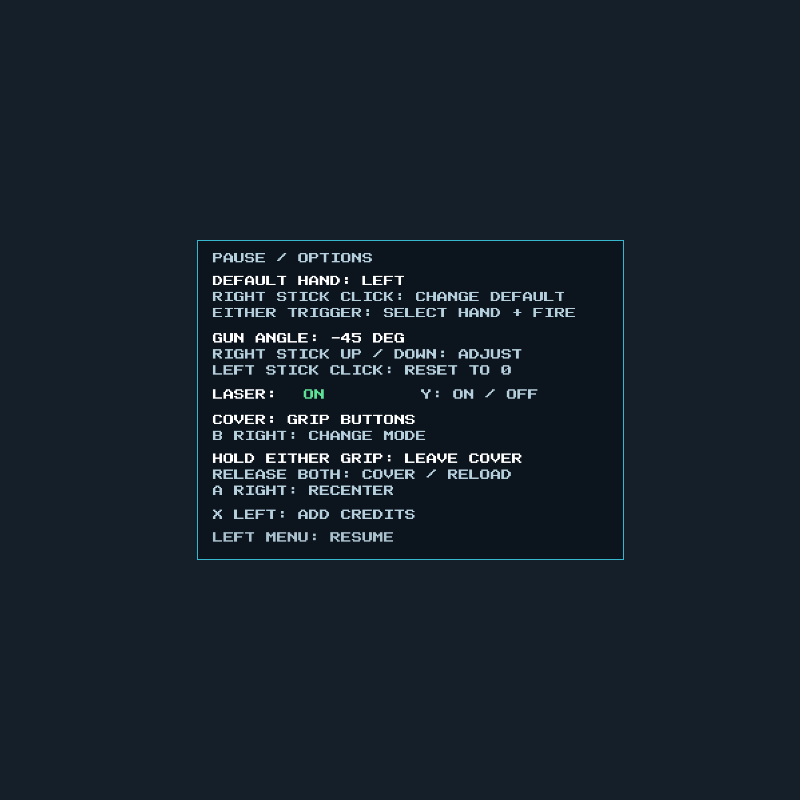
Adjust the pistol's angle to match your natural controller grip. The new GUN ANGLE option is saved for both hands and keeps the model, muzzle, laser and shot direction aligned.
Configure your gun angle
- Open Pause / Options with the left menu button.
- Move the right stick up or down to adjust GUN ANGLE in 1-degree steps. Hold the stick to repeat.
- Use a negative angle to lower the barrel. If the pistol points about 45 degrees too high, try -45 DEG. The range is -60 to +60 degrees.
- Click the left stick to reset the angle to 0 DEG. Close options with the left menu button to resume.
Your angle is saved automatically and retained when switching weapon hands or recentering. Existing installations start at zero unless an angle was already saved in the test build. Other preferences are preserved. Clicking the right stick still changes the default hand.
Windows PCVR also supports keyboard Up / Down to adjust and Home to reset while options are open. Desktop mouse aiming is unchanged.
Downloads
- TimeCrisisVR-v0.8.4-quest.apk — complete standalone Quest APK with bundled game files. Update with SideQuest or
adb install -r TimeCrisisVR-v0.8.4-quest.apkto retain settings. Launch Time Crisis VR (Experimental) under Unknown sources. - TimeCrisisVR-v0.8.4-windows-x64.zip — extract the complete folder and start Play VR.cmd, Play SteamVR.cmd, or Play Desktop.cmd. PCVR requires a connected headset and an OpenXR runtime with OpenGL support.
- TimeCrisisVR-v0.8.4-diagnostics.zip — optional Windows diagnostic exporter and instructions. It collects current/previous logs, arcade input recordings and Android exit details into a ZIP, without launching the game or uploading anything. Requires ADB; it also works with v0.8.3.
- SHA256SUMS-v0.8.4.txt — integrity checksums for the three downloads.
Tested
The tester confirmed the gun-angle controls and a Stage 2 playtest worked on Quest 3. That live session ended normally at frame 31,016 with Android exit status 0. The release retains the same native code and game/model assets as the confirmed test build, with updated version metadata and documentation.
Shared-host tests cover both hands, a +45-degree controller corrected by -45 degrees, model/muzzle/aim alignment, bounds, repeat/reset, saving and focus loss. All 56 saved option/angle combinations and twelve GLES menu views pass. The final APK passes signing, alignment and content checks; the Windows ZIP passes clean extraction, hashes and 601 desktop simulation frames. A prior recorded session also renders through 34,600 frames without CPU traps or reported graphics/DSP/sound faults; its capture shows STAGE 2 CLEAR.
Stage 2 crash reports remain open
The chandelier and stairs exits reported in issue #3 have not been reproduced. This release does not claim to fix them. If affected, keep the app closed after the crash and use the diagnostic helper before repeated launches overwrite the relevant recording. See collection instructions.
A new live PCVR test, Quest 2 refresh-rate measurements and a complete playthrough remain pending. Earlier aim-projection, colour, grip-cover, automatic hand-switching and Stage 1 explosive-box fixes are retained.
Built on spacestate1/namco22-decompile. The pistol is based on FireWarden's CC0 Lowpoly Pistol, imported from the supplied QuestRetroDepth model header. Original game content is separate from the MIT-licensed port code.
Time Crisis VR v0.8.3 - Aim alignment and Quest 2 refresh handling
Improved aim alignment and surface-depth shot marks, plus supported refresh-rate selection and verification for standalone Quest. Includes updated Quest and Windows PCVR downloads.
What's new
- Corrected flat-layer projection: HUD, flat sprites and fallback aiming now use the arcade camera. The old flat layer was approximately 1.545 times too wide, causing an increasing mismatch away from the centre of the screen.
- Shot marks on hit surfaces: the six-frame impact animation is placed at the nearest reconstructed surface, with stereo depth and a small offset to prevent flickering. Shots without a surface use the aligned flat plane. Other HUD artwork remains flat.
- Quest 2 compatibility entry: the APK now explicitly declares Quest 2 alongside Quest 3 and Quest 3S.
- Refresh-rate handling: request 120 Hz when the runtime offers it, otherwise choose the highest supported lower rate. Check the actual rate after focus and retry a bounded number of times if needed. A successful request is no longer treated as proof that the display changed rate.
The normal Windows monitor projection and mouse controls are preserved. The arcade simulation continues at approximately 59.906 Hz, independently of headset rendering.
Downloads and upgrading
- TimeCrisisVR-v0.8.3-quest.apk — complete standalone APK with bundled game files. Install with SideQuest or
adb install -r TimeCrisisVR-v0.8.3-quest.apkto keep your existing settings and game data. Open Time Crisis VR (Experimental) under Unknown sources. The filename now usesquestinstead ofquest3; the Android package is unchanged. - TimeCrisisVR-v0.8.3-windows-x64.zip — extract the complete folder and start Play VR.cmd, Play SteamVR.cmd, or Play Desktop.cmd. PCVR requires a connected headset and an OpenXR runtime with OpenGL support.
- SHA256SUMS-v0.8.3.txt — integrity checksums for both downloads.
Controls are unchanged from v0.8.2: hold either grip to leave cover, release both to hide/reload, and use either trigger to select that controller and fire. Physical ducking is available in options. The laser starts enabled and respects your saved choice. The animated arcade pistol, colour correction and Stage 1 explosive-box fix are retained.
Validation
The tester confirmed the installed aim-test build worked on Quest 3. The release packages retain the same native game code and assets as that build, with updated version metadata and English documentation.
- Camera-aligned flat sprites match reconstructed polygons pixel for pixel. Both multiview eyes match the single-view reference, including camera changes, gamma correction and draw batching.
- Math and input tests cover off-centre aiming, nearest surfaces, no-hit fallback, all six shot-mark tiles, unchanged desktop projection, bounded refresh retries and existing controller interactions.
- A 15,000-frame rendered Stage 1 replay completes without CPU traps or reported graphics/DSP faults. Its 1,781 animated shot-mark instances all resolve to surfaces.
- The final APK passes signing, alignment, immersive activity and bundled-file integrity checks. The final Windows ZIP passes clean extraction, checksums and 601 desktop simulation frames with visible output.
Quest 2's actual refresh rate, a new live PCVR comparison and a complete playthrough remain unverified. This release does not claim stable 120 FPS on every headset; refresh requests depend on the runtime. Accelerated replay is a correctness test, not a real-time performance measurement.
Built on spacestate1/namco22-decompile. The pistol is based on FireWarden's CC0 Lowpoly Pistol, imported from the supplied QuestRetroDepth model header. Original Time Crisis game content is separate from the MIT-licensed port code.
README · Quest quickstart · Windows instructions · Projection and refresh validation
Time Crisis VR v0.8.2 - Arcade pistol, grip cover and colours
An arcade-style pistol with an animated slide, grip-button cover, trigger-based hand switching and improved colour output for standalone Quest and Windows PCVR.
What's new
- New player pistol: separate body, trigger and slide/sights. The slide moves with confirmed shots while the grip and aim ray stay stable. The model uses 1,072 triangles and replaces the previous textured pistol.
- Hold either grip to leave cover. Release both grip buttons to return to cover and reload, like releasing the arcade pedal. Physical ducking remains available in options.
- Either trigger selects its hand and fires. Press the left trigger to move the pistol left; press the right trigger to move it right. Holding both does not repeatedly switch hands. Aim and recoil vibration follow the selected controller.
- Saved default hand: open the left menu and click the right thumbstick to choose DEFAULT HAND. This sets the starting hand and face-button layout. Automatic trigger handoffs leave the buttons unchanged.
- Corrected colour output: avoids applying gamma encoding twice, restoring darker tones, contrast and saturation. Quest uses the sRGB path when supported; the previous RGBA8 fallback remains available. The arcade's own colour table is retained.
Controls and upgrading
Cover has moved from the other trigger to the grip buttons. Both triggers now select their own controller and shoot. Existing laser, default-hand and physical-ducking settings are retained when updating the APK.
| Action | DEFAULT HAND: RIGHT | DEFAULT HAND: LEFT |
|---|---|---|
| Select hand / shoot / start | Either trigger | Either trigger |
| Leave cover | Hold either grip | Hold either grip |
| Hide / reload | Release both grips | Release both grips |
| Insert three credits | A right | X left |
| Toggle laser silently | B right | Y left |
| Recenter / calibrate upright height | X left | A right |
| Change cover mode, in options | Y left | B right |
| Change default hand, in options | Right thumbstick click | Right thumbstick click |
| Open options / resume | Left menu button | Left menu button |
Release a trigger after tracking or focus loss before firing again. The laser remains on by default and respects previous saved choices. Windows mouse/keyboard controls are unchanged.
Downloads
- TimeCrisisVR-v0.8.2-quest3.apk — complete standalone Quest 3 APK with bundled game files. Install with SideQuest or
adb install -r TimeCrisisVR-v0.8.2-quest3.apkto preserve settings. Open Time Crisis VR (Experimental) under Unknown sources. - TimeCrisisVR-v0.8.2-windows-x64.zip — extract the complete folder and start Play VR.cmd, Play SteamVR.cmd, or Play Desktop.cmd. PCVR requires a connected headset and an OpenXR runtime with OpenGL support.
- SHA256SUMS-v0.8.2.txt — integrity checksums for both downloads.
Validation and limitations
The shared host input tests cover both grips, handoffs while the other trigger remains held, short taps between game ticks, simultaneous presses, aim/haptic routing, stable face buttons, saved defaults, physical cover and tracking/action/focus loss. Eight production GLES gun views verify stereo, separate slide/trigger motion, a stationary grip and a complete return to rest. Nine menu views and all eight saved-setting combinations pass.
The Quest test build loaded the new gun and reached focused OpenXR with the sRGB path active. The colour correction was checked on the Quest 3 GPU with byte-identical raw output across both stereo render paths; the tester confirmed the improved appearance. The release retains the exact native libraries and weapon asset from the checked gun-test APK, with updated version metadata. Its signature, alignment, ARM64 libraries, ROM/model integrity and immersive activity were verified. The Windows ZIP passed clean extraction, checksums and 601 desktop simulation frames with visible output and no reported CPU traps or graphics errors.
Human confirmation of the new gun/control combination and a new live PCVR test are still pending. Earlier builds established Quest gameplay and Virtual Desktop PCVR, but those checks predate these control changes. A complete playthrough and perfectly stable 120 FPS are not claimed. The Stage 1 explosive-box fix, independent arcade timing and optional physical ducking from earlier releases are retained.
Built on spacestate1/namco22-decompile. The new pistol is based on FireWarden's CC0 Lowpoly Pistol, imported from the supplied QuestRetroDepth model header. Original Time Crisis game content is separate from the MIT-licensed port code.
Time Crisis VR v0.8.1 - Left-handed mode
Left-handed play for standalone Quest and Windows PCVR.
Enable left-handed mode
Open options with the left menu button, then click the right thumbstick until WEAPON HAND: LEFT appears. Resume with the left menu button. The choice is saved between sessions.
| Action | Left-handed controls |
|---|---|
| Aim, shoot and recoil vibration | Left controller / trigger |
| Trigger cover | Right trigger: hold to leave cover; release to hide/reload |
| Add three credits | X left |
| Toggle laser silently | Y left |
| Recenter / calibrate upright head height | A right |
| Switch physical ducking / trigger cover, in options | B right |
The right-handed layout remains the default, including after upgrading from older settings. Laser and cover preferences are preserved. Both layouts show their current controls in the English options menu. After changing hands, release the new firing trigger once before shooting; held inputs cannot accidentally change settings during the switch. Windows also supports H while paused to change the saved VR weapon hand. Mouse/keyboard play retains its existing controls.
Downloads
- TimeCrisisVR-v0.8.1-quest3.apk — complete standalone Quest 3 APK with bundled game files. Update with SideQuest or
adb install -rto preserve settings. - TimeCrisisVR-v0.8.1-windows-x64.zip — extract the complete folder and start Play VR.cmd, Play SteamVR.cmd, or Play Desktop.cmd.
- SHA256SUMS-v0.8.1.txt — file integrity checksums.
Validation
The tester confirmed that left-handed mode works on Quest 3, including the pistol, shooting and vibration. The installed APK hash matches this download; both eye images were captured and the app log showed no reported CPU/DSP/GL errors during the check.
Automated tests exercise the actual shared host input code with mocked OpenXR calls: both controller layouts and bindings, gun poses, fire/cover, credits, recenter, laser, haptics, saved hand, held inputs during switches, and focus/tracking loss. All eight saved preference combinations and nine GLES menu views passed. The Windows ZIP passed clean-extraction, checksum and desktop-render checks over 601 game frames. A separate live PCVR test of the new left-handed layout is still pending.
This remains an experimental port; the limitations documented for v0.8.0 still apply. Its Stage 1 explosive-box fix, infinite far plane, PCVR support and independent arcade timing are retained.
Built on spacestate1/namco22-decompile. Original game content is separate from the MIT-licensed port code.
Time Crisis VR v0.8.0 — PCVR and Stage 1 crash fix
Experimental Windows PCVR support and the Stage 1 explosive-box fix.
Downloads
- TimeCrisisVR-v0.8.0-quest3.apk — standalone Quest 3, bundled game files; install with SideQuest or
adb install -r. - TimeCrisisVR-v0.8.0-windows-x64.zip — extract the complete folder, connect your headset through PC VR software, then open Play VR.cmd. Play SteamVR.cmd selects SteamVR for that launch; Play Desktop.cmd plays on a monitor with mouse/keyboard.
- SHA256SUMS-v0.8.0.txt — download integrity checksums.
Changes
- Windows x64 / OpenXR / OpenGL 4.3 port, with the tracked pistol, stereo views, Quest Touch controls, saved options and both cover modes.
- Laser assistance defaults on. B still toggles it silently; saved choices are retained.
- Restores 318 original instructions omitted from the explosion coroutine. The recorded Quest failure at frame 12,087 now replays through 15,000 frames without a trap.
- Removes the former 2 km far-plane cutoff, preventing distant scenery from being clipped. Some camera-bound geometry and other texture issues may remain.
- Preserves normal arcade simulation timing when a PC compositor renders at half rate.
- Current/previous input recordings and an export script for repeatable crash reports.
Validation and limits
Quest 3 PCVR through Virtual Desktop at 90 Hz on an RTX 3050 Laptop GPU was tested, and the tester confirmed VR and controls worked. Desktop rendering, APK/package integrity, deterministic crash replay, stereo/multiview rendering and saved settings passed checks. The final timing adjustment passed 30/45/60/72/90/120 Hz clock tests; the headset disconnected before its second live check. A repeated live Quest explosive-box test is not yet confirmed. This is a prerelease: short hitches/audio underruns remain possible, other runtimes/controller layouts are unverified, and no complete playthrough is claimed.
Built on spacestate1/namco22-decompile. The original game logic, assets and hardware reconstruction come from that foundation and the supplied ROM set. Original game content is separate from the MIT-licensed port code.
README · Windows instructions · Crash investigation · Attribution
Time Crisis VR v0.7.3 — Immersive launch fix
Fixes the small-window launch regression in v0.7.1 and v0.7.2. The complete APK now opens the actual OpenXR game activity directly, with the required immersive VR declarations restored. Opening in VR was confirmed on Quest 3.
- Complete APK with automatic game-file preparation; no separate ZIP import.
- English menu, documentation and screenshots.
- Silent laser toggle with B; saved physical-ducking or left-trigger cover mode.
- Added compiled-manifest checks for both APK variants and corrected the optional setup-to-VR handoff. The optional ROM-free handoff has package validation but has not been retested on hardware.
Install TimeCrisisVR-v0.7.3-quest3.apk with SideQuest or adb install -r, then open Time Crisis VR (Experimental) from Unknown sources. Updating preserves existing private settings and game data. SHA-256 and build metadata are attached.
120 Hz remains the target; this launch fix does not claim a new performance benchmark or a complete playthrough.
Built on spacestate1/namco22-decompile. See README and NOTICE for controls, attribution and license scope.
v0.7.2 - English UI and documentation
Superseded by v0.7.3, which fixes this release's small-window launch regression. Use v0.7.3 for immersive VR.
English throughout the current release
-
Translated all VR menu labels, laser states, cover-mode instructions, calibration prompts, resume text and save errors into English.
-
Translated the startup failure dialog.
-
Updated the README and replaced the German quickstart with an English quickstart.
-
Regenerated the menu screenshot from the actual translated GLES renderer and checked its layout. The gameplay screenshot already contains English text.
Install TimeCrisisVR-v0.7.2-quest3.apk over your existing version. This remains the complete APK with bundled game files: no separate ZIP import is required. Saved laser and cover preferences are retained.
Validation: native options/cover/storage tests and all five GLES menu views passed; the APK contains the English labels and none of the previous German UI/error strings; bundled ROM hashes, signature and alignment verified; installed APK hash and OpenXR startup checked on Quest 3. No new full performance run is claimed.
Based on spacestate1/namco22-decompile. See the README for installation, controls and known limitations.
APK SHA-256: 425b63dbe911869821b85850778e8fefeed608ab3d4117cc802ef862d6d047bd
v0.7.1 - Time Crisis VR for Quest 3 (experimental)
Superseded by v0.7.2, which uses English throughout the menu and documentation.
First public experimental release of Time Crisis VR for Meta Quest 3.
Based on spacestate1/namco22-decompile, pinned at 6aaa90b4cbc7a23733e1c9f5f9a5e772a19fe23d.
Download and start
Install TimeCrisisVR-v0.7.1-quest3.apk with SideQuest or adb install -r. Open Time Crisis VR (Experimental) under Unknown sources. This is the complete APK with the supplied ROM set included: it prepares game files automatically, with no separate ZIP import.
After the arcade startup, press A right for three credits, wait briefly, then use the right trigger to start.
Included
-
Standalone Android/ARM64 OpenXR port, stereo world rendering and tracked 3D pistol.
-
Saved laser setting: B right toggles the beam without any popup.
-
Left menu opens options; Y left selects physical ducking or left-trigger cover.
-
Physical mode: calibrate upright with X, duck to hide/reload, stand up to leave cover.
-
Multiview world rendering, shared sprite cache, faster rasterization and a 120 Hz target.
-
Original sound and game logic through the upstream reconstruction.
Verification and limitations
-
Built APK signature, alignment, manifest and required ROM hashes checked.
-
Installed on Quest 3; tested automatic setup with the original private ROM directory temporarily moved aside. All 31 required chip hashes matched after setup; OpenXR initialized and switched to 120 Hz.
-
Physical ducking and menu controls were successfully tested on the preceding 0.7.0 build; the native gameplay code is unchanged in 0.7.1.
-
Java importer tests cover missing/corrupt files, alternate chip names, recovery and path traversal, plus the real ROM set.
-
120 Hz is a target, not a guarantee: the earlier 0.6.0 two-minute gameplay test averaged 120.017 FPS with 2.035% repeated/late frames. No new full performance run or complete playthrough is claimed for this release.
Original game content is separate from the MIT-licensed port code. See attribution and license scope.
SHA-256 of the APK:
ed6b9b88ca712d25b765dbf1464d93729477c84a43f0842e41fe6b477fed2b70
English documentation and an English quickstart are in the repository.