Colab
- A free cloud service based on Jupyter Notebooks that supports GPU/TPU, offered by Google.
- Write and execute code in Python
- Document your code that supports mathematical equations
- Create/Upload/Share notebooks
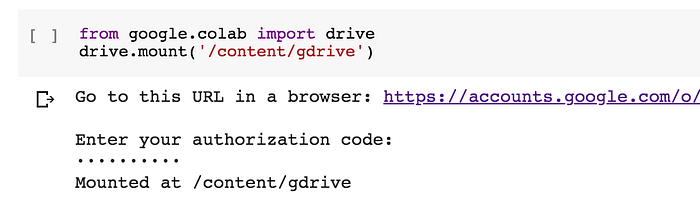
- Import/Save notebooks from/to Google Drive
- Import/Publish notebooks from GitHub
- Import external datasets e.g. from Kaggle
- Integrate PyTorch, TensorFlow, Keras, OpenCV
- Free Cloud service with free GPU
-
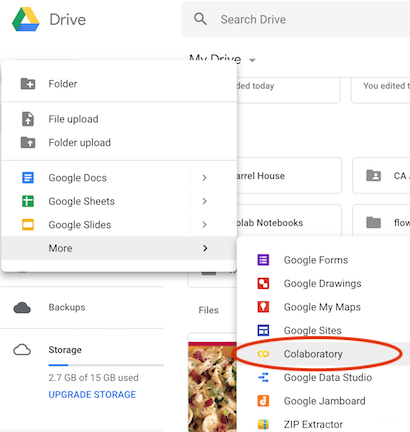
click “New” and drop the menu down to “More” and then select “Colaboratory.”
-
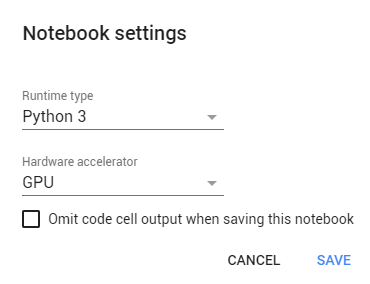
go to the “Runtime” dropdown menu, select “change runtime type” and select GPU in the hardware accelerator drop-down menu
-
click "save" and you are now having a Python-3 GPU kernel in use.
- How long can notebooks run in Colab? Notebooks run by connecting to virtual machines that have maximum lifetimes that can be as much as 12 hours. Notebooks will also disconnect from VMs when left idle for too long(maybe 1 hour, maybe 2 hours). Maximum VM lifetime and idle timeout behavior may vary over time, or based on your usage. This is necessary for Colab to be able to offer computational resources for free. Users interested in longer VM lifetimes and more lenient idle timeout behaviors that don’t vary as much over time may be interested in Colab Pro.
- Re-install each of the dependencies every time you kill/refactory your kernel(just keep your installation code and re-run them)
- Colab is good for testing and development on relatively small datasets. Once everything looks fine, we can run larger datasets on AWS or GCP