Describe the bug
After login as an Admin, the "Import" menu initially appears. However, if you select any other page in the sidebar, it disappears. Here's a screenshot... normally Import is right above Export.
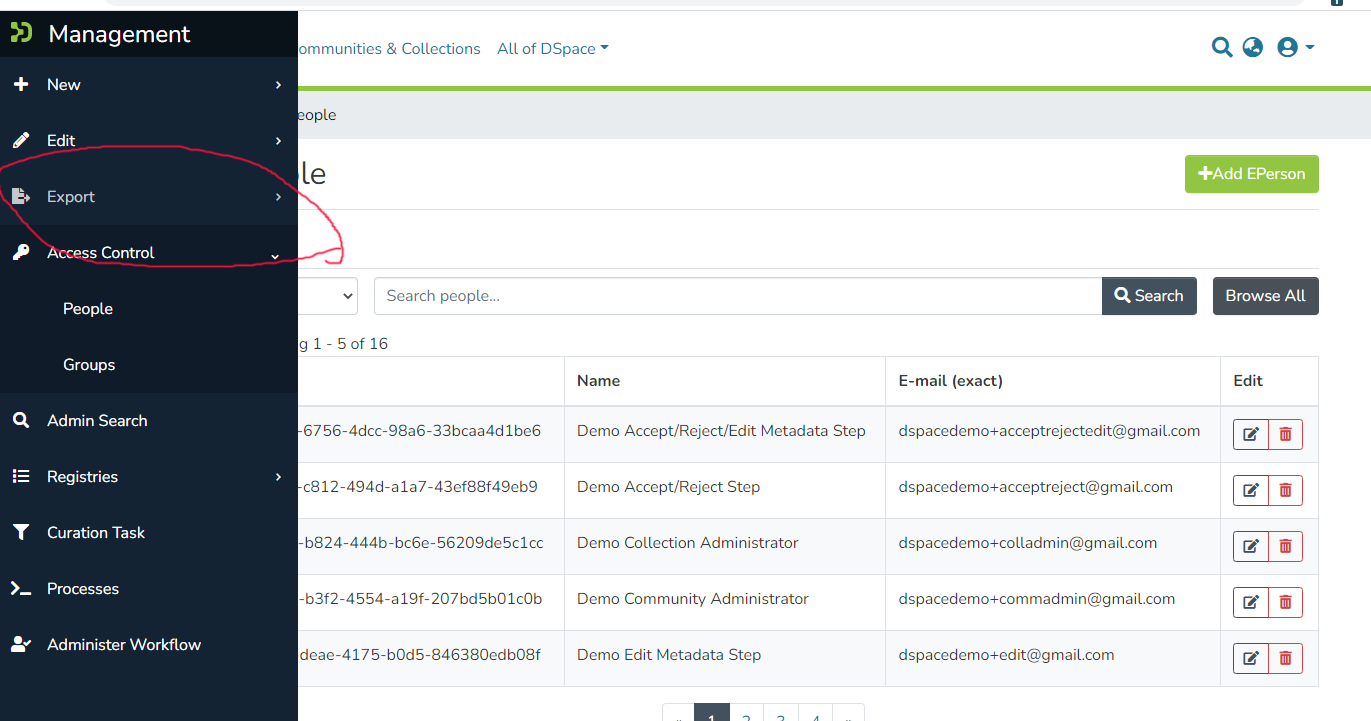
Reproducible both locally & on http://demo7.dspace.org
To Reproduce
Steps to reproduce the behavior:
- Login as an Admin
- Look at sidebar. The Import menu should be there
- Click on a different menu in sidebar, e.g. "Admin Search"
- Look again at the sidebar, the Import menu will have disappeared.
- If you click the reload button in your browser the Import menu will return. It will disappear again after you click a different item in the menu.
It almost seems like some sort of caching issue in the UI layer? Uncertain what could be causing this and why it's specific to the Import menu (no other menus are affected).


Describe the bug
After login as an Admin, the "Import" menu initially appears. However, if you select any other page in the sidebar, it disappears. Here's a screenshot... normally Import is right above Export.
Reproducible both locally & on http://demo7.dspace.org
To Reproduce
Steps to reproduce the behavior:
It almost seems like some sort of caching issue in the UI layer? Uncertain what could be causing this and why it's specific to the Import menu (no other menus are affected).