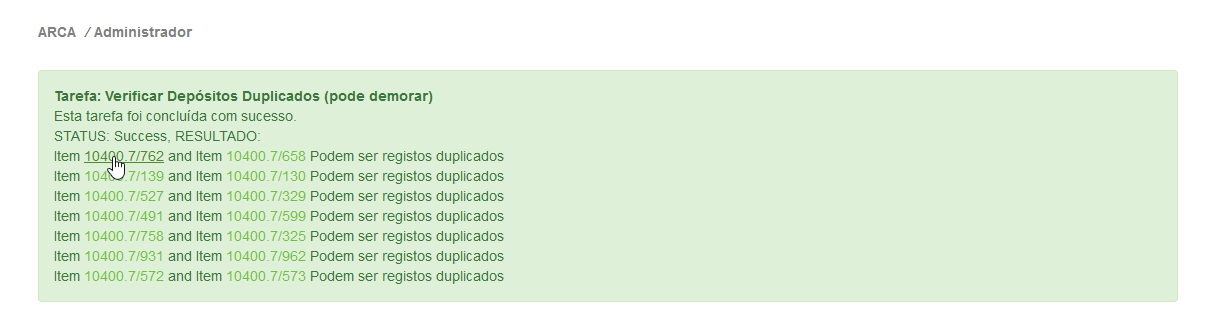
We have some custom curation tasks in DSpace 5 that we create a link to the item(s) we want to modify. The figure below shows an example of a curation task with links to items. This facilitates the user to access the document by clicking on it:
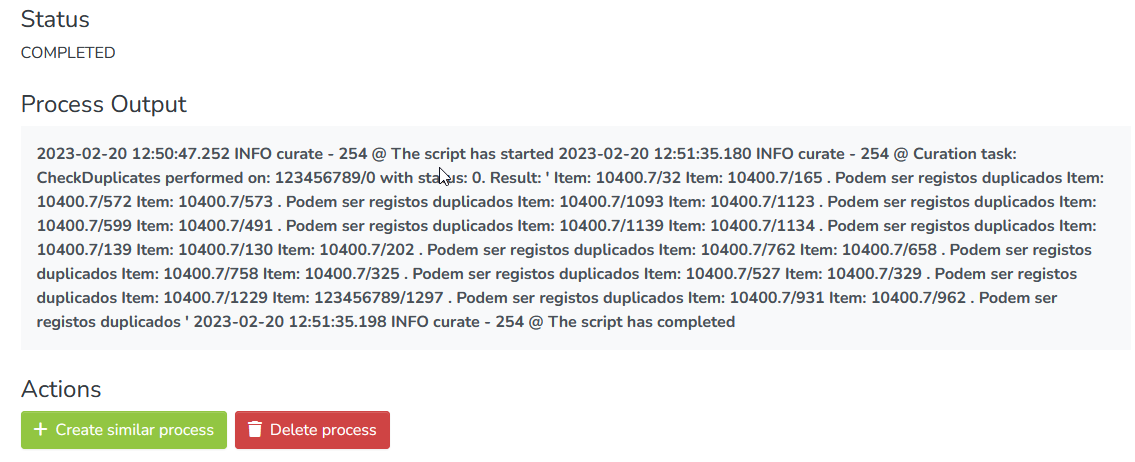
In DSpace 7 the process output strips all the html content and only shows plain text (See below):
In both cases we use the StringBuilder to construct the output, example:
...
res.append("<a href="http://hdl.handle.net/");
res.append(handle);
res.append("" target="_blank">");
But in DSpace 7 the html is stripped (see the previous image) and I think is the angular part where the data is processed.
We have some custom curation tasks in DSpace 5 that we create a link to the item(s) we want to modify. The figure below shows an example of a curation task with links to items. This facilitates the user to access the document by clicking on it:

In DSpace 7 the process output strips all the html content and only shows plain text (See below):

In both cases we use the StringBuilder to construct the output, example:
...
res.append("<a href="http://hdl.handle.net/");
res.append(handle);
res.append("" target="_blank">");
But in DSpace 7 the html is stripped (see the previous image) and I think is the angular part where the data is processed.