Make password minimum requirements stronger#1776
Conversation


…n paasword update


 tdonohue
added
bug
authentication: general
tdonohue
added
bug
authentication: general

There was a problem hiding this comment.
@corrad82-4s : Overall this works. However, the usability of the UI is not great. Currently we have two different validity checks on the new password as you can see in this screenshot of the create profile page:
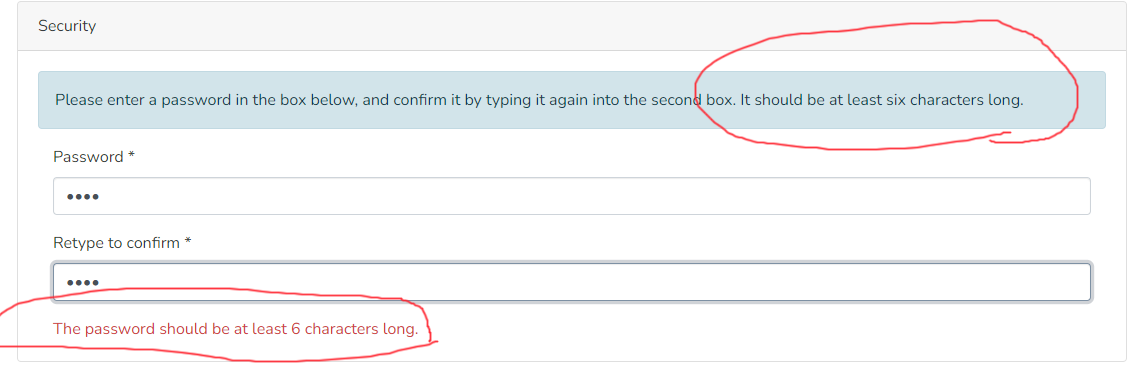
The UI display (in the create profile and edit profile) always tells the user that a password just needs to be >=6 characters & it has an "isInvalid" check to verify that. However, when the user submits a simple password of 6 characters, they'll get the error that tells them there are different password requirements
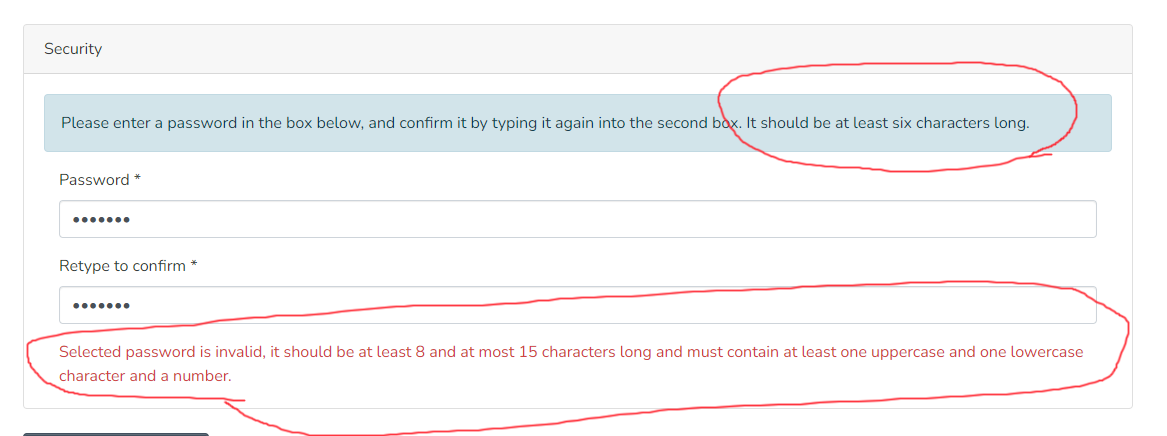
This results in a very confusing experience as you don't know which rules to follow.
I think the core issue here is that it looks like the existing rules were never changed. Currently, on main, the rules are that a password must be >6 chars. However, you didn't replace those rules in this PR, instead you just added new rules separately. I'd recommend we replace the existing validation checks/rules to align with the new minimum password requirements.
A few similar suggestions inline below. See also my review of the backend PR: DSpace/DSpace#8404 (review)

|
Hi @tdonohue , thank you for your comments. We will take in charge requested changes. We can change it by removing the current minimum lenght validation, performed only on frontend side, or better just leave a check that password is not empty, unless On the other hand we would let in place just the new password robustness check performing the backend call. So, eventually, the user won't be "stopped" when trying to post an invalid password, but he will be informed after posting it by backend validation. I think it is more acceptable than having 2 distinct and not coherent messages. Do you agree? |

|
@corrad82-4s : I'm OK with leaving the check for a non-empty password & also the check that the passwords are identical between the two fields. But, I think the minimum length check either needs to be removed or somehow updated to send a "validate only" request to the backend. For example: if the backend had a way to validate what the user has typed so far (without saving the password), then the UI could be updated to provide ongoing feedback to the user as they type their new password (i.e. on each character change). This would allow for the password validation error to be displayed until the user fully enters a new password that validates. But, if it's not easily possible to add this sort of "validate only" option on each character change, then I think it's OK to simply require the user to submit a password before the validation errors are shown. If we go with this approach though, it'd be best to provide a note which describes what a valid password looks like, so that users don't need to submit an invalid password first before they understand what is valid. |
|
Hi @tdonohue, yes, I definitely agree in removing minimum lenght validation. In my opinion, a note about minimum password requirements could be useful either if we validate the password while it is entered or we do it after it has been submitted for patch operation. So I would add it. Thank you |

 tdonohue
left a comment
tdonohue
left a comment
tdonohue
left a comment
There was a problem hiding this comment.
@corrad82-4s : Overall, this works, but the usability still isn't great because it looks like the minimum length validation wasn't removed (as we previously discussed). I think it needs to be removed, as there's no guarantee that a site will keep the 8 character requirement on the backend.. For example, if someone changes the regex (on the backend) to require 12 characters, they will be forced to customize the code of the frontend (as it's now hardcoded to require 8 character passwords)
Also, I still think it'd be better behavior if the frontend just displayed the error message that is sent by the backend. That'd let us specify the error message text in one place (in the backend's Messages.properties), instead of requiring it to be synchronized between the backend's Messages.properties and the frontend's en.json5
Beyond that, the functionality here works.

tdonohue
left a comment
tdonohue
left a comment
There was a problem hiding this comment.
@corrad82 : This looks good & works. I'm basically a +1. Just one minor fix to apply inline below.
I also added some feedback on the backend PR which could impact this PR.. I'm suggesting we may want to reconsider whether the error is a 422. See comments here: DSpace/DSpace#8404 (review)
There was a problem hiding this comment.
👍 Looks good now @corrad82-4s ! However, I still think we need to remove the unused i18n key (see my prior review). Once that's done, I think this is ready to be merged (assuming @artlowel agrees)
|
Hello @tdonohue , thank you for your approval. Our developer pushed latest required changes. |


|
Merging as this is at +2. Thanks again @corrad82-4s ! |
5 participants


References
Add references/links to any related issues or PRs. These may include:
Description
Short summary of changes (1-2 sentences).
422 error code is returned when password set by users, when they register for first time or reset password. This code means that password is invalid, according to minimum security requirements, checked by Backend.
Instructions for Reviewers
List of changes in this PR:
Include guidance for how to test or review your PR. This may include: steps to reproduce a bug, screenshots or description of a new feature, or reasons behind specific changes.
To test it, register a new user, and set a weak password as first one. Password won't be accepted. Set a more robust one, with a length included between 8 and 15 characters and at least an upper and lowercase chars and a number (according to default validation rule set in dspace.cfg). Password matching with these criteria will be accepted.
Same test must be done in password recovery process.
Checklist
yarn run lintpackage.json), I've made sure their licenses align with the DSpace BSD License based on the Licensing of Contributions documentation.