Add captioning support for video/audio files#1967
Conversation


 tdonohue
added
improvement
component: viewer
tdonohue
changed the title
tdonohue
added
improvement
component: viewer
tdonohue
changed the title

|
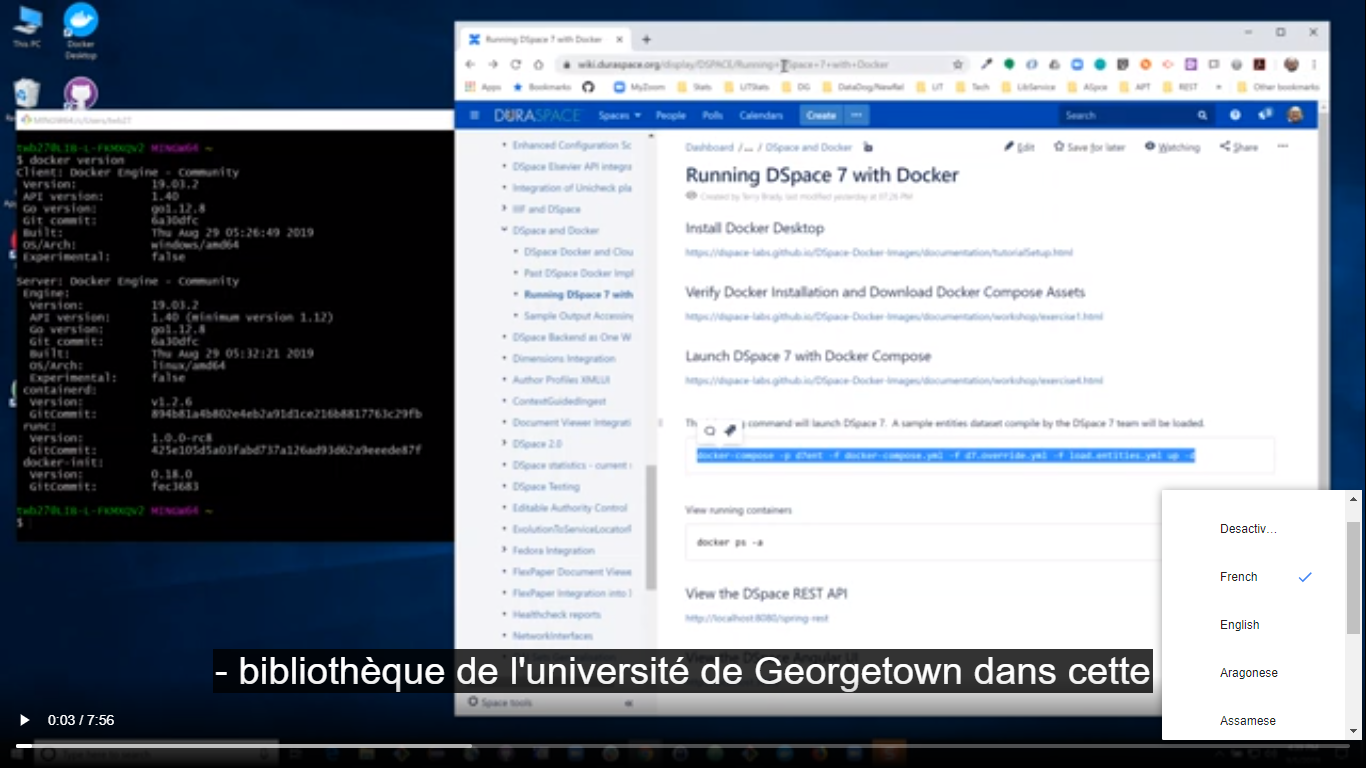
Hi @yingjin I checked the operation and it works very well and I can change languages and everything is excellent. |

 tdonohue
left a comment
tdonohue
left a comment
tdonohue
left a comment
There was a problem hiding this comment.
@yingjin : Thanks for this improvement! I gave this a test and was able to successfully get captioning working on a video using a *.vtt file.
The only thing that tripped me up was the naming convention...I had a video named test.mp4 and I originally named the VTT test-en.vtt only to realize it should be named test.mp4-en.vtt. That's just my own mistake, but we may want to make sure to write some clear documentation on this naming convention.
All that said, I have a few minor comments below on things to clean up in the code. I also think we should create a small PR for the backend to add VTT to our DSpace Format Registry -- otherwise, I'd worry someone will forget that step and find captioning doesn't work.
| controls | ||
| ></video> | ||
| > | ||
| <!-- <track default kind="captions" src="./assets/vtt/JusticeAndTransformation_caption.mp4-en.vtt" label="English" type="text/vtt"/>--> |
There was a problem hiding this comment.
Small thing, could we remove this commented out code?
| let filteredCapMedias: MediaViewerItem[]; | ||
| let capInfos: CaptionInfo[] = []; | ||
| filteredCapMedias = this.medias | ||
| .filter((media) => media.minetype === 'text/vtt') |
There was a problem hiding this comment.
We may want to add the 'text/vtt' mime type to the DSpace registry by default (this would require a separate backend PR). That way it's easier for others to reuse this code. For example, if someone forgets to add this mimeType & then uploads a VTT file, captioning won't work.
(If you could create a PR for this, that'd be great. If you don't have time to do so though, then I could always create this small PR as a compliment to this PR)
| filteredCapMedias | ||
| .forEach((media, index) => { | ||
| let srclang: string = media.bitstream.name.slice(-6, -4).toLowerCase(); | ||
| //capInfos[index] = new CaptionInfo( |
There was a problem hiding this comment.
Again, it'd be best to remove any commented out code.

 atarix83
left a comment
atarix83
left a comment
atarix83
left a comment
There was a problem hiding this comment.
thanks @yingjin for this PR
the code looks good, but i can't find a way to test it. I've followed instructions but the captions didn't appear.
I've created an item in the demo here https://demo7.dspace.org/items/0220cb00-3eb9-467d-916c-2ab588caa9b7
could you tell me what is wrong ?
moreover while i was trying to enabled the media viewer i found a bug that is not related to this PR, but it'd be nice if you can fix.
Basically if you enable the media viewer only for video the media player is not shown
mediaViewer:
  image: false
  video: true
It's enough to fix the following lines
https://github.com/yingjin/dspace-angular/blob/DA-8586/src/app/item-page/simple/item-types/publication/publication.component.html#L27
https://github.com/yingjin/dspace-angular/blob/DA-8586/src/app/item-page/simple/item-types/untyped-item/untyped-item.component.html#L27
|
Hi Tim,
Thank you for the suggestions. I added comments for CapInfo.ts class and
removed the comments in the other two files.
It would be nice to add text/vtt mime type to the registry by default.
Also, jpeg 2000 wasn't in the registry for IIIF viewer. If it is still the
case, might add that as well.
Best,
Ying
…On Wed, Dec 14, 2022 at 4:45 PM Tim Donohue ***@***.***> wrote:
***@***.**** approved this pull request.
@yingjin
<https://urldefense.com/v3/__https://github.com/yingjin__;!!BuQPrrmRaQ!haT-xVz3GzN4uOBdUoa1V7fcn3IkSrcLjKihaoR0c9jc7Wr2MBXlxCDv4sGdVOb3exBzBOK3qtDJnlMNeAgx3-1-SfOahg$>
: Thanks for this improvement! I gave this a test and was able to
successfully get captioning working on a video using a *.vtt file.
The only thing that tripped me up was the naming convention...I had a
video named test.mp4 and I originally named the VTT test-en.vtt only to
realize it *should be named* test.mp4-en.vtt. That's just my own mistake,
but we may want to make sure to write some clear documentation on this
naming convention.
All that said, I have a few minor comments below on things to clean up in
the code. I also think we should create a small PR for the backend to add
VTT to our DSpace Format Registry -- otherwise, I'd worry someone will
forget that step and find captioning doesn't work.
------------------------------
In src/app/item-page/media-viewer/media-viewer-video/caption-info.ts
<https://urldefense.com/v3/__https://github.com/DSpace/dspace-angular/pull/1967*discussion_r1049026407__;Iw!!BuQPrrmRaQ!haT-xVz3GzN4uOBdUoa1V7fcn3IkSrcLjKihaoR0c9jc7Wr2MBXlxCDv4sGdVOb3exBzBOK3qtDJnlMNeAgx3-0p8N7drA$>
:
> @@ -0,0 +1,4 @@
+export class CaptionInfo {
Could we add some TypeDocs / comments to better describe this class? It
looks like its purpose is to store information about the captioning file,
so that it can be placed in the HTML5 <track> tag. So, we should add a
brief note to describe how this is used.
------------------------------
In
src/app/item-page/media-viewer/media-viewer-video/media-viewer-video.component.html
<https://urldefense.com/v3/__https://github.com/DSpace/dspace-angular/pull/1967*discussion_r1049029099__;Iw!!BuQPrrmRaQ!haT-xVz3GzN4uOBdUoa1V7fcn3IkSrcLjKihaoR0c9jc7Wr2MBXlxCDv4sGdVOb3exBzBOK3qtDJnlMNeAgx3-37QypjHA$>
:
> @@ -8,7 +9,15 @@
"
preload="none"
controls
-></video>
+>
+<!-- <track default kind="captions" src="./assets/vtt/JusticeAndTransformation_caption.mp4-en.vtt" label="English" type="text/vtt"/>-->
Small thing, could we remove this commented out code?
------------------------------
In
src/app/item-page/media-viewer/media-viewer-video/media-viewer-video.component.ts
<https://urldefense.com/v3/__https://github.com/DSpace/dspace-angular/pull/1967*discussion_r1049030883__;Iw!!BuQPrrmRaQ!haT-xVz3GzN4uOBdUoa1V7fcn3IkSrcLjKihaoR0c9jc7Wr2MBXlxCDv4sGdVOb3exBzBOK3qtDJnlMNeAgx3-0L6ECc-g$>
:
> +
+ /**
+ * This method check if there is caption file for the media
+ * The caption file name is the media name plus "-" following two letter
+ * language code and .vtt suffix
+ *
+ * html5 video only support WEBVTT format
+ *
+ * Two letter language code reference
+ * https://www.w3schools.com/tags/ref_language_codes.asp <https://urldefense.com/v3/__https://www.w3schools.com/tags/ref_language_codes.asp__;!!BuQPrrmRaQ!haT-xVz3GzN4uOBdUoa1V7fcn3IkSrcLjKihaoR0c9jc7Wr2MBXlxCDv4sGdVOb3exBzBOK3qtDJnlMNeAgx3-0u0CdbSg$>
+ */
+ getMediaCap(name: string): CaptionInfo[] {
+ let filteredCapMedias: MediaViewerItem[];
+ let capInfos: CaptionInfo[] = [];
+ filteredCapMedias = this.medias
+ .filter((media) => media.minetype === 'text/vtt')
We may want to add the 'text/vtt' mime type to the DSpace registry by
default (this would require a separate backend PR). That way it's easier
for others to reuse this code. For example, if someone forgets to add this
mimeType & then uploads a VTT file, captioning won't work.
------------------------------
In
src/app/item-page/media-viewer/media-viewer-video/media-viewer-video.component.ts
<https://urldefense.com/v3/__https://github.com/DSpace/dspace-angular/pull/1967*discussion_r1049042287__;Iw!!BuQPrrmRaQ!haT-xVz3GzN4uOBdUoa1V7fcn3IkSrcLjKihaoR0c9jc7Wr2MBXlxCDv4sGdVOb3exBzBOK3qtDJnlMNeAgx3-34ULcnOQ$>
:
> + *
+ * Two letter language code reference
+ * https://www.w3schools.com/tags/ref_language_codes.asp <https://urldefense.com/v3/__https://www.w3schools.com/tags/ref_language_codes.asp__;!!BuQPrrmRaQ!haT-xVz3GzN4uOBdUoa1V7fcn3IkSrcLjKihaoR0c9jc7Wr2MBXlxCDv4sGdVOb3exBzBOK3qtDJnlMNeAgx3-0u0CdbSg$>
+ */
+ getMediaCap(name: string): CaptionInfo[] {
+ let filteredCapMedias: MediaViewerItem[];
+ let capInfos: CaptionInfo[] = [];
+ filteredCapMedias = this.medias
+ .filter((media) => media.minetype === 'text/vtt')
+ .filter((media) => media.bitstream.name.substring(0, (media.bitstream.name.length - 7) ).toLowerCase() === name.toLowerCase());
+
+ if (filteredCapMedias) {
+ filteredCapMedias
+ .forEach((media, index) => {
+ let srclang: string = media.bitstream.name.slice(-6, -4).toLowerCase();
+ //capInfos[index] = new CaptionInfo(
Again, it'd be best to remove any commented out code.
—
Reply to this email directly, view it on GitHub
<https://urldefense.com/v3/__https://github.com/DSpace/dspace-angular/pull/1967*pullrequestreview-1218329344__;Iw!!BuQPrrmRaQ!haT-xVz3GzN4uOBdUoa1V7fcn3IkSrcLjKihaoR0c9jc7Wr2MBXlxCDv4sGdVOb3exBzBOK3qtDJnlMNeAgx3-3qoG9uwg$>,
or unsubscribe
<https://urldefense.com/v3/__https://github.com/notifications/unsubscribe-auth/AALAW7UAC6J3W25XHUUZKP3WNJEWHANCNFSM6AAAAAASCS3YH4__;!!BuQPrrmRaQ!haT-xVz3GzN4uOBdUoa1V7fcn3IkSrcLjKihaoR0c9jc7Wr2MBXlxCDv4sGdVOb3exBzBOK3qtDJnlMNeAgx3-0hmV1CbA$>
.
You are receiving this because you were mentioned.Message ID:
***@***.***>
|

|
@yingjin : If you wanted to fix the image viewer issue in this PR, it's OK with me. It's not required for this PR, but you can do it if you want. |
|
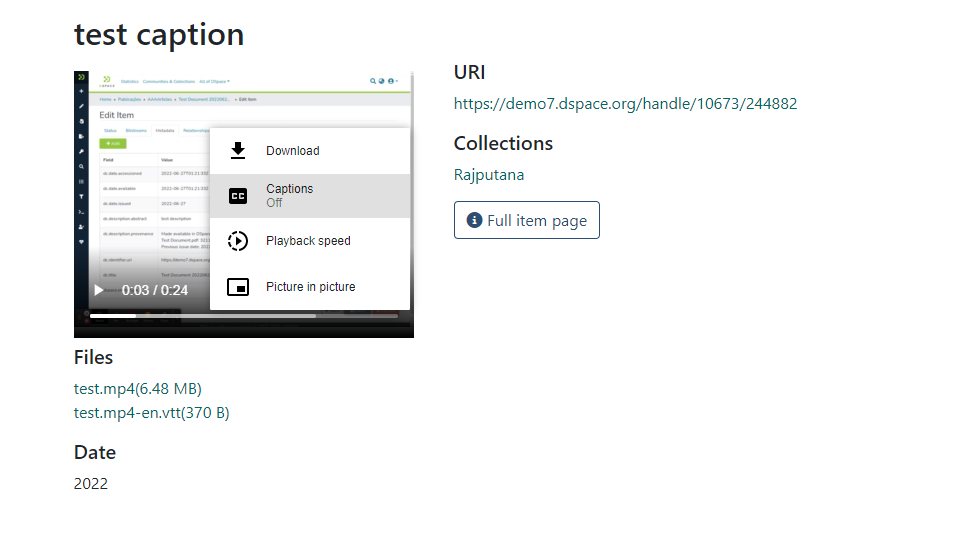
@atarix83 : I retested this PR with your example on the demo site & it works fine for me. I suspect maybe you forgot to turn on the captioning in the video viewer? By default, captioning is always off... but if you click the three-dot icon (lower right) you'll see the "Captions" menu (see screenshot). Click it and captioning will be enabled.
So, with this PR, enabling captioning involves two main steps...
|
|
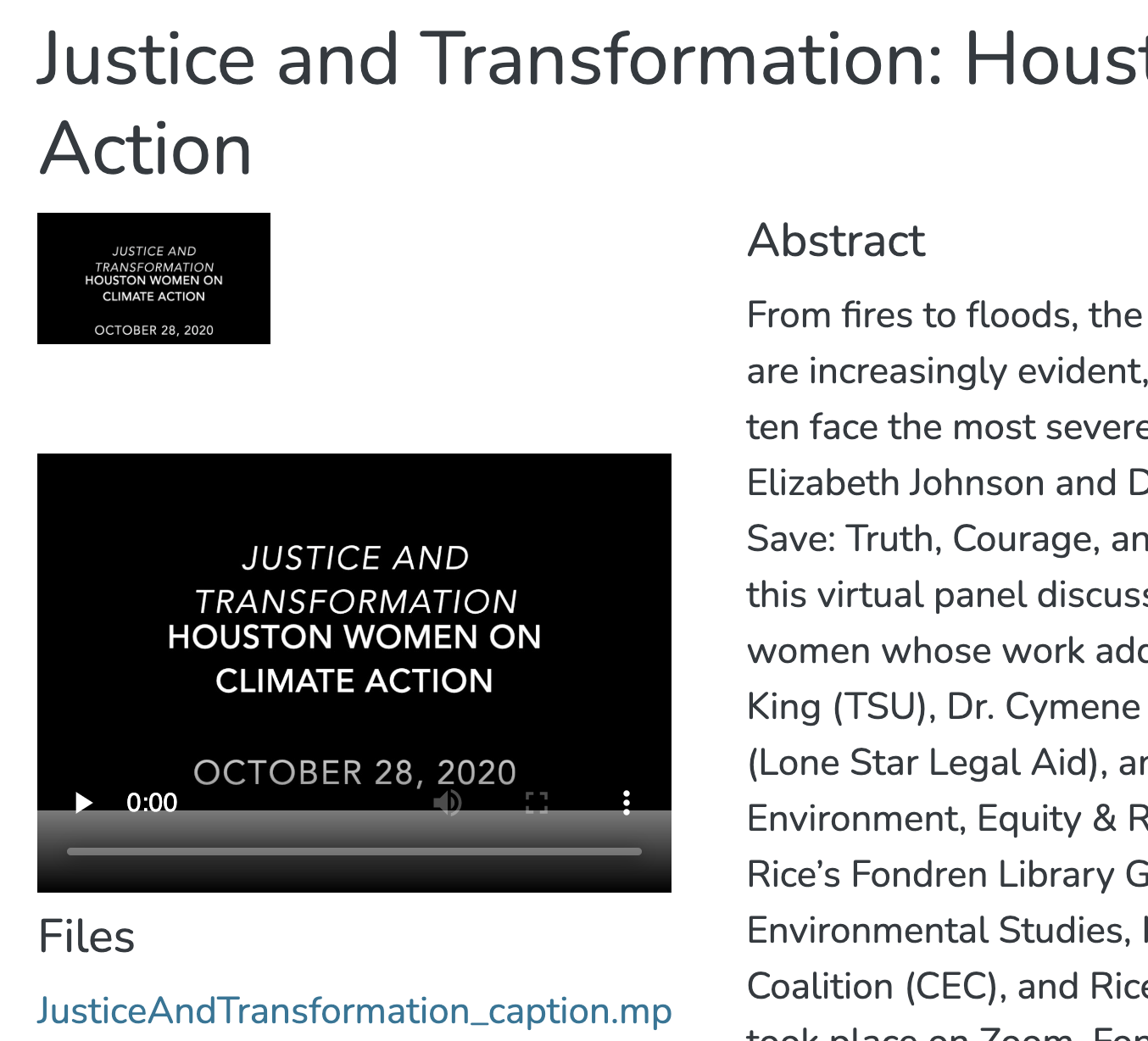
As @atarix83 suggested, And setup Here are the result after changing the line 27,
Is that expected behavior? Ying |
There was a problem hiding this comment.
👍 Thanks @yingjin . Tested this again today and it works as described.
Looking closer, I think the bug regarding having to enable image in order to get video to work is not going to be simple to fix. So, I think it needs to be treated as a separate bug ticket. Based on how the media.viewer.component.html is written, it appears to assume that you can only enable video if image is also enabled. I think it would require some refactoring to support something like:
mediaViewer:
  image: false
  video: true
So, I'll create a separate ticket for this bug, as it's not directly related to your work here. Separate ticket created at #2035
tdonohue
added
the
1 APPROVAL
|
Merging with +1 approval for 7.5. I've moved the outstanding bug to #2035 . I've also added some basic documentation for this new captioning feature to https://wiki.lyrasis.org/display/DSDOC7x/User+Interface+Configuration#UserInterfaceConfiguration-MediaViewerSettings Thanks again @yingjin ! |
4 participants


References
Add references/links to any related issues or PRs. These may include:
Description
Add captioning support for video/audio files. Only front end angular is changed.
Instructions for Reviewers
Please add a more detailed description of the changes made by your PR. At a minimum, providing a bulleted list of changes in your PR is helpful to reviewers.
List of changes in this PR:
Include guidance for how to test or review your PR. This may include: steps to reproduce a bug, screenshots or description of a new feature, or reasons behind specific changes.
Have an item with media bitstreams, either video/audio files, and their corresponding .vtt file named following this pattern -
the video file "greenteam.mp4" media should have a .vtt file named "greenteam.mp4-en.vtt". -en is the two letter language code and will be translated to full language name using language helper. You can have multiple .vtt files associated with it if there are multiple languages.
Refer language code here or language-helper.ts file.
https://www.w3schools.com/tags/ref_language_codes.asp
You also need to turn on the media viewer in config.yml, add new format at registries -> format. Name: WEB VTT, minetype: text/vtt and suffix: vtt.
After this, you could ingest the items with media items and vtt files and test it in media viewer. It should show you the caption off when click three dot at the right bottom corner of the media player. Choose caption and you should see a list of the language(s) listed. Choose one and test it.
Checklist
This checklist provides a reminder of what we are going to look for when reviewing your PR. You need not complete this checklist prior to creating your PR (draft PRs are always welcome). If you are unsure about an item in the checklist, don't hesitate to ask. We're here to help!
yarn run lintpackage.json), I've made sure their licenses align with the DSpace BSD License based on the Licensing of Contributions documentation.