v2.0.0
Pre-release

NeuralNote v2.0.0
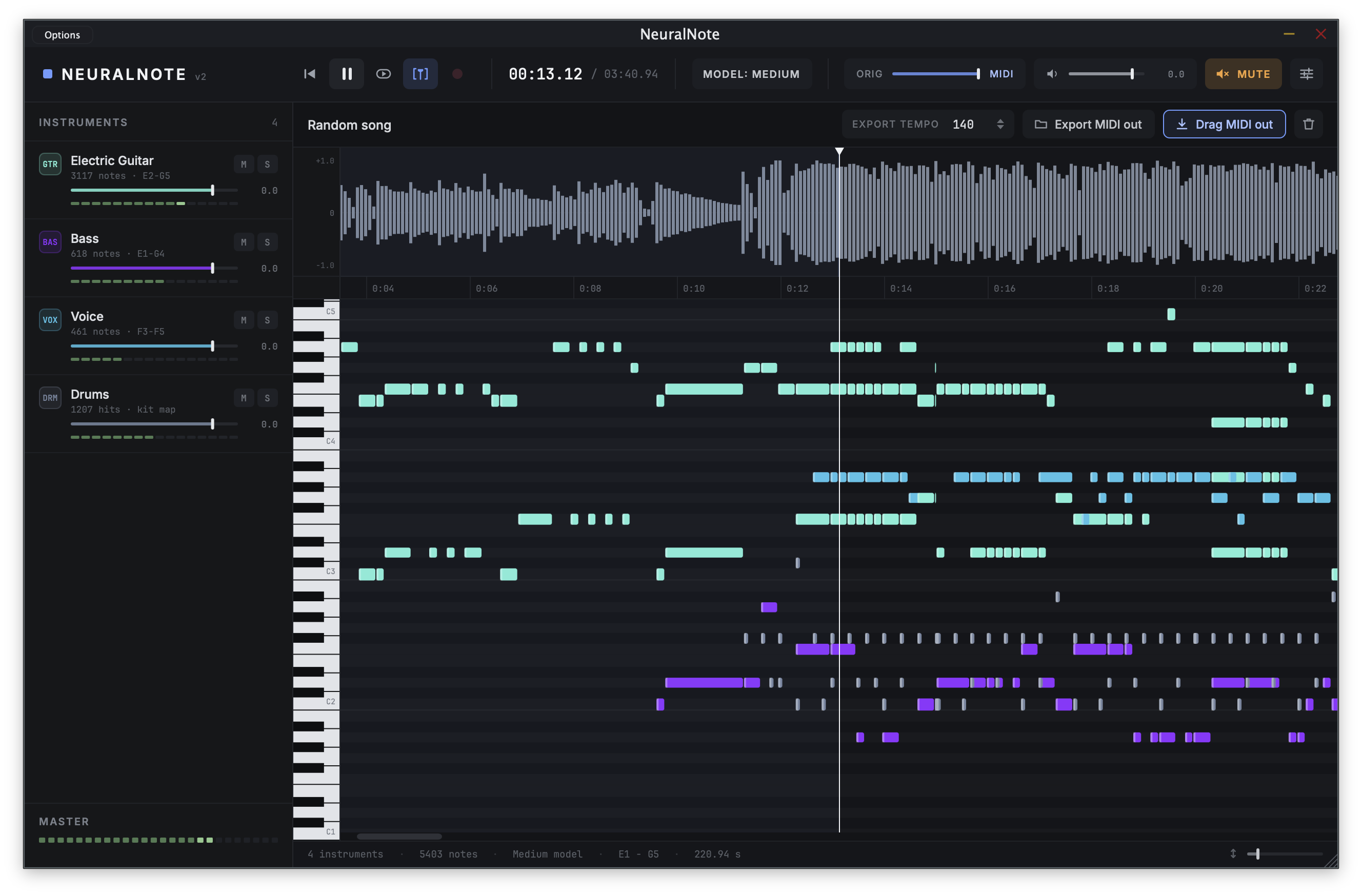
NeuralNote v2 is a major rewrite. Spotify's Basic Pitch is replaced by MuScriptor, a much larger and more capable transcription model from Kyutai and Mirelo (paper, blog post).
NeuralNote can now transcribe full mixes, not just one instrument at a time, and gives you the notes of each instrument separately. It comes with a new UI and a built-in synth to play them all back.
Downloads
| Platform | File | Contents |
|---|---|---|
| macOS (Apple Silicon) | NeuralNote_Installer_Mac_arm64.pkg |
Standalone, VST3 and AU |
| Windows (x64) | NeuralNote_Installer_Windows_x64.exe |
Standalone and VST3 |
- The macOS installer is signed and notarized. An installer for Intel Macs will come in a future release.
- The Windows installer is not code signed, so Windows may warn you before running it.
- Linux binaries are coming soon. In the meantime, you can build from source.
The model is not included in the installers. NeuralNote downloads it when you ask it to (see below).
What's new
- A new transcription model: MuScriptor. A transformer with 103M to 1.4B parameters, compared with fewer than 17K for Basic Pitch. It comes in three sizes,
small,mediumandlarge(about 210 MB, 620 MB and 2.7 GB), which trade speed for quality. NeuralNote downloads the one you choose from Hugging Face, from the Model button in the top bar. Downloads can be resumed and are checked for integrity. - Much better transcriptions, on full mixes, per instrument. Drop in a whole song and get the notes of each instrument separately. Select which instruments to transcribe, or leave it on
Automaticto let the model detect them. Transcriptions tend to be better when the model is given the correct set of instruments. - Results while you wait. Notes fill into the piano roll as they are decoded, and you can play them before the transcription finishes. A progress indicator and a cancel button are shown while it runs.
- A new built-in synth that plays every transcribed instrument, with gain, mute and solo per instrument, a mix control between the source audio and the transcription, and a master gain.
- Multi-instrument MIDI export. Drag and drop the MIDI onto your DAW or save it to a file. Each instrument gets its own track with the matching General MIDI program, and drums go on channel 10. When you record in your DAW with the transport running, the exported MIDI lines up with your bars.
- A new, modern UI, with a resizable window.
- Your transcription is saved with your DAW session.
- Everything runs locally. Your audio never leaves your machine. Transcription runs on the GPU, through Metal on macOS and Vulkan on Windows and Linux, or on the CPU, so a GPU isn't mandatory. A GPU is recommended for the
mediumandlargemodels. You can pick the device in Settings > Compute device.
Approximate speed on an Apple M1 Pro (above 1× means faster than real time (= takes less time than the audio to transcribe)):
| Size | GPU (Metal) | CPU |
|---|---|---|
small |
~3.5× | ~2× |
medium |
~1.5× | ~0.7× |
large |
~0.5× | not recommended |
Removed since v1
MuScriptor works differently from Basic Pitch, and some v1 features no longer apply or were dropped:
- The transcription settings: note sensitivity, split sensitivity, minimum note duration and pitch bend.
- Scale quantization and time quantization.
- The plugin parameters are now Mute, Mix and Master Gain, so sessions saved with v1 won't restore their old settings.
Feedback welcome!
This is a big release, and so far it has only been tested on a few machines and GPUs. Please open a GitHub issue if something breaks, gives wrong results or is unexpectedly slow, and also if it works well on your setup. Both help a lot. Please include your OS, your CPU and GPU, the model size and the compute device used. Problems in the transcription engine itself can also go to muscriptor.cpp.