Releases: DanKo12345/lumable
Release list
LumaBLE 0.4.4 (beta)

LumaBLE 0.4.4 (beta)
Music reacts more clearly at everyday listening levels, and the microphone is easier to tune
without guessing where the room noise ends.
Added
- Live bass, mid and treble meters on the Music card, with a short sound check for system audio
or a microphone and a live level beside the noise threshold. - Microphone noise-gate calibration from a brief quiet sample, with clear feedback when the sample
is too loud or unstable.
Changed
- The microphone threshold uses a decibel scale. Existing settings are migrated without changing
the effective threshold. - Quiet system music lifts the reaction colour while keeping the strip's hardware brightness and
Fusion's unmodified audio level. Louder music keeps its previous appearance. - Navigation items grow gently on hover; their labels remain sharp and stable at rest.
Fixed
- System audio no longer spends several seconds learning an already-playing quiet track as noise.
- Live microphone level stays readable over the threshold slider's fill in both themes, and music
controls keep their full labels through row transitions. - Audio capture recovers after transient device failures. BLE recovery keeps writes on their own
connection, and sleep automations run before Windows suspends the app.
Windows 10/11. The installer and portable ZIP are unsigned.
In the app
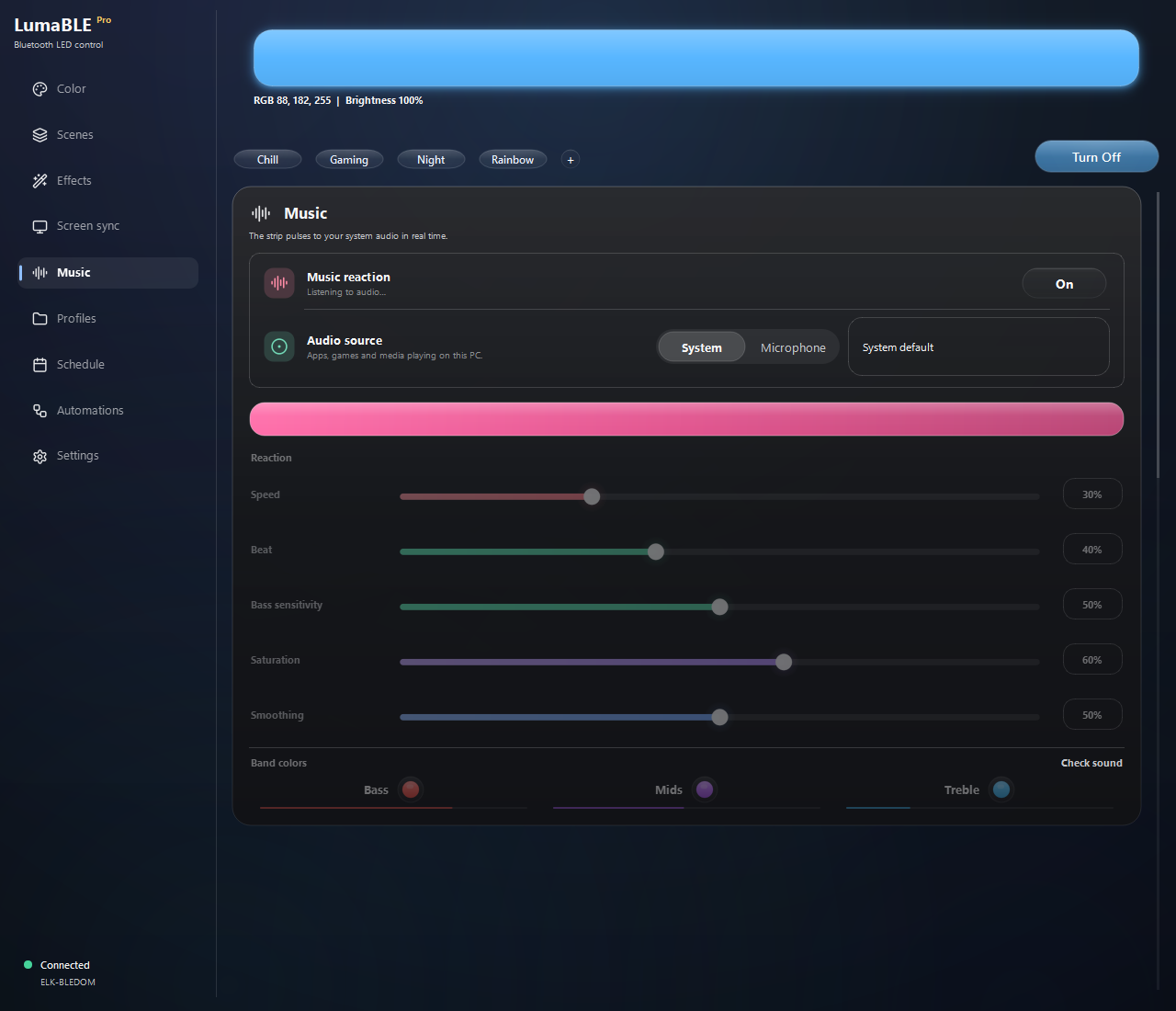
Illustrative levels in a temporary profile; no audio or Bluetooth device was connected.
LumaBLE 0.4.3 (beta)
LumaBLE 0.4.3 (beta)
A brighter LumaBLE. The refreshed light appearance brings clearer contrast throughout the app, Pro guidance appears only when it can help and moving your licence to another computer is now simple.
Added
- Take Pro with you. Release your licence on this computer, keep the key ready to copy and activate it on the next one.
- Guidance at the right moment. LumaBLE now explains when Pro needs a first check, a renewed connection or the correct Windows date and time.
Improved
- A more refined light theme. Cards, controls, lists and dialogs now feel consistent from one screen to the next.
- Quieter Pro checks. Nothing interrupts you while Pro is working normally, and Check again appears only when it can help.
- Safer removal. Before saved data is deleted, LumaBLE warns about an active Pro licence and selects the safer choice by default.
Fixed
- Navigation labels stay perfectly aligned as hover and press animations play.
- The licence-transfer window remains clear and readable in both light and dark themes.
- Visual review tools no longer start Bluetooth searches or scroll beyond the final card.
Full changelog: CHANGELOG.md · API docs: docs/local-api.md
Requires Windows 10/11 and a supported BLE RGB controller (BLEDOM / Triones / MagicHome / BanlanX).
The installer is currently unsigned, so Windows SmartScreen may show an unknown-publisher warning.
LumaBLE 0.4.2 (beta)
LumaBLE 0.4.2 (beta)
Find your strip, faster. LumaBLE now keeps your lights together, makes signal quality easy to read
and gives you a clearer path when a controller needs a closer look.
Added
- A clearer controller picker. My strips, nearby strips and other devices stay organised, so
familiar lights are easy to recognise even in a busy room. - Signal quality at a glance. See Strong, Medium, Weak or Not enough data instead of a number
that changes from moment to moment. - BLE reports where you need them. Save a report directly after a scan or compatibility check.
Improved
- Steadier scan results. LumaBLE listens throughout the search before ordering controllers, then
keeps the list still while you make a choice. - Safer controller choices. Saved strips remain familiar, while a new controller waits for your
confirmation before becoming part of the setup. - More reliable Pro checks. Licence status behaves more consistently offline and during temporary
service interruptions. - The Windows tray notification now uses shorter, more natural wording in every supported language.
Fixed
- Browsing other devices or refreshing the list no longer triggers a connection, selects a heading
or quietly changes the main strip. - Searching for an additional strip keeps the connected main strip and its place in your setup.
- The Local API no longer reports Screen Sync as active when no strip could be lit.
- Exported text diagnostics hide Bluetooth addresses consistently before they are shared.
Full changelog: CHANGELOG.md · API docs: docs/local-api.md
Requires Windows 10/11 and a supported BLE RGB controller (BLEDOM / Triones / MagicHome / BanlanX).
The installer is currently unsigned, so Windows SmartScreen may show an unknown-publisher warning.
LumaBLE 0.4.1 (beta)
LumaBLE 0.4.1 (beta)
Preview & polish: try Screen Sync before connecting a strip, keep the right controller selected and
enjoy smoother motion throughout the app.
Added
- Screen Sync preview without a strip. Try Screen or Screen + music before connecting a
controller. The preview behaves like the real mode without sending anything over Bluetooth. - See the finished light. The preview shows the colour after screen intensity, music movement and
beat pulses, so it matches what the strip will receive.
Improved
- Smoother motion throughout the app. Expandable controls, light previews and the RGB picker now
open and close without abrupt jumps. Reduced Motion remains immediate. - Lighter music processing. An unused experimental analysis no longer runs during normal music
playback. - More reliable updates. Temporary GitHub gateway failures are retried, and release notes appear
as readable text in the update window instead of raw HTML. - Preview status and diagnostics now say clearly when colours are shown on screen rather than sent
to a strip.
Fixed
- Searching for additional strips no longer changes the chosen main controller, lists it twice or
leaves the sidebar showing another device. - Reconnecting during Screen Sync waits for a fresh frame before writing to the strip.
- Scenes saved by a newer LumaBLE version are preserved when an older build opens the settings.
- Compact preview glow no longer clips at the edge, and animations no longer jump on their last
frame.
Full changelog: CHANGELOG.md · API docs: docs/local-api.md
Requires Windows 10/11 and a supported BLE RGB controller (BLEDOM / Triones / MagicHome / BanlanX).
The installer is currently unsigned, so Windows SmartScreen may show an unknown-publisher warning.
LumaBLE 0.4.0 (beta)
Luma Fusion
Your screen sets the colour. Music gives it a pulse.
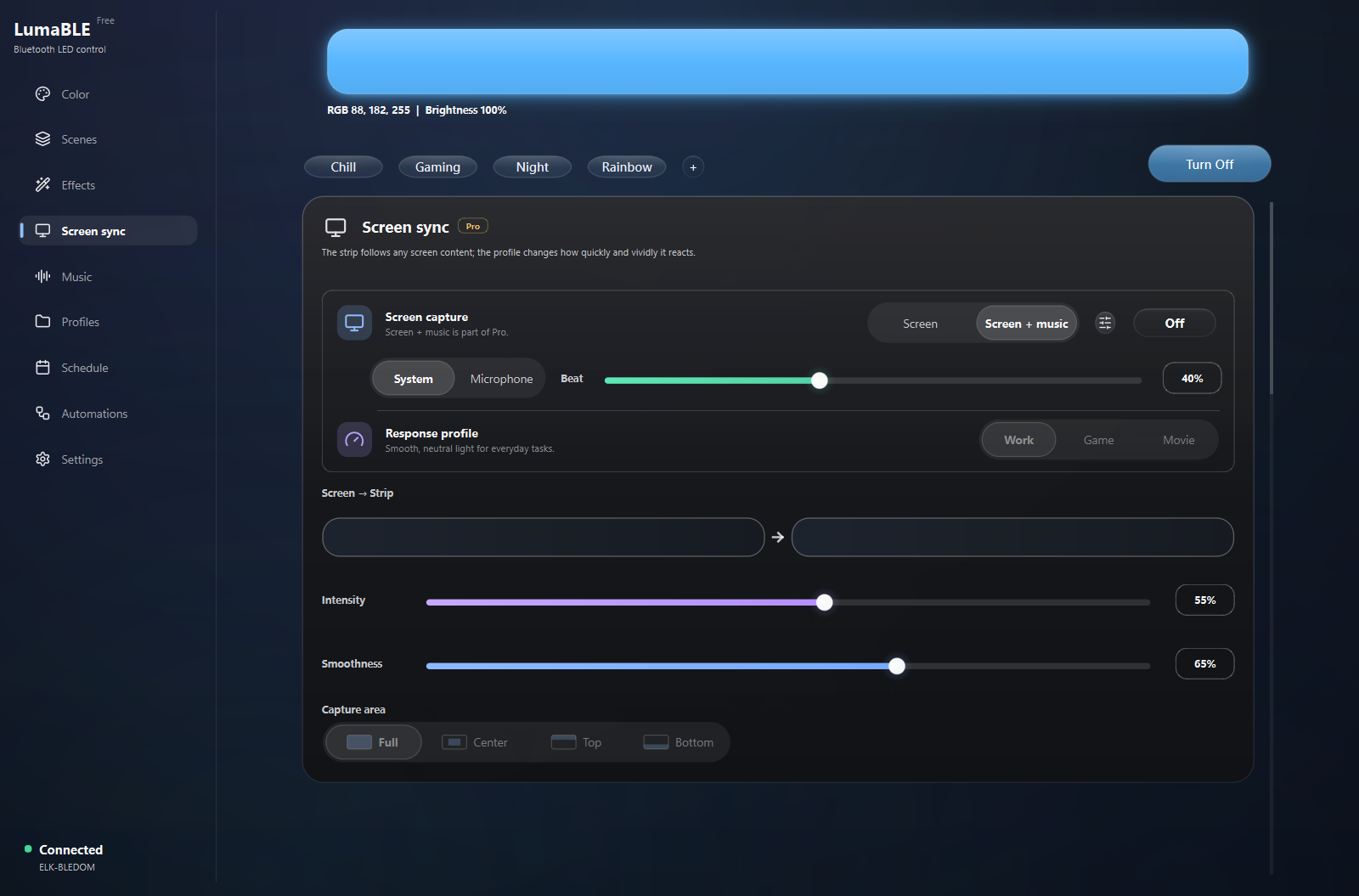
Luma Fusion brings Screen Sync and Music Sync together as one lighting experience.
The picture keeps control of the colour while music shapes the brightness and impact of each beat.
Stronger hits create stronger flashes, and silence settles naturally back to the screen.
Added
- Screen + music. Choose the combined mode directly in Screen Sync. The screen supplies the
colour; music adds movement and beat pulses without tinting the picture. - Controls where they belong. Audio source and Beat are one click away inside the Screen Sync
card, while staying in sync with the full Music page. - Fusion everywhere. Save the combined mode in scenes or start it from the mobile remote and
Local API. - Useful diagnostics. See the composed brightness, command results and the software delay from a
detected beat to a light command.
Improved
- Beats have weight. Ordinary hits stay balanced; stronger accents create brighter flashes.
- One light, one output. Screen and music no longer compete for the strip or multiply BLE traffic.
- Every beat gets its moment. A detected peak is held until the first command the link accepts,
so timer timing or a briefly busy controller cannot quietly weaken it. - Power feels continuous. Turn the strip off and the selected mode is remembered. Turn it back on
and LumaBLE waits for a fresh screen frame instead of replaying an old one. - Nearby strips come first. Supported controllers are ordered by signal strength, ahead of distant
or unrecognised Bluetooth devices.
Fixed
- Screen + music no longer leaves separate streaming modes fighting over the same strip.
- Power Off can no longer leak a queued colour, and Power On no longer flashes black before capture
resumes. - Late screen or audio samples from an older session no longer enter the current light output.
- The fading tail of one beat can no longer trigger a second full flash.
- A busy BLE link keeps the original pulse available for the next valid attempt instead of losing it.
Full changelog: CHANGELOG.md · API docs: docs/local-api.md
Requires Windows 10/11 and a supported BLE RGB controller (BLEDOM / Triones / MagicHome / BanlanX).
The installer is currently unsigned, so Windows SmartScreen may show an unknown-publisher warning.
LumaBLE 0.3.9 (beta)
LumaBLE 0.3.9 (beta)
Windows controls & Music: use your lights without keeping the main window open, move your setup safely to another installation, and get steadier music reactions in quiet rooms and at different volume levels.
Added
- More useful tray controls. Check the connection, apply a recent scene, or start and stop Screen Sync and Music Sync without opening LumaBLE.
- New hotkey actions. Screen Sync and Music Sync can now have global shortcuts. They are optional and stay unassigned until you choose them.
- Windows automation triggers. Rules can run when the PC locks, unlocks, goes to sleep or wakes up.
- Full backup and restore. Move scenes, rules, groups and portable settings in one file. LumaBLE keeps a copy of the current setup before restoring it.
Improved
- Music Sync adapts to the room. Background noise from a microphone or sound card is less likely to make the strip flicker in silence.
- Better beat detection. Reactions follow the rhythm instead of treating every increase in volume as a new beat.
- Natural fade after a beat. The last pulse now settles smoothly when the music stops.
- Recent scenes stay useful. The tray remembers scenes you applied successfully instead of filling the list with automatic rules.
- Backup and automation messages were simplified across English, Russian, Spanish and Chinese.
Fixed
- Clearing a hotkey now leaves it disabled instead of silently bringing the old shortcut back.
- Invalid or conflicting shortcuts are shown beside the affected action and do not replace working ones.
- Lock and unlock rules now receive the real Windows events and show the correct icons.
- Wake rules wait briefly for Bluetooth to return instead of failing as soon as the PC resumes.
- Music Sync starts fresh after changing the audio source, restarting a session or losing the recording device.
- Restored settings can no longer be overwritten by the old session while LumaBLE is closing.
Full changelog: CHANGELOG.md · API docs: docs/local-api.md
Requires Windows 10/11 and a supported BLE RGB controller (BLEDOM / Triones / MagicHome / BanlanX). The installer is currently unsigned, so Windows SmartScreen may show an unknown-publisher warning.
LumaBLE 0.3.8 (beta)
LumaBLE 0.3.8 (beta)
This release makes Screen Sync measurable and more reliable, then brings the app's everyday controls into one clearer visual system.
Screen Sync
- Live Sync diagnostics. Reports now show the whole session and the last 30 seconds separately: capture rate, processing time, displaced frames, BLE submissions, failures, link rejections and reconnects.
- A report that explains colour. The last completed frame records its monitor, capture area, response profile, intensity and smoothness alongside the detected and final RGB values.
- Correct frame cadence. Processing time is no longer added on top of the requested frame interval, so capture can hold its configured pace when the machine has enough headroom.
- Honest BLE back-pressure. A busy link is reported separately from a failed write, and a refused colour is retried instead of leaving a static screen on the wrong colour.
- Visual capture-area control. Full, Centre, Top and Bottom are now illustrated inside the selector, use the exact same geometry as capture, and work with mouse or keyboard.
Refreshed
- The main Colour card and RGB picker have clearer grouping, consistent spacing and cursor bounds that stay inside the colour plane.
- Profiles now separate saving from the saved list and keep compact actions aligned.
- Music reaction now groups its state, source, device, response controls and bass/mid/treble colours without unnecessary scrolling.
- Strip Groups now separate creating a group from managing saved groups, with compact member choices and a quiet delete action.
Fixed
- A late Screen Sync frame from a stopped session can no longer reach either the metrics or the strip.
- BLE results are attributed to the command that produced them even when callbacks complete on another thread.
- Selected segmented-control labels no longer lose their final glyph, including Cyrillic text at Windows display scaling.
- Capture-area glyphs and colour-picker cursors remain inside their rounded frames.
Full changelog: CHANGELOG.md · API docs: docs/local-api.md
Requires Windows 10/11 and a supported BLE RGB controller (BLEDOM / Triones / MagicHome / BanlanX). The installer is currently unsigned, so Windows SmartScreen may show an unknown-publisher warning.
LumaBLE 0.3.7 (beta)
LumaBLE 0.3.7 (beta)
This release makes first contact with an unfamiliar controller safer and more useful, adds a guided welcome tour, and refreshes two of the app's densest tools.
Added
- BLE scan reports. Diagnostics can save advertisement data, manufacturer data and service UUIDs for every device seen during a scan, including devices hidden from the visible controller list.
- Read-only compatibility checks. Unknown devices now offer Check instead of Connect. LumaBLE reads services and characteristics, sends no commands and disconnects when the inspection finishes.
- Honest SP630E recognition. BanlanX SP630E advertisements are identified by their known signature, while the UI remains explicit that control is not supported yet.
- A guided welcome tour. New users see colour control, scenes, screen sync, automations, connection status and Diagnostics through a safe visual demonstration that never controls the real strip.
- More expressive DIY effects. Custom effects now allow up to 12 colours and eight motions per step: steady, breathe, pulse, twinkle, flicker, fade in, fade out and strobe.
Refreshed
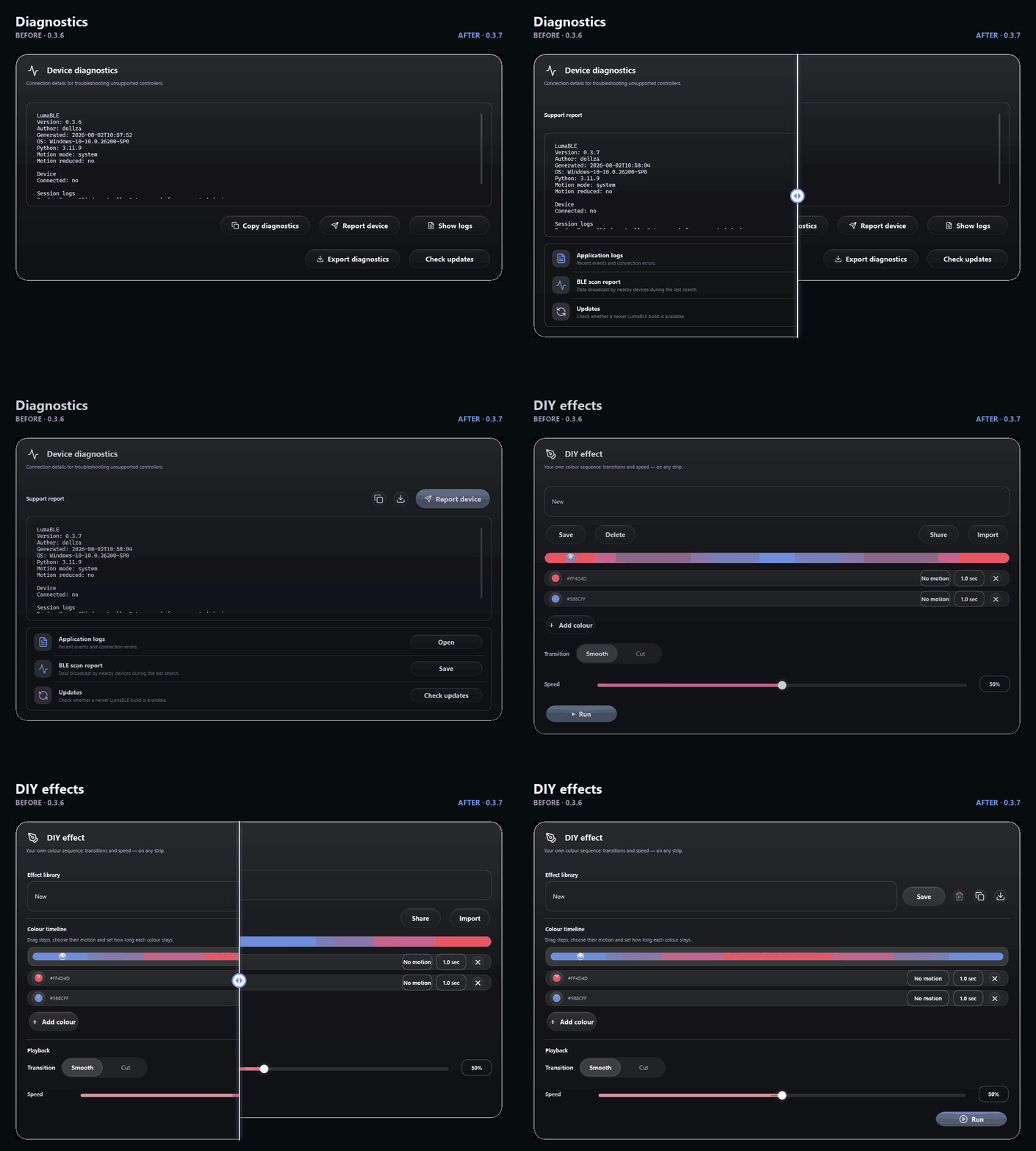
- Diagnostics now presents one clear reporting action and a compact list of secondary tools.
- DIY effects now use a duration-weighted timeline with visible step boundaries, a cleaner library and a focused playback section.
- Welcome-tour focus frames and simulated controls animate smoothly, stay aligned after resizing and respect Reduced Motion.
Fixed
- Anonymous BLE devices are no longer mistaken for possible LED controllers because of the words "Unknown BLE Device".
- Reading controller capabilities no longer builds a real brightness command or changes the next colour sent to the strip.
- Unknown devices are no longer encouraged down the normal connection path.
- Long DIY motion names, timeline rows and compact actions remain aligned at Windows display scaling.
Before and after
Full changelog: CHANGELOG.md · API docs: docs/local-api.md
Requires Windows 10/11 and a supported BLE RGB controller (BLEDOM / Triones / MagicHome / BanlanX). The installer is currently unsigned, so Windows SmartScreen may show an unknown-publisher warning.
LumaBLE 0.3.6 (beta)
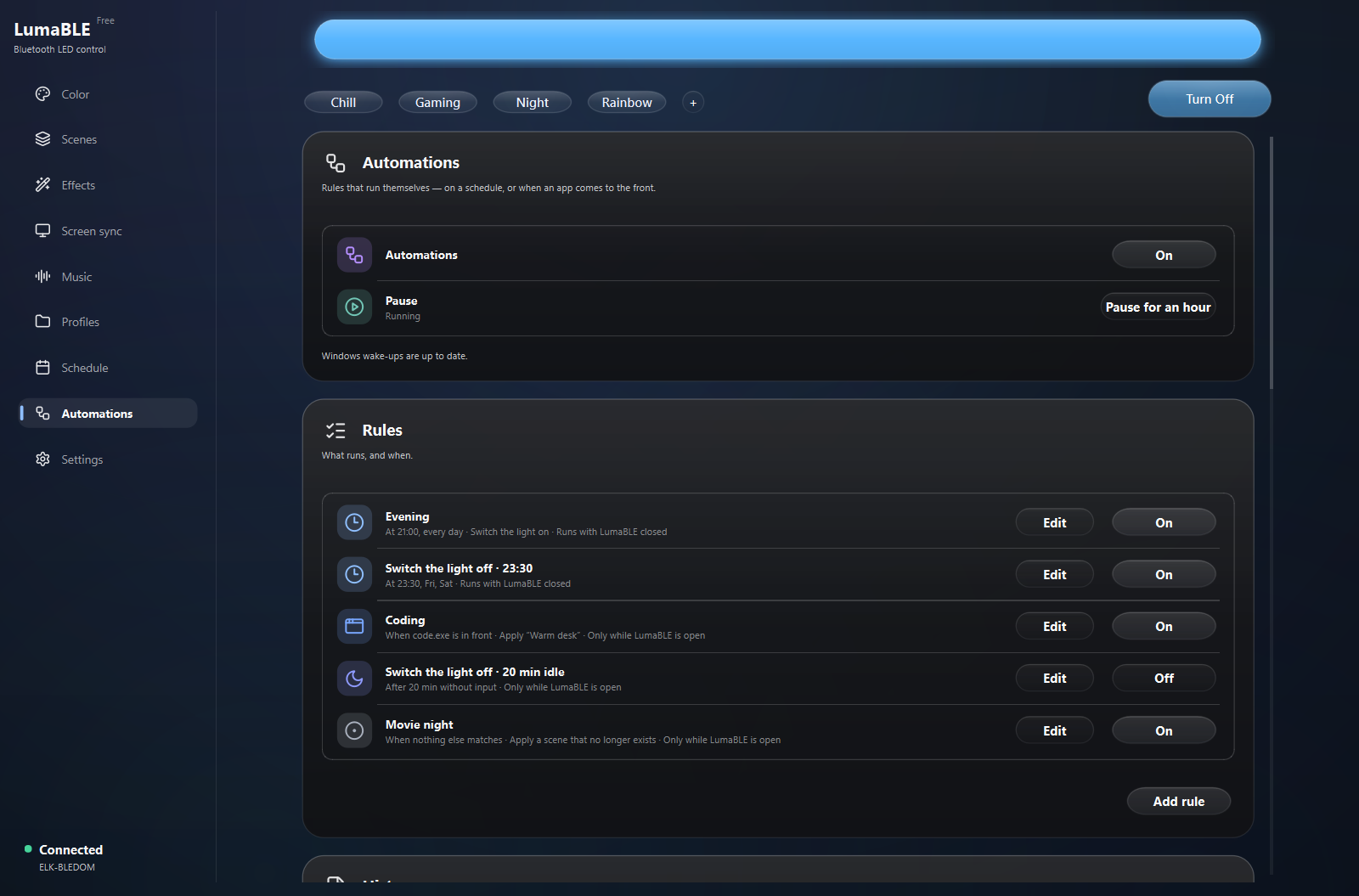
Automations arrive as one understandable rule system: schedule the light, react to apps or idle time, pause everything safely, and see what happened afterwards.
Added
- One Automations screen. Create, edit, enable and delete rules for time, foreground apps, idle time, LumaBLE startup and strip connections.
- Rules that work with LumaBLE closed. Supported Pro power schedules are registered with Windows and catch up after sleep without waking the computer just for the light.
- Automation history. See which rule ran, why another was skipped, how often it repeated and whether an operation failed or was cancelled.
- A durable pause. Pause and resume apply to both the open app and Windows background runs, survive restarts and clearly show when Windows has not received the request yet.
Changed
- Safe migration. Existing Schedule and App Triggers become rules with a backup and a rollback-aware handoff from the old Windows tasks.
- A clearer rule editor. Consistent fields, weekday controls, advanced options, Pro marking and pinned actions remain usable on short windows.
- Refreshed Pro experience. The Pro window, badges, icons and accent controls use a calmer hierarchy and more consistent spacing.
- A better phone remote. Local API pairing and controls now use a compact mobile-first layout with sticky status, denser colour controls and room for the browser toolbar.
Fixed
- Update checks retry while LumaBLE remains open, and a manual check opens the full update window immediately.
- Partial or failed scene writes can no longer be recorded as a successful automation.
- Overdue rules no longer fight each other or run twice when the app and a Windows task overlap.
- Pause, resume, cancellation and shutdown no longer leave stale work that can return later.
- Clicking a discovered controller now continues into the actual connection flow.
- Rule fields and footer actions no longer clip or jump when advanced settings are opened.
Full changelog: CHANGELOG.md · API docs: docs/local-api.md
Requires Windows 10/11 and a supported BLE RGB controller (BLEDOM / Triones / MagicHome / BanlanX).
LumaBLE 0.3.5 (beta)
LumaBLE 0.3.5 (beta)
Trust & Accessibility: update checks now understand beta releases and show what changed, the interface stays usable at Windows display scaling and short window heights, and motion and keyboard behaviour follow the user's needs.
Added
- A clearer update window. See the installed and available versions, release title and notes before opening the download page. Choose Remind later or skip only that exact version.
- Reduced Motion. Choose Match Windows, Reduce motion or Full motion in Settings. Reduced Motion removes decorative ripples, slides, pulses and confetti while real operations and effects on the strip continue normally.
- Better keyboard and screen-reader support. Weekday toggles, editable value readouts and scene tiles now expose their real roles and state. Focused controls scroll into view, scene tiles support arrow navigation, and their menu opens from the keyboard.
Changed
- Reliable beta updates. LumaBLE correctly orders beta, release-candidate and final versions, ignores drafts and does not mistake build metadata for a newer release.
- Comfortable at 125% and 150%. The main window respects the available Windows work area, and navigation remains reachable on short displays.
- Dialogs that fit. Logs, About, Pro, confirmations and the colour picker keep their actions visible and scroll only the content that can overflow.
- Lighter theme refreshes. Changing the theme or accent no longer repeats expensive application-wide styling when nothing global changed.
- Safer release notes. GitHub titles and notes are bounded and shown as plain text.
Fixed
- Skipping one update no longer hides newer beta or final releases, and a manual check still reports the skipped version.
- Closing the local API no longer leaves an event-stream handler running or prints a socket traceback.
- Arrowing through scene tiles no longer leaves the grid, changes column on an incomplete row or applies a scene accidentally.
- Long confirmation text no longer clips the actions below it.
- Scrollable dialogs remain visually correct in the light theme.
Full changelog: CHANGELOG.md · API docs: docs/local-api.md
Requires Windows 10/11 and a supported BLE RGB controller (BLEDOM / Triones / MagicHome / BanlanX).