Repository navigation
F: Introduction to Python | GHPython
Here you can find a summary on the use of Python in Grasshopper.
Additional information on the Interface, Python use of numbers, text and lists and RhinoCommon API can be found in these links.
 Interface
The Python component can be found under the Maths menu.
The Script Editor window opens up when double-clicking the component. To run scripts you can press the play button or F5.

 Inputs & Outputs
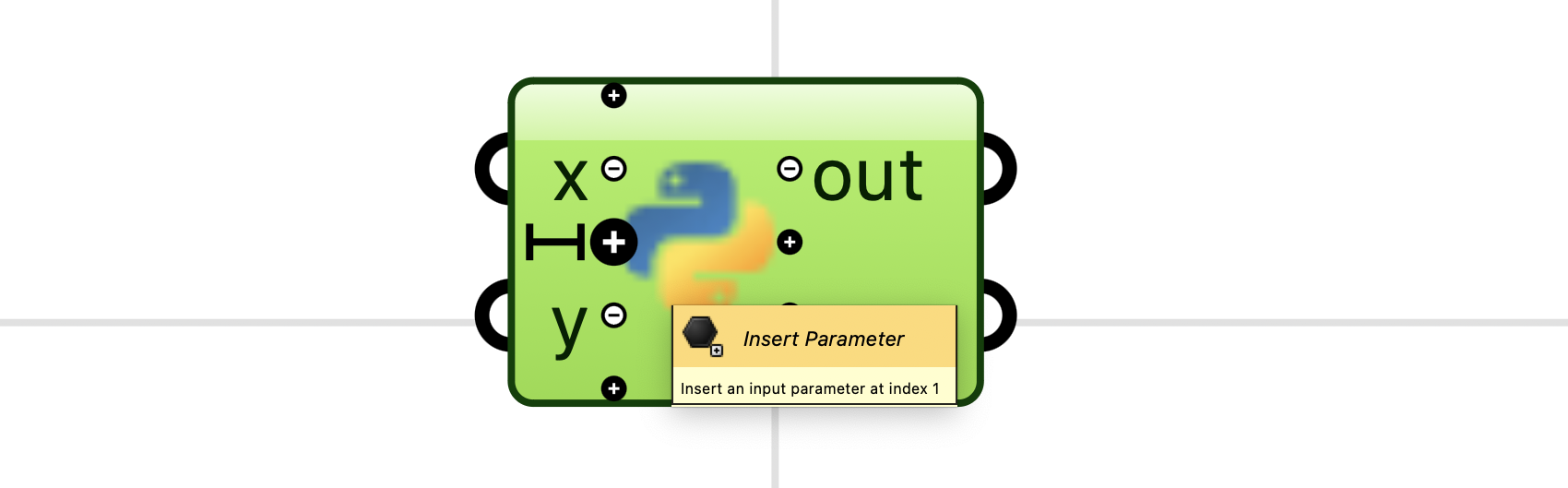
The Inputs can be added by zooming in on the component and clicking on the addition signs, and renamed by double-clicking and writing the name in the available text section.
Different Type Hints and Access options are available. This will modify how the input will be processed by the component.
Type Hints are used to select types of elements. This includes booleans, Point3D, Plane, string, and other element types available in Grasshopper.
The Access types available are:
| Access | Description |
|---|---|
| Item | Every data item will be treated individually. |
| List | The data will be treated as a list structure. (Every branch will transform into a sublist.) |
| Tree | The data will be treated as a GH tree. The data structure will be kept. |

The out output functions as a Standard Output/Error parameter option. It displays the information that is printed with print(), the errors, and other information generated while running the code. It can also be disabled by double-clicking on the output and deselecting the out option.

print()is a common function in Python. It is used to print a specified message on the screen. It is useful to visualize any type of information used in the code.
Commenting code allows adding additional information. This can be done by using # or """:
# This is a comment

"""
This is also a comment
"""
Any type of arithmetic operation can be carried out in Python.
The values can be used directly in the operations (1), assigned to parameters (2), or assigned to the inputs of the component (3).

Using parameters is useful because they can be called at any point, specified with a purpose outside the component, linked to geometry in the code, and used for other functions.
The parameters can be any word (not only letters). Previous operations can be called when assigned to a parameter:
amount = 5
unit_price = 10
discount = 0.1

subtotal = amount * unit_price
total = subtotal * (1 - discount)
print(total)

>> returns:
>> 0.9
Here are some common arithmetic operators:
| Operator | Name |
|---|---|
| + | addition |
| - | subtraction |
| * | multiplication |
| / | division |
| % | modulus |
| ** | exponential |
| // | floor division |
As in Grasshopper, the values can be specified as integers (int) or floats (float). Some functions require one or the other type; integers are also useful for removing decimal numbers. This is done with parentheses:
number = 0.5
value = int(number)
print(value)

>> returns:
>> 0
number = 10
value = float(number)
print(value)

>> returns:
>> 10.0
roundcan also be used to remove the decimal numbers
Python can manipulate text (represented by the string type str). Strings can also be specified by adding " or '.
"This is a string"
str(This is also a string)
Multiple strings can be merged by using +:
s1 = "Str"
s2 = "ing"
complete_word = s1 + s2
print(complete_word)

>> returns:
>> String
Specific letters can also be selected by using []:
# single letters
word = "String"
new_word = word[1] + word[3] + word[5]
print(new_word)

>> returns:
>> tig

# sets of letters
word = "String"
new_word = word[1:4]
print(new_word)

>> returns:
>> tri

# letters after
word = "String"
new_word = word[2:]
print(new_word)

>> returns:
>> ring

# letters before
word = "String"
new_word = word[:2]
print(new_word)

>> returns:
>> St
Some of the images and information included in this section come from the Rhino Developer Documentation website.

