InfoApp

InfoApp v1.1
Made installation easier! There were also some improvements in the app, I guess...
Hardware and Software requirements
There are no definitive minimum spec requirements to run this project. The listed specs are NOT the required specs. However, this project was made and tested on Windows 10 Home Single-language v21H2 64-bit running on the specs listed below.
- AMD Ryzen 7 4800H 8-core
- RTX 3050 Mobile 4GB vRAM
- 8GB dRAM
Any modern machine, even of much lower spec, can run this project, as long as the OS matches or is newer than Windows 10 v21H2. Even then, it could be assumed that this project will also run just fine on Windows 7 and most versions succeeding it, including Windows 11. Linux and macOS emulation compatibility is not guaranteed.
TL;DR: If your device is running Windows 8 or newer, you can run this program... probably.
Installation
- On the Assets section below, click on
InfoApp.exe(recommended) orInfoApp.zipto download the executable file.
Note: There are no functional differences between the EXE and ZIP downloads aside from the ease of use.

-
Go to the downloads folder. Extract the files manually if you downloaded the ZIP version.
-
Double-click on the file. This will be directed to the same folder as the file you downloaded by default, but you can change it if you wish.
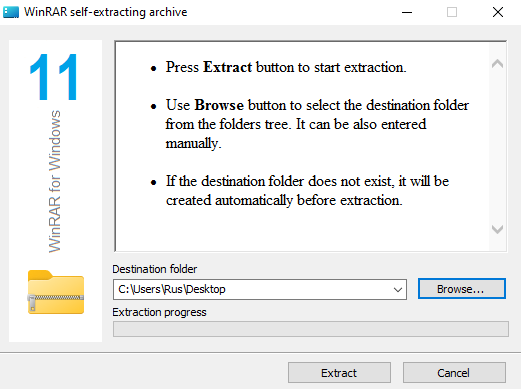
- Click "Extract" then wait for the extraction to finish.

- Go to the files you extracted, then double-click on
Site Details.exeto open the app.

Unrelated image of the app running

Source code
The project can still be run in-IDE. If you wish to take this process instead, download Source (zip) from this release, go to the v1.1.0 beta release page, and skip to Step 3 of Installation.
More info
See the main GitHub page for more information.