A wearable assistive device that translates sign language gestures into text and speech — and converts spoken/typed words into sign language video demonstrations — bridging communication between the deaf/mute community and the hearing world.
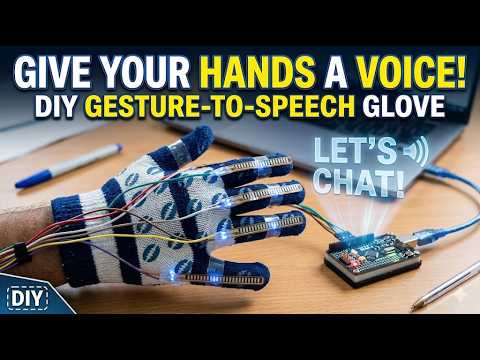
📺 Click the thumbnail above to watch the full project walkthrough and demo.
- About the Project
- Features
- System Architecture
- Hardware Components
- Software Stack
- How It Works
- Installation & Setup
- Usage
- Project Structure
- Results
- Future Work
- Team
- Acknowledgements
Communication is a fundamental human need, yet individuals who are deaf or mute often face significant barriers when interacting with people who don't understand sign language — especially in healthcare, education, and public services.
The Silent Voice Glove is a low-cost, portable, wearable device built using an Arduino microcontroller, five flex sensors, and an MPU6050 IMU. It recognizes hand gestures in real time and translates them into words displayed via a Flask web interface. The system also works in reverse: spoken or typed words are converted into sign language video demonstrations.
Built entirely with open-source technologies, the glove is designed to be accessible, replicable, and deployable without internet dependency.
- Real-time gesture-to-text translation using flex sensors + IMU
- Per-user calibration to handle different hand sizes and glove fits
- Wrist orientation detection (palm up/down/neutral) via MPU6050
- Motion state classification (static, waving, shaking)
- Voice input → Sign language video via Web Speech API
- Text input → Sign language video for reverse communication
- Browser-based interface — no app installation required
- Extensible gesture dataset via a simple CSV file
- Works offline without internet dependency
┌─────────────────────────────────────────────────────────────┐
│              FLEX SENSORS & GESTURE RECOGNITION             │
├──────────────────────────┬──────────────────────────────────┤
│      GLOVE (Hardware)    │     TEXT/VOICE (Browser)         │
│                          │                                  │
│  Flex Sensors x5         │  User Voice / Text Input         │
│       +                  │  (index.html + Web Speech API)   │
│    MPU6050               │                                  │
│       ↓                  │           ↓                      │
│   Arduino Uno            │    /trial → /vids                │
│  (Serial @ 9600 baud)    │  (word split → video lookup      │
│       ↓                  │         → playback)              │
│  Python Flask Backend    │                                  │
│  ┌──────────┬─────────┐  │                                  │
│  │/calibrate│ /detect │  │                                  │
│  │(baseline)│(compare)│  │                                  │
│  └──────────┴─────────┘  │                                  │
│       ↓           ↓      │                                  │
│  glove.html    /vids      │                                  │
│  (display)  (video play)  │                                  │
└──────────────────────────┴──────────────────────────────────┘
| Component | Purpose |
|---|---|
| Arduino Uno | Microcontroller — reads sensors, sends serial data |
| Flex Sensors (×5) | Detect bend angle of each finger |
| MPU6050 IMU | Captures wrist roll, pitch, and motion state |
| Connecting Wires & Glove | Physical wearable assembly |
Wiring:
- Flex sensors → Analog pins
A0, A1, A2, A3, A6 - MPU6050 → I2C (
SDA,SCL) - Arduino → PC via USB (Serial @ 9600 baud)

The assembled glove with flex sensors on each finger, MPU6050, and Arduino Uno connected via breadboard.
| Layer | Technology |
|---|---|
| Firmware | Arduino C++ (Wire.h, MPU6050.h) |
| Backend | Python 3 + Flask |
| Serial Comm | pyserial |
| Frontend | HTML / CSS / JavaScript (Jinja2 templates) |
| Voice Input | Web Speech API (browser-native) |
| Gesture Dataset | CSV (data.csv) |
-
Calibration: User holds their hand open and flat. The Arduino streams 20 samples from the 5 flex sensors. The Flask backend averages these to establish a per-user baseline.
-
Detection: User performs a sign language gesture. The backend reads 20 more samples, compares each finger's deviation from the baseline against a threshold (13 ADC units). A finger is classified as
BENTif it exceeds the threshold in at least 2 out of 20 readings. -
Gesture Lookup: The resulting 5-bit finger state tuple (e.g.,
bent, straight, straight, straight, bent) along with wrist roll, pitch, and motion state is matched againstdata.csvto retrieve the corresponding word. -
Display: The matched word is shown on the
glove.htmlinterface.
- User types a word or speaks into the microphone on
index.html. - The Web Speech API transcribes speech to text.
- The Flask backend looks up the corresponding sign language video file.
- Videos are displayed sequentially on
vids.html.
flex1,flex2,flex3,flex4,flex5,roll,pitch,motion
Example: 480,310,290,405,320,palm_neutral,fingers_up,static
- Python 3.8+
- Arduino IDE
- An Arduino Uno with the glove hardware assembled
git clone https://github.com/Dev-06-06/theme_based_project.git
cd theme_based_projectpip install flask pyserial- Open the Arduino sketch from the repo in the Arduino IDE.
- Select Board: Arduino Uno and the correct Port.
- Upload the sketch.
By default, the app uses COM13. Override it with an environment variable if needed:
# Windows
set GLOVE_PORT=COM3

# Linux / macOS
export GLOVE_PORT=/dev/ttyUSB0Place your sign language .mp4 video files inside the static/ folder. Files should be named after the word they represent (e.g., hello.mp4, thank.mp4).
python main.pyThen open your browser and navigate to: http://127.0.0.1:5000
- Navigate to
http://127.0.0.1:5000/glove - Hold your hand open and flat, then click Calibrate
- Perform a sign language gesture, then click Detect
- The recognized word appears on screen
| Step | Screenshot |
|---|---|
| Perform a gesture with the glove |  |
| Recognized word displayed on screen |  |
- Navigate to
http://127.0.0.1:5000 - Type a word or click the mic button and speak
- Click Convert to Sign Language
- Watch the corresponding sign language video(s)
| Step | Screenshot |
|---|---|
| Type or speak a word |  |
| Sign language video output |  |
theme_based_project/
│
├── main.py                  # Flask backend (all routes)
├── data.csv                 # Gesture lookup dataset
│
├── static/                  # Sign language video files (.mp4)
│   ├── hello.mp4
│   └── ...
│
└── templates/               # Jinja2 HTML templates
    ├── index.html           # Main page (text/voice input)
    ├── glove.html           # Glove interface (calibrate + detect)
    ├── trial.html           # Transcript confirmation page
    └── vids.html            # Sign language video output page
thumb,index,middle,ring,pinky,roll,pitch,motion,gesture
straight,bent,bent,straight,straight,palm_neutral,fingers_up,static,THREE
...
To add new gestures, simply append rows to data.csv — no code changes required.
| Test Case | Input | Output |
|---|---|---|
| Known gesture | Flex sensor reading | Word displayed on screen |
| Unknown gesture | Flex sensor reading | "WE ARE WORKING ON IT" |
| Voice input (known word) | Web Speech API transcript | Sign language video played |
| Text input (multiple words) | Typed text | Multiple sign videos played |
- Wireless Communication: Replace USB serial with Bluetooth (HC-05) or Wi-Fi for a fully wireless glove
- Expanded Vocabulary: Grow the gesture dataset and leverage full IMU data for richer gesture support
- Text-to-Speech Output: Integrate
pyttsx3orgTTSto produce audio output alongside the display - ML Classification: Replace threshold-based lookup with KNN or SVM for better noise robustness
- Mobile App: Android/iOS companion app receiving gesture data over Bluetooth
- User Study: Usability testing with deaf and mute individuals to measure real-world accuracy and satisfaction
| Name | Roll Number |
|---|---|
| E. Chaitanya Yadav | 1602-23-733-140 |
| B. Gautham Krishna | 1602-23-733-143 |
| M. Ranadheer Reddy | 1602-23-733-149 |
| L. Rahul Dev | 1602-23-733-166 |
Guide: Dr. Bhargavi Peddi Reddy, Associate Professor
Institution: Department of Computer Science & Engineering, Vasavi College of Engineering (Autonomous), Hyderabad
- Dr. Bhargavi Peddi Reddy — Project Guide
- Dr. T. Adilakshmi — Head of Department, CSE
- Management of Vasavi College of Engineering
- Arduino · Flask · MPU6050 · Web Speech API
"Give voice to the silent — one gesture at a time."