A Flutter package for integrating Anam AI's real-time avatar system into your Flutter applications. Built on WebRTC, this is a Flutter port of the Anam JavaScript SDK.
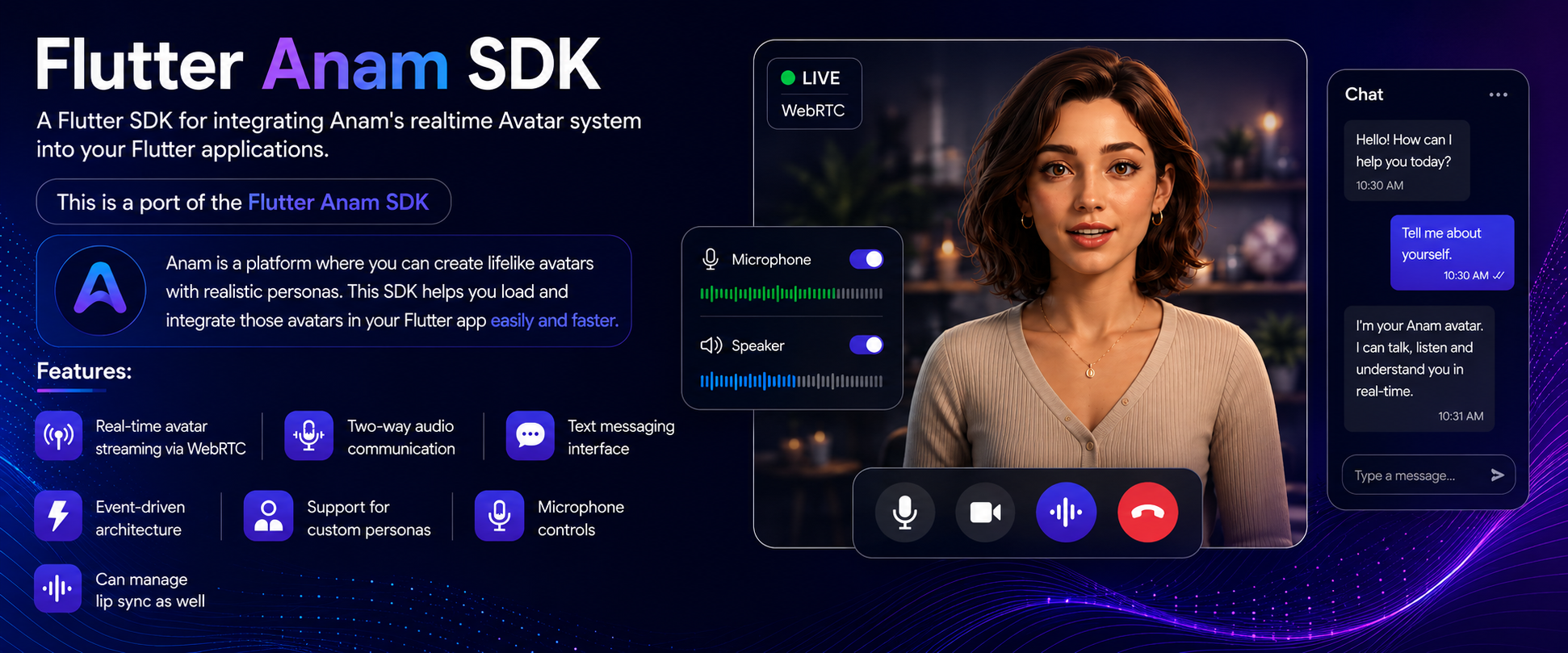
- Real-time avatar video/audio streaming via WebRTC
- Two-way audio communication with microphone controls
- Text messaging with full message history
- Event-driven architecture for reactive UIs
- Custom persona configuration (avatar, voice, system prompt, language)
- Server-side session management with WebSocket proxy support
- Custom audio mode for bring-your-own-transcription pipelines
- Built-in
AnamAvatarViewwidget - Cross-platform: iOS, Android, macOS, Web
Add to your pubspec.yaml:
dependencies:
  flutter_anam_sdk: ^0.0.1
Then run:
flutter pub getAdd to ios/Runner/Info.plist:
<key>NSMicrophoneUsageDescription</key>
<string>Required for voice communication with the avatar</string>
<key>NSCameraUsageDescription</key>
<string>Required for video communication with the avatar</string>- Add to
macos/Runner/Info.plist:
<key>NSMicrophoneUsageDescription</key>
<string>Required for voice communication with the avatar</string>
<key>NSCameraUsageDescription</key>
<string>Required for video communication with the avatar</string>- Add to both
macos/Runner/DebugProfile.entitlementsandmacos/Runner/Release.entitlements:
<key>com.apple.security.network.client</key>
<true/>
<key>com.apple.security.device.audio-input</key>
<true/>
<key>com.apple.security.device.camera</key>
<true/>Add to android/app/src/main/AndroidManifest.xml:
<uses-permission android:name="android.permission.INTERNET" />
<uses-permission android:name="android.permission.RECORD_AUDIO" />
<uses-permission android:name="android.permission.MODIFY_AUDIO_SETTINGS" />
<uses-permission android:name="android.permission.ACCESS_NETWORK_STATE" />
<uses-permission android:name="android.permission.CAMERA" />Production (session token from your server):
import 'package:flutter_anam_sdk/flutter_anam_sdk.dart';

final client = AnamClientFactory.createClient(
  sessionToken: 'your-session-token',
);
Development only (direct API key — never ship to production):
final client = AnamClientFactory.unsafeCreateClientWithApiKey(
  apiKey: 'your-api-key',
  enableLogging: true,
);import 'package:flutter_webrtc/flutter_webrtc.dart';
final renderer = RTCVideoRenderer();
await renderer.initialize();final personaConfig = PersonaConfig(
personaId: 'your-persona-id',
name: 'AI Assistant',
avatarId: 'default_avatar',
voiceId: 'default_voice',
systemPrompt: 'You are a helpful assistant.',
);
await client.talk(
personaConfig: personaConfig,
onStreamReady: (stream) {
if (stream != null) {
renderer.srcObject = stream;
}
},
);AnamAvatarView(
renderer: renderer,
onMicToggle: () => client.setInputAudioEnabled(!client.inputAudioEnabled),
isMicEnabled: client.inputAudioEnabled,
)// Send a text message
client.sendUserMessage('Hello!');
// Interrupt the avatar while it speaks
client.interruptPersona();
// Mute / unmute microphone
client.muteInputAudio();
client.unmuteInputAudio();
// End the session
await client.stopStreaming();
// Clean up when done
client.dispose();Subscribe to events with client.on<T>(AnamEvent.xxx) which returns a Stream<T>:
// Message history updates
client.on<List<Message>>(AnamEvent.messageHistoryUpdated).listen((messages) {
  setState(() => _messages = messages);
});

// Connection lifecycle
client.on(AnamEvent.connectionEstablished).listen((_) {
  print('WebRTC connected');
});

client.on(AnamEvent.connectionClosed).listen((_) {
  print('Session ended');
});

// Stream events
client.on(AnamEvent.videoStreamStarted).listen((_) {
  print('Video stream is live');
});

client.on(AnamEvent.sessionReady).listen((_) {
  print('Avatar session is ready');
});

// Avatar state
client.on(AnamEvent.personaTalking).listen((_) {
  print('Avatar is speaking');
});

client.on(AnamEvent.personaListening).listen((_) {
  print('Avatar is listening');
});

// Errors and warnings
client.on(AnamEvent.error).listen((error) {
  print('Error: $error');
});

client.on(AnamEvent.warning).listen((warning) {
  print('Warning: $warning');
});| Event | Payload | Description |
|---|---|---|
messageHistoryUpdated |
List<Message> |
Message history changed |
connectionEstablished |
— | WebRTC connected |
connectionClosed |
— | Session ended |
videoStreamStarted |
MediaStream |
Video stream is active |
audioStreamStarted |
— | Audio stream is active |
sessionReady |
Map |
Avatar session is ready |
personaTalking |
— | Avatar began speaking |
personaListening |
— | Avatar is now listening |
inputAudioEnabled |
— | Microphone enabled |
inputAudioDisabled |
— | Microphone disabled |
error |
dynamic |
An error occurred |
warning |
dynamic |
A non-fatal warning |
Disable the client microphone to implement your own speech recognition, VAD, or custom turn-taking logic. The avatar's audio is still received and played; only outbound mic capture is disabled.
final client = AnamClientFactory.createClient(
  sessionToken: sessionToken,
  disableClientAudio: true,
);

await client.talk(
  personaConfig: personaConfig,
  onStreamReady: (stream) { /* ... */ },
);
With disableClientAudio: true:
- No microphone permission is requested
- Audio transceiver is set to
recvonly - Data channel remains available for sending messages
Send audio chunks directly to the avatar's lip-sync engine (Brain-less mode):
// Send PCM audio chunk (pcm_s16le, 24 kHz, mono)
client.appendInputAudio(Uint8List audioBytes);

// Signal end of a speech turn
client.endAgentAudioSequence();| Method | Description |
|---|---|
createClient({sessionToken, enableLogging, disableClientAudio}) |
Create a client with a session token (recommended) |
createClientWithOptions({sessionToken, personaId, ...}) |
Create a client with a default persona baked in |
unsafeCreateClientWithApiKey({apiKey, enableLogging}) |
Development only — exposes your API key |
createWebRTCOffer({iceServers, disableClientAudio}) |
Generate a WebRTC offer without a full client (advanced) |
| Method | Description |
|---|---|
talk({personaConfig, onStreamReady, preNegotiatedSession, proxyUrl}) |
Start an avatar session |
stopStreaming([reason]) |
End the current session |
sendUserMessage(content) |
Send a text message to the avatar |
interruptPersona() |
Interrupt the avatar while it is speaking |
setInputAudioEnabled(bool) |
Enable or disable the microphone |
muteInputAudio() |
Mute the microphone |
unmuteInputAudio() |
Unmute the microphone |
appendInputAudio(Uint8List) |
Stream raw PCM audio to the avatar (Brain-less mode) |
endAgentAudioSequence() |
Signal end of a speech turn (Brain-less mode) |
streamToVideoElement(renderer) |
Attach the remote stream to a renderer |
on<T>(AnamEvent) |
Subscribe to an event, returns Stream<T> |
dispose() |
Stop the session and release all resources |
| Property | Type | Description |
|---|---|---|
isSessionActive |
bool |
Whether a session is currently running |
isConnected |
bool |
Whether WebRTC is connected |
isDataChannelOpen |
bool |
Whether the data channel is open |
inputAudioEnabled |
bool |
Whether the microphone is active |
messageHistory |
List<Message> |
Read-only message history |
currentPersona |
PersonaConfig? |
Active persona configuration |
currentSessionId |
String? |
Active session ID |
PersonaConfig({
  required String personaId,         // Anam persona ID
  required String name,              // Display name
  required String avatarId,          // Avatar asset ID
  required String voiceId,           // Voice asset ID
  String? llmId,                     // Override the default LLM
  String? systemPrompt,              // System prompt for the avatar
  int? maxSessionLengthSeconds,      // Session timeout
  String? languageCode,              // e.g. 'en-US'
})AnamAvatarView({
required RTCVideoRenderer? renderer, // Video renderer (null shows placeholder)
bool showControls = true, // Show the mic toggle button
VoidCallback? onMicToggle, // Callback for the mic button
bool isMicEnabled = true, // Current mic state (controls button icon)
double borderRadius = 12.0, // Corner radius
Color backgroundColor = Colors.black, // Background color
})class Message {
final String id;
final MessageRole role; // MessageRole.user | MessageRole.assistant
final String content;
final DateTime timestamp;
}
Contributions are welcome! Please open an issue or submit a pull request on GitHub.
This project is licensed under the MIT License — see the LICENSE file for details.
Built with ❤️ by DevCodeSpace