TL;DR Be sure that the css you're using is not generated with the old devextreme theme builder, otherwise components may act in a weird way.
Steps to Reproduce:
- Use any dx-text-box or number box with the clear button enabled.
- Go to low resolutions like 1024x768
- Use bootstrap and try to work with md-4 or md-3 or whatever.
Results You Received:
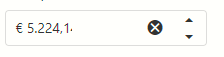
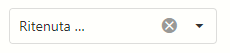
The text is almost entirely truncated (below screens targets 18.2.8).
Number:
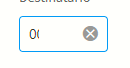
Bigger number box:
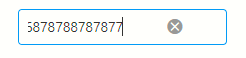
Number box with spinners:
TextBox inside DropDownBox:
This is quite crucial, since most of the number boxes, at low resolutions, should be quite small in order to don't take unnecessary space. Previous versions of devextreme didn't suffer such an issue.
Results You Expected:
I would not expect the text to be truncated by the buttons overlay.
Environment Details:
Browsers tested:

TL;DR Be sure that the css you're using is not generated with the old devextreme theme builder, otherwise components may act in a weird way.
Steps to Reproduce:
Results You Received:
The text is almost entirely truncated (below screens targets 18.2.8).
Number:

Bigger number box:

Number box with spinners:

TextBox inside DropDownBox:

This is quite crucial, since most of the number boxes, at low resolutions, should be quite small in order to don't take unnecessary space. Previous versions of devextreme didn't suffer such an issue.
Results You Expected:
I would not expect the text to be truncated by the buttons overlay.
Environment Details:
Browsers tested: