Repository navigation
Releases: Diddlik/AudioSwitcher
Release list
AudioSwitcher 1.5.1

v1.5.1

Release tray window fix in v1.5.1
AudioSwitcher 1.5.0
v1.5.0

AudioSwitcher 1.5.0
AudioSwitcher 1.4.0
AudioSwitcher 1.4.0
New interface
- A light, teal-accented design with dedicated profile, quick-switch, and settings views.
- Full-width navigation highlights, responsive fields, consistent icons, and clearer hover/focus states.
- Visible unsaved changes and a highlighted Save action.
- Shortcut capture buttons with individual keycaps; Tab leaves capture and Delete/Backspace clears it.
- Activation timestamps describe the last successful action, rather than claiming a continuously monitored active profile.
- Custom title bar extends into the window decoration area to remove the extra top strip.
About and updates
- New About window with app, .NET, architecture, and Windows version information.
- Links to source code and GitHub releases.
- Current update status and a manual check using the same updater as the startup check.
- An already downloaded update remains pending until exit; repeated checks retain that status.
- Standalone builds explain that automatic updates require an installed copy.
- Credits for 25 restored packages, including transitive and development dependencies, with versions, authors, license references, and NuGet links.
Languages and validation
- English, Russian, Ukrainian, French, Italian, and Polish, including the About window.
- 31 passing tests, including layout coverage for the main views and About at two sizes in all six languages.
- README includes fresh render images from actual Avalonia controls; earlier German desktop screenshots remain available.
Download Diddlik.AudioSwitcher-win-Setup.exe for installation and automatic updates, or use the portable ZIP. Existing profiles remain in %LocalAppData%\AudioSwitcher\config.json.
Native desktop capture and an installed update cycle were not exercised during local validation.
AudioSwitcher 1.3.1
AudioSwitcher 1.3.1
AudioSwitcher 1.3.1 fixes live language switching.
Fixed
- Interface text now changes immediately after selecting another language in Settings.
- The selected language still applies to the tray menu, status messages, update messages, and profile activation overlay.
Installation
Download and run the Windows installer. Existing installations receive version 1.3.1 through the integrated update function.
The installer is not code signed yet. Windows may display a SmartScreen warning on first launch.
AudioSwitcher 1.3.0
AudioSwitcher 1.3.0
AudioSwitcher 1.3.0 adds a multilingual interface with English as the default language.
New
- Choose English, Russian, Ukrainian, French, Italian, or Polish in Settings.
- The selected language applies immediately to the main window, status messages, tray menu, update messages, and profile activation overlay.
- The selected language is stored locally with the existing configuration.
Installation
Download and run the Windows installer. Existing installations receive version 1.3.0 through the integrated update function.
The installer is not code-signed yet. Windows may display a SmartScreen warning on first launch.
AudioSwitcher 1.2.1
v1.2.1

Add profile switch notifications
AudioSwitcher 1.2.0
AudioSwitcher 1.2.0
AudioSwitcher 1.2.0 bringt eine überarbeitete Oberfläche, direkte Shortcut-Erfassung und eine konsistente neue visuelle Identität.
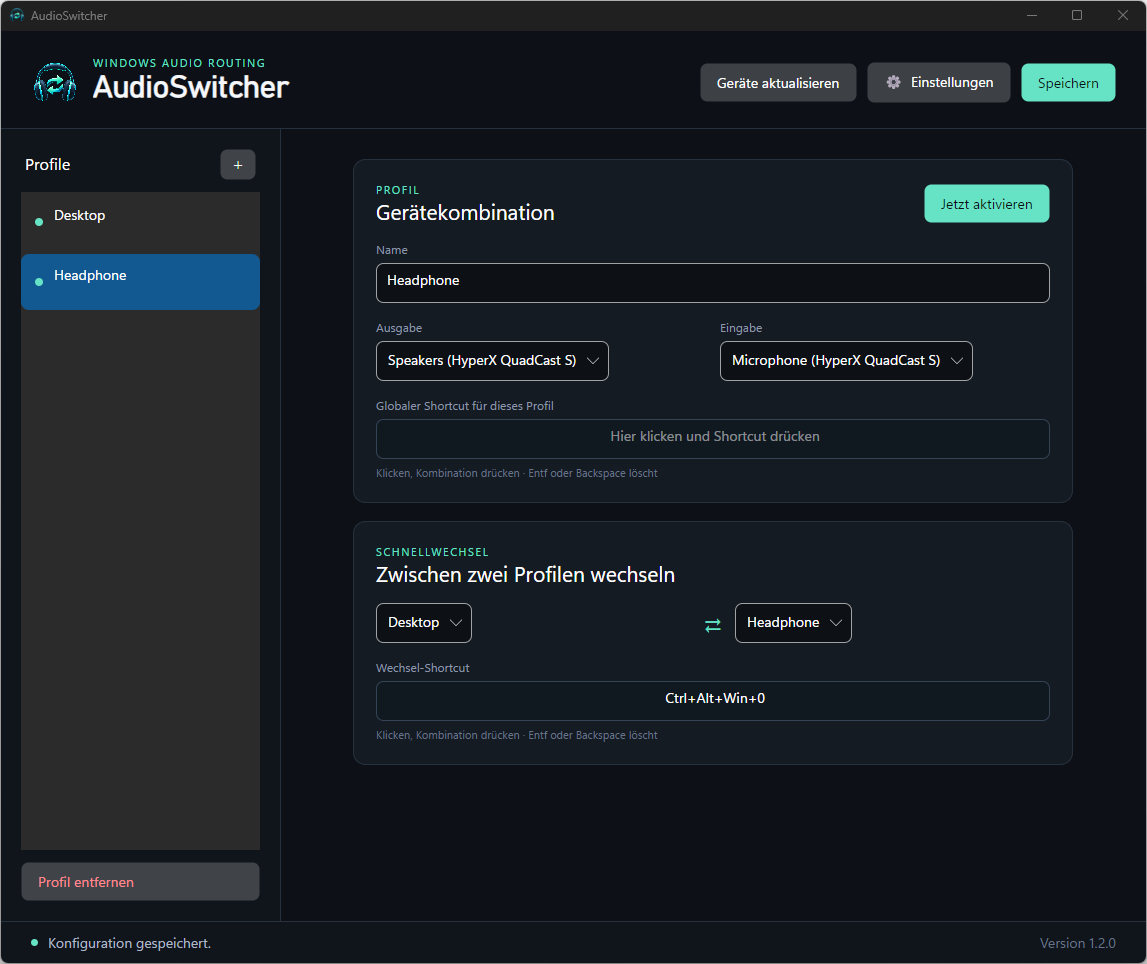
Neu
- Neues AudioSwitcher-Icon in App, Taskleiste, Tray, Installer und Dokumentation
- Shortcuts werden direkt per Tastendruck erfasst statt als Text eingegeben
EntfoderBackspaceentfernt eine Shortcut-Belegung- Systemeinstellungen befinden sich in einem separaten Einstellungsmenü
- Die installierte Programmversion ist direkt in der Oberfläche sichtbar
- Zusätzliche Tests für die Tastenerfassung
Bereits enthalten
- Profile mit je einem Ein- und Ausgabegerät
- Globaler Shortcut pro Profil
- Schnellwechsel zwischen zwei Profilen
- Zuverlässiges Umschalten aller Windows-Audiorollen
- System-Tray, Autostart und automatische Updates
Installation
Den Windows-Installer herunterladen und starten. Bestehende Installationen erhalten Version 1.2.0 über die integrierte Update-Funktion.
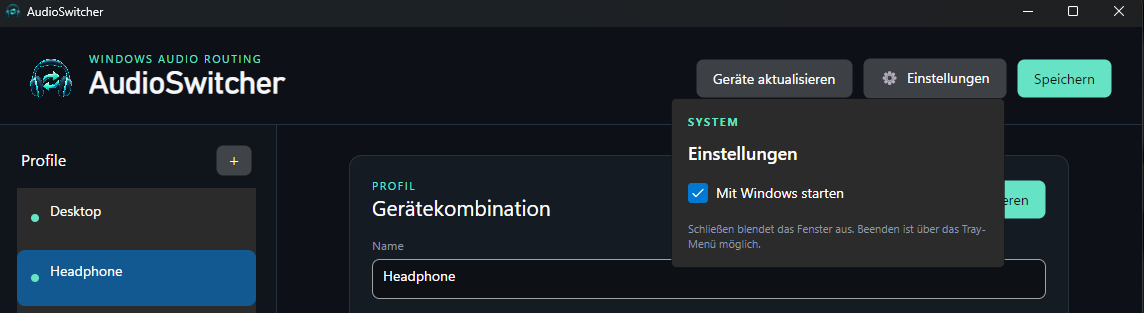
Einstellungen
Autostart und weitere Systemoptionen sind kompakt in einem eigenen Menü untergebracht.
Der Installer ist noch nicht code-signiert. Windows kann beim ersten Start eine SmartScreen-Warnung anzeigen.
AudioSwitcher 1.0.1
v1.0.1

Fix Windows audio profile switching
AudioSwitcher 1.0.0
v1.0.0

AudioSwitcher 1.0.0