How to Setup a Remote Webform
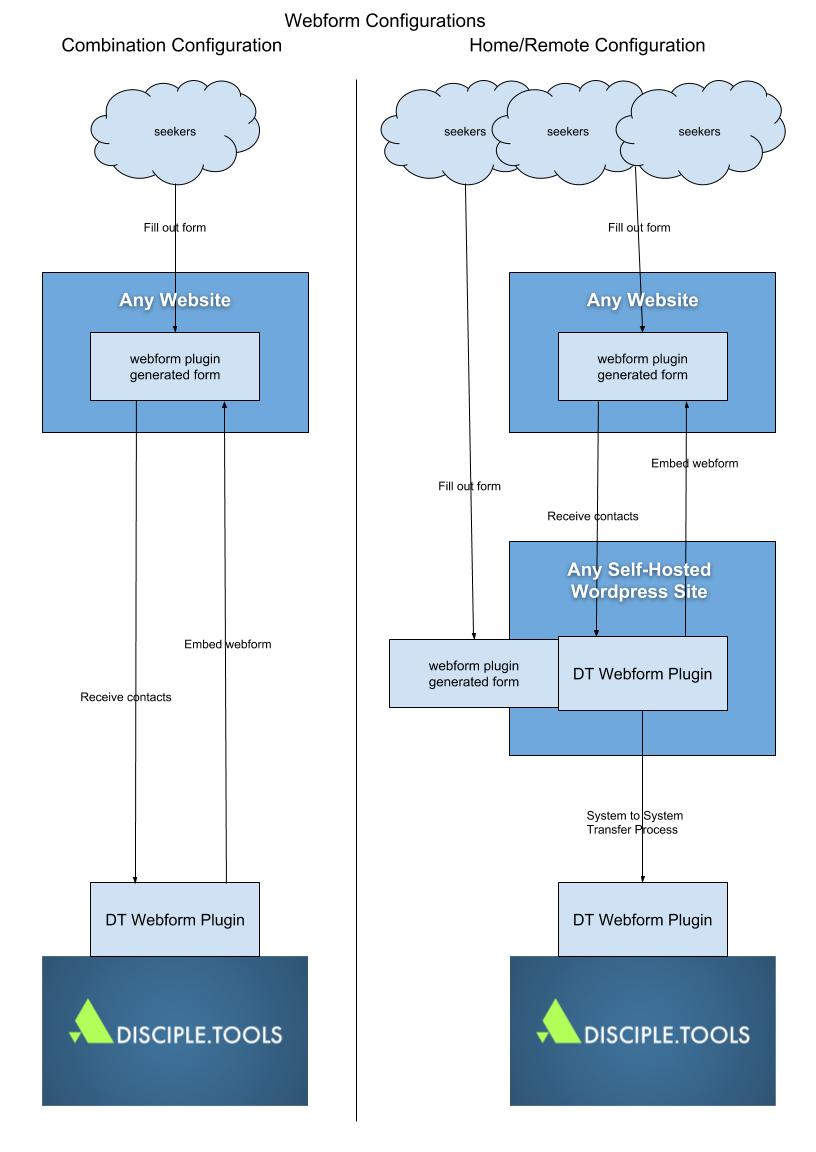
- Better security
- Using this remote strategy let you hide url of the disciple.tools instance
- Shortcode instead of iframe
- It lets you use a shortcode on your website instead of an iframe, iframes in general don't look as good and don't work as well on mobile
See the video for detailed instruction
- Install the Webform plugin on your Disciple.Tools Instance
- Download the Disciple.Tools webform plugin and install it on your public facing wordpress website.
- In the WP Admin > Site Links set up the site link to you Disciple.Tools instance (site link instructions)
- In WP Admin > Webform (DT) select the site link you created.
- You can now set up a webform to use on your website
- Display the webform using these instructions