| difficulty | 2 |
|---|---|
| training | true |
| chapter | Chapter 9: Challenge roundup |
| tags | angular |
The app you have to build is a simplified version of https://www.tesla.com/modelx/design. You can use that website for inspiration if you want, but our API and possible configurations are a lot simpler. In this challenge, we focus on selecting a car model and color.
- Models and colors must be retrieved from the API included in the project and accessible at the http://localhost:4200/models endpoint.
- Data types are pre-generated for you in
src/app/models.type.ts - A
configurator.servicehas been started with a Signal that holds all available car models. - Images for all models and colors can be found at https://interstate21.com/tesla-app/images/
- Complete the
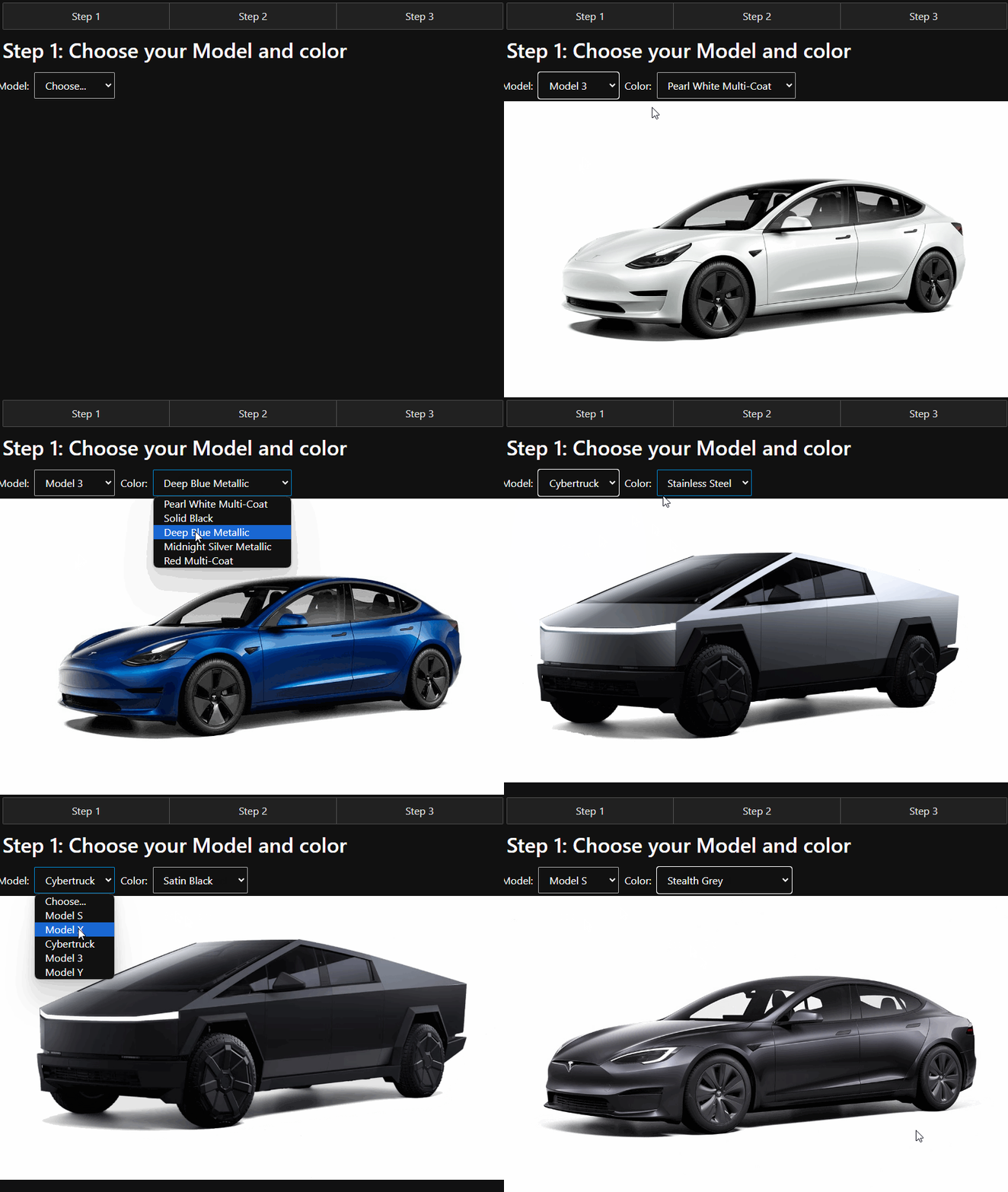
step1.componentto display the right information in the two select dropdowns. - When a Model and Color are selected, the proper image should be displayed on the screen as illustrated below.
💡 HINT: Use Signals as much as possible in
configurator.serviceto store the current state of your configuration (selected model, selected color)
- If you see the
data-testattribute anywhere in the boilerplate don't remove it. - The project has
mini.cssas a dependency for basic styling.
This is an example of what the functionality should look like for the completed exercise. If you’d like to mimic this style, feel free to do so, but it is not required.