Releases: Duoasa/QuotaView
Release list
QuotaView 0.4.2 Build 1 — More Progress Styles, Steadier Activity

QuotaView 0.4.2 Build 1 — More Progress Styles, Steadier Activity
Download QuotaView-v0.4.2-build.1.zip
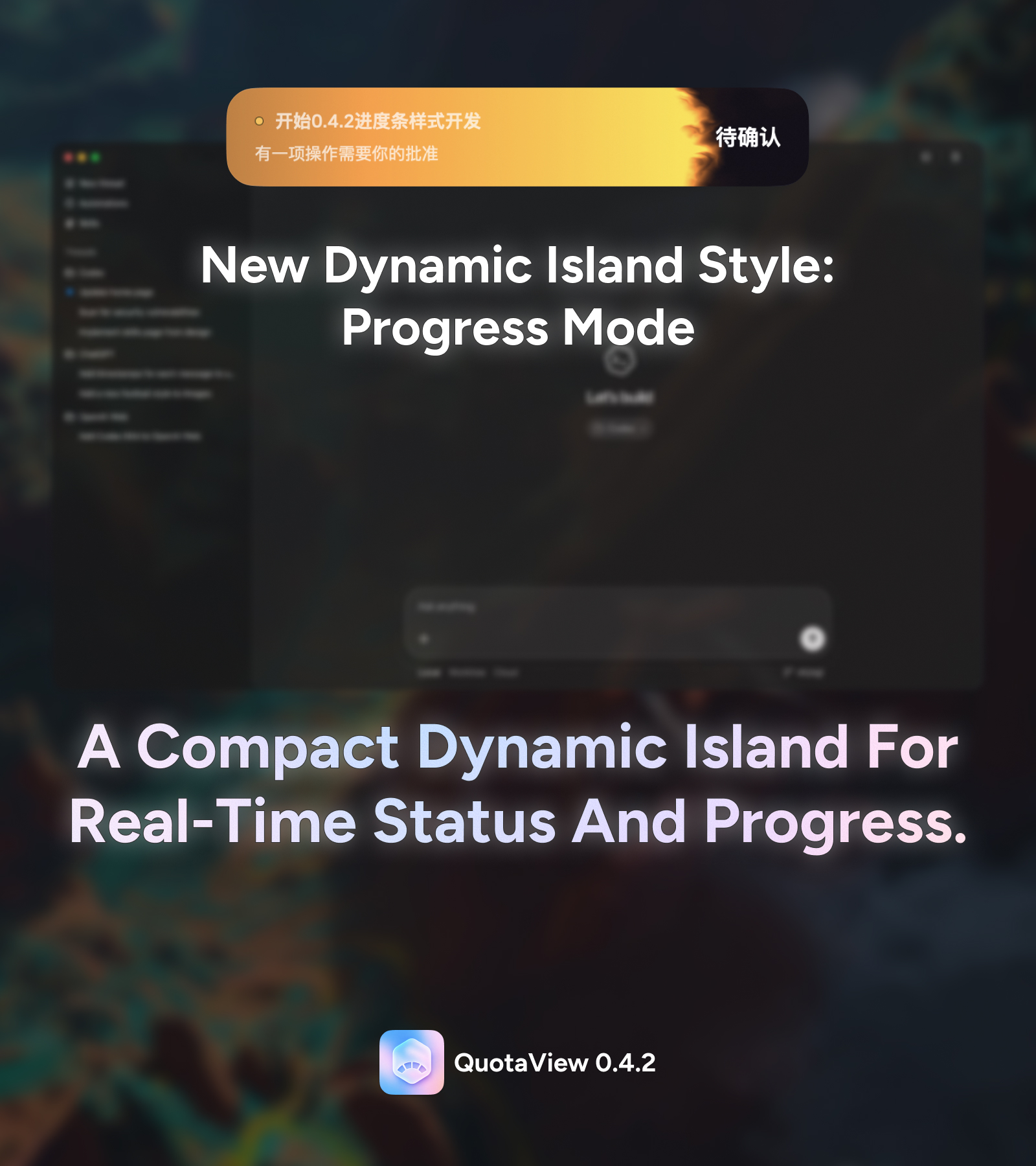
QuotaView 0.4.2 expands the progress-aware Codex Island and tightens task
lifecycle tracking.

Highlights
- Four progress styles: Choose State Smoke, Diamond Front, Drop Field, or
Liquid Slosh from live previews, with state-matched colors. - Smoother progress feedback: Planned steps transition more gently, and the
three new effects add a restrained highlight after reaching 100%. - Reliable task continuity: Intermediate tool steps stay active; only the
real end of the Codex turn triggers completion.
The universal build supports Apple Silicon and Intel Macs running macOS 14 or
later. It is signed with the QuotaView Developer ID, notarized by Apple, and
stapled for offline Gatekeeper verification.
Signed installations on the Stable channel can receive this release through
QuotaView's in-app updater.
QuotaView 0.4.1 Build 1 — A Progress-Aware Codex Island
QuotaView 0.4.1 Build 1 — A Progress-Aware Codex Island
Download QuotaView-v0.4.1-build.1.zip
QuotaView 0.4.1 adds a dedicated progress-style Codex Island alongside the
existing AI Orb and makes task progress feel consistent whether Codex uses an
explicit multi-step plan or performs one unplanned action.
Highlights
- Dedicated Progress Bar style: Choose between AI Orb and Progress Bar in
Settings. The progress surface has its own compact geometry and does not
inherit AI Orb size choices. - Approximate task progress: A smoke front follows sanitized plan status
counts when a structured plan exists. Active planned work is capped at 95%;
only a real completion event reaches 100%. - Consistent single-step behavior: Every active task waits at 1% for a
4-second plan-discovery window. An in-progress plan step contributes a
conservative 10% of one step to prevent a newly detected multi-step task
from jumping ahead. If no plan arrives, the Island transitions
into a slower single-step estimate capped at 50%. A late plan can still take
over without moving the displayed front backward. - Reliable desktop plan detection: The local Hook recognizes both direct
plan updates and thetools.update_plan(...)calls wrapped by Codex Desktop's
execution tool. - Privacy-preserving by construction: The helper immediately reduces a plan
to completed, in-progress, and pending counts. Step text, explanations, raw
scripts, prompts, arguments, and tool output are never forwarded. - More readable state smoke: Working uses a low-saturation bright cyan,
context compaction uses a cool gray-white, and the opacity curve follows the
visible smoke width so the leading text remains readable while the smoke
front stays distinct. - Refined completion feedback: Completion fills the Island, darkens, fades
back to the native surface, and separates a clean 1 pt green highlight
outline from a four-sided breathing glow beneath the Island. Extra transparent
render space lets the glow decay without a rectangular cutoff. - Reliable idle convergence: Missing terminal Hook events settle safely
after inactivity, while delayed tool-finished events cannot reopen a turn
that already completed. - Stable bilingual layout: Expanded Progress Bar text uses a compact
left-title/detail and right-aligned-state layout. Expanded and compact sizes
are fixed against the widest supported English and Simplified Chinese copy,
preventing geometry jumps. - Three AI Orb sizes: The expanded AI Orb supports 100%, 85%, and 75%
proportional sizes without changing the Progress Bar or compact Island.
The universal build supports Apple Silicon and Intel Macs running macOS 14 or
later. It is signed with the QuotaView Developer ID, notarized by Apple, and
stapled for offline Gatekeeper verification.
Signed installations on the Stable channel can receive this release through
QuotaView's in-app updater.
QuotaView 0.3.7 Build 1 — Multiple Quota Windows and a Screen-Aware Codex Island
QuotaView 0.3.7 Build 1 — Multiple Quota Windows and a Screen-Aware Codex Island
Download QuotaView-v0.3.7-build.1.zip
QuotaView 0.3.7 makes every valid Codex core quota window visible and gives
multi-display users a simple way to keep the Codex Island on the screen where
Codex is located.
Highlights
- Complete core quota visibility: Primary and secondary Codex windows are
modeled independently and shown from the shortest duration to the longest,
so 5-hour and weekly limits can appear together. - Duration-based labels: Quota titles come from the duration returned by
Codex rather than the subscription name. Missing or invalid secondary data
hides cleanly instead of producing a false zero. - Independent Spark quota: Spark remains a separate neutral window after
the core limits, with its own usage and reset countdown and no repeated plan
label. - One screen-placement switch: Enable Lock to Codex Screen to place the
Codex Island on the display containing the largest visible Codex window.
Leave it off to keep following the active menu-bar hotspot. - Safe multi-display fallback: If Codex is unavailable, hidden, minimized,
or cannot be located, the Island returns to the hotspot automatically. - Local and permission-free: Screen selection reads only the Codex process
identifier and window/display geometry. It does not read window titles,
contents, or pixels and requests no Accessibility or Screen Recording access. - Stable single-task scope: Particle Orb, Ripple Glow, custom compact/hide
timing, Reduce Motion, and the stable single-task lifecycle remain intact.
The universal build supports Apple Silicon and Intel Macs running macOS 14 or
later. It is signed with the QuotaView Developer ID, notarized by Apple, and
stapled for offline Gatekeeper verification.
Signed installations on the Stable channel can receive this release through
QuotaView's in-app updater.
QuotaView 0.3.6 Build 2 — Customizable Codex Island / 可自定义 Codex 灵动岛
QuotaView 0.3.6 Build 2 — Customizable Codex Island
Download QuotaView-v0.3.6-build.2.zip
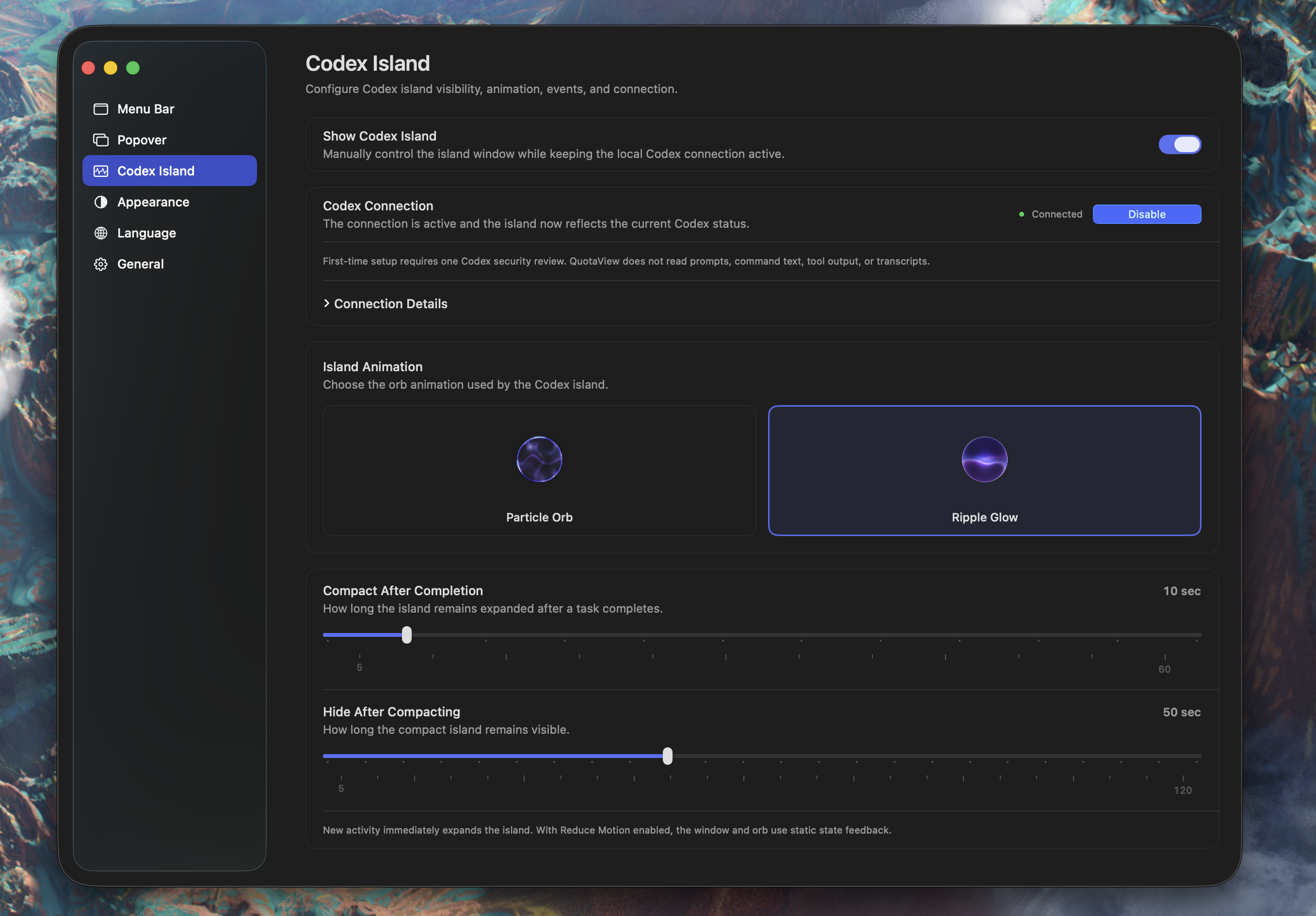
QuotaView 0.3.6 upgrades the stable single-task Codex Island with animation and
event timing controls, without changing its local-only privacy boundary.
Highlights
- Independent visibility control: Show or hide the Codex Island without
disconnecting the local Codex activity bridge. - Two live orb styles: Choose the existing Particle Orb or the new
Ripple Glow from production-rendered previews. Changes take effect
immediately. - State-aware Ripple Glow: The new orb covers all nine existing Codex task
states, preserves a circular silhouette, and uses smooth color and speed
transitions. - Custom event timing: Set Compact After Completion from 5–60 seconds
and Hide After Compacting from 5–120 seconds in five-second steps, with
visible ticks and the current value. - Accessible and resilient: Reduce Motion remains supported. Ripple Glow
falls back to Particle Orb if Metal initialization is unavailable, and its
pipeline is cached to avoid repeated shader compilation. - Stable scope: This release continues to use one single-task island. The
separate multi-task Preview experiment is not included.
The universal build supports Apple Silicon and Intel Macs running macOS 14 or
later. It is signed with the QuotaView Developer ID, notarized by Apple, and
stapled for offline Gatekeeper verification.
Users on the signed 0.3.5 Build 5 release can receive this version through the
Stable in-app update channel.
QuotaView 0.3.6 Build 2 — 可自定义 Codex 灵动岛
下载 QuotaView-v0.3.6-build.2.zip
QuotaView 0.3.6 为稳定的单任务 Codex 灵动岛加入动画和事件时间自定义,同时
保持仅限本地的数据与隐私边界。
主要更新
- **独立显示控制:**可手动显示或隐藏 Codex 灵动岛,不会断开 Codex 本地
活动连接; - 两种实时光球:可在生产渲染预览中选择既有的粒子球或新的
波澜光晕,切换后立即生效; - **状态化波澜光晕:**新光球适配现有九种 Codex 任务状态,保持圆形轮廓,
并平滑过渡颜色和速度; - 自定义事件时间:****完成后缩小支持 5–60 秒,缩小后隐藏支持
5–120 秒,均以 5 秒为档位,并显示刻度与当前值; - **辅助功能与降级:**继续支持 Reduce Motion;Metal 初始化不可用时自动
回退粒子球,并缓存波澜光晕 Pipeline,避免重复编译着色器; - **稳定范围:**本版继续采用单任务灵动岛,不包含独立的多任务 Preview
实验。
Universal 构建支持 macOS 14 或更高版本的 Apple 芯片与 Intel Mac,使用
QuotaView Developer ID 签名,已通过 Apple 公证并完成 Staple,可离线通过
Gatekeeper 验证。
已安装正式签名版 0.3.5 Build 5 的用户可以通过应用内 Stable 更新通道升级
到此版本。
QuotaView 0.3.5 Build 5 — Usage Overview and App Updates
QuotaView 0.3.5 Build 5 expands the usage overview and introduces secure in-app update checks for future Stable releases.
What's new
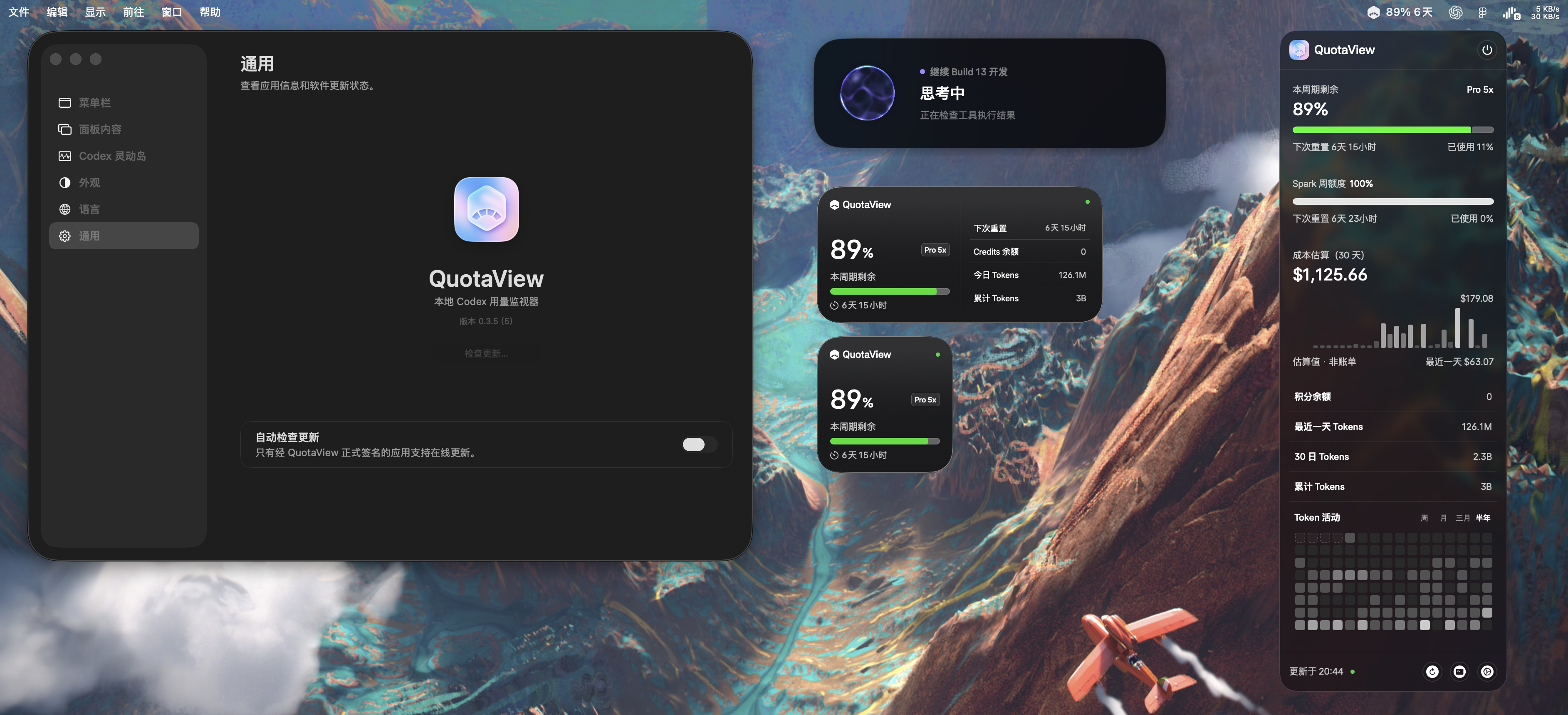
- Adds a separate Spark weekly quota below the primary period quota. Spark uses its own reset time and a neutral progress style, and stays hidden when no valid Spark window is available.
- Moves the primary reset countdown into the period quota chart and removes the redundant standalone panel setting.
- Adds latest-day and 30-day token summaries plus a monochrome 30-day cost estimate. The estimate uses the documented local reference rate and is explicitly labeled as an estimate, not a bill.
- Keeps Token Activity's complete 16-column grid while limiting the longest range to the most recent six months of available history.
- Uses consistent latest-day semantics across the summary, Token Activity, and cost chart instead of presenting an older usage bucket as today.
- Adds Sparkle 2.9.2 manual Stable update checks and a separate native setting for an optional 24-hour automatic check. Update installation always requires confirmation.
- Keeps update traffic disabled in Debug, ad-hoc, unpackaged, wrong-bundle-ID, and unexpected-signing-team environments.
First updater release
Build 5 is the first QuotaView release containing the updater, so it must be installed manually. In-app updating begins with a later Stable build explicitly approved for the update sequence.
Security and compatibility
- Universal app for Apple Silicon and Intel Macs.
- Requires macOS 14 or later.
- Signed with Developer ID, notarized by Apple, and stapled for offline Gatekeeper verification.
- The Sparkle enclosure and appcast use EdDSA signatures; the update feed accepts Stable releases only.
- QuotaView remains read-only for Codex account data. The quota reset interface remains a local demo and does not consume reset credits.
SHA-256: d8524ddf5739501bd797cdd082cc8738a7775d8b994fe99033068af8f821b2e1
QuotaView 0.3.3 — Token Activity
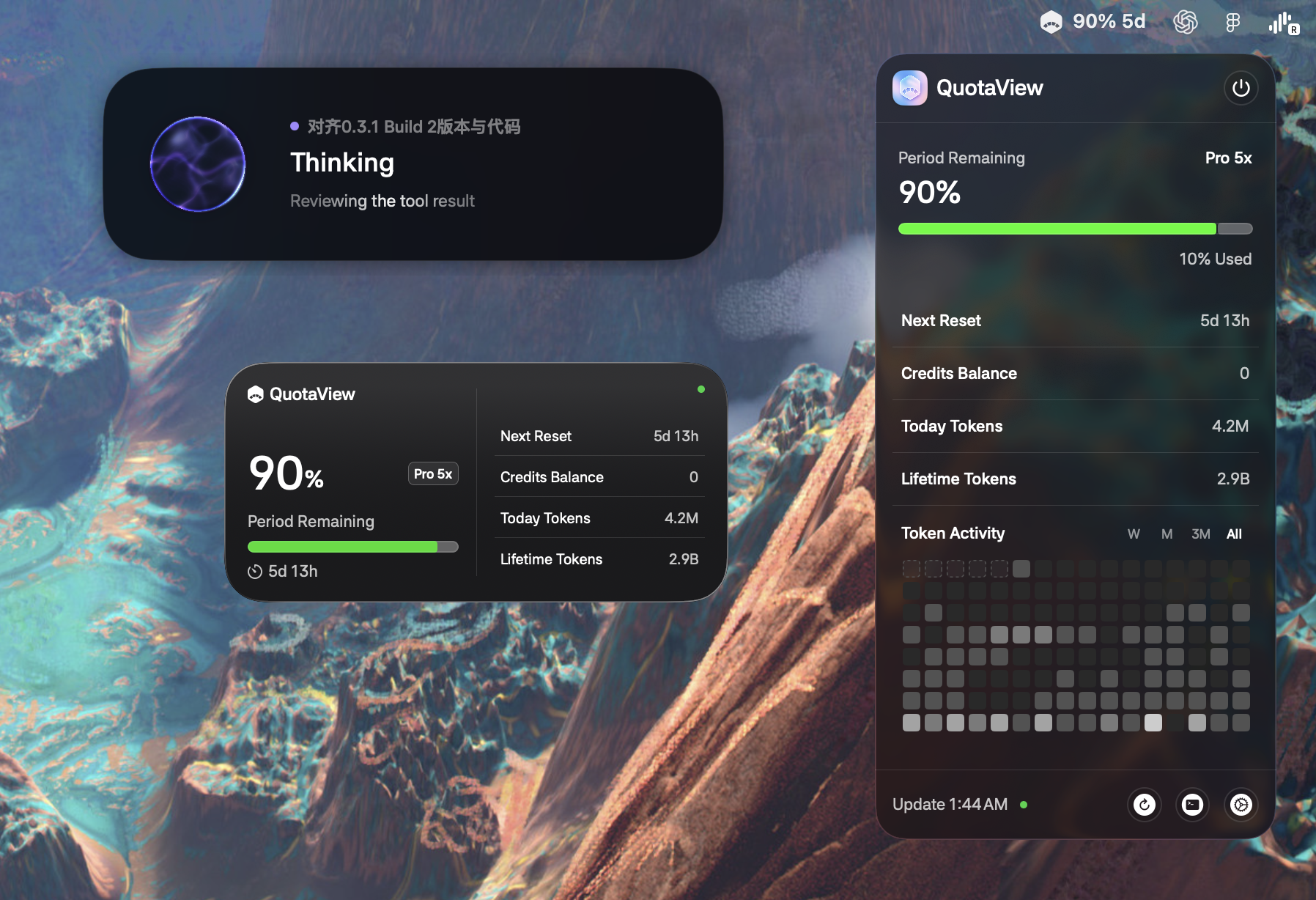
QuotaView 0.3.3 adds a compact Token Activity chart to the menu panel.
What's new
- Review daily token usage below the existing usage metrics.
- Switch between the last week, month, three months, and all available
history. The last month is selected by default. - Read every range as a complete 16-column rounded-square grid, with leading
placeholders and real dates aligned from the bottom right. - Use a high-contrast five-step monochrome palette: opaque white levels in
Dark Mode and opaque grayscale levels in Light Mode. Placeholder cells keep
their subtle translucent treatment. - Hover a day for 0.5 seconds to see its date and compact K/M/B token usage.
- Keep the top of the menu fixed while its lower edge smoothly expands or
contracts for the selected range. - Show or hide the Token Activity chart from Settings.
Stable and preview channels
QuotaView 0.3.3 keeps the stable single-task Codex Island. The experimental
multi-task Island from 0.3.2 Preview 1 is not included in this stable release;
that separate pre-release remains available for community testing.
Distribution
- Universal app for Apple Silicon and Intel Macs
- Developer ID signed with Hardened Runtime
- Notarized by Apple and stapled for offline Gatekeeper verification
Requirements
- macOS 14 or later
- A Codex version with Hooks support for Codex Island activity
QuotaView 0.3.2 Preview 1 — Multi-task Codex Island
QuotaView 0.3.2 Preview 1 brings the core multi-task workflow to Codex Island.
It is an early-access release for validating the experience; v0.3.1 Build 2
remains the recommended stable version and GitHub Latest release.
What's new
- Track multiple concurrent Codex sessions in one fixed Island, with
independent status, lifecycle, completion, and cleanup. - Use a three-row task rail, a continuous sliding window for longer task
lists, task counts, and a compact multi-task summary. - Keep a stable primary task through priority arbitration so ordinary
background events do not unnecessarily take over the Island. - Optionally follow the current Codex task through bounded, read-only
Accessibility title matching with a safe automatic fallback. - Preserve the existing live Metal status surface, native glass transitions,
compact/expanded states, Reduce Motion behavior, and accessibility actions.
Known preview limitations
- Event-to-Island response can still feel delayed depending on Hook delivery,
local scheduling, and the current Codex task state. - Current-task following is title-based and can lag or miss when titles are
unresolved, duplicated, changed quickly, or affected by Codex UI changes. - Task switching, title marquee behavior, and compact/expanded transition
rhythm still need experience and performance refinement.
Stability recommendation
This build is intended for preview validation. Use v0.3.1 Build 2 when stable
behavior is more important than multi-task support.
Requirements
- macOS 14 or later
- A Codex version with Hooks support
QuotaView 0.3.1 Build 2 — Widget Hotfix
QuotaView 0.3.1 Build 2 is a focused hotfix for WidgetKit data sharing and variable Codex quota periods.
Fixed
- Restored Small and Medium widget data for notarized direct downloads by migrating the shared container to the team-prefixed App Group
BUUH229D5Q.com.quotaview.shared. - Renamed “Weekly Remaining” to “Period Remaining” so the interface works for 5-hour, 7-day, and future variable quota periods. The Simplified Chinese title is now “本周期剩余”.
- Added a release packaging check that rejects a non-team-prefixed App Group unless the app embeds a provisioning profile.
Requirements
- macOS 14 or later
- A Codex version with Hooks support
QuotaView 0.3.1 — Codex Island
QuotaView 0.3.1 introduces Codex Island, a native macOS activity surface that
shows Codex status with a live Metal-rendered fluid sphere.
What's new
- Added expanded, compact, and hidden Codex Island states with smooth
transitions and status-specific motion and color. - Added live Codex lifecycle tracking through official Hooks, including tool
use, permission requests, context compaction, subagents, completion, and
failures. - Added a guided one-click setup flow in Settings. QuotaView installs and
updates its fixed-path helper, preserves existing hooks, opens the official
/hooksreview page, and asks for the one trust confirmation required by
Codex. - Added clear connection states, immediate “Codex not connected” feedback,
automatic restart guidance, and real-event verification before reporting a
successful connection. - Codex Island compacts 20 seconds after completion and hides after two minutes;
new activity expands it immediately.
Privacy and security
QuotaView forwards only a hashed session identifier, the last workspace path
component, event type, coarse tool category, session source, and timestamp. It
does not collect prompts, commands, arguments, tool output, or transcript
paths. Hook trust is never bypassed.
Requirements
- macOS 14 or later
- A Codex version with Hooks support
Download verification
QuotaView-v0.3.1.zip
SHA-256:
ff2417f40c8d5ad9e12c4c3c42101fb3e12e9e04c137c1bc6a42e2b56bf50e2d
The Universal app is signed with Developer ID, notarized by Apple, and stapled
for offline Gatekeeper verification.
QuotaView 0.2.1 — Native Widgets
QuotaView 0.2.1 brings essential quota information to native macOS widgets while preserving the app's simple, lightweight, and privacy-conscious design.
Highlights
- Added native Small and Medium WidgetKit widgets for weekly quota, reset time, Credits, token usage, subscription plan, and connection state.
- Added a privacy-safe App Group data path. The main app shares only a minimal, sanitized, expiring snapshot; widgets never access credentials, the network, or the Codex App Server.
- Refined the menu panel, progress display, connection indicator, and local Liquid Glass details with a compact, data-first layout.
- Normalized subscription labels to official OpenAI plan names and improved unavailable states so missing data is never presented as a fabricated value.
- Updated the English and Simplified Chinese documentation and product preview.
Distribution
- Universal macOS app: Apple Silicon and Intel
- Requires macOS 14 or later
- Signed with Developer ID Application
- Notarized by Apple and stapled for offline Gatekeeper verification
Download QuotaView-v0.2.1.zip, unzip it, and open QuotaView.app.
SHA-256:
99e7fb951d4abd6475204c059f1e16481dac8be4c3b72e6b19889fc54737521b
QuotaView remains read-only. The quota reset flow is still a local demonstration and does not call the live account reset endpoint.