Local web UI for the pi coding agent. Pi Web reads your local pi session files and gives you a browser workspace for session browsing, real-time chat, model configuration, skill management, and project file preview.
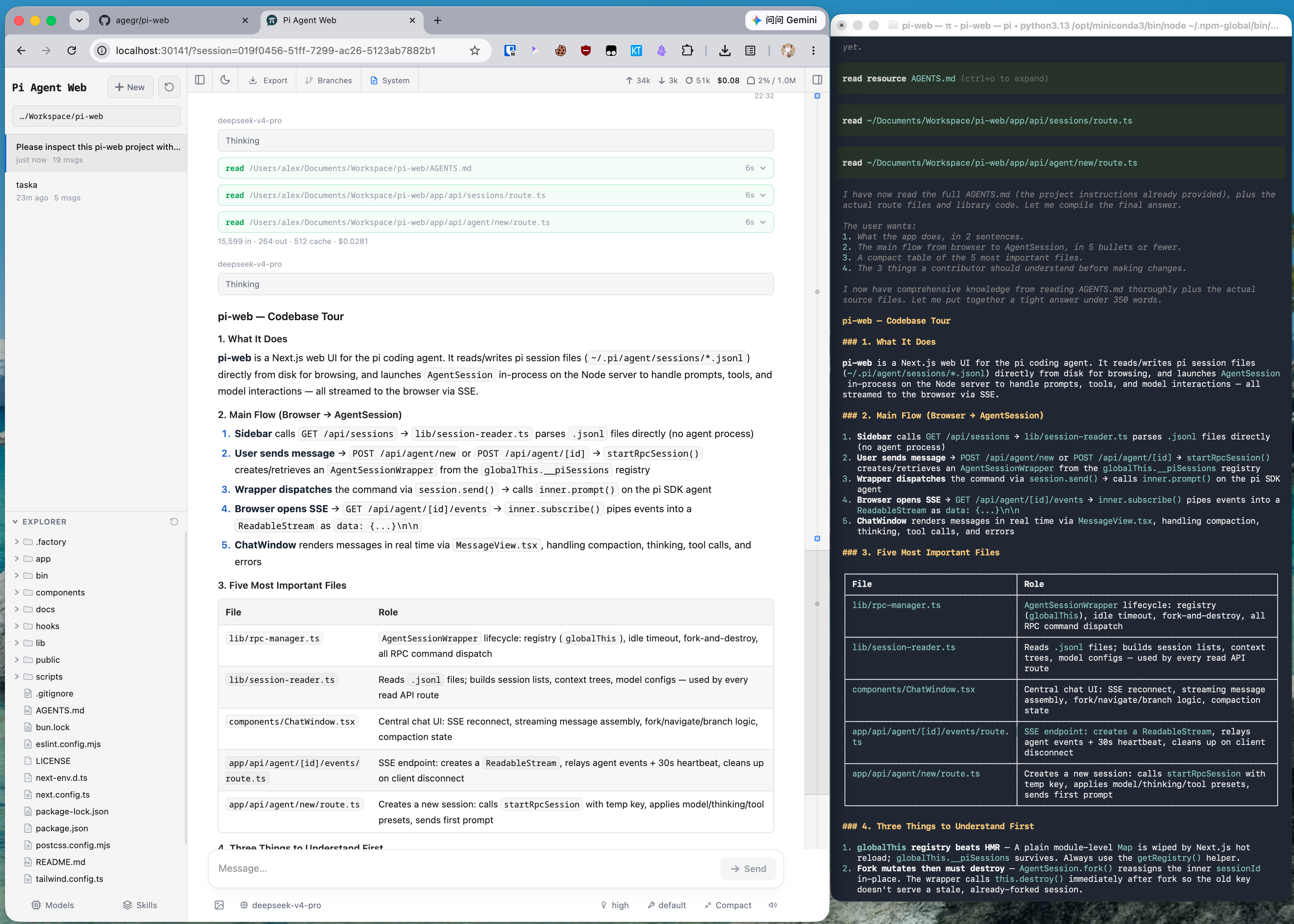
The same pi session in CLI and Pi Web: structured tool calls, readable Markdown, session browsing, and cleaner results.
Pi Web requires Node.js 22.19.0 or newer. Check your version with node --version.
Run without installing:
npx @agegr/pi-web@latestOr install globally:
npm install -g @agegr/pi-web
pi-web
Then open http://127.0.0.1:30141. The CLI will try to open the browser automatically after the server is ready. Pi Web listens on 127.0.0.1 by default.
Options:
pi-web --port 8080              # custom port
pi-web --hostname 0.0.0.0       # expose on a trusted network
pi-web -p 8080 -H 0.0.0.0       # combine options
pi-web --no-open                # do not open the browser automatically

PORT=8080 pi-web                # environment variable is also supported
PI_WEB_HOSTNAME=0.0.0.0 pi-web  # explicit network exposure
PI_WEB_ALLOWED_HOSTS=pi-web.internal pi-web  # allow an exact proxy/custom hostname
PI_WEB_PASSWORD='a-long-random-password' pi-web  # require Basic Auth (username: pi)
PI_WEB_NO_OPEN=1 pi-web         # useful when running as a background service
Set PI_WEB_PASSWORD to protect the web interface and every API endpoint with HTTP Basic Auth. The username is always pi. Leaving the variable unset or empty disables authentication.
Pi Web can invoke a high-privilege agent. Basic Auth does not encrypt the password in transit, so do not expose plain HTTP to the internet. Use HTTPS through a trusted reverse proxy or a trusted VPN for remote access.
API requests accept loopback names, IP literals, the selected bind hostname, and exact comma-separated names in PI_WEB_ALLOWED_HOSTS. Configure that variable when a trusted reverse proxy uses a different external hostname.
Pi Web reads the standard HTTP_PROXY, HTTPS_PROXY, and NO_PROXY environment variables for server-side model and API requests.
On macOS or Linux:
HTTP_PROXY=http://127.0.0.1:7890 \
HTTPS_PROXY=http://127.0.0.1:7890 \
NO_PROXY=localhost,127.0.0.1 \
npx @agegr/pi-web@latest
On Windows PowerShell:
$env:HTTP_PROXY = "http://127.0.0.1:7890"
$env:HTTPS_PROXY = "http://127.0.0.1:7890"
$env:NO_PROXY = "localhost,127.0.0.1"
npx @agegr/pi-web@latest- Pick work back up: browse previous pi conversations by project without digging through terminal history or session paths.
- Try different directions safely: continue from an earlier message or fork a session into a separate route.
- Work across branches: switch Git worktrees from the sidebar so new sessions and the Explorer follow the checkout you choose.
- Chat beside the project: browse files on the left and preview source, docs, images, audio, and PDFs on the right while the agent works.
- See session state clearly: context usage, cost, compaction state, and system prompt details are visible from the top bar.
- Configure less from the terminal: manage models, login/API keys, model tests, and skill switches from the web UI.
- Use the interface in your language: switch between the supported UI languages from the top bar.
- Data directory: Pi Web reads
~/.pi/agent/sessionsby default. SetPI_CODING_AGENT_DIRto point at another pi agent directory. - Session files: files are stored as
~/.pi/agent/sessions/<encoded-cwd>/<timestamp>_<uuid>.jsonl. - Model config: the Models panel reads and writes
models.jsonin the pi agent directory. Model lists and defaults come from pi's config. - File access: file browsing and preview are scoped to the selected project directory and working directories that appear in sessions.
- Git worktrees: see Worktrees in Pi Web for when the switcher appears, how new worktrees are created, and what removal does.
- Forks vs in-session branches: Fork creates a new
.jsonlfile. "Edit from here" creates another branch inside the same session file. - Internationalization: see Internationalization for using translations and adding languages or UI text.
Pi Web also ships a native desktop shell built with Tauri (src-tauri/). The shell spawns the pi-web server with a bundled Node.js 22 runtime (no system Node required) and renders the same interface in a native window with desktop integrations:
- System tray: show/hide the window, start a new session, or quit (closing the window hides to tray — quit from the tray menu to fully exit and stop the server).
- Native folder picker: the directory picker offers a "System" button that opens the OS folder dialog.
- Reveal in Finder / Explorer: open a file's location in the system file manager from the file viewer toolbar.
- Native notifications: get a system notification when the agent finishes a run.
- External links open in your browser: http(s) links that point outside the local server are handed to the default browser.
- Single instance & window state: launching the app again focuses the existing window; window size/position is remembered.
- Official pi icon: the app icon is the official pi logo from pi.dev.
Everything else — skins/themes, source control (SCM), model config, sessions — is identical to the web version.
- Node.js 22.19.0+ (for building)
- Rust toolchain (
cargo,rustc1.77+) - macOS: Xcode Command Line Tools (
xcode-select --install) for building - Network access to crates.io (a Rust mirror is recommended if crates.io is slow)
The desktop shell loads the Next.js dev server, so start the dev server first, then launch the shell in a second terminal:
npm install

# terminal 1 — Next.js dev server (http://127.0.0.1:30141)
npm run dev

# terminal 2 — desktop shell (Tauri)
npm run desktop:dev
desktop:dev is a shortcut for tauri dev: it compiles the Rust shell and opens a native window pointing at the dev server (configured as devUrl in src-tauri/tauri.conf.json). React changes hot-reload through the dev server; changes under src-tauri/ are watched and trigger an automatic shell rebuild.
Prerequisites for the first run:
- Rust toolchain (
rustc1.77+, from rustup) - macOS: Xcode Command Line Tools —
xcode-select --install - The first compile pulls in ~500 crates from crates.io; on a slow network configure a Rust mirror (e.g. rsproxy.cn)
npm run desktop:buildThe build script (scripts/desktop-build.mjs) does the following automatically:
next buildin standalone mode (NEXT_OUTPUT=standalone) — Next traces exactly what the server imports and produces a trimmed runtime (~125 MB instead of 600 MB+ of full dependencies)- Packs the standalone runtime (
server.js+ trimmednode_modules+.next/static+public) intosrc-tauri/resources/pi-web/ - Downloads the Node 22 LTS runtime to
src-tauri/resources/bin/node(packed as a plain resource so it stays out ofContents/MacOS/and never shows up as a second Dock icon) - Runs
tauri build
Artifacts land in src-tauri/target/release/bundle/ as Pi Web.app (≈ 240 MB) and Pi Web.dmg (≈ 60 MB). The app is fully self-contained (bundled Node runtime + pi-web server, no system Node needed). Make sure no dev server is running on port 30141 before building — the build shares .next/ with the dev server and the script aborts if 30141 is already in use.
To run the packaged app: open the .app (or install from the .dmg). The shell starts its own bundled node server.js on port 30141 (falling back to a free port if occupied) and waits for a health check before opening the window. Closing the window hides it to the tray; use Quit in the tray menu (or Cmd+Q) to exit — the shell then kills the bundled server process group so no orphan node/next-server is left behind. Server logs go to /tmp/piweb-desktop-server.log for troubleshooting.
- Port 30141 already in use — the shell auto-falls back to a free port, but in dev mode the Next.js dev server owns 30141; stop it (
pkill -f "next dev") before a production build. - Build aborts with "Dev server is running on port 30141" — expected:
npm run desktop:buildrefuses to run while the dev server is alive because both share.next/. - Leftover
next-serverprocesses after quitting the app — older builds leaked the bundled Node process on normal quit (window close was intercepted to hide-to-tray, so the cleanup path never fired). Current builds clean up on quit (Cmd+Q, tray Quit, and SIGTERM/SIGINT); if you still see orphans,pkill -f "resources/bin/node"once and rebuild. - The window opens blank / server never becomes ready — check
/tmp/piweb-desktop-server.logfor the Node startup error, and confirmsrc-tauri/resources/pi-web/server.jsandsrc-tauri/resources/bin/nodeexist (both are produced bydesktop:build).
src-tauri/
  src/
    main.rs         # entry point
    lib.rs          # app setup, plugins, window events, server lifecycle
    server.rs       # port probe → spawn bundled Node (server.js) → health check → spawn window
    tray.rs         # system tray menu (toggle / new session / quit)
    commands.rs     # Tauri commands: select_directory, reveal_in_finder, notify
  tauri.conf.json   # window, bundle, resources
  icons/            # app icons (generated from the official pi logo)
  resources/
    bin/node        # bundled Node runtime (gitignored, produced by desktop:build)
    pi-web/         # Next standalone runtime: server.js + trimmed node_modules (gitignored)
- Closing the window hides it to the tray; the server keeps running in the background. Choose Quit in the tray menu to exit and stop the server.
- The port auto-detects: 30141 by default, and falls back to a free port if it is occupied.
- The bundled Node runtime is shipped as a plain resource under
Contents/Resources/(not anexternalBinsidecar inContents/MacOS/) so macOS does not treat it as a separate app and no extra Dock icon appears. src-tauri/resources/andsrc-tauri/target/are gitignored and produced by the build script.
npm install
npm run dev
The local dev server runs at http://127.0.0.1:30141.
Common checks:
node_modules/.bin/tsc --noEmit
npm run lint
Avoid running next build / npm run build during local development. It writes to .next/ and can interfere with the dev server; leave builds for release work.
app/
  api/
    agent/          # creates/drives AgentSession and exposes SSE events
    auth/           # OAuth and API key management
    cwd/browse/     # browsable server directory listing
    cwd/validate/   # custom working directory validation
    default-cwd/    # pi default working directory lookup
    files/          # file listing, reading, preview, and watching
    home/           # current user home directory
    models/         # available models, default model, thinking levels
    models-config/  # read/write models.json and test models
    sessions/       # session reads, rename, delete, context, HTML export
    skills/         # skill listing, search, install, enable/disable
components/
  AppShell.tsx        # main layout, URL state, top panels, file tabs
  SessionSidebar.tsx  # project selector, session tree, Explorer
  DirectoryPicker.tsx # browsable and editable working-directory picker
  ChatWindow.tsx      # messages, SSE, image drag/drop, minimap
  ChatInput.tsx       # input bar, model/tools/thinking/compact/slash controls
  MessageView.tsx     # message, thinking, tool call/result rendering
  ModelsConfig.tsx    # model and auth configuration panel
  SkillsConfig.tsx    # skill management panel
  FileExplorer.tsx    # file tree
  FileViewer.tsx      # source, diff, image, audio, PDF, DOCX preview
lib/
  directory-browser.ts # directory normalization and safe listing helpers
  http-dispatcher.ts  # HTTP(S) proxy setup for server-side fetch
  rpc-manager.ts      # AgentSessionWrapper lifecycle and global registry
  session-reader.ts   # parses .jsonl session files and branch contexts
  normalize.ts        # normalizes toolCall field names
  file-access.ts      # file read safety boundary
  file-paths.ts       # path encoding and relative path helpers
  markdown.ts         # Markdown/Mermaid/KaTeX plugin configuration
  pi-types.ts         # pi-related types
hooks/
  useAgentSession.ts  # session loading, command sending, SSE state machine
  useAudio.ts         # completion sound
  useDragDrop.ts      # image drag/drop
  useTheme.ts         # theme switching
bin/
  pi-web.js           # npm CLI entrypoint
instrumentation.ts    # initializes the server HTTP dispatcher